
Disclosure: LabFin is reader-supported. If you sign up for a tool through links on this page, we may earn a commission at no extra cost to you. Commissions vary between providers and our ratings do not — here’s our full disclosure.
Of the tools on this list, the best AI for productivity is Gemini. ChatGPT, Claude, Perplexity and Microsoft Copilot then follow. We rank them by three documented features: work inside your apps, scheduled tasks or agents, and projects that keep files across chats. Our page on Notion AI covers AI on your own workspace and its strict data terms.
Where you already work matters more than the order, however. If your day runs through Word and Outlook, Microsoft Copilot fits better than its place suggests. Similarly, Gemini fits Gmail and Google Docs.
Best AI for Productivity: The Short Answer
Among the best AI for productivity on this list, Gemini meets all three checks. On Google AI Pro, at $19.99 a month, it writes inside Gmail and Docs, runs scheduled actions and keeps sources in Gemini Notebook. ChatGPT follows: its Plus plan page lists projects, scheduled tasks and expanded ChatGPT Work for $20 a month. For more, our page on ChatGPT vs Notion AI covers a general assistant against AI inside your team’s workspace.
Copilot is the pick for Office, despite ranking last here. Microsoft 365 Personal puts it inside Word, Excel and Outlook for $9.99. Our guide to Microsoft Copilot for productivity covers it in detail. It ranks last only because it meets one check and our tie-break favors higher review scores.
The List at a Glance
| Tool | Inside your apps · Tasks or agents · Projects | Standard plan |
|---|---|---|
| Gemini | Gmail and Docs · Scheduled actions · Gemini Notebook | Google AI Pro $19.99/mo |
| ChatGPT | No · Scheduled tasks, ChatGPT Work · Projects | Plus $20/mo |
| Claude | No · Scheduled tasks on Pro · Projects | Pro $20/mo or $200/yr |
| Perplexity | No · Computer agent, on credits · Not documented | Pro $20/mo or $200/yr |
| Microsoft Copilot | Word, Excel, Outlook · Not documented · Not documented | Personal $9.99/mo |
How We Ordered the Best AI for Productivity
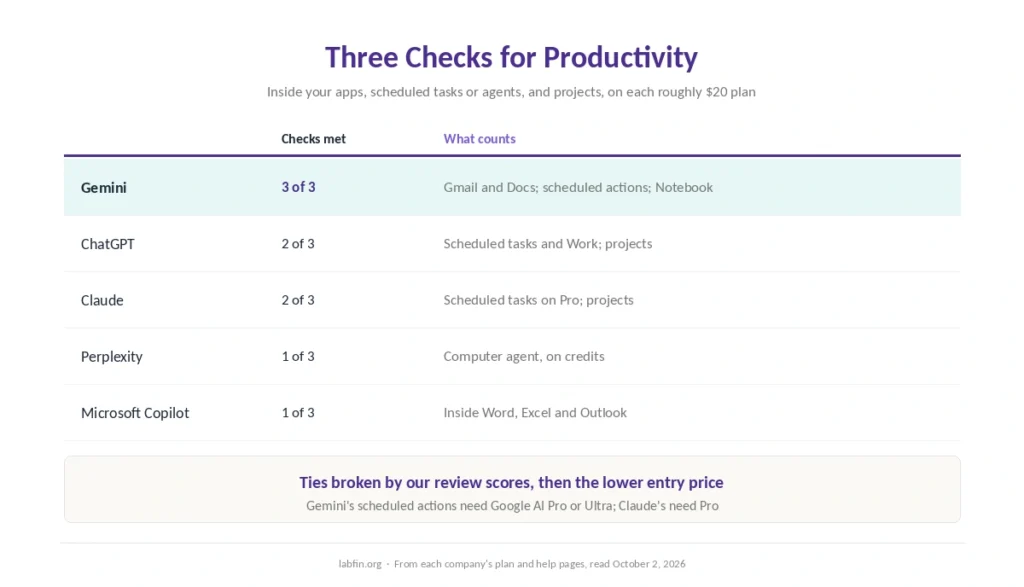
This list of the best AI for productivity counts three documented features on each tool’s roughly $20 plan. First comes work inside your mail and documents, because copying text into a chat costs time. Next come scheduled tasks or an agent that finishes multi-step work. Last come projects that keep files and instructions across chats.
Gemini meets all three. ChatGPT and Claude meet two each, so the rule on our list of the best AI tools breaks the tie: equal review scores, then the lower entry price. Perplexity and Copilot meet one each, and the same rule sets their order.
1. Gemini: Inside Gmail, Docs and a Schedule
On Google AI plans, Gemini writes inside Gmail with Help me write and works in Google Docs. Its Notebook also keeps your sources together and cites the passages it used. Our list of the best AI for summarization covers that feature.
Gemini also runs up to 10 scheduled actions on Google AI Pro and Ultra, Google’s help center says. The catch: keeping Gmail and Drive connected means leaving training on. For Gmail drafting specifically, see our list of the best AI for email writing.
2. ChatGPT: Tasks, Work and Projects
ChatGPT Plus includes projects, scheduled tasks and expanded ChatGPT Work, which runs multi-step jobs on desktop, web and mobile. Work, however, shares its allowance with Codex. On Pro, OpenAI also launched always-on agents called dots on September 29, 2026, launch coverage reports.
The catch: ChatGPT does not write inside Gmail or Word, and Free and Go also show ads. Our guide to ChatGPT for productivity covers the details.
3. Claude: Projects for Long Work
Claude’s Projects keep reference files and instructions together, and its context holds up to 1M tokens, depending on the model. So it suits long documents and ongoing work in one place, as our guide to Claude for writing also covers.
Claude’s pricing page also lists scheduled tasks on Pro. The catch: it does not write inside Gmail or Word. Its limits also come without published numbers, as our comparison of AI tool limits shows.
4. Perplexity: An Agent on Credits
Perplexity Pro includes the Computer agent, which runs multi-step tasks on credits. However, Pro gets no monthly credits, only a one-time bonus of 4,000, while Max gets 10,000 a month.
The catch: Perplexity does not write inside your mail or documents on Pro. Its Email Assistant, moreover, needs Max at $200 a month.
5. Microsoft Copilot: The Pick for Office
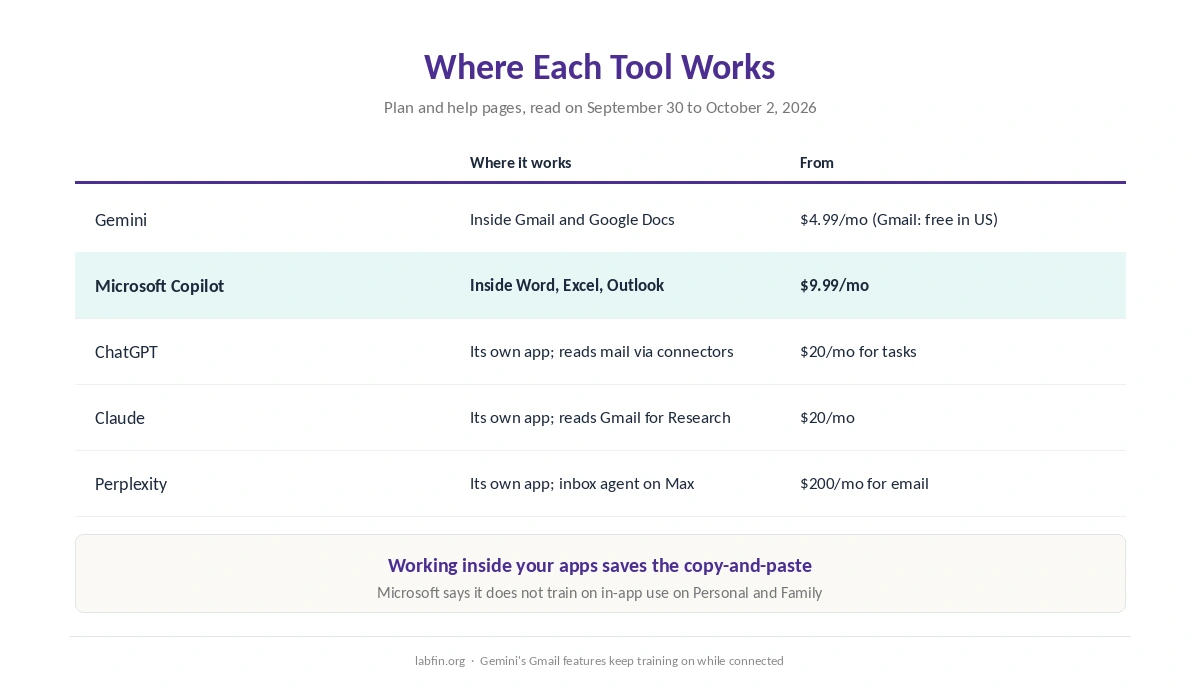
Microsoft 365 Personal puts Copilot inside Word, Excel and Outlook for $9.99 a month. In addition, Microsoft says it does not train on that in-app use on Personal and Family plans.
The catch: our sources document no scheduled tasks or projects for consumer Copilot. Also, its Researcher needs Premium. For Office against Google’s suite, see our Gemini vs Microsoft Copilot comparison.
Which Tool for Which Way of Working
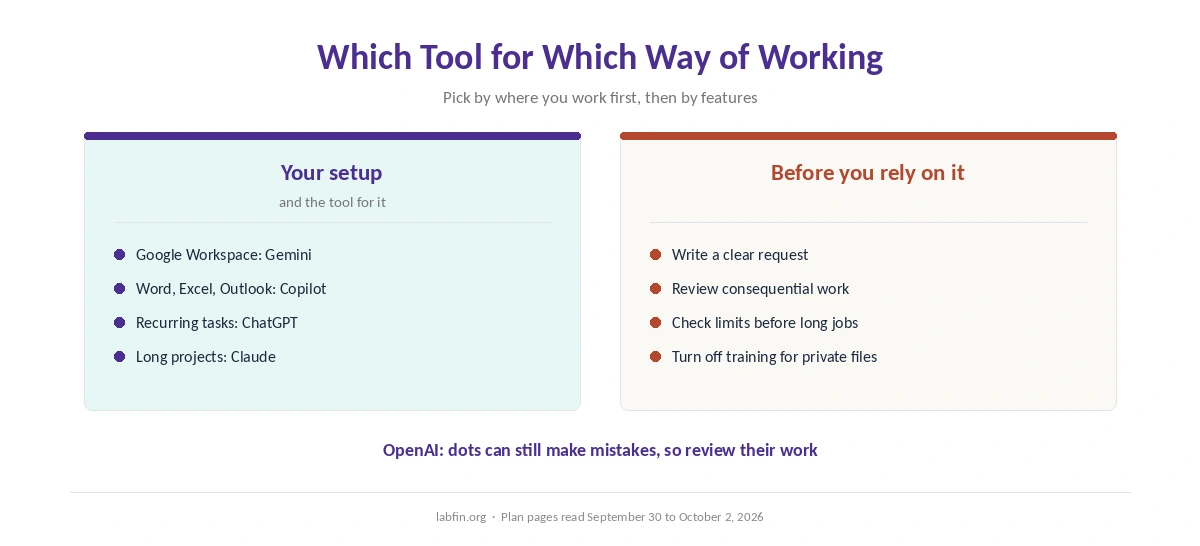
The best AI for productivity on this list depends on where you work. Google Workspace: Gemini. Word, Excel and Outlook: Microsoft Copilot. Recurring tasks and multi-step jobs: ChatGPT. Long documents in one project: Claude. Our Claude vs Notion AI comparison also weighs a general assistant against workspace AI.
For meetings, our list of the best AI for meeting notes ranks Fathom, Fireflies and Otter, as our Fathom review details for the top pick.
For repeated tasks across apps, moreover, our list of the best AI automation tools compares Zapier, Make and n8n. Our guide to building AI automations without code also shows how to start.
Teams that manage projects in ClickUp, in addition, can weigh its AI add-on in our ClickUp AI review.
Whichever you pick, a clear request saves rounds of fixes, as our guide to writing better prompts explains. Also review anything consequential before it goes out, because every agent can still make mistakes.
How We Research
This list draws on each company’s plan and help pages, read on September 30 to October 2, 2026. One example is ChatGPT’s Plus plan page. The dots launch comes from launch coverage, and we mark it as reported. Gemini’s scheduled actions come from Google’s help center, and Claude’s from claude.com/pricing, read on October 2, 2026.
We run no productivity tests of our own. Our criteria live on our about page.
Best AI for Productivity FAQ
Of the tools on this list, Gemini meets all three checks on Google AI Pro: it works inside Gmail and Docs, runs scheduled actions and keeps a Notebook. ChatGPT follows, with projects, scheduled tasks and ChatGPT Work on Plus.
Gemini, with Help me write on Google AI plans, and free on personal accounts in the US. Perplexity’s Email Assistant also works with Gmail, but only on Max.
Microsoft Copilot, on Microsoft 365 Personal at $9.99 a month and above.
Yes. ChatGPT Plus lists scheduled tasks, Gemini runs up to 10 scheduled actions on Google AI Pro and Ultra, and Claude lists scheduling on Pro. Our sources document none for consumer Copilot.
Only for low-stakes jobs. OpenAI itself says its dots can still make mistakes, so review consequential work.
The Verdict
Among the best AI for productivity on this list, Gemini covers the most, from Gmail and Docs to scheduled actions. ChatGPT covers the most inside its own app, and Copilot wins inside Office. Claude suits long projects, while Perplexity adds an agent on credits.
So pick by where you work first, then by features. And review what any agent produces before it reaches a client.