
Disclosure: LabFin is reader-supported. If you sign up for a tool through links on this page, we may earn a commission at no extra cost to you. Commissions vary between providers and our ratings do not — here’s our full disclosure.
Microsoft Copilot for productivity means AI inside the apps you already work in. Microsoft 365 Personal costs $9.99 a month and puts Copilot in Word, Excel and Outlook. It also includes 1 TB of storage. Premium, at $19.99, adds Researcher for cited reports.
This page covers Microsoft Copilot in Microsoft 365, not GitHub Copilot, the coding tool. So it explains what each plan adds, how Microsoft meters usage, and what happens to your documents.
Microsoft Copilot for Productivity: The Short Answer
Microsoft Copilot for productivity pays off if your work already lives in Office. Personal gives Copilot in Word, Excel and Outlook for $9.99 a month or $99.99 a year. In addition, Microsoft says it does not train on Copilot use inside those apps on Personal and Family plans.
However, the limits and research tools depend on the plan. Microsoft meters usage in credits without published counts, and Researcher needs Premium or Pro. Also, Microsoft has announced usage-based billing for its Cowork and Code features on consumer plans, GeekWire reported.
What Copilot Does Inside Office
Inside the apps. Copilot works in Word, Excel and Outlook, so you can draft, summarize and analyze without copying text into a chat. Summaries inside Word and Outlook are also its strength, as our list of the best AI for summarization covers. For example, it can draft a reply in Outlook, as our list of the best AI for email writing covers.
Models from two companies. In September 2026, Microsoft announced Claude Opus 5.5 and GPT-6 Sol for Word, Excel and PowerPoint, WindowsForum reported. As a result, Copilot can run Anthropic’s and OpenAI’s models inside Office, as our Claude vs Microsoft Copilot comparison explains.
Research. Microsoft retired Deep Research in the consumer Copilot app on August 18, 2026. Its successor, Researcher, returns structured reports with citations, but it needs Microsoft 365 Premium or Pro.
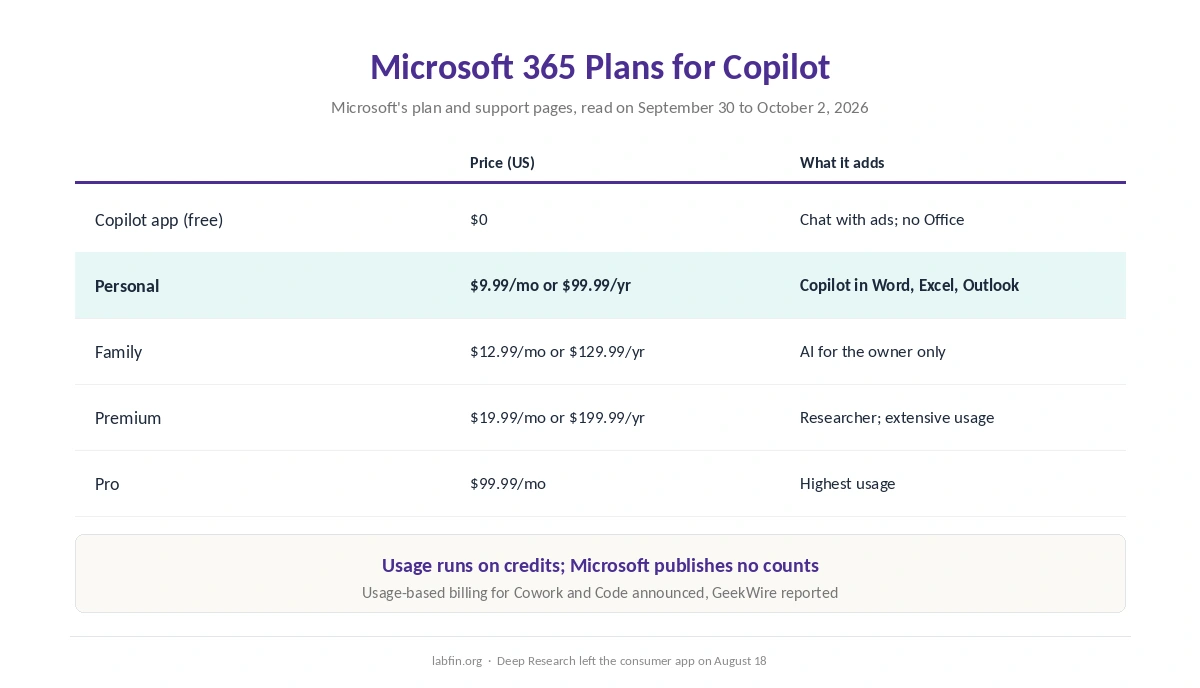
| Plan | Price (US) | What it adds for productivity |
|---|---|---|
| Copilot app (free) | $0 | Chat with ads; no Office integration |
| Microsoft 365 Personal | $9.99/mo or $99.99/yr | Copilot in Word, Excel, Outlook; 1 TB |
| Microsoft 365 Family | $12.99/mo or $129.99/yr | AI features for the subscription owner only |
| Microsoft 365 Premium | $19.99/mo or $199.99/yr | Extensive usage; Researcher; agentic features |
| Microsoft 365 Pro | $99.99/mo | Highest usage |
Limits and Credits
Microsoft describes Copilot’s usage in credits, with higher limits on each step up. However, it publishes no counts on its plan pages. So, as with ChatGPT Plus and Claude Pro, you learn the limit when you reach it, as our comparison of AI tool limits shows.
Microsoft has also announced usage-based billing for Cowork and Code on consumer plans, GeekWire reported. As a result, heavy agent work may cost extra on top of the subscription. Over a year, Personal costs $99.99 and Premium $199.99, as our yearly cost breakdown compares.
Your Documents and Data
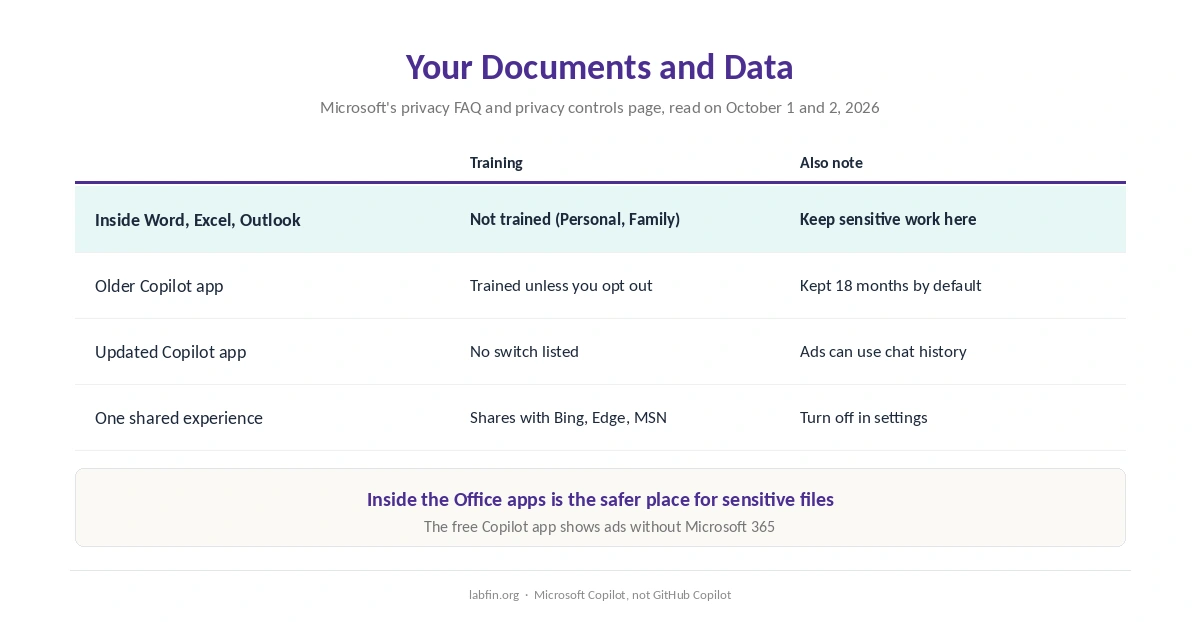
Inside Office, Microsoft says it does not train on your Copilot use on Personal and Family plans. That covers drafting and analysis in Word, Excel and Outlook. Our page on the best AI for data analysis covers spreadsheets, code execution and Excel add-ins.
The Copilot app is different, however. Microsoft’s FAQ for the older app said it trains on conversations unless you opt out. It also said the app keeps them for 18 months by default. The pages for the updated app, however, list no training switch. Microsoft’s privacy controls page also says personalized ads can draw on chat history and memories.
Also check One shared experience, which shares Copilot chats with Bing, Edge and MSN unless you turn it off. For sensitive files, keep work inside the Office apps rather than the free chat.
Check What Copilot Produces
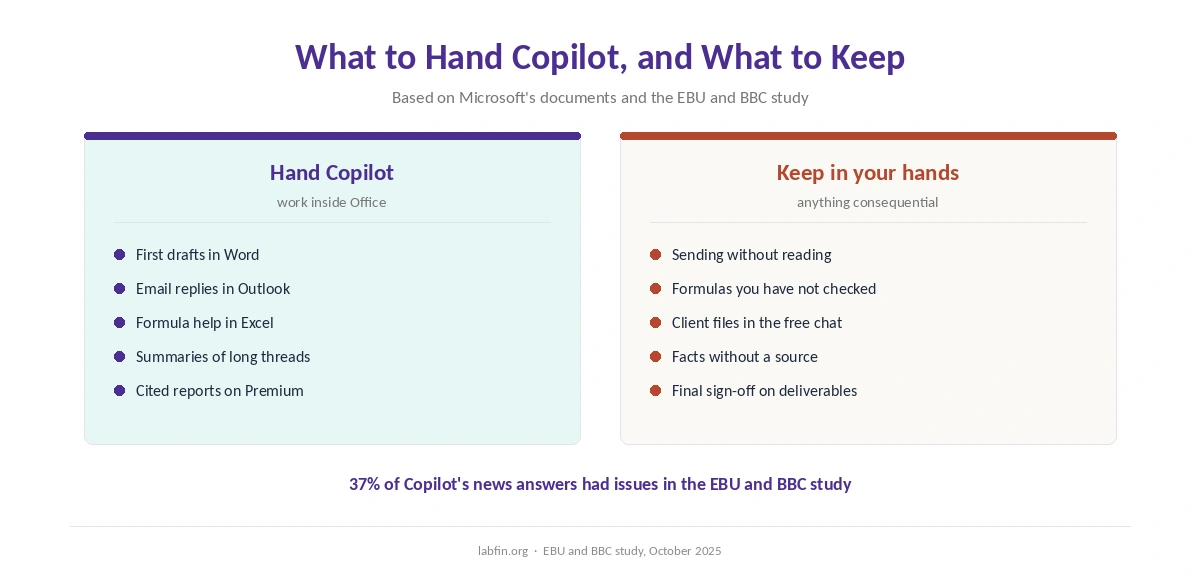
Copilot’s answers still need checking. In the EBU and BBC study of October 2025, 37% of its news answers had a significant issue. Its sourcing problems, at 15%, still matched the lowest tested.
So review drafts before you send them, check formulas in Excel, and open the citations in Researcher reports. Above all, keep a person responsible for anything that goes to a client.
Where Microsoft Copilot Runs Short for Productivity
Research needs Premium, and the limits also come without numbers. In addition, usage-based billing for agent work is on the way. Finally, on Family, only the subscription owner gets the AI features, so the plan does not give every member Copilot.
Who Should Use Microsoft Copilot for Productivity, and What to Use Instead
Copilot suits people whose day runs through Word, Excel and Outlook. Microsoft Copilot for productivity also suits anyone who already pays for Microsoft 365, since Copilot comes with it. Our list of Microsoft Copilot alternatives also covers what you give up by leaving Office bundling.
Other tools fit other workflows. ChatGPT offers projects, scheduled tasks and always-on dots, as our guide to ChatGPT for productivity covers. For head-to-heads, see our ChatGPT vs Microsoft Copilot comparison and our Gemini vs Microsoft Copilot comparison.
How We Research
This guide draws on Microsoft’s plan comparison and its privacy controls page, read on September 30 to October 2, 2026. Model and billing news comes from WindowsForum and GeekWire, and we name those sources.
We run no productivity tests of our own. Plan details come from our Microsoft Copilot review, and our criteria live on our about page.
Microsoft Copilot for Productivity FAQ
Personal, Family, Premium and Pro all include Copilot in the Office apps. On Family, only the subscription owner gets the AI features.
Yes, on Microsoft 365 Premium and Pro. Deep Research, by contrast, left the consumer Copilot app on August 18, 2026.
Not inside the Microsoft 365 apps on Personal and Family plans, Microsoft says. The Copilot app itself lists no training switch.
Usage runs on credits, and the plan pages publish no counts. Higher plans give more usage.
No. Microsoft Copilot is the assistant in Windows, Edge and Microsoft 365. GitHub Copilot is a separate coding tool.
The Verdict
Microsoft Copilot for productivity is worth it if you already live in Word, Excel and Outlook. Personal at $9.99 adds Copilot to those apps, and Premium adds Researcher.
Still, keep sensitive work inside the Office apps rather than the free chat. Then review what Copilot drafts before it goes out, because Microsoft Copilot for productivity still needs a person in charge.