
Disclosure: LabFin is reader-supported. If you sign up for a tool through links on this page, we may earn a commission at no extra cost to you. Commissions vary between providers and our ratings do not — here’s our full disclosure.
ChatGPT for productivity has moved from answering questions to doing work. Plus adds projects, scheduled tasks and ChatGPT Work, OpenAI’s mode for multi-step tasks. On September 29, 2026, OpenAI also launched dots, always-on agents that keep working between conversations. For more, our page on ChatGPT vs Notion AI covers a general assistant against AI inside your team’s workspace.
More automation also means more to check. OpenAI itself tells users to review consequential work from dots, and agents that read your inbox and chat apps carry new security risks. This guide covers what each plan offers, where the limits sit, and what to keep in your own hands.
ChatGPT for Productivity: The Short Answer
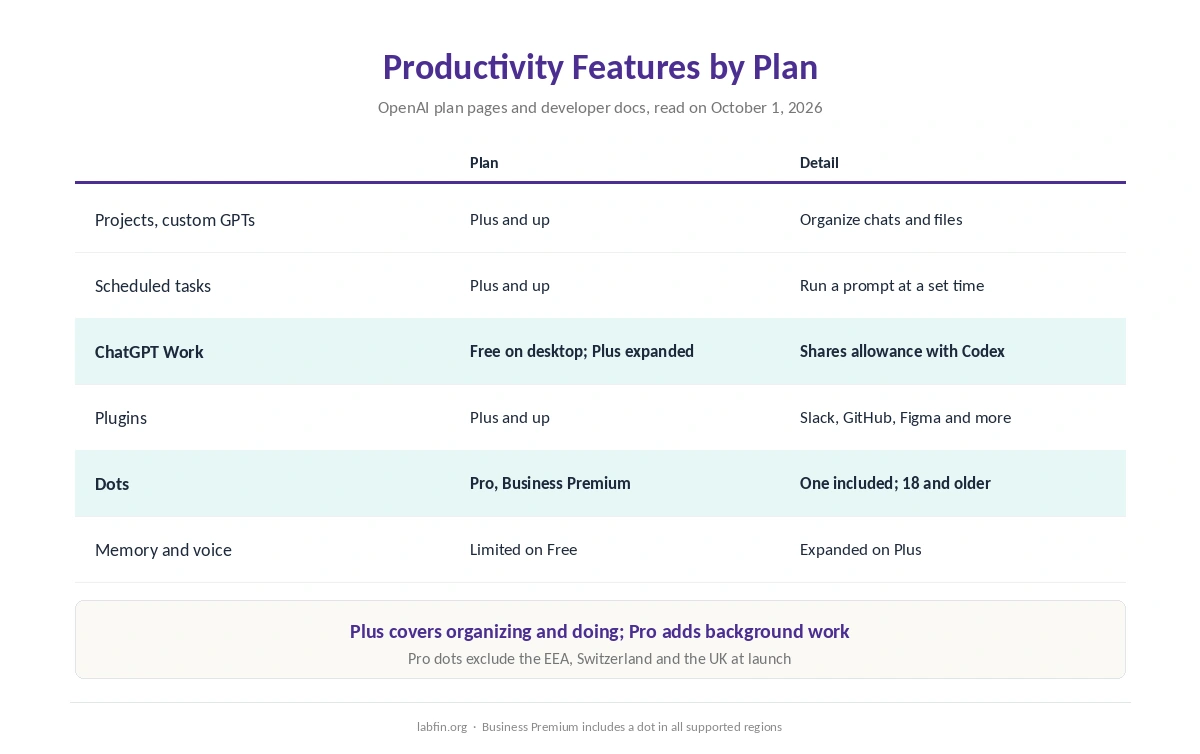
ChatGPT for productivity is worth paying for on Plus if you repeat the same tasks every week. For $20 a month, Plus adds projects, scheduled tasks, custom GPTs, plugins and expanded ChatGPT Work. Free covers chat, limited memory and voice, and limited ChatGPT Work on desktop.
Dots are for people who want work done in the background. They come with Pro, from $100 a month, and with Business Premium. Pro users in the EEA, Switzerland and the UK do not get them at launch. Tasks a dot starts still draw on your plan’s ChatGPT Work and Codex allowance.
What ChatGPT Offers for Productivity
Organizing work. OpenAI’s Plus plan page lists projects, scheduled tasks and custom GPTs, with expanded memory and context. Projects keep related chats and files together, and scheduled tasks run a prompt at a set time. OpenAI, however, plans to retire custom GPTs and move them to plugins, so projects are the safer place for standing instructions.
Doing work. ChatGPT Work handles multi-step tasks, and on Plus it runs on desktop, web and mobile with GPT-6 Astra and GPT-6.1 Sol available. It shares its usage allowance with Codex, OpenAI’s developer docs say, so heavy use of one leaves less for the other. Our page on using ChatGPT effectively covers effort levels, projects and memory after OpenAI’s September changes.
Connecting apps. Plugins, as OpenAI renamed its apps in July 2026, link ChatGPT to tools such as Slack and Figma. Gmail and Outlook connectors handle email from a chat, as our list of the best AI for email writing explains.
| Plan | Price (US) | What it adds for productivity |
|---|---|---|
| Free | $0 | Limited memory and voice; limited ChatGPT Work on desktop |
| Go | $8/mo | More messages, longer memory; may include ads |
| Plus | $20/mo | Projects, scheduled tasks, custom GPTs, plugins, expanded Work |
| Pro | From $100/mo | One dot included; longer Work and Codex sessions |
| Business Premium | $125/user/mo, or $100 yearly | One dot included in all supported regions |
Dots: Always-On Agents
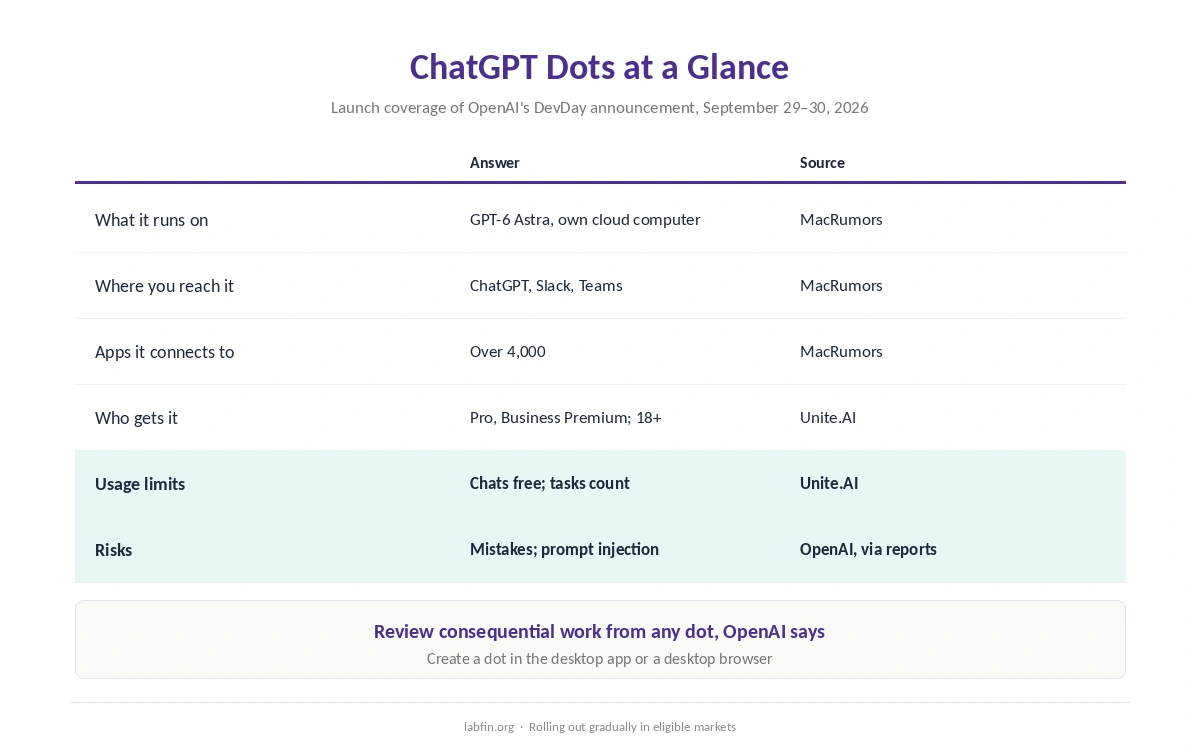
A dot is an agent that keeps working. OpenAI announced dots at DevDay on September 29, 2026, built on GPT-6 Astra with their own cloud computer and browser, MacRumors reported. They connect to over 4,000 apps and can be reached in ChatGPT, Slack and Teams.
The first dot comes with Pro and Business Premium at no extra cost, for users 18 and older. You create it in the desktop app or a desktop browser. Chatting with a dot does not count toward usage limits, but tasks it starts in Codex or ChatGPT Work do, according to Unite.AI.
⚠️ Dots read your connected apps. OpenAI warns that dots can make mistakes and tells users to review consequential work, Technology.org reported. Its alignment team also described prompt injections that copy themselves from agent to agent on September 25, 2026, Think Facility noted.
Limits and Costs
OpenAI publishes no fixed message counts for chat on Plus, and ChatGPT Work shares its allowance with Codex. ChatGPT for productivity therefore runs into the same shared limits as coding. On Plus, OpenAI estimates 5 to 45 messages every five hours with GPT-6 Astra, as our guide to ChatGPT for coding covers. Over a year, Plus costs $240, monthly only, as our yearly cost breakdown shows.
Check What ChatGPT Does for You
Agents save time only if their output is right. In the EBU and BBC study of October 2025, 36% of ChatGPT’s news answers had at least one significant issue. Artificial Analysis also found that GPT-5.6 Sol, the Plus chat model, rarely declines questions it cannot answer. For research tasks, our guide to ChatGPT for research covers how to check reports.
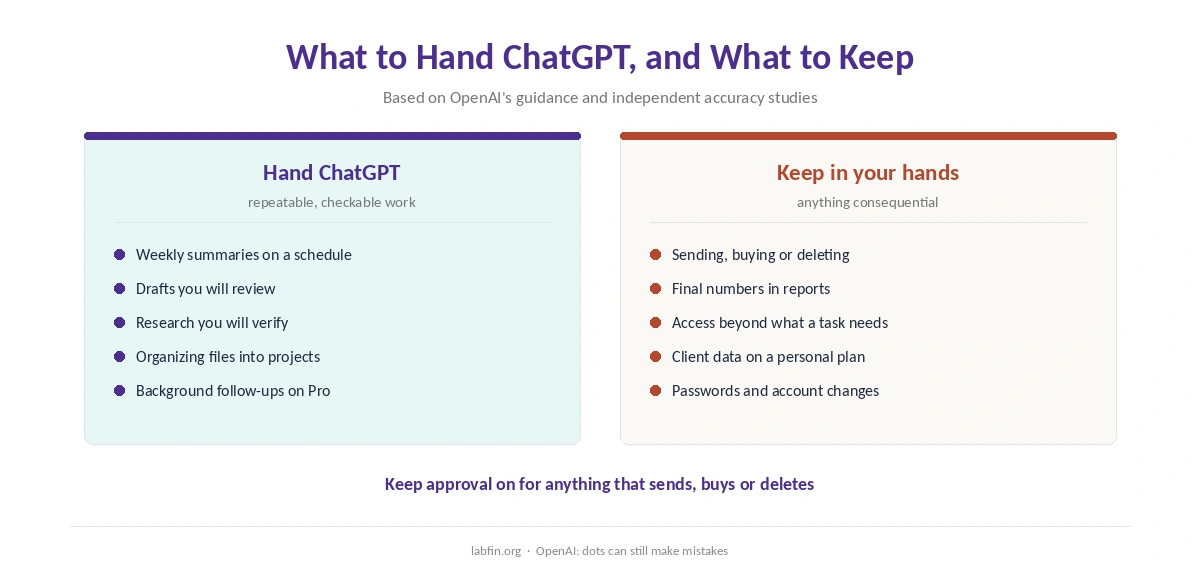
Keep approval on for anything that sends, buys or deletes. Review summaries against the source before you act on them, and give agents access only to the apps a task needs.
Your Data
On Free, Go, Plus and Pro, ChatGPT trains on your chats by default until you opt out in Data controls. Business and Enterprise plans skip training by default. ChatGPT for productivity works only with the access you give it, and anything you connect becomes readable within the permissions you grant. Our page on the best AI for data analysis covers spreadsheets, code execution and Excel add-ins.
Who Should Use ChatGPT for Productivity, and What to Use Instead
ChatGPT suits people who repeat tasks and want them organized in one place. Plus covers projects, scheduled tasks and ChatGPT Work, and dots suit Pro users who want work done in the background.
Office-centered workers may prefer Microsoft Copilot. It works inside Word, Excel and Outlook, as our ChatGPT vs Microsoft Copilot comparison explains. For plan details, see our ChatGPT review.
How We Research
This guide draws on OpenAI’s plan pages and developer docs, read on October 1, 2026. Details on dots come from launch coverage by MacRumors, Unite.AI and Technology.org. Accuracy figures come from the EBU and BBC and Artificial Analysis, each dated where used.
We run no productivity experiments of our own, since results would age with every model update. Our criteria live on our about page.
ChatGPT for Productivity FAQ
For repeated tasks, yes, especially on Plus with projects, scheduled tasks and ChatGPT Work. Its output still needs review before you act on it.
Always-on agents on GPT-6 Astra that OpenAI launched on September 29, 2026. They work in the background, connect to over 4,000 apps and come with Pro and Business Premium.
OpenAI’s mode for multi-step tasks. It is limited on Free, expanded on Plus and shares its usage allowance with Codex.
Chatting with a dot does not, but tasks it starts in Codex or ChatGPT Work count against your plan’s allowance.
Not for Pro users in the EEA, Switzerland or the UK at launch. Business Premium users get them in all supported regions.
The Verdict
ChatGPT for productivity pays off on Plus if you organize repeated work in projects and scheduled tasks. Dots add background work on Pro and Business Premium, at the cost of more access to your apps and more to review.
Keep approval on for anything consequential, connect only what a task needs, and turn off training on personal plans.