
Disclosure: LabFin is reader-supported. If you sign up for a tool through links on this page, we may earn a commission at no extra cost to you. Commissions vary between providers and our ratings do not — here’s our full disclosure.
This v0 review covers Vercel’s AI builder for web interfaces and apps. v0, for example, turns a text prompt into React and Next.js code with a live preview, then syncs to GitHub and deploys to Vercel in a click.
It is, for example, strong for fast front-end prototypes. However, pricing runs on credits that track token use, and the cheapest paid plan for new users, moreover, is now Team at $30 a user a month, trackers report.
v0 Review: Is It Worth It in 2026?
For developers and designers who build on React and Vercel, yes. It also produces clean interface code quickly and fits straight into the Vercel workflow.
For full back-end work or other frameworks, other tools fit better. Our list of the best AI for coding ranks general coding agents.
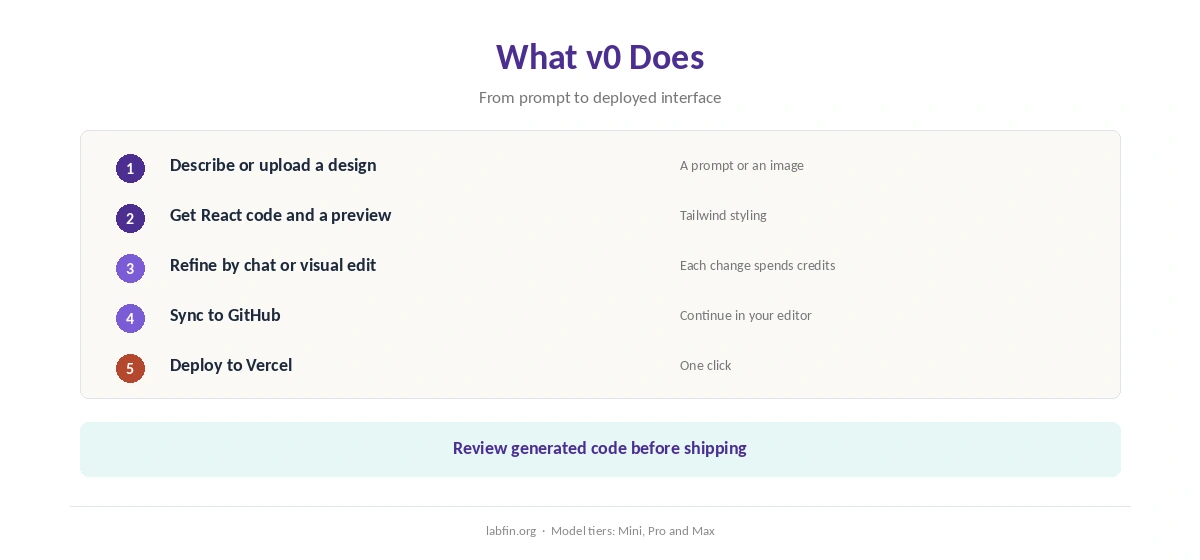
What v0 Does
First, you describe an interface or upload a design, and v0 generates React components with Tailwind styling and a live preview. You then also refine it by chat or visual editing.
Projects, moreover, sync to GitHub and deploy to Vercel. The product, for example, moved from v0.dev to v0.app as it grew from a component generator into an app builder, guides report.
What v0 Costs
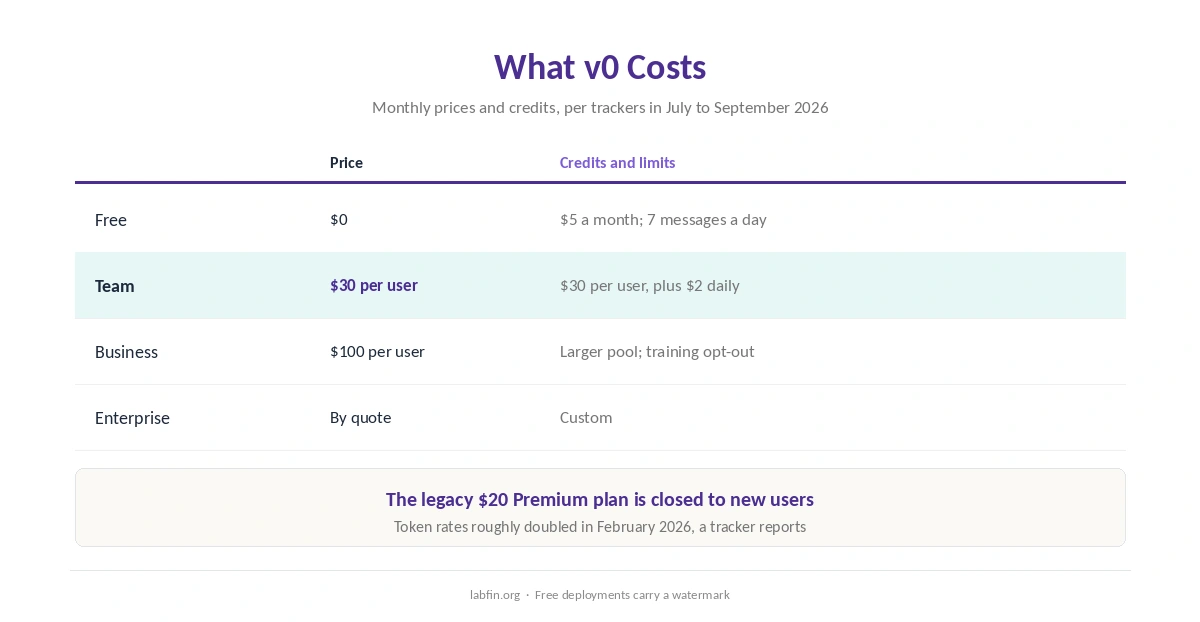
However, v0 sells plans with monthly credits that you spend as you generate, as trackers read its pricing page between July and September 2026.
| Plan | Price | Credits and limits |
|---|---|---|
| Free | $0 | $5 a month; 7 messages a day; watermarked deploys |
| Team | $30 per user/mo | $30 per user a month, plus $2 daily login credits |
| Business | $100 per user/mo | Larger pool; training opt-out, a guide reports |
| Enterprise | By quote | Custom |
In practice, credits map to token use, so complex prompts and regenerations cost more. Token rates, moreover, roughly doubled in February 2026, a pricing tracker reports. Our list of the cheapest useful AI tools compares options.
Which Models It Uses
v0 runs its own model tiers, renamed Mini, Pro and Max in early 2026, guides report. You pick a tier per request, and larger tiers therefore spend credits faster.
However, we found no independent benchmark of v0’s models. Our guide to AI benchmarks explained covers how independent boards score coding tools.
Code Quality and Review
Generated code, for example, tends to look clean, but it still needs review: check data handling, accessibility and any packages it adds. Our guide to reviewing AI-generated code covers a checklist.
When you review v0 output for bugs after generation, our guide to using AI for debugging covers the workflow.
Your Data
On data, we could not confirm v0’s training rule for Free and Team. One guide reports that a training opt-out arrives with Business, which suggests lower plans may allow training.
Therefore, keep client code and secrets out of lower plans until you confirm the terms. Our guide to which AI tools train on your data compares other tools.
Who Runs v0
Vercel, for example, the company behind the Next.js framework and its hosting platform, also makes v0. Our guide to who owns which AI tool covers more owners.
v0 vs Cursor and Claude Code
Cursor and Claude Code, by contrast, also work across whole codebases in any language, with independent agent scores. Our Cursor review and Claude Code review cover them.
Our list of v0 alternatives ranks six options, and our Cursor vs v0 comparison weighs an editor against the builder.
Among builders, moreover, our v0 vs Bolt.new and v0 vs Lovable comparisons cover the closest rivals.
v0’s distinct offer, however, is fast front-end generation with one-click Vercel deployment. Many developers, therefore, prototype in v0 and continue in an editor. Our guide to using AI for coding projects also covers safe agent settings.
Who Should Use v0
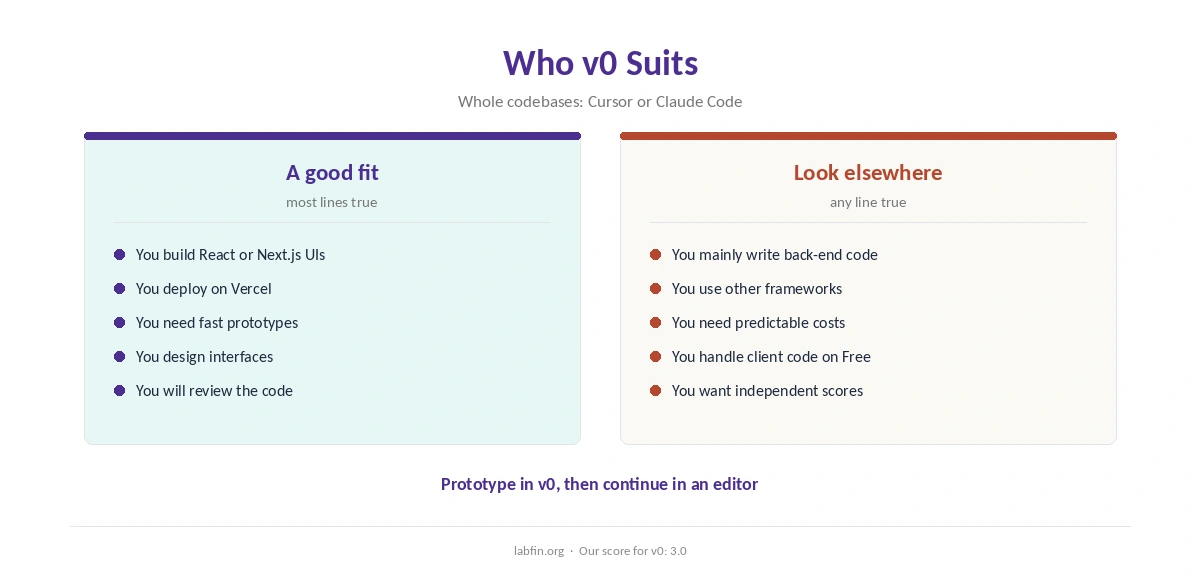
Overall, v0 suits front-end developers, designers and founders building React or Next.js interfaces on Vercel. It also suits quick prototypes for user testing.
By contrast, it suits back-end work, other frameworks and budget-sensitive heavy users less. Our list of the best AI for coding beginners covers learning tools, and our Cursor vs GitHub Copilot comparison covers editors.
How We Research
This v0 review, for example, takes plans and pricing history from trackers that read v0.app/pricing between July and September 2026, including one that tracks its price changes.
However, we could not read v0’s data terms or find an independent test, so two criteria rest on missing evidence. Our about page explains the criteria.
v0 Review FAQ
Free includes $5 in monthly credits. Team costs $30 per user a month and Business $100; v0 quotes Enterprise prices.
Yes, with $5 in monthly credits, seven messages a day and watermarked deployments.
v0 no longer sells the $20 Premium plan to new users, trackers report; new paid users start on Team.
React and Next.js interfaces with Tailwind styling, which you can sync to GitHub and deploy to Vercel.
We could not confirm it for Free and Team; one guide reports a training opt-out on Business.
v0
Fast front-end, credit-based pricing
v0 turns prompts into clean React and Next.js interfaces with live previews and one-click Vercel deployment. Against that, credits make costs hard to predict, the paid entry rose to $30 a user, and training terms are unconfirmed below Business.
The Verdict
v0 is one of the fastest ways to turn an idea into a working React interface on Vercel. Its live preview and deployment, moreover, remove much of the setup.
The rest of this v0 review holds the score at 3.0, mainly for credit-based pricing and unconfirmed data terms. So start free, and keep client code out until you confirm the terms.