
Disclosure: LabFin is reader-supported. If you sign up for a tool through links on this page, we may earn a commission at no extra cost to you. Commissions vary between providers and our ratings do not — here’s our full disclosure.
How to use AI for coding projects comes down to one habit. Give the agent a clear target and a way to check its own work. Anthropic’s guide for Claude Code and OpenAI’s guide for Codex both build on that idea, from planning to tests.
This guide turns those guides into seven steps for a whole project, from the first spec to the release. It also covers what independent research found, because the speed you feel is not always the speed you get.
How to Use AI for Coding Projects: The Short Answer
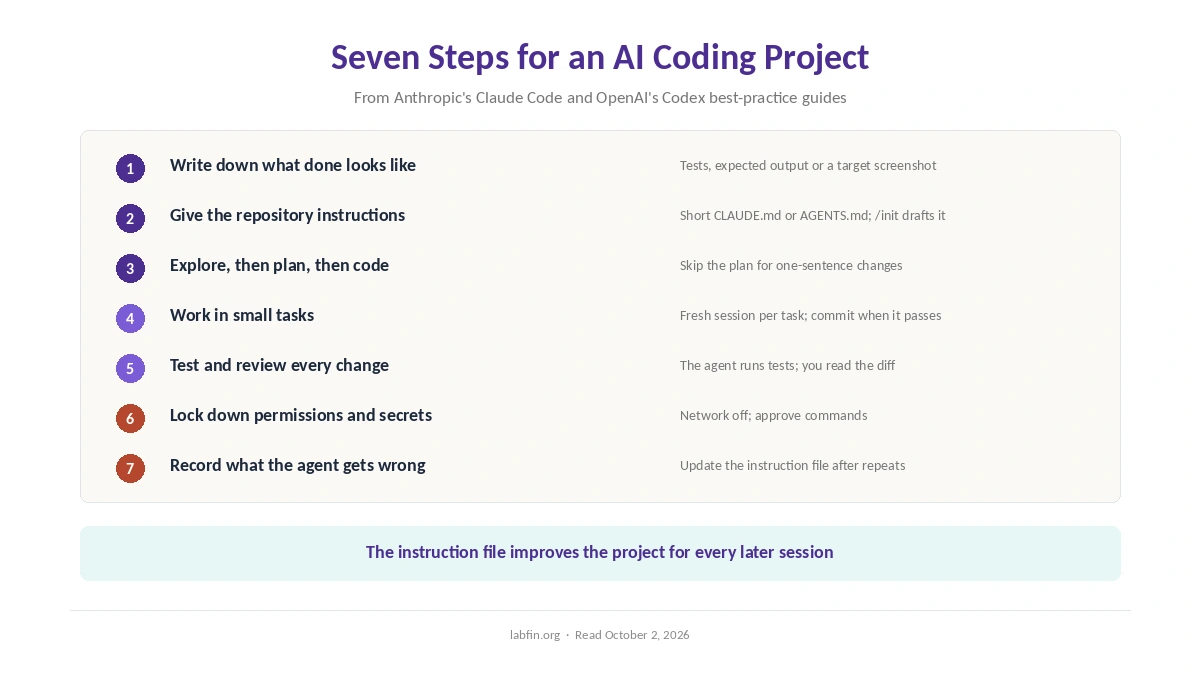
Write down what done looks like, then set up a short instruction file in the repository. Next, ask the agent to read the code and plan before it writes anything. Then split the work into small tasks with tests.
Finally, review every diff, keep secrets and network access locked down, and record each repeated mistake in the instruction file. That way, the project gets easier for the agent over time rather than harder.
Step 1: Write Down What Done Looks Like
Before any code, write a short spec. Say what the feature does, what it must not break, and how you will check it. Tests, expected outputs or a screenshot of the target all count.
Anthropic’s guide for Claude Code stresses giving the agent a way to verify its work. An agent that can check its own result fixes more of its own mistakes. For instance, a failing test is a clearer target than a paragraph of wishes.
Step 2: Give the Repository Its Own Instructions
Both major agents read a project file at the start of every session: CLAUDE.md for Claude Code and AGENTS.md for Codex. In each, the /init command drafts a first version for you.
Keep it short. Anthropic warns that a bloated CLAUDE.md makes Claude ignore instructions. OpenAI, likewise, says a short, accurate AGENTS.md beats a long file of vague rules. So list build and test commands, style rules that differ from defaults, and anything the agent cannot learn from the code. Our guide to writing better prompts applies to these files too.
Step 3: Explore, Then Plan, Then Code
Ask the agent to read the relevant files first, then to write a plan, and only then to code. Claude Code has a plan mode for exactly this, and Codex can follow a plan template for longer work.
However, planning has a cost. Anthropic’s own rule of thumb is to skip the plan when you could describe the diff in one sentence. Our guide to prompt frameworks that actually help covers when step-by-step thinking helps.
Step 4: Work in Small Tasks
The fourth rule of how to use AI for coding projects is size. Give the agent one task at a time, each small enough to review in a sitting. Anthropic notes that Claude’s context window fills fast and that performance degrades as it fills, so long, sprawling sessions work against you.
Start a fresh session for each new task, and commit after each one that passes. As a result, a bad change costs you one task, not a day of work.
Step 5: Test and Review Every Change
Ask the agent to write or update tests for each change and to run the suite before it reports back. OpenAI’s Codex guide lists both, and it says that at OpenAI, Codex reviews every pull request.
An automated review, however, does not replace yours. Read each diff before it merges, especially changes to authentication, payments or data deletion. Our guide to checking AI output applies to code as well, and our guide to reducing AI hallucinations explains why confident answers can still be wrong.
Step 6: Lock Down Permissions and Secrets
Agents can be steered by instructions hidden in files they read. In 2025, for example, researchers used hidden text in project files to make Windsurf’s agent send secrets to an outside server. Our Windsurf review covers the case, and our GitHub Copilot review covers a similar attack through pull requests.
So keep network access off unless a task needs it, and keep secrets out of the repository. Also approve commands rather than letting every one run. Codex, for one, starts with network access off in its sandbox. Cursor, meanwhile, fixed two flaws rated 9.8 out of 10 in version 3.0, as our Cursor review explains.
Step 7: Record What the Agent Gets Wrong
OpenAI suggests a simple loop: when Codex makes the same mistake twice, ask it for a retrospective and update AGENTS.md. Anthropic likewise says to treat CLAUDE.md like code, reviewing and pruning it when things go wrong.
Over a project, those notes become the most valuable file in the repository. They also make a handover easier, because the next person, or the next agent, inherits the same rules.
What Independent Research Found
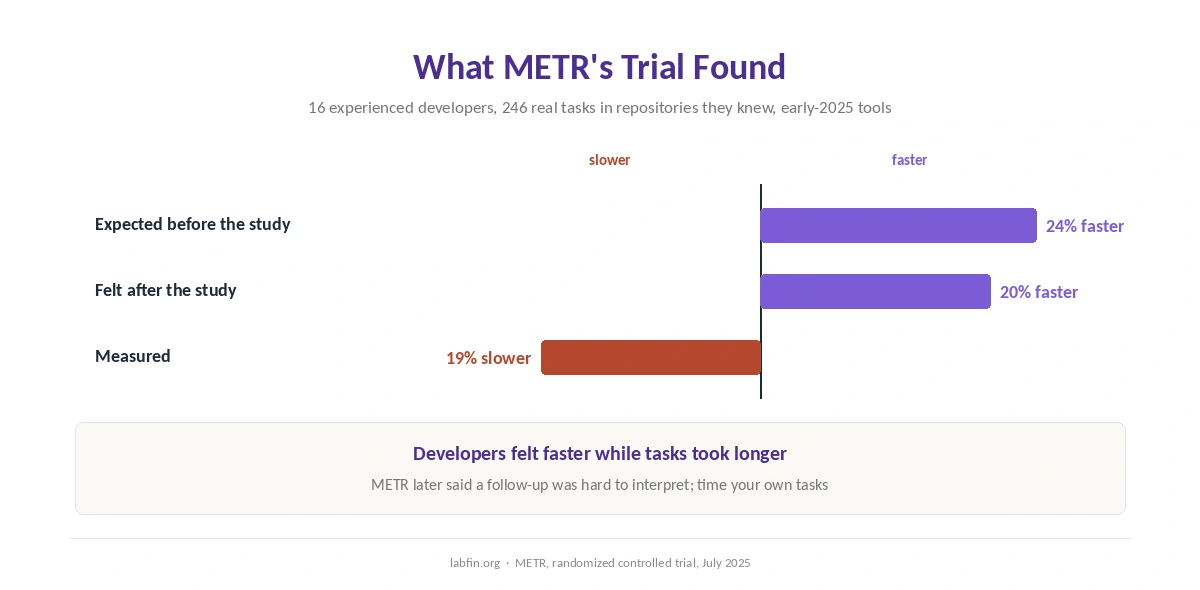
In a randomized trial published in July 2025, METR gave 16 experienced open-source developers 246 real tasks in repositories they knew well. They expected AI to make them 24% faster and afterwards felt 20% faster. In fact, tasks took 19% longer when AI was allowed.
The trial used early-2025 tools on mature codebases, so it does not cover every setting. METR later said a follow-up had become hard to interpret, partly because many developers declined to work without AI, reports note. Still, the lesson holds: time your own tasks rather than trusting how fast you feel.
What to Hand to the Agent, and What to Keep
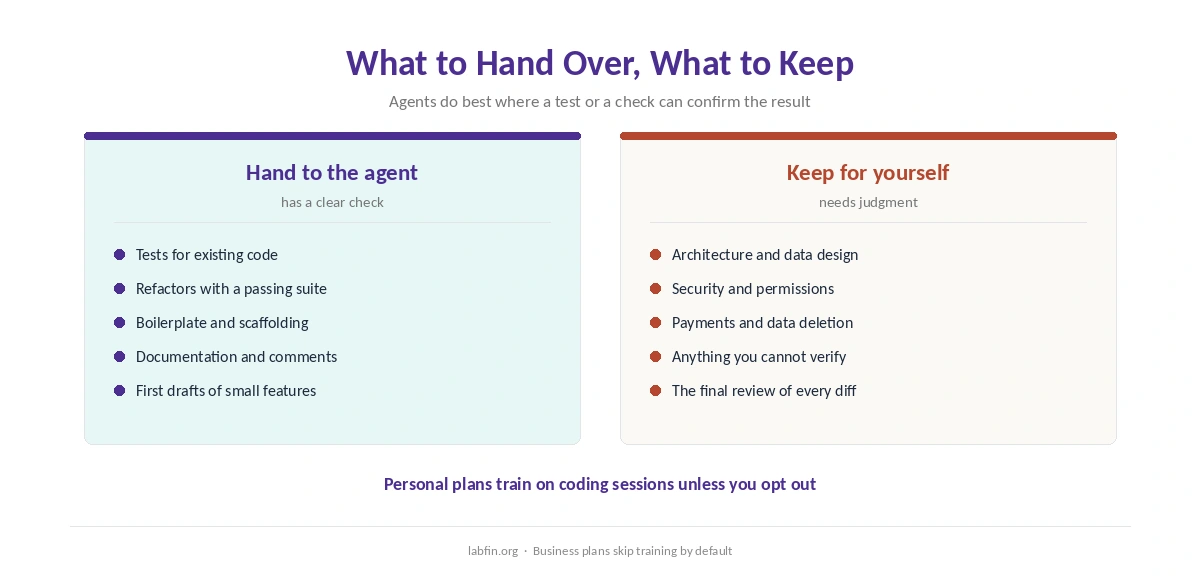
Agents do well on tasks with a clear check: tests for existing code, refactors with a passing suite, boilerplate and documentation. By contrast, keep architecture, security decisions and anything you cannot verify for yourself.
Your plan also matters for privacy. Personal plans at OpenAI and Anthropic train on coding sessions unless you opt out. Business plans, by contrast, skip training by default, as our list of the best AI for business explains.
Which Tools Fit This Workflow
Claude Code and Codex hold the top entries on Artificial Analysis’s Coding Agent Index, at 68 and 63, as our list of the best AI for coding shows. Our guides to Claude for coding and ChatGPT for coding cover each one’s plans. Both also come with standard $20 subscriptions.
If you prefer an AI editor, our Cursor vs GitHub Copilot comparison weighs the two main options. Beginners, meanwhile, can start with our list of the best AI for coding beginners, and API builders with our list of the best AI tools for developers. Either way, the seven steps above stay the same.
How We Research
This guide draws on Anthropic’s Claude Code best practices and OpenAI’s Codex best practices, read on October 2, 2026.
The productivity figures come from METR’s paper by Becker, Rush, Barnes and Rein. The security cases come from our tool reviews, and our about page explains how we work.
How to Use AI for Coding Projects: FAQ
Write a spec with a way to check it, and add a short CLAUDE.md or AGENTS.md. Then have the agent plan before coding, work in small tested tasks, and review every diff.
It is a short project file the agent reads at the start of each session. It holds build and test commands and rules the agent cannot infer from code. Codex uses AGENTS.md and Claude Code uses CLAUDE.md.
Not always. In METR’s 2025 trial, experienced developers took 19% longer with AI on familiar codebases, while feeling 20% faster. Time your own tasks to know.
Only with limits. Keep network access off and secrets out of the repository, and approve commands. Hidden text in files can steer an agent.
On Artificial Analysis’s Coding Agent Index, Claude Code scored 68 and Codex 63, with Codex far cheaper per task. Our list of the best AI for coding compares them.
The Verdict
How to use AI for coding projects is mostly about structure, not prompts. A clear target, a short instruction file and small tested tasks let the agent do more of the work safely.
So when you decide how to use AI for coding projects, plan, test and review as you would with a new teammate. Also measure the time you actually save. Then keep the habits that pay off and drop the rest.