
Disclosure: LabFin is reader-supported. If you sign up for a tool through links on this page, we may earn a commission at no extra cost to you. Commissions vary between providers and our ratings do not — here’s our full disclosure.
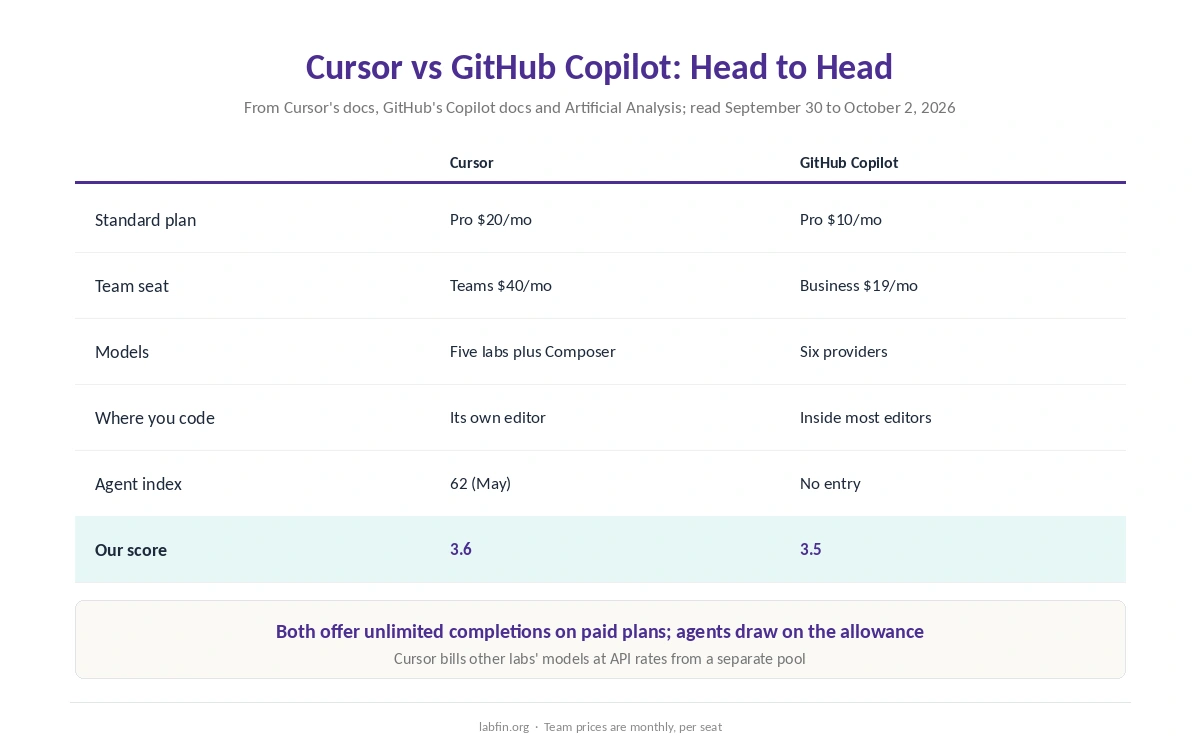
Cursor vs GitHub Copilot is a choice between an AI editor of its own and an AI assistant that plugs into the editor you already use. Cursor Pro costs $20 a month, while GitHub Copilot Pro costs $10 and works in VS Code, JetBrains IDEs, Visual Studio, Xcode and Eclipse.
However, both sell models from several labs, both offer unlimited completions on paid plans, and both run agents in the cloud. Our reviews score Cursor 3.6 and GitHub Copilot 3.5, so the decision turns on your editor, your budget and how much independent evidence you want.
Cursor vs GitHub Copilot: The Short Answer
Choose GitHub Copilot if you want to keep your current editor, pay less, or work mostly inside GitHub issues and pull requests. Choose Cursor instead if you are willing to switch editors for an agent with a public benchmark score and a cheap model of its own. Our guide on GitHub Copilot for teams covers seats, credits and rollout.
On Artificial Analysis’s May index, for example, Cursor’s Composer 2.5 scored 62 at $0.07 a task. Copilot’s own agent, by contrast, has no entry on either version of that index, and GitHub publishes no SWE-bench score for it.
Head to Head
| Criterion | Cursor | GitHub Copilot |
|---|---|---|
| Free plan | Hobby, with limited agent and Tab use | 2,000 completions a month |
| Standard plan | Pro $20/mo | Pro $10/mo: 1,500 AI credits |
| Heavier plans | Pro Plus $60; Ultra $200/mo | Pro+ $39/mo; Max $100/mo |
| Team seat | $40/mo Standard | Business $19/mo |
| Where you code | Its own editor, CLI, cloud agents | Most major editors, GitHub.com, CLI |
| Models | Five labs plus Composer | Six providers |
| Agent index | Composer 2.5: 62 (May) | No entry |
| Our score | 3.6 | 3.5 |
Prices and Usage
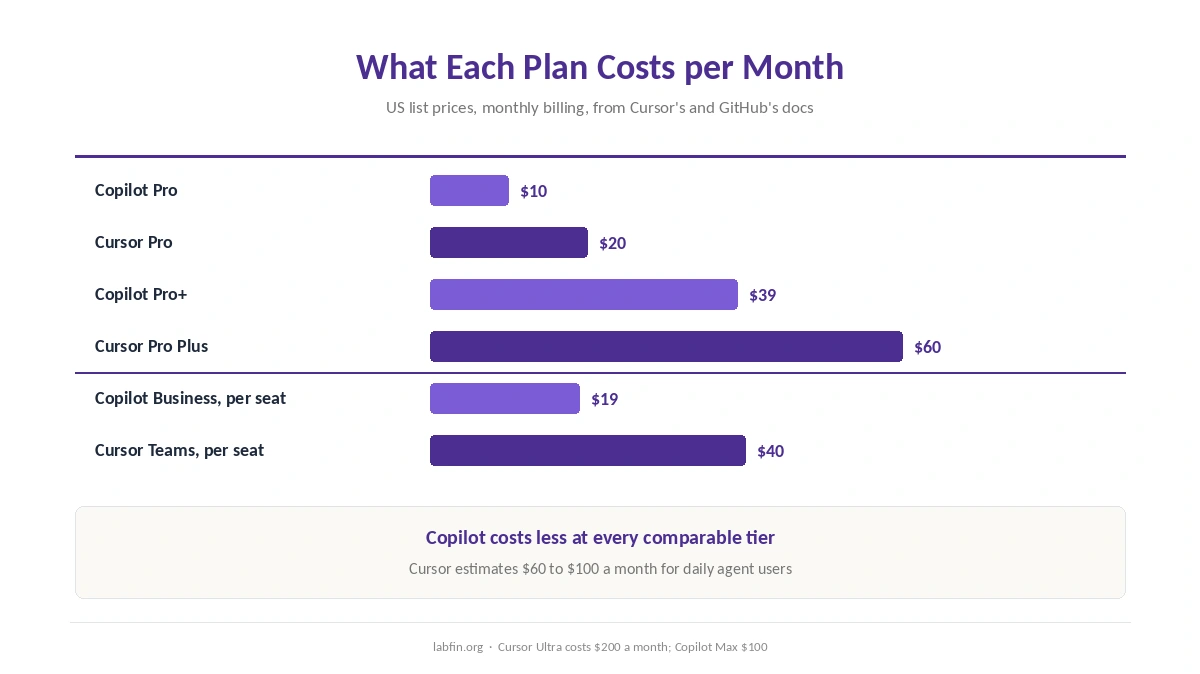
Cursor Pro costs $20 a month, Pro Plus $60 and Ultra $200. Each paid plan also splits usage into two pools: a larger one for Cursor’s own models, Composer 2.5 and Grok, and one for other labs’ models at API prices. However, Cursor’s docs estimate that daily agent users spend $60 to $100 a month in total.
GitHub Copilot Pro costs $10 a month with 1,500 AI credits, of which 500 are a flex allotment that GitHub says can change. Above that, Pro+ costs $39 and Max $100. On both products, completions stay unlimited on paid plans, so only chat and agent work draw down the allowance.
For teams, the gap widens. Copilot Business costs $19 a seat, while Cursor Teams costs $40, or $120 for Premium. In addition, Cursor charges $0.25 per million tokens on other labs’ models for Teams. Our breakdown of what AI tools cost per year puts both next to other plans.
Where You Code
Copilot works inside Visual Studio Code, Visual Studio, JetBrains IDEs, Xcode and Eclipse, as well as on GitHub.com and in a CLI. For example, its cloud agent takes a GitHub issue, works in GitHub Actions and opens a pull request. Our GitHub Copilot review covers each surface.
Cursor, by contrast, replaces your editor entirely. Paid plans include unlimited Tab completions, the agent, Cloud Agents and Bugbot code reviews, and Cursor also offers a CLI. Our Cursor review covers the editor in depth.
Which Models You Get
First, Cursor lists models from OpenAI, Anthropic, Google, SpaceXAI and Meta, plus its own Composer 2.5. Copilot’s paid plans, meanwhile, list models from OpenAI, Anthropic, Google, xAI, Moonshot AI and Microsoft. Both therefore cover GPT, Claude, Gemini and Grok models alike.
The bigger difference, though, is pricing. In Cursor, other labs’ models bill at API rates from a separate pool, while Copilot counts every model against one credit allowance. Our Grok review covers the SpaceXAI models both tools now carry.
What the Agent Scores Show
Artificial Analysis tests coding agents together with their models, and it changed the index version in September. Therefore, compare figures only within one version.
On the May version, Cursor with Composer 2.5 scored 62 at $0.07 a task, close to Codex with GPT-5.5 at 65 and $4.82. Since then, we found no Cursor entry on the September version, and no Copilot entry on either. Our list of the best AI for coding tracks the scored agents.
Data and Privacy
Cursor’s rule hinges on Privacy Mode. With it on, Cursor does not train on your code and keeps zero data retention agreements with its model providers. With it off, however, Cursor may store and use code and prompts to train its models. For teams, Privacy Mode is on by default.
GitHub, meanwhile, has used interaction data from Copilot Free, Pro and Pro+ to train its models since April 24, 2026, unless you opt out under Privacy. Copilot Business and Enterprise are excluded, though. So on both sides, personal accounts need a setting changed and team plans start private.
Security Record
Cursor fixed two flaws rated 9.8 out of 10, dubbed DuneSlide, in version 3.0, released on April 2, 2026. Cato AI Labs disclosed them in July. As a result, keep Cursor on 3.0 or later.
Copilot, for its part, had RoguePilot in Codespaces, which GitHub patched, and command-injection flaws in its editor integrations that Microsoft fixed in February. In April, moreover, researchers showed that prompt injection in pull requests could steer its agent into leaking secrets.
Who Owns Each
Cursor’s maker, Anysphere, became part of SpaceXAI when SpaceX’s purchase closed on August 14, 2026, Bloomberg reported. GitHub, on the other hand, has belonged to Microsoft since 2018. GitHub Copilot is separate from Microsoft Copilot, which our Microsoft Copilot review covers.
Where Each One Is Weakest
Cursor is weakest on price and lock-in. For instance, it costs twice Copilot Pro, heavy agent months can run well past the plan price, and you must move to its editor. In addition, its current agent score is missing from the September index.
GitHub Copilot is weakest on independent evidence and budget certainty. For one, no independent benchmark scores its own agent, and part of each credit allowance can change.
Winners by Category
Price: GitHub Copilot, at $10 against $20, and $19 against $40 per team seat. Editor choice: Copilot, which works in the editors you already use. GitHub integration: Copilot, with its issue-to-pull-request agent.
Independent agent evidence: Cursor, with a 62 on the May index against no Copilot entry. Cost per agent task: Cursor’s own model, at $0.07. Model choice: a tie. Training defaults: also a tie. Overall, in Cursor vs GitHub Copilot our scores are close, 3.6 against 3.5.
When to Choose Each
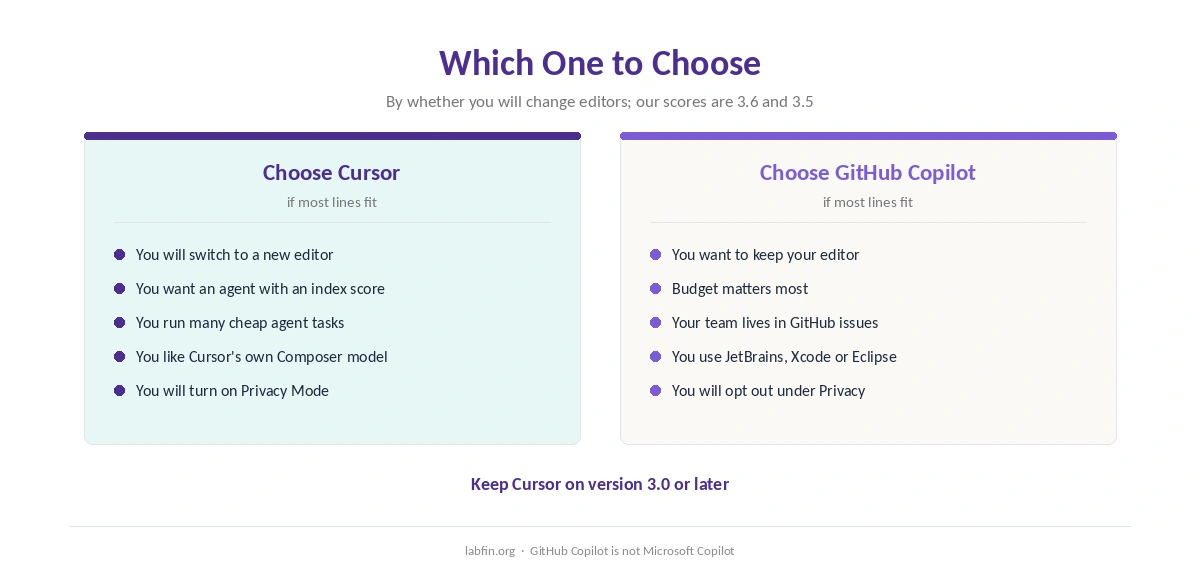
Take GitHub Copilot when you want to keep VS Code, JetBrains or Xcode, when budget matters, or when your team lives in GitHub. Then opt out of training under Privacy and set a budget for extra credits.
Take Cursor when you are ready to switch editors for a benchmarked agent and a cheap in-house model. Then turn on Privacy Mode before opening real code, too. For other options, see our list of Cursor alternatives, and our guides to Claude for coding and ChatGPT for coding.
How We Research
This Cursor vs GitHub Copilot comparison reuses the sources behind our Cursor review and our GitHub Copilot review. They include Cursor’s models and pricing docs and GitHub’s Copilot plan docs, read between September 30 and October 2, 2026.
Agent scores come from Artificial Analysis, ownership from Bloomberg, and security findings from The Hacker News, Microsoft and the Cloud Security Alliance. Both scores come from our reviews, and our about page explains the criteria. Learners can also compare free options in our list of the best AI for coding beginners.
Cursor vs GitHub Copilot FAQ
Our reviews score Cursor 3.6 and GitHub Copilot 3.5. Copilot fits people who want to keep their editor and pay less; Cursor fits people who will switch editors for a benchmarked agent.
GitHub Copilot: Pro costs $10 a month against $20 for Cursor Pro. Team seats cost $19 on Copilot Business and $40 on Cursor Teams.
We found no official statement from either company on running Copilot inside Cursor. Copilot officially supports VS Code, Visual Studio, JetBrains IDEs, Xcode and Eclipse.
Cursor may train unless Privacy Mode is on, which teams get by default. GitHub trains on Copilot Free, Pro and Pro+ data unless you opt out; Business and Enterprise are excluded.
Both offer models from several labs, including GPT, Claude, Gemini and Grok. Cursor adds its own Composer 2.5, which scored 62 on Artificial Analysis’s May index at $0.07 a task.
The Verdict
Cursor vs GitHub Copilot comes down to whether you will change editors. If not, Copilot gives you completions, an agent and several labs’ models where you already work, for half the price.
If you will, Cursor gives you an editor built around AI and an agent with a public score. Either way, change the training setting before you open a client repository.