
Disclosure: LabFin is reader-supported. If you sign up for a tool through links on this page, we may earn a commission at no extra cost to you. Commissions vary between providers and our ratings do not — here’s our full disclosure.
This Gamma review covers an AI presentation maker that turns a prompt, an outline or a document into a designed deck in about a minute. Gamma, for example, also builds documents, simple websites and social posts in the same editor.
It is among the quickest ways to a good-looking first draft, and its data controls are clearer than most. However, the free plan’s credits arrive only once, and exports to PowerPoint can need cleanup.
Gamma Review: Is It Worth It in 2026?
For founders, marketers, teachers and consultants who share decks as links, yes. Plus, moreover, costs about $9 a month on yearly billing.
For teams that live in PowerPoint templates, less so. Microsoft 365 with Copilot builds slides inside PowerPoint, as our Microsoft Copilot review covers.
What Gamma Does
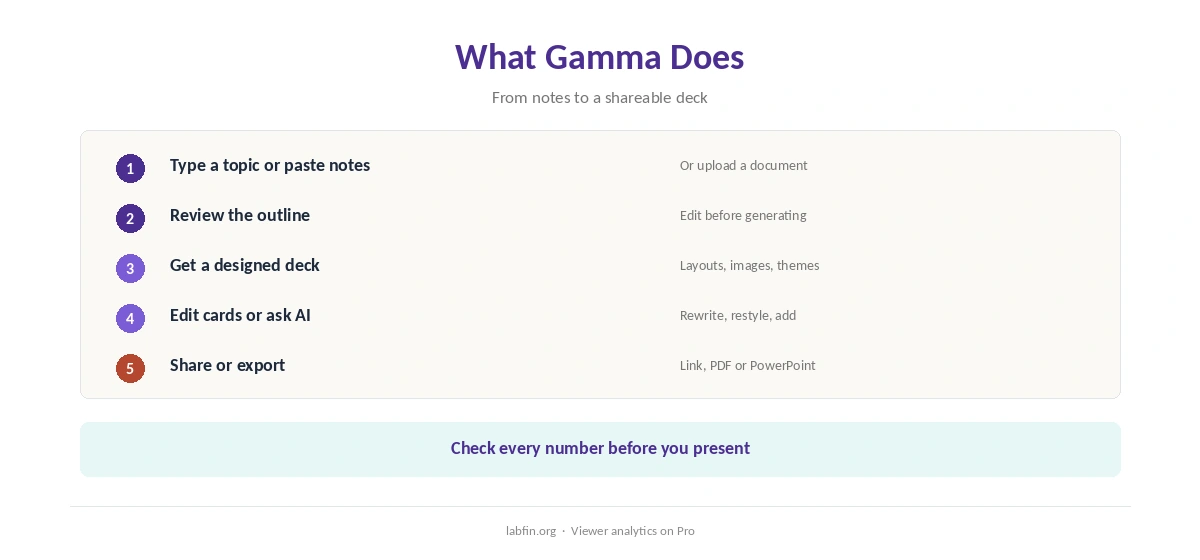
First, you type a topic or paste notes, and Gamma drafts an outline, then a full deck with layouts and images. Then you edit cards, restyle with themes, or ask the AI to rewrite a section. Our guide to using AI for content outlines also helps with the first draft.
Decks, in addition, publish as web links with viewer analytics on Pro, or export to PDF and PowerPoint. The same editor makes documents, one-page websites and social posts.
What Gamma Costs
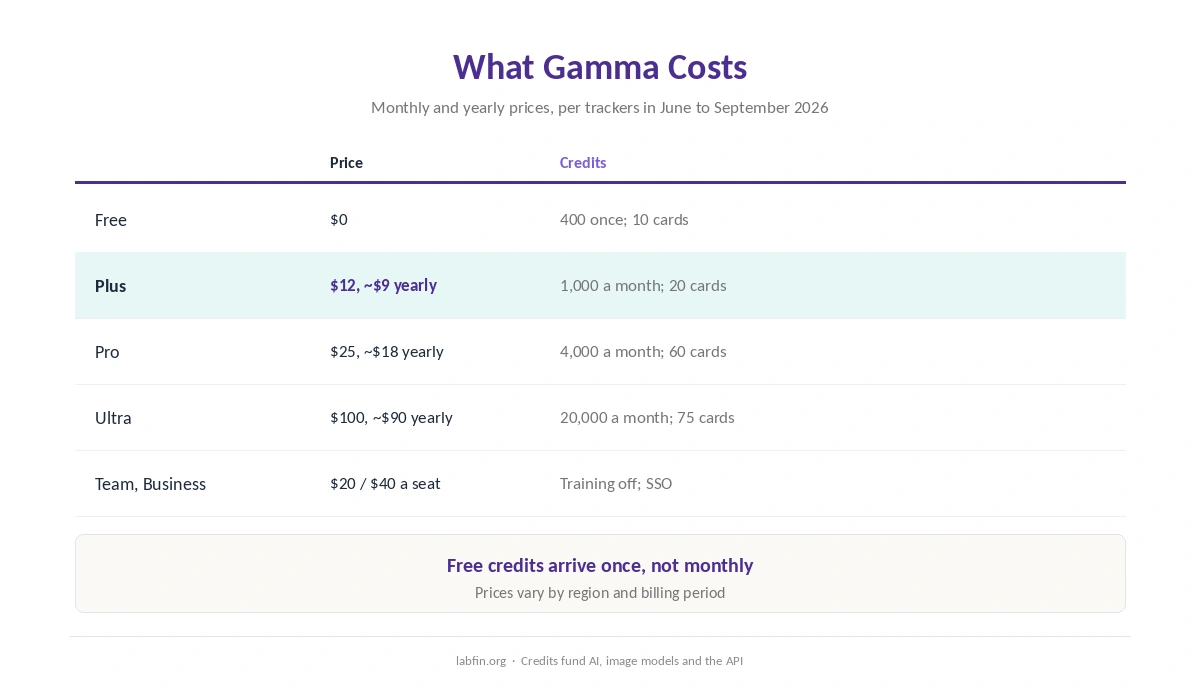
In addition, Gamma sells individual plans with monthly AI credits, as trackers read its pricing page between June and September 2026.
| Plan | Price | Credits and limits |
|---|---|---|
| Free | $0 | 400 credits once; 10 cards per prompt; Gamma branding |
| Plus | $12/mo, about $9 yearly | 1,000 a month; 20 cards; no branding |
| Pro | $25/mo, about $18 yearly | 4,000 a month; 60 cards; custom fonts, analytics, API |
| Ultra | $100/mo, about $90 yearly | 20,000 a month; 75 cards; top models |
| Team, Business | $20 and $40 per seat/mo | Shared workspace; training off; SSO on Business |
Credits, for example, fund AI generation, image models and the API. One tracker, moreover, reports that since mid-2026 basic creations no longer use credits, while the agent, advanced models and API still do. Our list of the cheapest useful AI tools compares other low-cost plans.
Design Quality and Exports
Gamma’s strength is speed to a polished, web-native deck. Reviews, however, repeatedly report that PowerPoint exports need fixes to fonts and layouts, so budget time if your audience expects a .pptx file.
However, we found no independent benchmark of AI presentation tools. Our guide to AI benchmarks explained covers what independent boards do measure.
Accuracy
Gamma writes slide text with third-party models, so facts and figures can be wrong. Therefore, check every number, quote and claim before presenting, as our guide to fact-checking AI output explains.
Your Data
On Free, Plus, Pro and Ultra, Gamma may use your content to improve its AI features by default, its help center says. You can opt out under Settings, then Data Controls.
Team and Business workspaces, by contrast, are excluded from training automatically. Gamma also reached SOC 2 Type II in late 2025, a risk assessment reports. Our guide to which AI tools train on your data compares other tools.
Who Runs Gamma
Gamma Tech, Inc., led by co-founder and CEO Grant Lee, makes Gamma. In November 2025, TechCrunch reported a $2.1 billion valuation and $100 million in annual recurring revenue.
Gamma vs General Assistants
ChatGPT and Claude can also draft slide outlines and, in some plans, create files, as our ChatGPT review and Claude review cover. Gamma, however, adds the design layer and sharing analytics that general assistants lack.
Our guides to ChatGPT for productivity and Microsoft Copilot for productivity cover slide help inside assistants.
Who Should Use Gamma
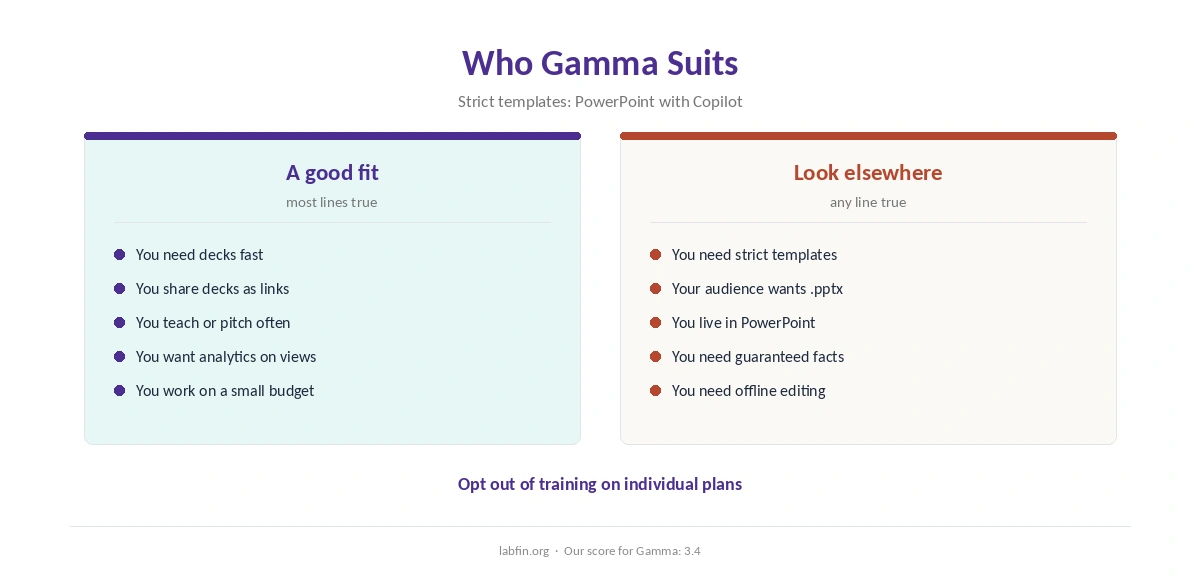
Overall, this Gamma review finds it suits anyone who needs good-looking decks fast and shares them as links. It also suits teachers and small teams on a budget. Our list of the best AI for students covers other study tools.
By contrast, however, it suits strict corporate templates and heavy PowerPoint workflows less. Our list of the best AI for productivity covers wider office tools, and our list of the best AI for marketing covers campaign work.
How We Research
This Gamma review takes plans from trackers that read gamma.app/pricing in 2026, and data terms from Gamma’s help center.
However, we found no independent test of AI presentation quality. Our about page explains the criteria.
Gamma Review FAQ
Plus costs $12 a month or about $9 yearly, Pro $25 or about $18, and Ultra $100 or about $90. Team and Business cost $20 and $40 per seat.
Yes, with 400 AI credits granted once at signup, decks of up to 10 cards per prompt, and Gamma branding.
Yes, on paid plans. Reviews report that exports often need font and layout fixes.
On individual plans by default, with an opt-out in Data Controls. Team and Business are excluded automatically.
Gamma for fast, designed decks shared as links; PowerPoint with Copilot for strict templates and .pptx files.
Gamma
Fast, designed decks with clear data controls
Gamma turns prompts and notes into designed decks in about a minute, with link sharing and analytics, from about $9 a month. Against that, free credits come only once, PowerPoint exports can need cleanup, and slide facts still need checking.
The Verdict
Gamma is one of the quickest ways to turn notes into a good-looking deck. Its data controls, moreover, are clearer than those of most AI tools we review.
The rest of this Gamma review sets the score at 3.4. So start free, opt out of training on individual plans, and check facts and exports before you present.