
Disclosure: LabFin is reader-supported. If you sign up for a tool through links on this page, we may earn a commission at no extra cost to you. Commissions vary between providers and our ratings do not — here’s our full disclosure.
Understanding AI usage limits starts with tokens: the small pieces of text that models read and write. Every chat plan, credit system and API price, for example, ultimately measures how many tokens you use and how hard the model works on them.
This guide explains tokens, context windows, the main types of limits and why long chats run out faster. For each tool’s actual limits, however, see our comparison of AI tool limits.
Understanding AI Usage Limits: The Short Answer
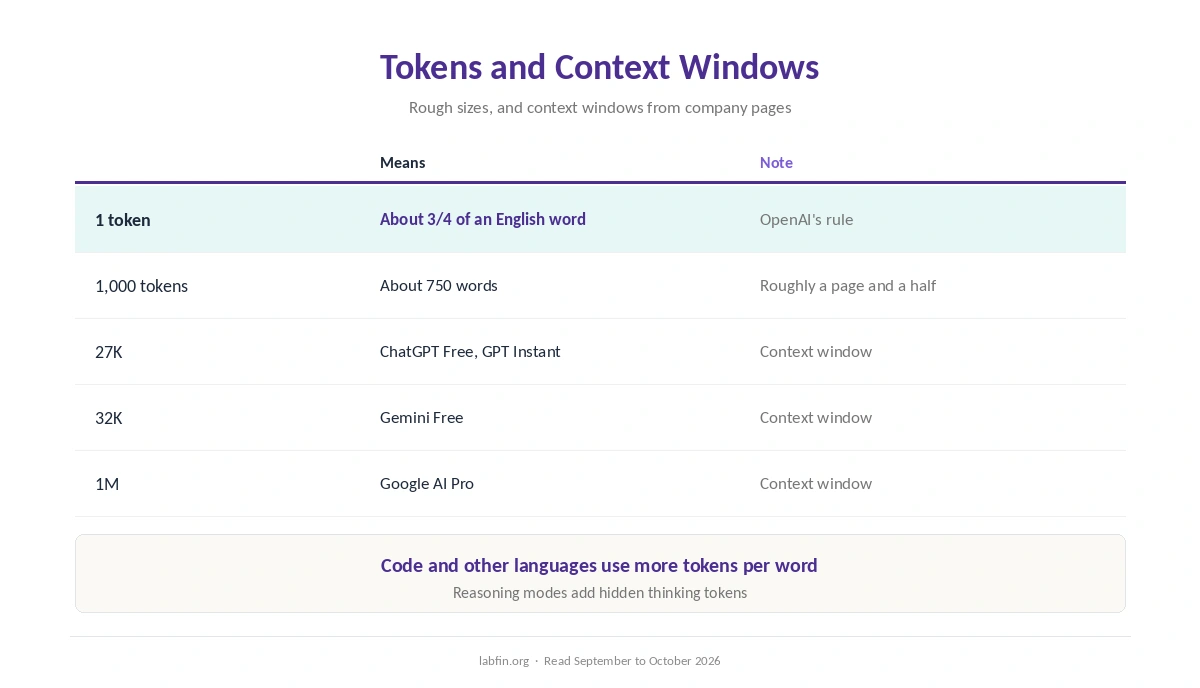
A token is roughly three-quarters of an English word, so 1,000 tokens hold about 750 words, by OpenAI’s rule of thumb. The context window is how many tokens a model can consider at once, including the whole chat up to that point. Our guide on understanding AI model tiers explains which plans get which models.
Chat plans then limit use by message windows, weekly caps or credits, while APIs charge per million tokens. Long chats, large files and reasoning modes, therefore, use more of any limit.
What Tokens Are
Models split text into tokens: common words are one token, while rare words, code and other languages often take several. As a result, the same page can cost different token counts in different languages.
Both what you send and what the model writes count. Reasoning modes, moreover, add hidden thinking tokens that count toward limits and API bills.
Context Windows
The context window caps how much text a model can hold in one conversation. ChatGPT’s pricing page, for example, lists 27K tokens for GPT Instant on Free and 54K on Go and Plus, as our ChatGPT review covers.
Gemini’s free plan allows 32K, and Google AI Pro raises it to 1M tokens, as our Gemini pricing guide lists. When a chat exceeds the window, older parts drop out or the chat must restart.
Types of Usage Limits
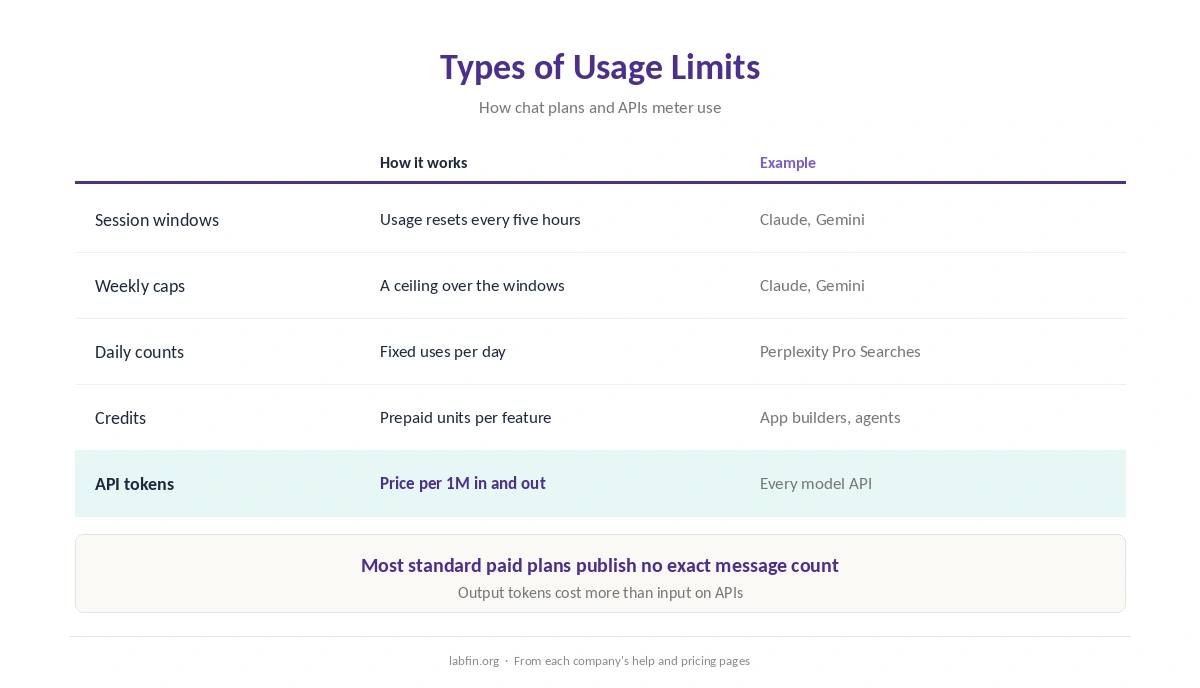
Chat plans use several kinds of limits. Claude, for example, resets usage every five hours with a weekly cap on top, as our Claude usage limits guide explains.
Gemini works in five-hour windows up to a weekly cap, while Perplexity counts Pro Searches per day. Credit systems, by contrast, meter features such as agents, images or app builders, as our Lovable review shows.
Why Long Chats Run Out Faster
Each new message in a chat, in effect, sends the whole conversation again. So message 50 in a long chat costs far more than message one, and large uploaded files add to every turn.
That is why limits seem to vanish in long sessions. Our guide to using Claude for long documents covers projects and file handling.
How API Pricing Works
APIs charge per million input and output tokens, and output costs more. Claude Opus 5.5, for example, costs $4 and $20, Sonnet 5.5 $2 and $10, and Haiku 4.5 $1 and $5, as our Claude pricing guide covers.
DeepSeek V4.1 Flash, by contrast, starts at $0.15 per million input tokens off-peak. Our list of the best AI tools for developers compares API prices, and our list of the cheapest useful AI tools covers low-cost plans.
Making Limits Last Longer
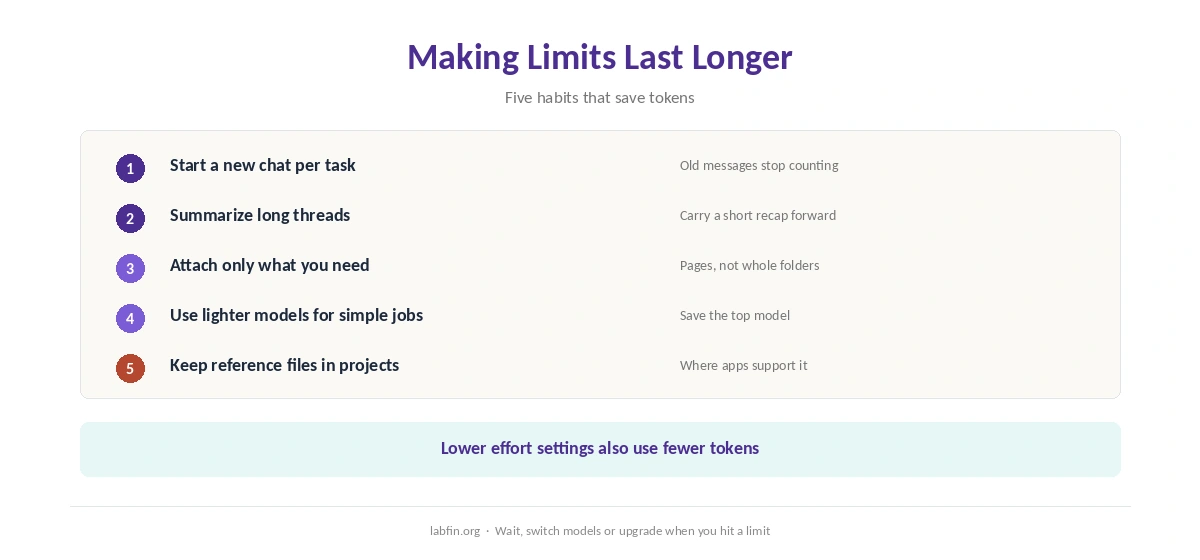
Understanding AI usage limits also points to simple habits. Start a new chat for each new task, and summarize long threads before moving on. Also attach only the pages you need, and use lighter models or lower effort for simple questions.
Projects keep reference files outside the chat in some apps. Our guide to building a personal AI workflow covers projects and memory.
When You Hit a Limit
You can wait for the window to reset, switch to a lighter model, or upgrade. If a tool stops responding for other reasons, our guide to AI tools not working lists six checks.
How We Research
This guide on understanding AI usage limits draws on each company’s pricing and help pages, as read for our reviews between September and October 3, 2026, and on OpenAI’s token guide.
We run no usage tests of our own. Our about page explains how we research, and our breakdown of AI tool costs covers yearly prices.
Understanding AI Usage Limits FAQ
A small piece of text; in English, roughly three-quarters of a word on average.
The number of tokens a model can consider at once, including the whole conversation up to that point.
Long chats resend earlier messages, and files and reasoning modes add tokens to every turn.
No. They raise limits; most standard plans publish no exact message count.
Per million input and output tokens; output costs more, five times input on Claude’s current models.
The Verdict
Understanding AI usage limits comes down to tokens and how each plan meters them. Once you see that long chats and big files cost more, however, limits become easier to manage.
So start fresh chats, attach only what you need, and pick lighter models for simple tasks.