
Disclosure: LabFin is reader-supported. If you sign up for a tool through links on this page, we may earn a commission at no extra cost to you. Commissions vary between providers and our ratings do not — here’s our full disclosure.
This LM Studio review covers a free desktop app for downloading and running open AI models on your own computer. LM Studio, for example, lets you chat with models such as DeepSeek, Qwen or OpenAI’s open gpt-oss line without sending text to a cloud service.
It has been free for personal and work use since July 2025, guides report. However, the models you can run are smaller than the leading cloud assistants, and speed depends on your hardware.
LM Studio Review: Is It Worth It in 2026?
For privacy-minded users and developers, yes. Your prompts stay on your machine, there is no subscription, and a built-in local server lets your own code call the model. Our guide to setting up a local AI stack also covers security for local servers.
For the best answers, a cloud assistant still wins. Claude and ChatGPT lead independent boards, as our list of the best AI tools shows.
What LM Studio Does
First, LM Studio searches Hugging Face for open models, downloads them, and runs them with the llama.cpp or Apple MLX engines. A built-in chat window, moreover, lets you test each model straight away. Our Ollama vs LM Studio comparison also weighs an open-source engine against a desktop app.
It also runs a local server compatible with OpenAI’s API, so apps written for cloud models can point at your own machine instead. Since early 2026, a headless mode called llmster runs it on servers without a desktop, guides report. Our list of the best AI tools for developers covers related tools.
What LM Studio Costs
The desktop app costs nothing, for personal or work use, under its terms. Element Labs, its maker, sells a quote-only Enterprise tier for organizations.
| Plan | Price | What you get |
|---|---|---|
| Free | $0 | Full desktop app, local server, LM Link for up to 5 devices |
| Enterprise | By quote | SSO, model and MCP controls, admin features |
Your real cost, therefore, is hardware and electricity. Our list of the cheapest useful AI tools compares paid options.

Hardware and Setup
LM Studio runs on Apple Silicon Macs, Windows and Linux. Small models run on a recent laptop, while larger ones need more memory or a strong graphics card, guides suggest.
Setup, however, takes minutes: install the app, pick a model sized for your machine, and start chatting. LM Studio also flags models that are likely too large for your hardware.
Which Models It Runs
LM Studio runs open-weight models, for example DeepSeek, Qwen, Llama, GLM and OpenAI’s gpt-oss models. It does not run Claude, GPT-6 or Gemini, which are available only as cloud services.
DeepSeek’s open weights, moreover, let you avoid its hosted service, which stores data in China, as our DeepSeek review explains, and our guide to DeepSeek for coding covers self-hosting.
What Independent Evaluations Show
For this LM Studio review, we found no independent test of LM Studio itself, which is a runner rather than a model. The open models it runs, however, score below the leading cloud models on independent boards.
So expect more errors on hard questions, and check facts carefully. Our guides to AI benchmarks explained and why AI gets facts wrong explain why.
Privacy and Data
When you run a model locally, your prompts and files stay on your computer. Features that use the internet, such as web search when logged in, are the exception, so turn them off for sensitive work.
LM Studio is closed-source, however, so you rely on its maker’s description rather than public code. Our guide to which AI tools train on your data compares cloud tools.
Who Makes LM Studio
Element Labs makes LM Studio, which launched in 2023. Co-founder Yagil Burowski announced its headless mode in January 2026, guides report.
LM Studio vs Cloud Assistants
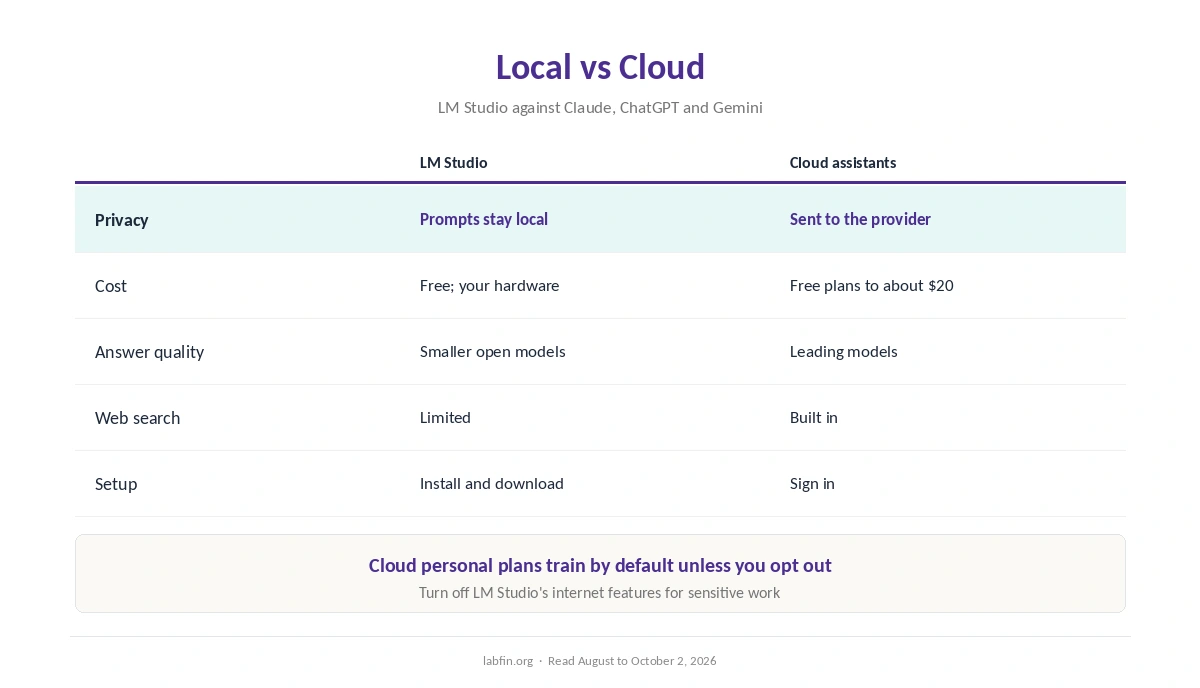
Claude, ChatGPT and Gemini give stronger answers, web search and long-document tools, from free plans to about $20 a month. Their personal plans, however, train by default unless you opt out.
LM Studio, by contrast, keeps everything local and free, at the cost of smaller models. Our list of DeepSeek alternatives covers cloud options, and our Claude review covers the top-rated one.
Who Should Use LM Studio
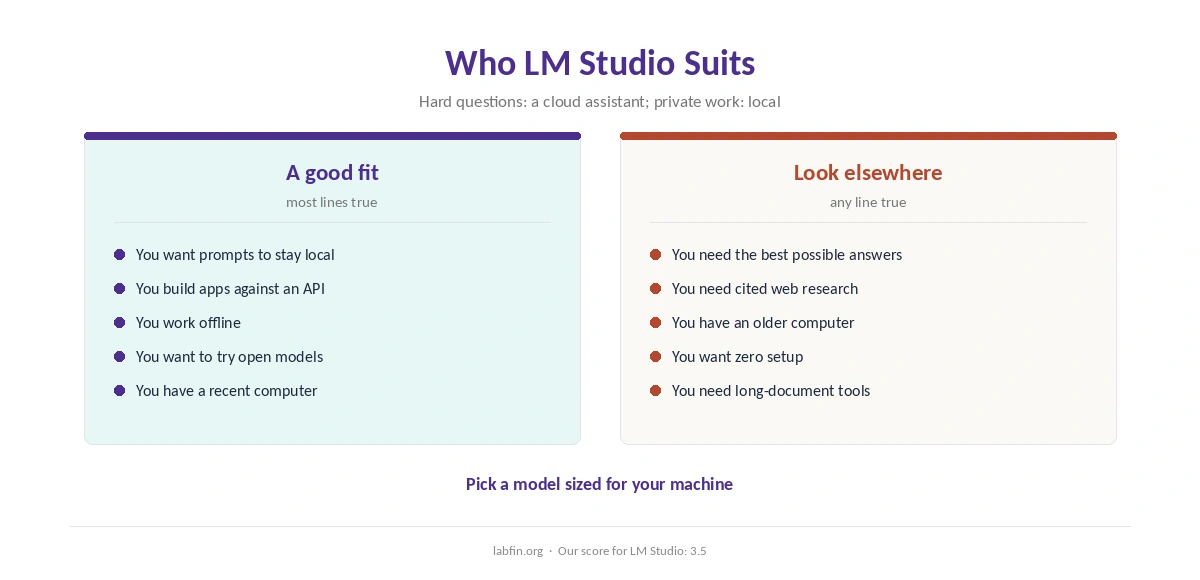
Overall, LM Studio suits developers, privacy-minded users and anyone who wants to try open models without a subscription. It also suits offline work and testing models before deploying them. Our guide to using AI for coding projects covers safe settings.
By contrast, it suits people who need the best answers, research with citations, or an older computer less. Our guide to free AI workflows covers free cloud options.
How We Research
This LM Studio review takes features, version and license details from guides that read LM Studio’s site and terms in 2026, including one updated in September.
We did not test it on our own hardware. Our about page explains the criteria.
LM Studio Review FAQ
Yes. The desktop app is free for personal and work use since July 2025. An Enterprise tier is sold by quote.
Local models run on your computer, so prompts stay there. Internet features such as web search are the exception.
No. It runs open-weight models such as DeepSeek, Qwen, Llama and gpt-oss. Claude and GPT-6 are cloud-only.
No. It is free to use but closed-source.
A recent Apple Silicon Mac, Windows or Linux computer. Larger models need more memory or a strong graphics card.
LM Studio
Free, private and local
LM Studio downloads and runs open models on your own computer for free, keeps prompts local, and serves an OpenAI-compatible API for your code. Against that, local models trail the leading cloud assistants, speed depends on your hardware, and the app is closed-source.
The Verdict
LM Studio is the easiest way to run open AI models on your own computer, free and private by design. Its local server, moreover, makes it useful for developers.
The rest of this LM Studio review holds the score at 3.5, since local models trail the cloud leaders. So use it for private and offline work, and keep a cloud assistant for hard questions.