
Disclosure: LabFin is reader-supported. If you sign up for a tool through links on this page, we may earn a commission at no extra cost to you. Commissions vary between providers and our ratings do not — here’s our full disclosure.
This GitHub Copilot review starts with a billing change. Since June 1, 2026, every chat, agent session and terminal task draws down GitHub AI Credits, priced by the tokens each model uses. Code completions, by contrast, stay unlimited on paid plans. Pro still costs $10 a month and includes 1,500 credits, but only 1,000 of them are fixed. For more, our page on GitHub Copilot alternatives covers seven options ranked by our review scores.
The other 500 are a flex allotment, which GitHub says will adapt as the economics of AI change. So the price holds while the amount of agent work it buys can move. Copilot’s strengths sit elsewhere: a model menu from six providers, and support for most major editors. Its weak spots are a missing independent agent score and training on personal plans by default since April 24, 2026.
GitHub Copilot Review: The Short Answer
Yes, if you live in GitHub and want AI in the editor you already use. At $10 a month, Pro costs half the $20 that Claude Pro or ChatGPT Plus charge, and completions never run out. Furthermore, the cloud agent turns a GitHub issue into a pull request without leaving the site. For more, our page on ChatGPT vs GitHub Copilot covers Codex against Copilot on price, credits and training defaults.
Look elsewhere for long autonomous agent work. Our GitHub Copilot review finds two reasons. Credits drain fastest there, and no independent benchmark scores Copilot’s own agent. In addition, personal plans now feed your interaction data to model training unless you switch it off, so check that setting on day one. Our GitHub Copilot vs Tabnine comparison also weighs a cloud assistant against an on-premises one.
What GitHub Copilot Costs
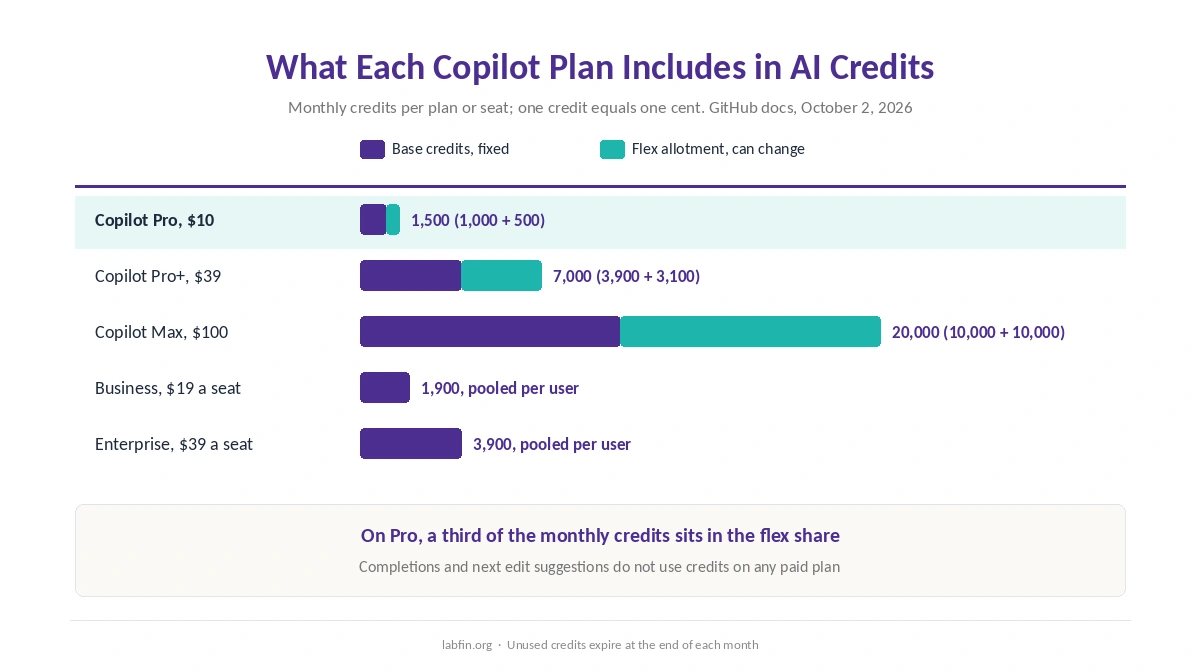
GitHub’s plan documentation, read on October 2, 2026, lists five paid tiers and two free ones. Each paid plan includes a monthly allowance of AI credits, and one credit equals $0.01. Base credits match the price, while the flex allotment on top varies by plan.
| Plan | Price | AI credits a month |
|---|---|---|
| Copilot Free | $0 | Allowance not itemized; 2,000 completions; auto model only |
| Copilot Student | $0 for verified students | Allowance not itemized; auto model only |
| Copilot Pro | $10/mo | 1,500 (1,000 base + 500 flex) |
| Copilot Pro+ | $39/mo | 7,000 (3,900 base + 3,100 flex) |
| Copilot Max | $100/mo | 20,000 (10,000 base + 10,000 flex) |
| Copilot Business | $19 per seat/mo | 1,900 per user, pooled |
| Copilot Enterprise | $39 per seat/mo | 3,900 per user, pooled; needs Enterprise Cloud |
Unused credits do not carry over. Instead, the allowance resets at midnight UTC on the first day of each month, whatever your billing date. When credits run out, you can upgrade and pay only the difference, wait for the reset, or set a budget for extra usage at $0.01 a credit. GitHub warns that extra usage may be capped, though.
Two details soften the meter. Auto model selection earns a 10% discount on model costs on paid plans. Moreover, verified teachers and maintainers of popular open-source projects can get Pro free, according to the same docs. For the chat assistants’ own plans, our full AI pricing comparison lists every tier.
⚠️ Older reviews quote premium requests, such as 300 a month on Pro. That system ended on June 1, 2026, and GitHub now files it under legacy billing. Because credits follow token prices, a long agent session on a frontier model costs far more than a quick chat on a light one.
Completions, Chat and Agents
Copilot works in Visual Studio Code, Visual Studio, JetBrains IDEs, Xcode and Eclipse, as well as on GitHub.com, GitHub Mobile and the terminal through Copilot CLI. Every plan includes Copilot CLI and the GitHub Copilot app, according to GitHub’s plan overview.
Inline suggestions and next edit suggestions are the oldest part, and they stay outside the credit meter on paid plans. Agent mode then edits across files inside the editor. The cloud agent goes further: you assign it an issue, it works in GitHub Actions, and it opens a pull request for review.
GitHub also runs third-party agents from OpenAI and Anthropic inside Copilot, in public preview. Code review can comment on pull requests, although the Free plan offers only a limited selection review in VS Code. For other coding agents and how they rank, our list of the best AI for coding orders them by Artificial Analysis’s agent index.
Models: A Wide Menu With Conditions
GitHub’s supported-models page lists models from OpenAI, Anthropic, Google, xAI, Moonshot AI and Microsoft. They include GPT-6.1 Sol, Claude Opus 5.5 and Sonnet 5.5, Gemini 3.8 Flash and Grok 4.7. However, Free and Student users get auto model selection only, so the menu starts with Pro. Our page on Claude vs GitHub Copilot covers Claude Code against Copilot, which also offers Claude models.
The 1M-token context window works only in Visual Studio Code and Copilot CLI, and it burns credits faster. Models also come and go quickly: GitHub retired four of them on October 2, 2026 alone. In addition, GitHub warns that its codenamed evaluation models may perform worse on security-related prompts.
⚠️ For Claude Fable 5 and 5.1, GitHub notes that Anthropic retains prompts and outputs by default to run safety classifiers. Enterprises can request zero data retention through the end of 2026, and the other Claude models run under zero retention. Our Claude review covers those models on Anthropic’s own plans.
What the Independent Record Shows
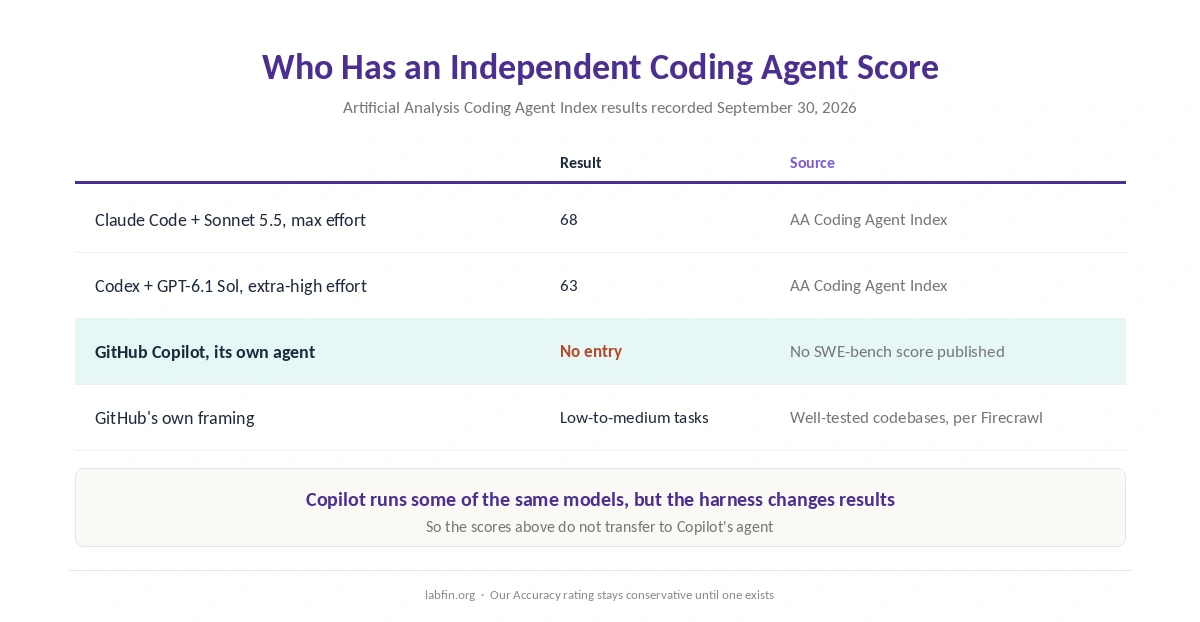
Copilot has no entry in the Artificial Analysis Coding Agent Index results we recorded on September 30, 2026. GitHub also publishes no SWE-bench score for its agent, as a Firecrawl review noted in June 2026. Instead, GitHub describes the cloud agent, as Firecrawl quotes it, as best for low-to-medium complexity tasks in well-tested codebases.
For comparison, the same index scored Claude Code with Sonnet 5.5 at maximum effort at 68, and Codex with GPT-6.1 Sol at extra-high effort at 63. Copilot can run some of the same models, but the agent harness around a model changes results, so those numbers do not transfer. Our guides to Claude for coding and ChatGPT for coding cover both measured agents.
⚠️ Without a score, our Accuracy rating stays conservative. We will revisit it when an independent evaluation measures Copilot’s own agent rather than the models it borrows.
Privacy: Your Plan Decides
On March 25, 2026, GitHub announced that from April 24 it would use interaction data from Copilot Free, Pro and Pro+ to train its models, unless users opt out. That data covers inputs, outputs, code snippets and associated context. You can switch it off in your GitHub settings under Privacy, and earlier opt-outs carry over.
Copilot Business and Enterprise are excluded, and so are enterprise-owned repositories. GitHub adds that it does not train on private repositories at rest, though code you work on with Copilot counts as interaction data. The announcement predates the Max plan, and we found no separate statement for Max, so check the setting there too.
Organization plans also add controls the personal ones lack. According to GitHub’s docs, Free has no audit logs, content exclusion, policy management or indemnification coverage. By contrast, Business and Enterprise let admins exclude files from Copilot and review its activity.
Security: Prompt Injection Keeps Coming Back
In February 2026, Orca Security disclosed RoguePilot, in which hidden instructions in a GitHub issue could make Copilot in Codespaces leak a repository token. GitHub patched it, according to The Hacker News. That same month, Microsoft’s security updates also fixed command-injection flaws in Copilot’s editor integrations.
In April 2026, researchers led by Aonan Guan showed that comments and pull request titles could steer three agents into leaking secrets: GitHub’s Copilot Agent, Anthropic’s Claude Code Security Review and Google’s Gemini CLI Action. So the problem is not unique to Copilot. Still, any agent that reads issue text needs its firewall and secret scanning left on.
Who Owns GitHub Copilot
Microsoft has owned GitHub since 2018. Even so, GitHub Copilot is a separate product from Microsoft Copilot, the assistant in Windows and Office, which our Microsoft Copilot review covers. The shared name causes real confusion when teams buy licenses, so check which one a quote means.
Who Should Use GitHub Copilot
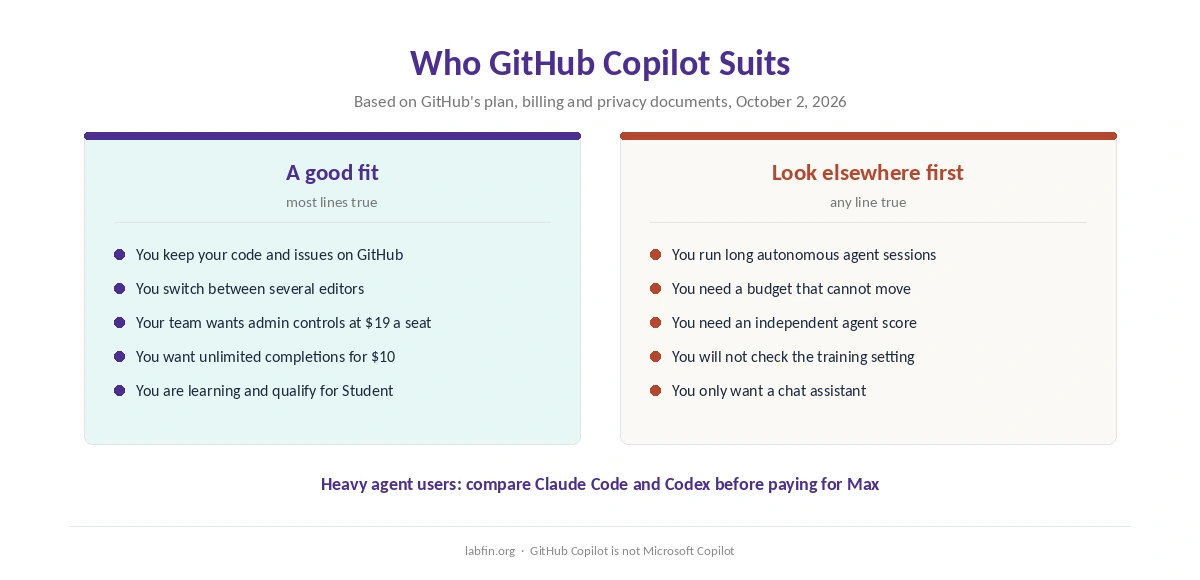
Copilot suits developers who keep their work on GitHub and switch between editors. It also suits teams that want admin controls and no training on their code at $19 a seat. Learners can start on Free or Student, and our list of the best AI for beginners in coding compares the options.
It suits heavy agent users less. Long sessions on frontier models drain credits, and no independent score backs the agent. For editor-first work, our Cursor review covers the closest rival, and our list of Cursor alternatives widens the field.
How We Research
This GitHub Copilot review takes plans, credits, models and features from GitHub’s documentation, read on October 2, 2026. Those pages include the individual plans page and the billing and supported-models pages. The training policy comes from GitHub’s blog post of March 25, 2026.
Agent scores come from Artificial Analysis, read on September 30, 2026. Security incidents come from Orca Security via The Hacker News, Microsoft’s February 2026 advisories and the Cloud Security Alliance’s note on the April research. Model prices for developers building products are a separate topic, which our list of the best AI tools for developers covers.
Output Quality and Accuracy rest on outside evaluations, so with no Copilot agent score both stay conservative. We run no tests of our own. Our about page explains how we score.
GitHub Copilot Review FAQ
Free costs $0 with 2,000 completions a month. Pro is $10 a month, Pro+ $39 and Max $100. For organizations, Business is $19 a seat and Enterprise $39 a seat, according to GitHub’s docs.
Since June 1, 2026, chat, agents and Copilot CLI draw down credits priced by tokens, at $0.01 a credit. Completions stay unlimited on paid plans. Unused credits expire at the end of each month.
On Free, Pro and Pro+, interaction data trains GitHub’s models by default since April 24, 2026, unless you opt out under Privacy settings. Business and Enterprise are excluded, and repositories at rest are not used.
Paid plans list models from OpenAI, Anthropic, Google, xAI, Moonshot AI and Microsoft, including GPT-6.1 Sol and Claude Opus 5.5. Free and Student plans use auto model selection only.
No. Both belong to Microsoft, but GitHub Copilot is a coding assistant, while Microsoft Copilot is the general assistant in Windows and Office.
GitHub Copilot
Cheap to start, metered once agents run
Pro costs $10 a month with unlimited completions, a model menu from six providers and an agent that turns issues into pull requests. Against that, agent work now draws down credits whose flex share can change, personal plans train on interaction data by default, and no independent benchmark scores Copilot’s own agent.
The Verdict
GitHub Copilot is easy to justify at $10 a month. Completions never run out, it works in most major editors, and its cloud agent fits teams that already plan work in GitHub issues.
Two things hold this GitHub Copilot review at 3.5. First, the switch to credits makes agent-heavy months harder to budget, because part of each allowance can change. Second, personal plans now train on your interaction data until you opt out. Turn that off, set a budget, and Copilot earns its place.