
Disclosure: LabFin is reader-supported. If you sign up for a tool through links on this page, we may earn a commission at no extra cost to you. Commissions vary between providers and our ratings do not — here’s our full disclosure.
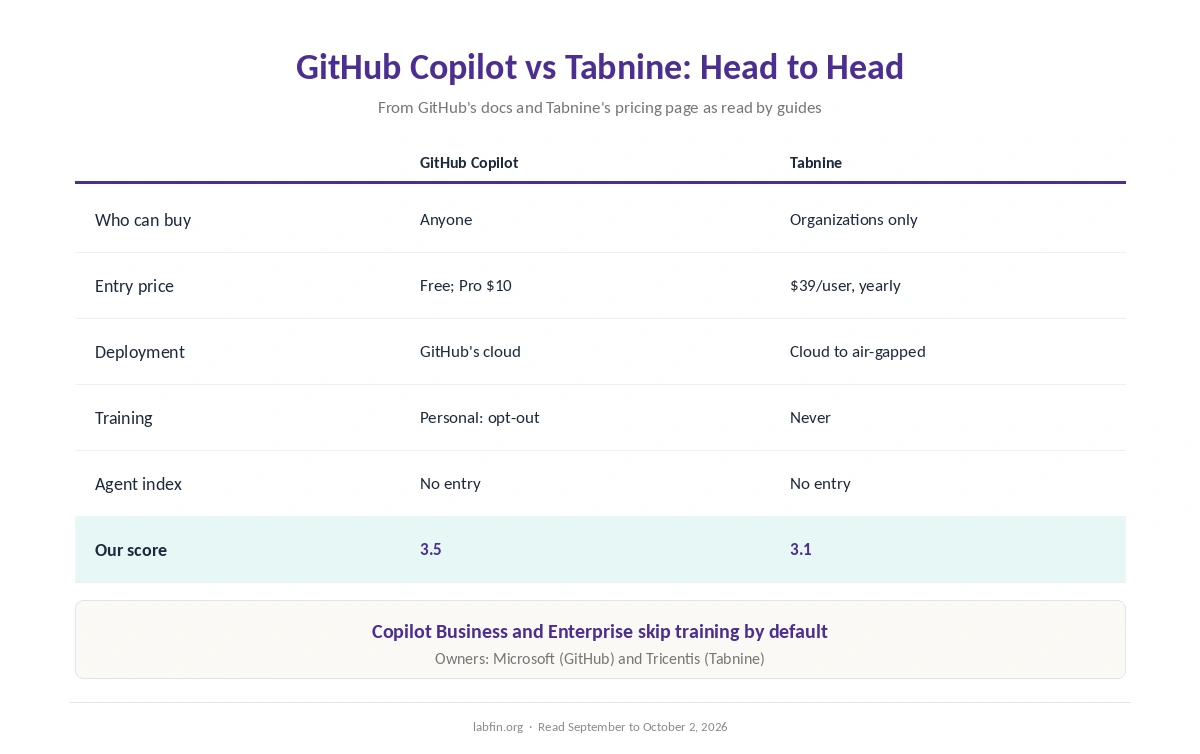
GitHub Copilot vs Tabnine compares two AI assistants that both work inside the editor you already use. Copilot, for example, is a cloud service from GitHub, from $10 a month for individuals. Tabnine, by contrast, sells only to organizations, from $39 per user on yearly contracts, and can run entirely on your own servers.
Our reviews also score GitHub Copilot 3.5 and Tabnine 3.1. Price and plan choice favor Copilot; deployment and default data terms, however, favor Tabnine.
GitHub Copilot vs Tabnine: The Short Answer
Choose GitHub Copilot, first, if your company allows cloud tools. It costs far less, works in more editors, plans work from GitHub issues, and Business at $19 a seat keeps code out of training by default.
Choose Tabnine instead, however, if code must stay inside your network. It keeps no customer code on any plan and also offers on-premises and air-gapped deployment, which Copilot does not.
Head to Head
| Criterion | GitHub Copilot | Tabnine |
|---|---|---|
| Who can buy | Individuals and organizations | Organizations only |
| Entry price | Free; Pro $10/mo | $39 per user/mo, yearly |
| Team seat | Business $19; Enterprise $39 | $39 or $59 per user, yearly |
| Editors | VS Code, Visual Studio, JetBrains, Xcode, Eclipse | VS Code, JetBrains, Visual Studio, Eclipse |
| Deployment | GitHub’s cloud | Cloud, VPC, on-premises, air-gapped |
| Training on your code | Personal plans: yes, opt-out; Business: no | No; zero code retention |
| Agent index | No entry | No entry |
| Our score | 3.5 | 3.1 |
Prices
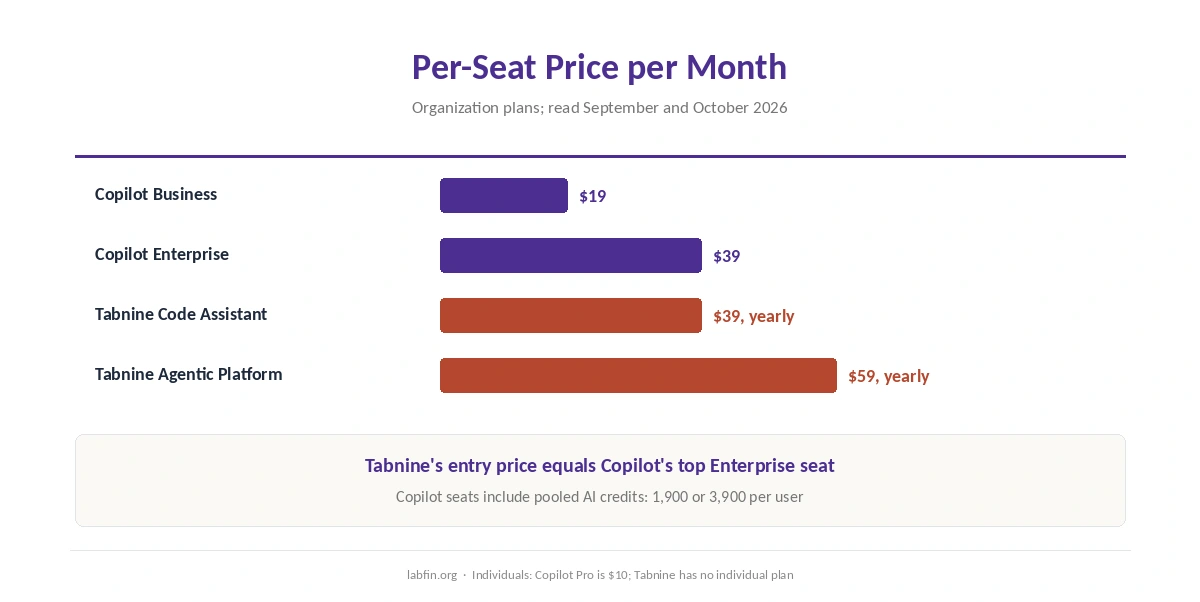
First, Copilot has a free plan with 2,000 completions a month, Pro at $10 and Pro+ at $39. For organizations, moreover, Business costs $19 a seat with 1,900 pooled AI credits per user, and Enterprise $39 with 3,900, as our GitHub Copilot pricing guide explains.
Tabnine, by contrast, has no free or individual plan. Code Assistant costs $39 per user a month and Agentic Platform $59, both billed yearly through sales. Tabnine’s entry price, therefore, equals Copilot’s top Enterprise seat.
Editors and Workflow
Both also run as plugins rather than replacing your editor. Copilot, for instance, covers VS Code, Visual Studio, JetBrains IDEs, Xcode and Eclipse, plus GitHub.com and a CLI, and its cloud agent turns issues into pull requests.
Tabnine, meanwhile, also covers VS Code, JetBrains IDEs, Visual Studio and Eclipse, plus its own CLI. Its Context Engine connects to GitHub, GitLab, Bitbucket and Perforce, so it also suits teams that do not use GitHub. Our guide to using AI for coding projects covers both workflows.
Deployment and Data
Here, however, Tabnine leads. It keeps no customer code and never trains on it on any plan, and it runs in Tabnine’s cloud, a private VPC, on-premises servers or a fully disconnected network.
Copilot, on the other hand, runs only in GitHub’s cloud. Free, Pro and Pro+, moreover, have trained on interaction data since April 24, 2026 unless you opt out, while Business and Enterprise are excluded. Our guide to which AI tools train on your data compares both.
Models and Agents
Copilot’s paid plans, for example, list models from six providers, including Claude and GPT, and GitHub lists Claude and Codex as third-party agents in preview. Tabnine, by contrast, lets companies bring their own model endpoint or use models through Tabnine at the provider’s price plus 5%.
Neither has an entry on Artificial Analysis’s Coding Agent Index, as our guide to AI benchmarks explained notes. Evidence, therefore, does not separate them.
Who Owns Each
First, GitHub has belonged to Microsoft since 2018. Tabnine, by contrast, has belonged to Tricentis, a software-testing company, since July 30, 2026. Our guide to who owns which AI tool tracks both.
Winners by Category
In short, GitHub Copilot wins on price, plan choice, editor coverage and GitHub integration. It also offers a free plan and plans for individuals, which Tabnine lacks. Our Windsurf vs Tabnine comparison also covers deployment.
Tabnine, on the other hand, wins on deployment options and default data terms. Evidence, however, is a tie. Overall, in GitHub Copilot vs Tabnine our scores favor Copilot, 3.5 against 3.1, unless your code cannot leave your network.
Which One to Choose
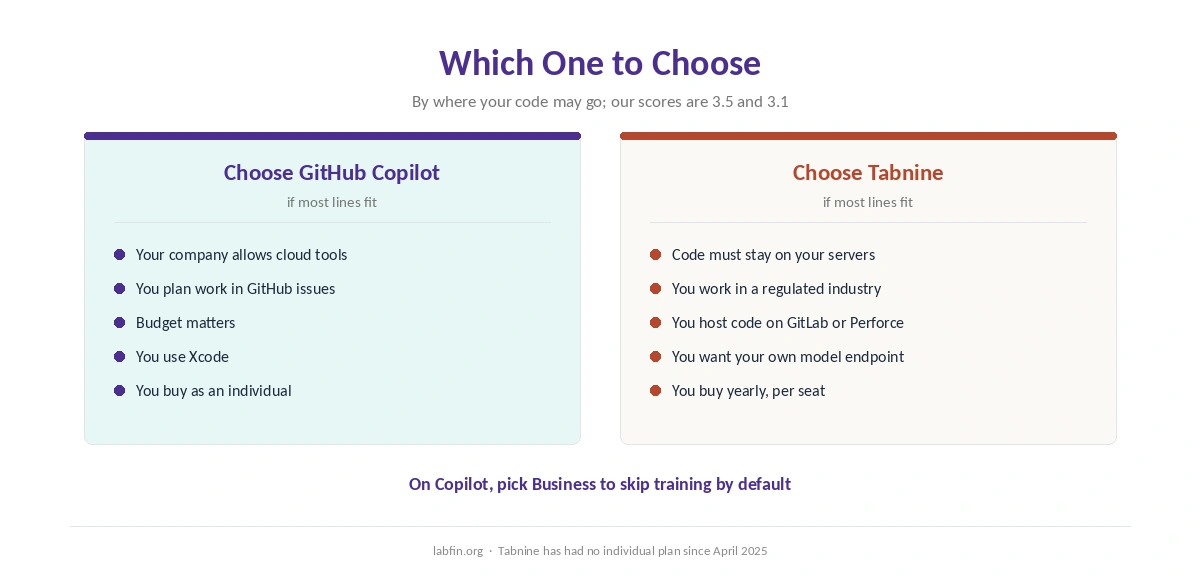
Overall, take GitHub Copilot if cloud tools are allowed, especially on Business, which skips training by default. By contrast, take Tabnine if policy or regulation keeps code on your own servers, or if you host code outside GitHub.
For other options, see our lists of GitHub Copilot alternatives and Cursor alternatives. Each one names its ranking rule.
Our Cursor vs Tabnine comparison, in addition, covers an AI editor against Tabnine, and our GitHub Copilot vs Windsurf page covers another rival.
How We Research
This GitHub Copilot vs Tabnine comparison reuses the sources behind our reviews of each tool, including GitHub’s Copilot documentation and Tabnine’s pricing page as read by several guides, between September and October 2, 2026.
Our about page explains the criteria, and our list of the best AI for business covers other business plans. Our Cursor pricing guide, in addition, covers a third option. We run no tests of our own.
GitHub Copilot vs Tabnine FAQ
Our reviews score Copilot 3.5 and Tabnine 3.1. Copilot is cheaper and covers more editors; Tabnine can run entirely on your own servers.
GitHub Copilot: Pro costs $10 a month and Business $19 a seat. Tabnine starts at $39 per user, billed yearly.
No. Copilot runs in GitHub’s cloud. Tabnine offers on-premises and air-gapped deployment.
Tabnine does not on any plan. Copilot Free, Pro and Pro+ do unless you opt out; Business and Enterprise do not.
Yes. Its Context Engine connects to GitHub, GitLab, Bitbucket and Perforce.
The Verdict
Overall, GitHub Copilot vs Tabnine comes down to where your code may go. If the cloud is allowed, Copilot does more for less, and Business keeps code out of training.
If it must stay on your own servers, however, Tabnine is one of the few options. Either way, also check the training setting before you start.