
Disclosure: LabFin is reader-supported. If you sign up for a tool through links on this page, we may earn a commission at no extra cost to you. Commissions vary between providers and our ratings do not — here’s our full disclosure.
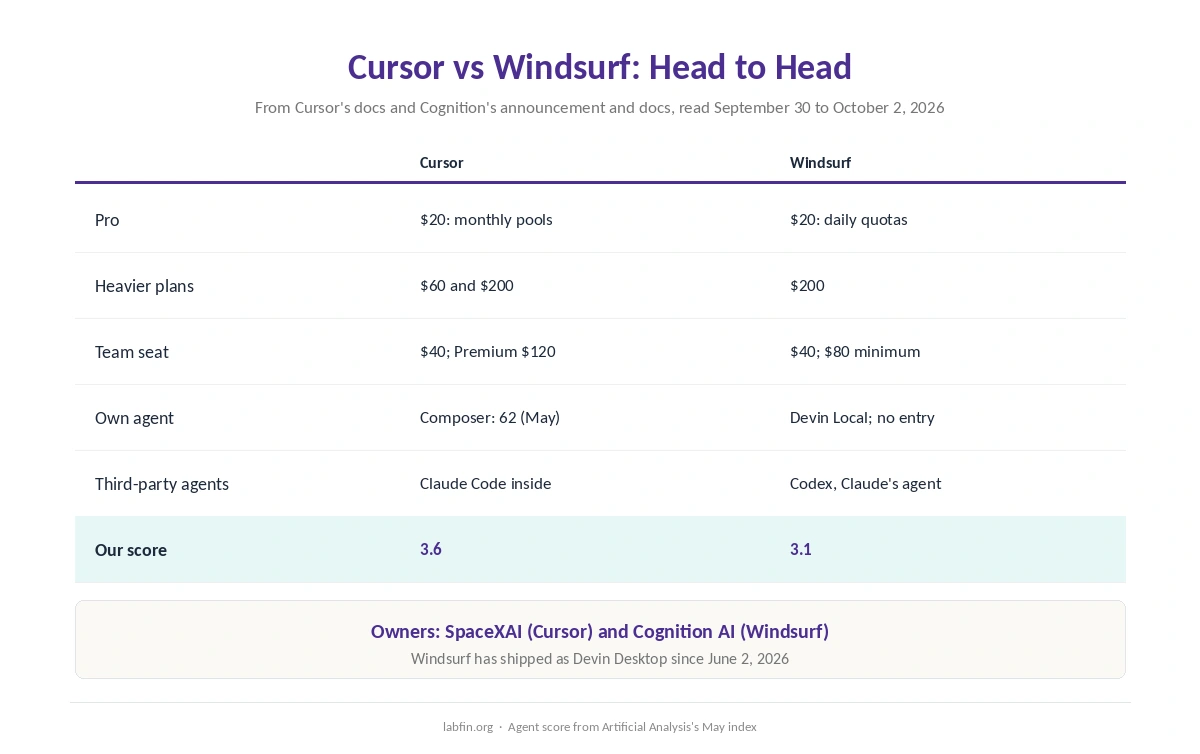
Cursor vs Windsurf compares the two best-known AI code editors. Both build on VS Code, and both also charge $20 a month for Pro. However, Windsurf now ships as Devin Desktop, after Cognition renamed it in June 2026.
The differences, therefore, lie in how each meters usage, how each runs agents, and how much independent evidence each has. Our reviews score Cursor 3.6 and Windsurf 3.1.
Cursor vs Windsurf: The Short Answer
Choose Cursor, first, if you want the more proven editor. Its own Composer 2.5 scored 62 on Artificial Analysis’s agent index in May at $0.07 a task, and Privacy Mode keeps your code out of training.
Choose Windsurf instead if you run several agents at once and want them on one board, including Codex and Claude’s agent. Its quotas also refresh daily rather than monthly, though it has no independent agent score.
Head to Head
| Criterion | Cursor | Windsurf (Devin Desktop) |
|---|---|---|
| Free plan | Hobby, limited (guides) | A light quota |
| Pro | $20/mo: two monthly pools | $20/mo: daily and weekly quotas |
| Heavier plans | Pro Plus $60; Ultra $200 | Max $200 |
| Team seat | $40; Premium $120 | $40; $80/mo minimum |
| Own agent | Composer 2.5: 62 (May) | Devin Local; no index entry |
| Third-party agents | Claude Code runs inside | Codex, Claude’s agent on one board |
| Training by default | No with Privacy Mode on | Opt-out stops training |
| Our score | 3.6 | 3.1 |
Prices and Limits
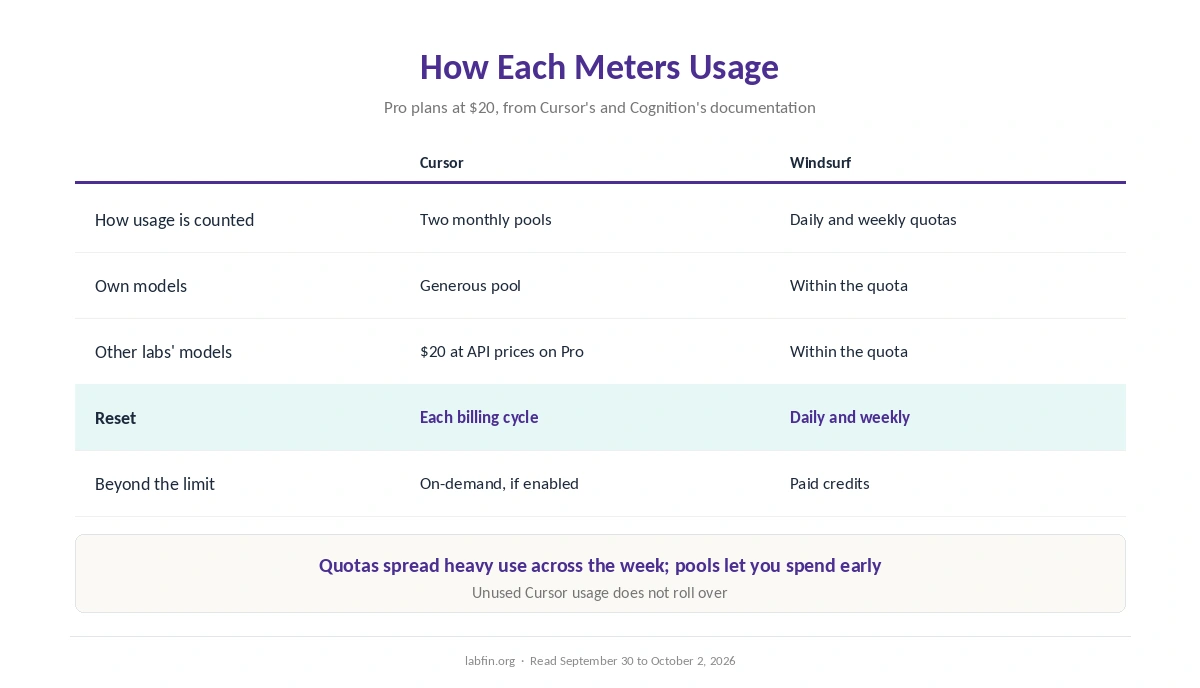
Both Pro plans cost $20; however, they meter usage differently. Cursor gives each paid plan two monthly pools: a generous one for its own models and $20 of other labs’ models at API prices. Unused usage, moreover, does not roll over, as our Cursor pricing guide explains.
Windsurf, by contrast, uses daily and weekly quotas across its desktop app, CLI and cloud sessions. Extra use then also draws on paid credits. In practice, therefore, quotas spread heavy use across the week, while pools let you spend faster early in the month.
Agents and Workflow
Cursor, for its part, centers on one editor with Tab completions, an agent, Cloud Agents and Bugbot code review. Its own Composer 2.5, meanwhile, keeps cost per task low, and Claude Code also runs inside Cursor, as our Claude vs Cursor comparison explains.
Windsurf, by contrast, centers on its Agent Command Center, a board of local and cloud sessions. Through an open protocol, moreover, it runs Codex and Claude’s agent alongside its own Devin Local, which replaced Cascade in July.
Models
First, Cursor lists models from OpenAI, Anthropic, Google, SpaceXAI and Meta, plus its own Composer 2.5. Windsurf’s paid plans, similarly, include frontier models from Anthropic, OpenAI and Google, pricing guides report, alongside Cognition’s SWE-series models.
However, neither publishes a full model list per plan on the pages we read, so check each model menu before you rely on a specific model.
Evidence and Stability
On evidence, Cursor has a public agent score, 62 for Composer 2.5 on the May version of Artificial Analysis’s index. Windsurf, however, has no entry on either version, as our guide to AI benchmarks explained covers.
In addition, Windsurf is mid-transition: a new name in June and a new local agent in July. Cursor, for its part, changed owners in August but still kept its product and pricing.
Data and Security
On data, Cursor does not train on your code with Privacy Mode on, which teams get by default. Windsurf, meanwhile, stops training once you opt out, and Enterprise data is never used, Cognition says.
Both, however, have had serious flaws. Cursor fixed two rated 9.8 in version 3.0, while Windsurf’s 2025 issues included hidden-instruction leaks and a path-traversal bug rated 9.8. Our guide to which AI tools train on your data compares the defaults.
Who Owns Each
First, Cursor’s maker, Anysphere, has belonged to SpaceXAI since August 2026. Windsurf, by contrast, belongs to Cognition AI, the maker of Devin. Our guide to who owns which AI tool maps both.
Winners by Category
In short, Cursor wins on agent evidence, cost per task with Composer, plan choice and stability. It also has more tiers between $20 and $200, as our comparison of AI tool limits notes.
Windsurf, on the other hand, wins on multi-agent orchestration and daily quota refreshes. Price at the Pro tier, however, is a tie. Overall, in Cursor vs Windsurf our scores favor Cursor, 3.6 against 3.1. Our list of Windsurf alternatives also covers the trade-offs.
Which One to Choose
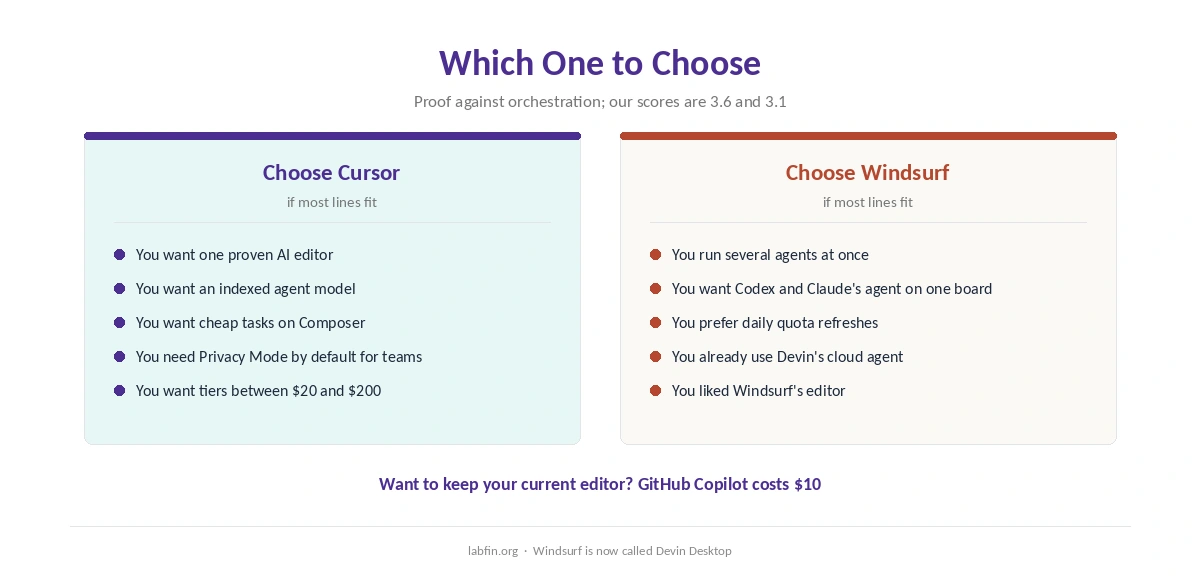
Overall, take Cursor if you want one proven AI editor with a cheap in-house model and Privacy Mode. By contrast, take Windsurf if you already use several agents and want one board for them.
For other options, see our lists of Cursor alternatives and GitHub Copilot alternatives. Each list names its ranking rule.
Our GitHub Copilot vs Windsurf comparison also covers a cheaper option, and our Cursor vs GitHub Copilot page completes the set.
How We Research
This Cursor vs Windsurf comparison reuses the sources behind our reviews of each tool, including Cursor’s models and pricing docs and Cognition’s Devin Desktop announcement, read between September 30 and October 2, 2026.
Agent scores, in addition, come from Artificial Analysis. Our about page explains the criteria, and our guide to using AI for coding projects covers safe agent settings.
Cursor vs Windsurf FAQ
Our reviews score Cursor 3.6 and Windsurf 3.1. Cursor has an independent agent score and more plan choice; Windsurf manages several agents on one board.
Both Pro plans cost $20 a month and team seats $40. Cursor’s own Composer model, however, costs about $0.07 a task, which keeps heavy use cheaper.
Yes, as Devin Desktop. Cognition renamed it on June 2, 2026, and existing plans and settings carried over.
Cursor uses monthly pools that do not roll over; Windsurf uses daily and weekly quotas. Both bill extra use beyond the plan.
Cursor does not with Privacy Mode on. Windsurf stops training once you opt out, and never uses Enterprise data.
The Verdict
Cursor vs Windsurf comes down to proof against orchestration. Cursor has the evidence, the cheap in-house model and the steadier product.
Windsurf still earns its place if you run many agents and want one board for all of them. Either way, change the training setting before you open private code.