
Disclosure: LabFin is reader-supported. If you sign up for a tool through links on this page, we may earn a commission at no extra cost to you. Commissions vary between providers and our ratings do not — here’s our full disclosure.
Grok vs Cursor compares two tools that now share an owner. Grok, for example, is SpaceXAI’s general assistant, with real-time posts from X and a coding agent called Grok Build. Cursor, in turn, is an AI code editor whose maker SpaceX bought in August 2026.
As a result, Grok models already sit in Cursor’s own model pool. Our reviews also score Cursor 3.6 and Grok 3.3.
Grok vs Cursor: The Short Answer
Choose Cursor, first, for day-to-day coding. It is a full editor with Tab completions and an agent, its own Composer 2.5 scored 62 on Artificial Analysis’s agent index in May, and you can use Grok models inside it anyway. Our list of Grok alternatives also ranks six options by our review scores.
Choose Grok instead, however, if you want a general assistant first, with live X posts and fewer invented answers on Artificial Analysis’s knowledge test. Its Grok Build agent, however, scored 56, below Cursor’s best entry.
Head to Head
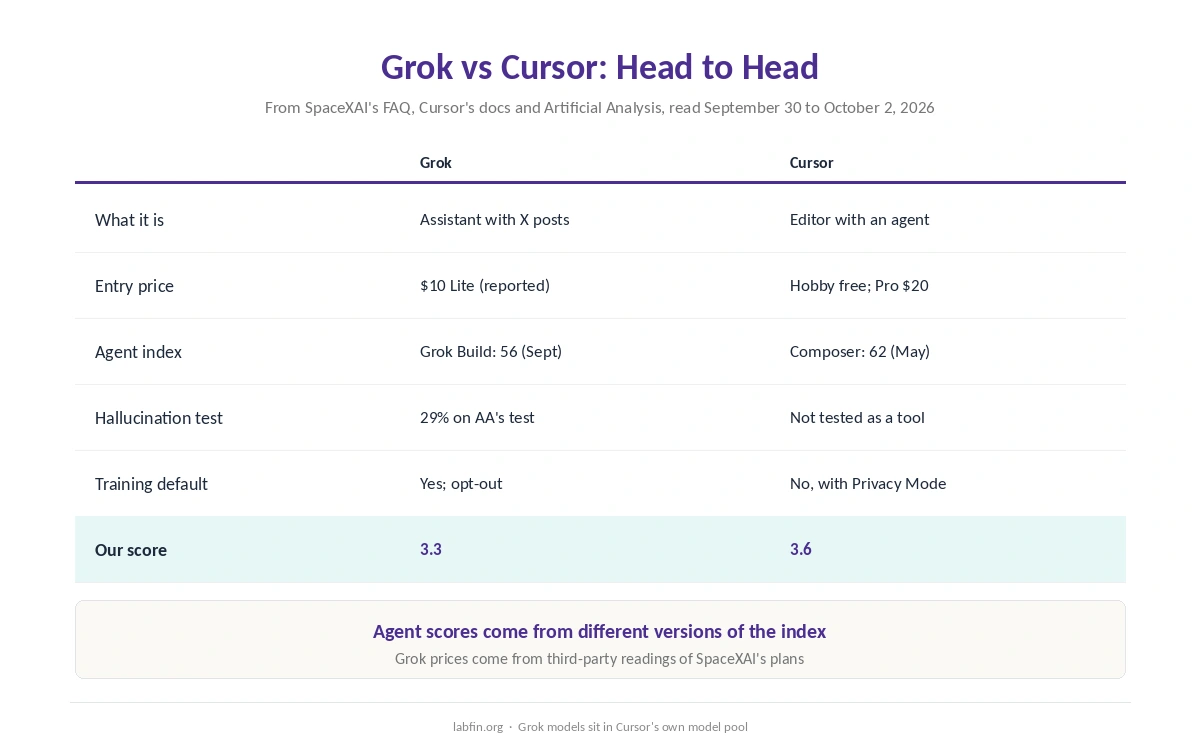
| Criterion | Grok | Cursor |
|---|---|---|
| What it is | General assistant with X posts | AI code editor with an agent |
| Entry price | SuperGrok Lite $10/mo (reported) | Hobby free; Pro $20/mo |
| Coding agent | Grok Build | Built in; Composer 2.5 |
| Agent index | Grok Build: 56 (September) | Composer 2.5: 62 (May) |
| Hallucination test | 29% on AA’s knowledge test | Not tested as a tool |
| Training by default | Yes; Improve the model off | No with Privacy Mode on |
| Our score | 3.3 | 3.6 |
One Owner, Two Products
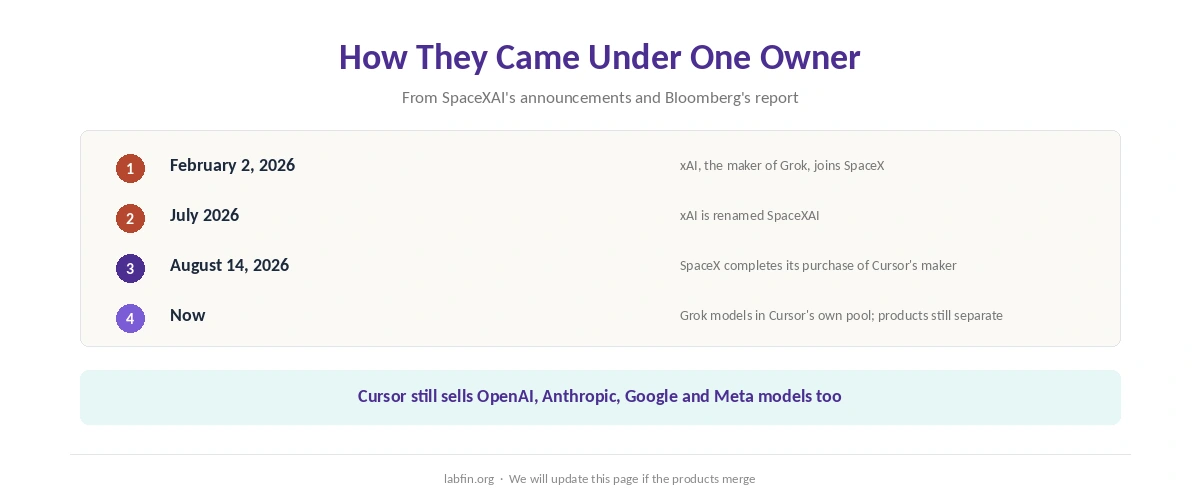
First, xAI joined SpaceX on February 2, 2026, and took the name SpaceXAI in July. Then, on August 14, SpaceX also completed its purchase of Anysphere, Cursor’s maker, Bloomberg reported.
As of October 2, however, the two products remain separate: Grok is still an assistant on grok.com and X, and Cursor still sells models from OpenAI, Anthropic, Google and Meta alongside Grok. Our guide to who owns which AI tool tracks the deal.
Coding
Cursor, first, focuses on coding: Tab completions, an agent, Cloud Agents and code review in one editor. Its Composer 2.5, for example, scored 62 on the May version of the agent index at $0.07 a task, as our Cursor pricing guide explains.
Grok, by contrast, offers Grok Build, which scored 56 with Grok 4.7 on the September version, according to an Artificial Analysis post. Since the two scores come from different versions, however, treat the gap as rough, as our guide to AI benchmarks explained notes.
Beyond Code
Grok’s strengths, however, lie outside the editor. For example, it draws on real-time X posts, and Artificial Analysis measured Grok 4.7 at a 29% hallucination rate on its knowledge test, one of the lower rates we have recorded.
Cursor, on the other hand, does nothing beyond code, though. Our list of ChatGPT alternatives covers Grok as a general assistant, and our Perplexity vs Grok comparison weighs its live answers.
Prices
Third-party readings of SpaceXAI’s plans put SuperGrok Lite at $10 a month and SuperGrok at $30. Cursor, meanwhile, has a free Hobby plan, Pro at $20, Pro Plus at $60 and Ultra at $200.
Inside Cursor, moreover, Grok models draw on the Cursor Models pool rather than the dollar pool for other labs. For Grok fans who mainly code, therefore, Cursor Pro may be the better buy.
Data and Safety
On data, Grok trains on your chats unless you turn off Improve the model, and xAI deletes its Private Chat within 30 days. Cursor, by contrast, does not train on your code with Privacy Mode on, which teams get by default.
Both, in addition, carry history. Grok’s January 2026 image scandal led to blocks in two countries, and Cursor fixed two flaws rated 9.8 in version 3.0. Our guide to which AI tools train on your data compares the defaults.
Winners by Category
In short, Cursor wins on coding workflow, agent evidence and data terms with Privacy Mode on. It also gives you Grok models inside the editor, too.
Grok, on the other hand, wins on general use, real-time X posts and its lower hallucination rate. Overall, in Grok vs Cursor our scores favor Cursor, 3.6 against 3.3.
Which One to Choose
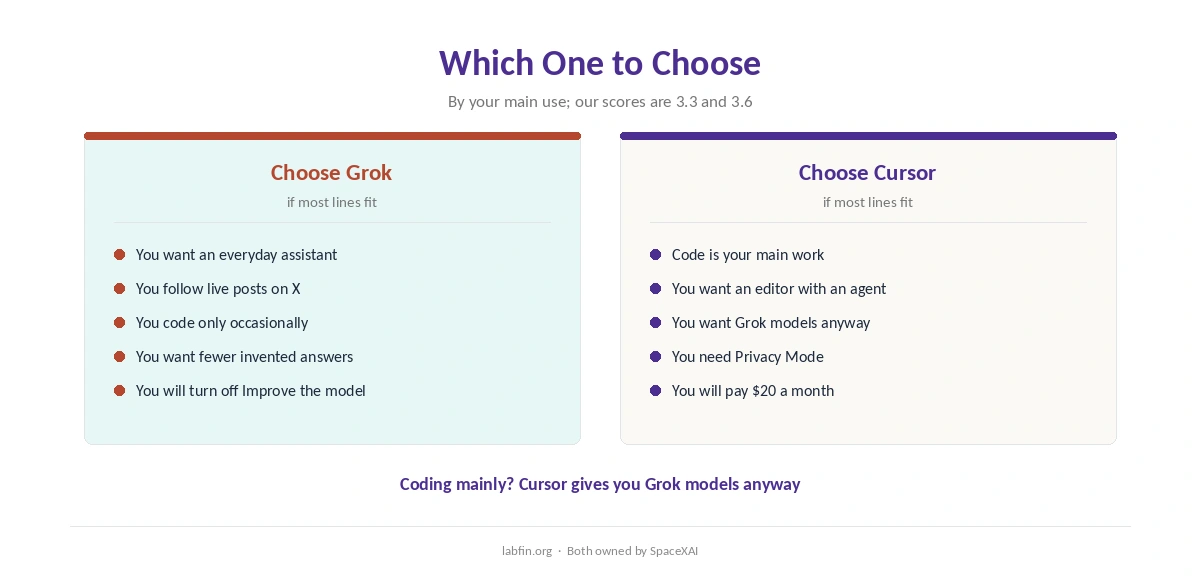
Overall, take Cursor if code is your main work; you can still pick Grok models inside it. By contrast, take Grok if you want an everyday assistant with live X posts and only occasional coding.
For other options, see our lists of Cursor alternatives and our Grok vs Microsoft Copilot comparison.
Our DeepSeek vs Cursor and Claude vs Cursor pages, in addition, set Cursor against other model makers. Each one, moreover, covers data rules.
How We Research
This Grok vs Cursor comparison reuses the sources behind our reviews of each tool, including Cursor’s models and pricing docs and SpaceXAI’s consumer FAQ, read between September 30 and October 2, 2026.
Agent scores come from Artificial Analysis. Our about page explains the criteria, and our list of the best AI tools for developers compares Grok’s API.
Grok vs Cursor FAQ
Cursor. It is a full AI editor, its Composer 2.5 scored 62 on the agent index in May, and you can use Grok models inside it. Grok Build scored 56.
Both belong to SpaceXAI, part of SpaceX. xAI joined SpaceX in February 2026, and the Cursor purchase closed on August 14, 2026.
Yes. Grok models sit in Cursor’s own model pool, alongside Composer 2.5.
SuperGrok Lite is reported at $10 a month. Cursor has a free Hobby plan, and Pro costs $20.
Grok does unless you turn off Improve the model. Cursor does not with Privacy Mode on.
The Verdict
Grok vs Cursor is less a rivalry than a division inside one company. Cursor is the coding tool, and it already includes Grok models.
Grok, meanwhile, is the everyday assistant, with live X posts and fewer invented answers. So pick by your main use, and turn off training in Grok or turn on Privacy Mode in Cursor.