
Disclosure: LabFin is reader-supported. If you sign up for a tool through links on this page, we may earn a commission at no extra cost to you. Commissions vary between providers and our ratings do not — here’s our full disclosure.
GitHub Copilot vs Windsurf is a choice between an AI assistant inside the editor you already use and an editor built around many agents. Copilot Pro costs $10 a month and works in VS Code, JetBrains IDEs, Visual Studio, Xcode and Eclipse.
Windsurf, by contrast, now ships as Devin Desktop, after Cognition renamed it in June 2026, and Pro costs $20 on daily and weekly quotas. Our reviews score GitHub Copilot 3.5 and Windsurf 3.1.
GitHub Copilot vs Windsurf: The Short Answer
Choose GitHub Copilot if you want to keep your editor, pay less, or work mostly inside GitHub issues and pull requests. It also costs half as much for individuals, and less than half for teams.
Choose Windsurf instead if you want one board for local, cloud and third-party agents, including Codex and Claude’s agent. Neither tool, however, has an entry on Artificial Analysis’s Coding Agent Index, so neither has a public agent score.
Head to Head
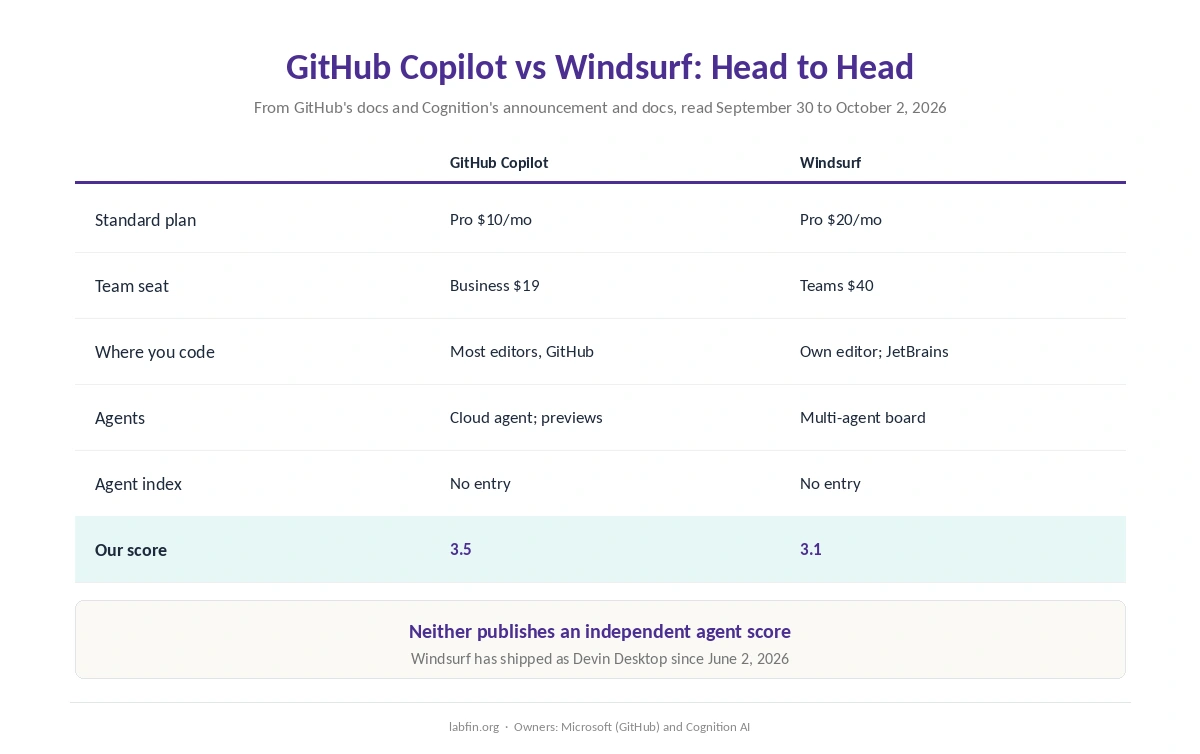
| Criterion | GitHub Copilot | Windsurf (Devin Desktop) |
|---|---|---|
| Free plan | 2,000 completions a month | A light quota |
| Standard plan | Pro $10/mo: 1,500 AI credits | Pro $20/mo: daily and weekly quotas |
| Team seat | Business $19 | Teams $40; $80/mo minimum |
| Where you code | Most editors, GitHub.com, CLI | Its own editor; JetBrains plugin |
| Agents | Cloud agent; Claude and Codex in preview | Agent board: local, cloud, Codex, Claude |
| Agent index | No entry | No entry |
| Training on personal plans | Yes since April 24; opt-out | Opt-out stops training |
| Our score | 3.5 | 3.1 |
Prices and Plans
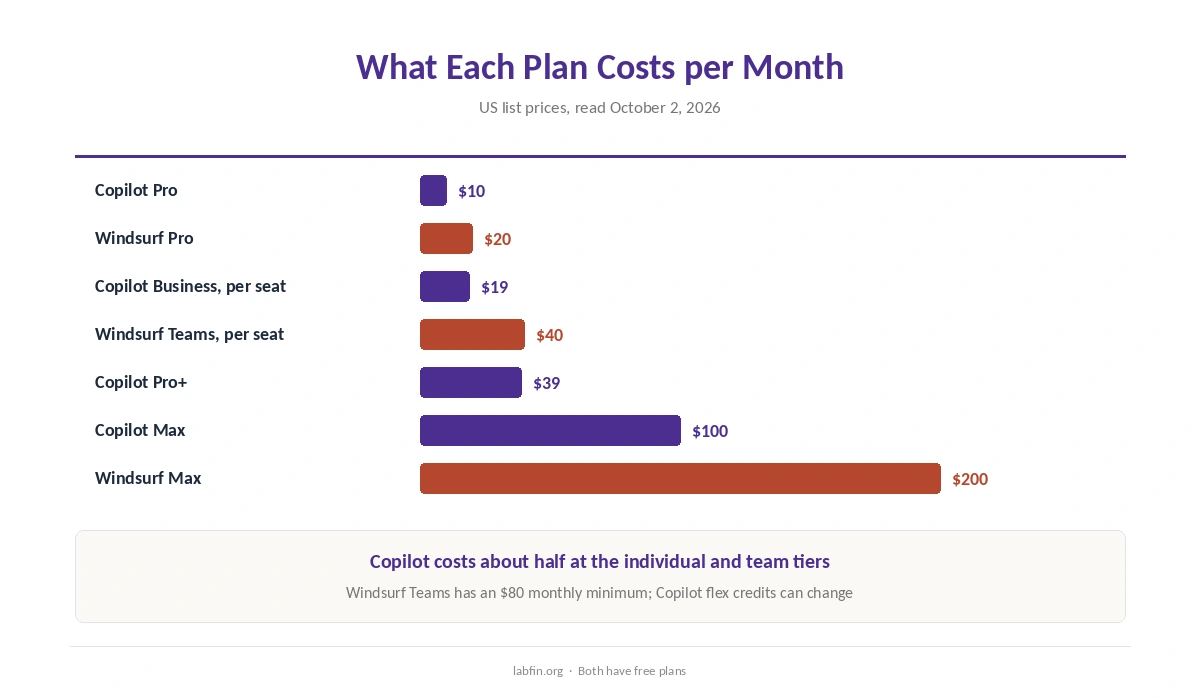
First, Copilot Free includes 2,000 completions a month, and Pro costs $10 with unlimited completions and 1,500 AI credits. Above that, Pro+ costs $39 and Max $100, as our GitHub Copilot pricing guide explains.
Windsurf, meanwhile, also has a free plan with a light quota, Pro at $20 and Max at $200. Teams seats cost $40, with an $80 monthly minimum, against $19 for Copilot Business. Flex credits on Copilot, though, can change, so budget around the base credits.
Where You Code
Copilot, for example, works inside Visual Studio Code, Visual Studio, JetBrains IDEs, Xcode and Eclipse, as well as on GitHub.com and in a CLI. Its cloud agent, moreover, takes an issue, works in GitHub Actions and opens a pull request.
Windsurf, on the other hand, is its own editor, compatible with VS Code extensions and settings. For JetBrains users, however, a Windsurf plugin keeps the old name. Our Cursor vs GitHub Copilot comparison covers the same editor trade-off with Cursor.
Agents and Models
Copilot’s paid plans also list models from six providers, including Claude and GPT models. GitHub also lists Anthropic’s Claude and OpenAI’s Codex as third-party agents inside Copilot, in public preview.
Windsurf’s distinct strength, however, is orchestration. Its Agent Command Center shows local and cloud sessions on one board, and its Devin Local agent replaced Cascade in July. Through an open protocol, moreover, it runs Codex and Claude’s agent alongside it.
Evidence and Security
On evidence, neither tool has an entry on Artificial Analysis’s Coding Agent Index, and GitHub publishes no SWE-bench score for Copilot’s own agent. By contrast, Claude Code and Codex both have scores, as our list of the best AI for coding shows.
Both, in addition, have security histories. Copilot faced RoguePilot, patched editor flaws and an April prompt-injection attack through pull requests. Windsurf’s 2025 flaws, meanwhile, included hidden-instruction leaks and a path-traversal bug rated 9.8.
Data and Training
On data, GitHub has trained on Copilot Free, Pro and Pro+ interaction data since April 24, 2026, unless you opt out under Privacy. Business and Enterprise, however, are excluded.
Windsurf, now Devin Desktop, similarly stops training once you opt out, Cognition’s documentation says, and Enterprise data is never used. On both, therefore, personal accounts need a setting changed, as our guide to which AI tools train on your data shows.
Who Owns Each
GitHub, for its part, has belonged to Microsoft since 2018. Windsurf, by contrast, belongs to Cognition AI, the maker of Devin, which bought it in July 2025. Our guide to who owns which AI tool maps both.
Winners by Category
Overall, GitHub Copilot wins on price, editor choice, GitHub integration and stability. It also costs less than half as much per team seat.
Windsurf, on the other hand, wins on multi-agent orchestration. Evidence and training defaults, however, are a tie. Overall, in GitHub Copilot vs Windsurf our scores favor Copilot, 3.5 against 3.1. Our list of Windsurf alternatives also covers the trade-offs.
Which One to Choose
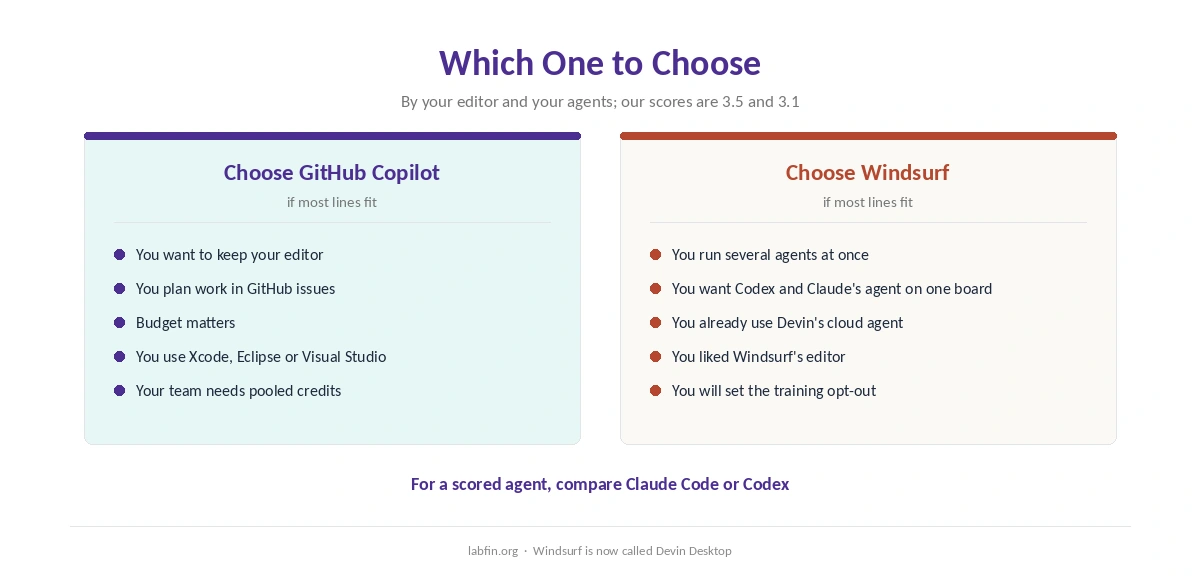
Take GitHub Copilot if you want to stay in VS Code, JetBrains or Xcode, keep costs low, or plan work in GitHub issues. By contrast, take Windsurf if you already run several agents and want them on one board.
For other options, see our lists of GitHub Copilot alternatives and Claude Code alternatives. Our Cursor review also covers the other AI editor. Each list, moreover, names its ranking rule.
How We Research
This GitHub Copilot vs Windsurf comparison reuses the sources behind our reviews of each tool, including Cognition’s Devin Desktop announcement and GitHub’s Copilot documentation, read between September 30 and October 2, 2026.
Our about page explains the criteria, and our guide to using AI for coding projects covers safe agent settings. Our Cursor pricing guide, in addition, covers a third $20 option. We run no tests of our own.
GitHub Copilot vs Windsurf FAQ
Our reviews score GitHub Copilot 3.5 and Windsurf 3.1. Copilot costs less and works in more editors; Windsurf manages several agents on one board.
GitHub Copilot: Pro costs $10 a month against $20 for Windsurf Pro, and team seats cost $19 against $40.
Yes, as Devin Desktop. Cognition renamed it on June 2, 2026, and existing plans and settings carried over.
We cannot say from independent evidence: neither has an entry on Artificial Analysis’s Coding Agent Index.
On personal plans, both need an opt-out. Copilot Business and Enterprise and Devin Enterprise are excluded.
The Verdict
GitHub Copilot vs Windsurf comes down to your editor and your agents. For most developers, Copilot does more for less, inside the tools they already use.
Windsurf still earns its place if you run many agents and want one board for them. Either way, change the training setting before you open private code.