
Disclosure: LabFin is reader-supported. If you sign up for a tool through links on this page, we may earn a commission at no extra cost to you. Commissions vary between providers and our ratings do not — here’s our full disclosure.
Claude usage limits run on two clocks: a session limit that resets every five hours, and, on paid plans, a weekly limit on top. Anthropic publishes no fixed message counts. Instead, each plan gets a multiple of another plan’s usage.
This guide explains how those limits work, what uses them up, and how to make them last longer. It draws on Anthropic’s help center, read on October 2, 2026. Our Claude pricing guide covers what each plan costs.
Claude Usage Limits: The Short Answer
Every plan has a five-hour session limit, and Pro, Max and Team add weekly limits. Long chats, big attachments, Research, web search and heavier models use the most. Your usage in Claude’s apps, Claude Code and the desktop app also counts toward the same limit.
To check where you stand, open Settings, then Usage. When you hit a limit, you can wait for the reset, turn on usage credits on a paid plan, or upgrade.
The Two Clocks: Sessions and Weeks
The session limit is a rolling five-hour window. Once you use it up, you wait until it resets, and the exact time appears in your usage settings.
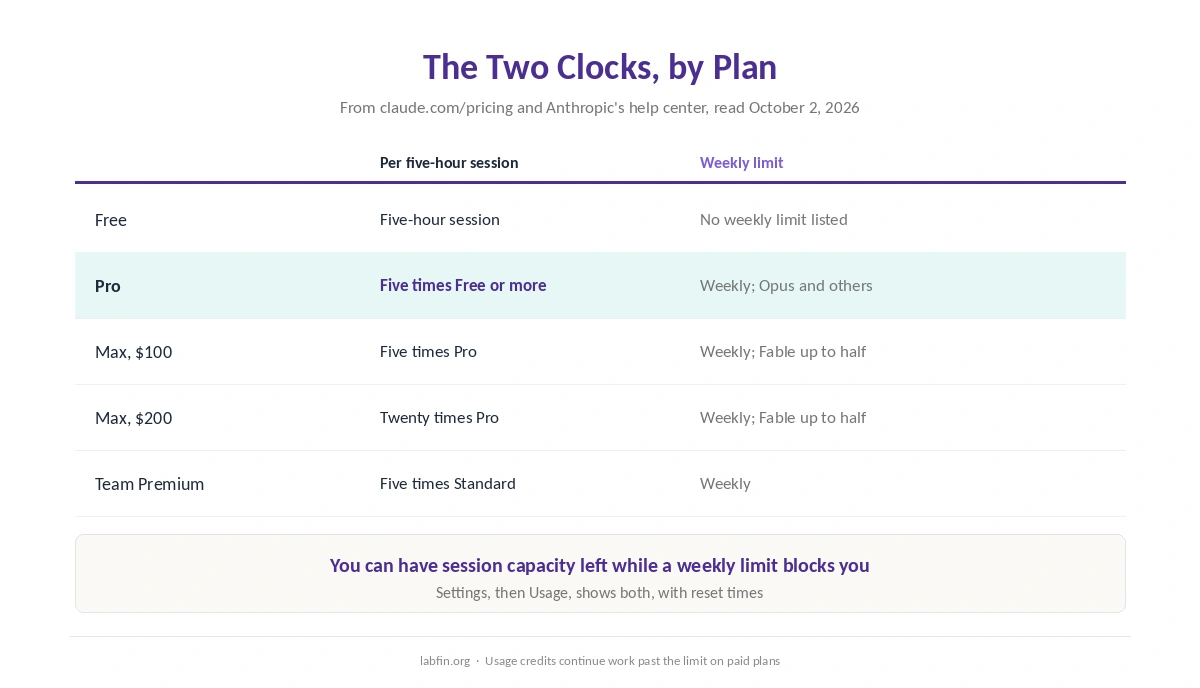
Paid plans add weekly limits, which reset on their own schedule. Anthropic’s help center lists separate weekly limits for Opus models and for all other models. So you can still have session capacity left while a weekly limit blocks you.
How Much Each Plan Gets
Anthropic describes limits as multiples rather than numbers. Pro gives at least five times Free’s usage per session, while the two Max tiers give five and twenty times Pro’s.
On Team, Premium seats get five times the usage of Standard seats. Anthropic’s Fable models, meanwhile, run only on usage credits on Pro, and on Max they can use up to half of the weekly limit, as our Claude review notes.
What Uses Up Your Limit
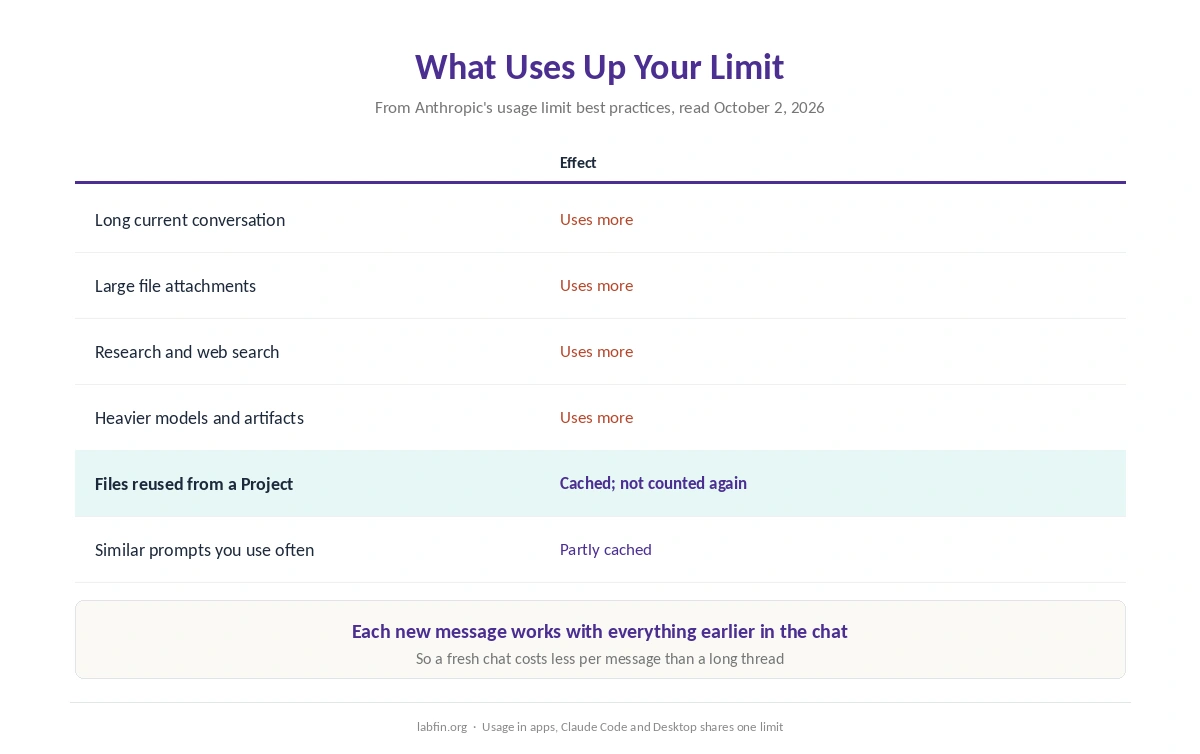
Anthropic’s help center names the main factors: message length, file attachment size, the length of the current conversation, tools such as Research and web search, the model you choose, and creating artifacts.
Conversation length matters most in practice, because each new message works with everything earlier in the chat. A long thread, therefore, costs more per message than a fresh one.
What Does Not Count Again
Anthropic also caches some content. Files in Projects are cached and do not count against your limits when you reuse them, and similar prompts you use often are partly cached. Our guide to AI tools not working also covers outages, limits, browsers and long chats.
So putting reference material in a Project, rather than pasting it into each chat, saves usage. Our guide to building a personal AI workflow covers how to set Projects up.
One Pool for Chat, Code and Desktop
Your usage across Claude’s web and mobile apps, Claude Code and Claude Desktop counts toward the same limit, Anthropic says. A long Claude Code session in the morning, for example, leaves less for chat in the afternoon.
The Agent SDK and scripted claude -p runs are the exception. Since June 15, 2026, they draw on a separate monthly credit: $20 on Pro and $100 or $200 on Max. Our Claude Code review covers what that means for coding.
How to Check Your Usage
On the web, open Settings, then Usage. The Plan usage limits section shows your progress toward the session limit and the weekly limits, along with when each resets.
On Pro, Max, Team and seat-based Enterprise plans, the same page also shows usage credits. In Claude Code, meanwhile, the /usage command shows the same picture without leaving the terminal.
When You Hit the Limit
You have three options. First, wait for the five-hour or weekly reset. Second, on a paid plan, turn on usage credits so work continues past the plan limit at extra cost.
Third, upgrade: Max at $100 or $200 a month raises the multiple. Free users, by contrast, can only wait, as our comparison of free and paid AI tools notes. However, if you hit the weekly limit only occasionally, usage credits may cost less than a higher plan.
Usage Limits vs Length Limits
Anthropic separates two kinds of limits. Usage limits cap how much you can use Claude over time, while length limits cap how much one conversation can hold, measured in tokens.
Hitting a length limit, therefore, calls for a new chat or less pasted material, not a wait. A summary of the old chat, moreover, carries the key points into the new one, a habit our guide to Claude for writing recommends for long drafts.
How to Stretch Your Limits
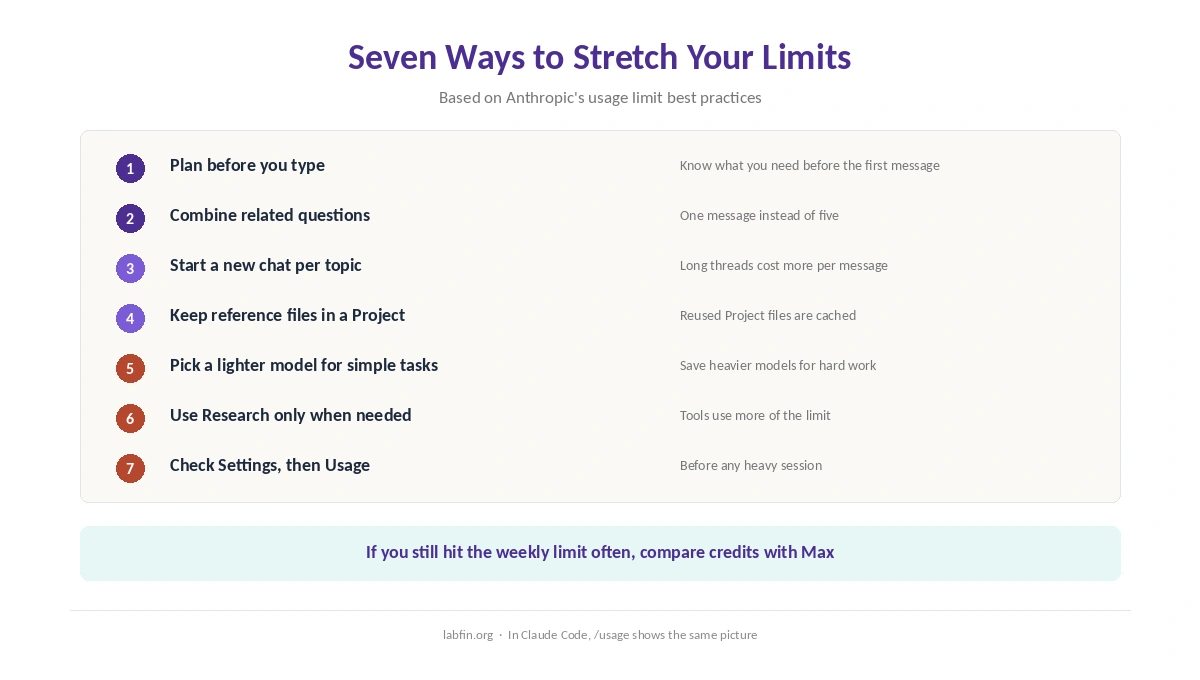
Plan before you type, and combine related questions into one message, as Anthropic’s own best-practices article suggests. Start a new chat for each new topic, and keep reference files in a Project.
Also choose a lighter model for simple tasks, and save Research and web search for questions that need them, as our guide to Claude for research suggests. Our guide to writing better prompts helps you get more from each message.
Claude Limits vs ChatGPT and Gemini
ChatGPT also publishes few fixed counts, with deep research and Codex shown as ranges, as our ChatGPT pricing guide covers. Gemini, likewise, now uses five-hour windows with a weekly cap, as our Gemini pricing guide explains.
So Claude is not unusual in hiding exact numbers. For heavy coding, though, our list of Claude Code alternatives compares the cost per task, and our list of Claude alternatives covers chat.
How We Research
This guide to Claude usage limits draws on Anthropic’s usage limit best practices and its article on usage and length limits, read on October 2, 2026. Plan multiples come from claude.com/pricing and the Pro and Max help articles.
We run no tests of our own. Our about page explains how we work, and our guide to Claude for coding covers Claude Code’s effort settings.
Claude Usage Limits FAQ
Every plan has a session limit that resets every five hours, and paid plans add weekly limits. Anthropic publishes multiples, not fixed message counts.
The session limit resets on a rolling five-hour window, and weekly limits on their own schedule. Settings, then Usage, shows the exact reset times.
Yes. Usage in Claude’s apps, Claude Code and Claude Desktop counts toward the same limit. The Agent SDK has a separate monthly credit since June 15, 2026.
Anthropic gives no fixed number. Pro offers at least five times Free’s usage per session, and the count depends on message length, attachments, tools and model.
Wait for the reset, turn on usage credits on a paid plan, or upgrade to Max. Shorter chats and Projects also make limits last longer.
The Verdict
Claude usage limits feel opaque because Anthropic gives multiples instead of counts. Once you know the two clocks and what costs most, though, they become easier to manage.
So check Settings, then Usage, before heavy work, keep reference files in Projects, and start fresh chats often. If you still hit the weekly limit every week, compare usage credits with Max.