
Disclosure: LabFin is reader-supported. If you sign up for a tool through links on this page, we may earn a commission at no extra cost to you. Commissions vary between providers and our ratings do not — here’s our full disclosure.
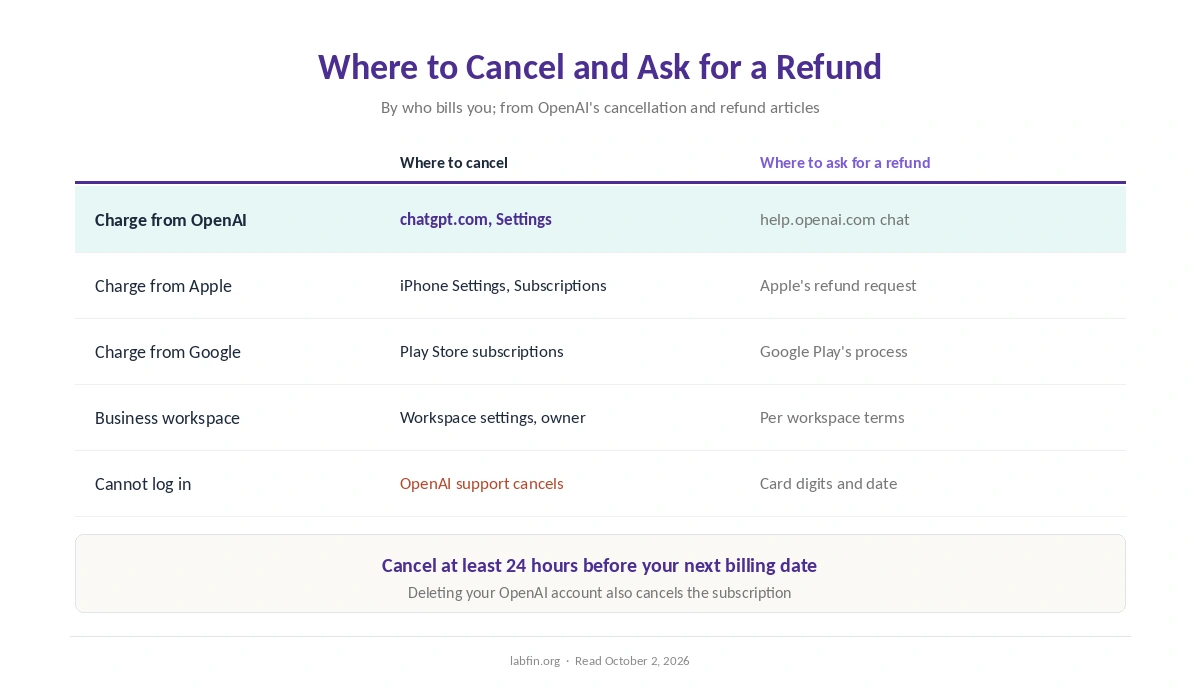
To cancel ChatGPT Plus, you cancel where you subscribed: on chatgpt.com, in Apple’s settings or in Google Play. Cancel at least 24 hours before your next billing date, OpenAI says, or OpenAI may bill you for another month.
Refunds are a separate step, and OpenAI calls subscription fees non-refundable in general. Still, some users can get money back, depending on timing and region. This guide covers both, based on OpenAI’s help articles read on October 2, 2026.
How to Cancel ChatGPT Plus: The Short Answer
If you subscribed on the website, log in to chatgpt.com, open Settings and, under Cancel plan, select Cancel. If you subscribed in the iPhone or Android app, however, cancel through Apple or Google Play instead.
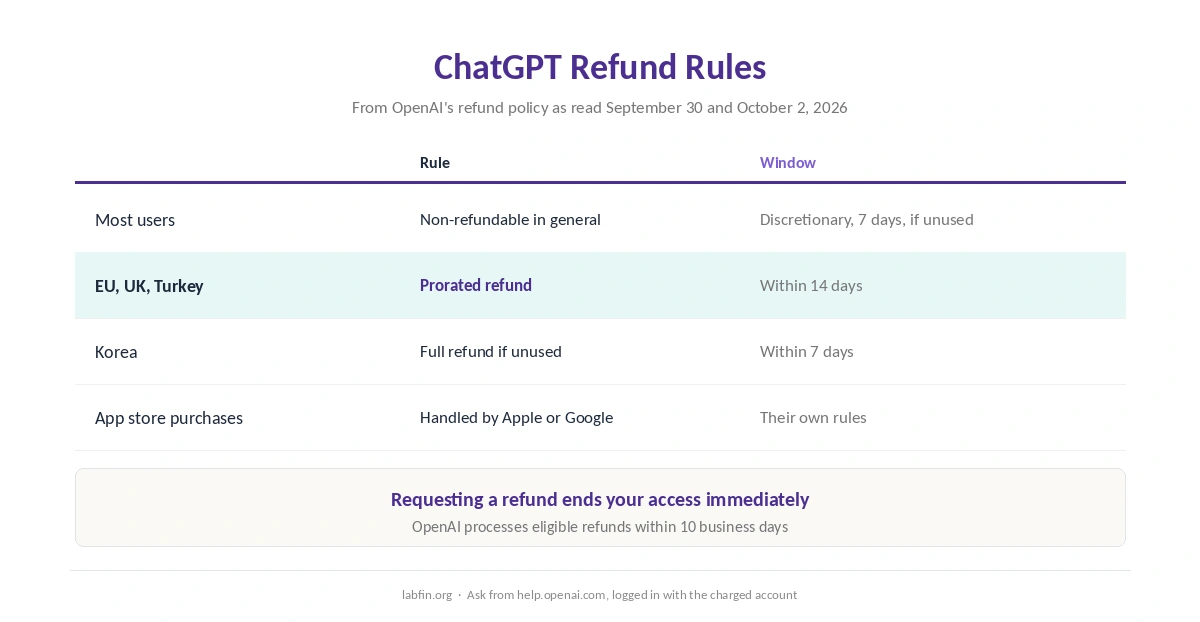
To ask for a refund, log in to help.openai.com with the same account and request it in the support chat. Once you request a refund, though, your access ends immediately.
Step 1: Find Where You Subscribed
To cancel ChatGPT Plus correctly, first check who bills you. A charge from OpenAI means you subscribed on the web, while a charge from Apple or Google means you subscribed in the app.
This matters because the web button cannot cancel an app-store subscription, and an app store cannot cancel a web one. So check the receipt or your card statement first.
Step 2: Cancel on chatgpt.com
To cancel ChatGPT Plus on the web, log in to ChatGPT, open Settings and find your plan. Then, under Cancel plan, select Cancel, as OpenAI’s help article describes.
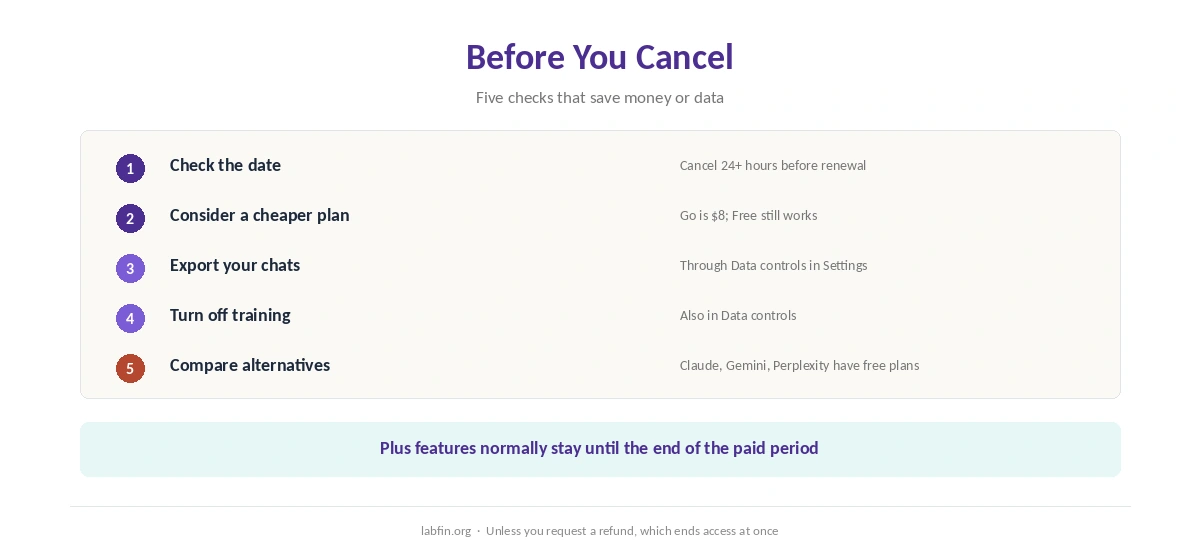
Your Plus features normally stay until the end of the period you paid for. Afterwards, the account falls back to the free plan, as our comparison of free and paid AI tools explains.
Step 3: Cancel in the iPhone or Android App
If Apple bills you, open the Settings app on your iPhone, tap your name, then Subscriptions, choose ChatGPT and tap Cancel Subscription. If Google Play bills you, open the Play Store, go to Payments and subscriptions, choose ChatGPT and cancel there.
In both cases, the app store, not OpenAI, handles the subscription. OpenAI’s help article therefore sends app users to Apple or Google for both cancellation and refunds.
Step 4: Request a Refund, If You Qualify
OpenAI says subscription fees are non-refundable in general. However, its refund rules allow exceptions: a discretionary refund within 7 days for an unused individual subscription, and prorated refunds within 14 days in the EU, UK and Turkey. In Korea, unused subscriptions can get a full refund within 7 days.
To ask, log in to help.openai.com with the account that was charged and request a refund in the chat. OpenAI says it processes eligible refunds within 10 business days, and the subscription ends at once.
If You Cannot Log In
OpenAI can cancel the subscription for you. Its help article asks for the last four digits of the card and the date of your most recent payment, so it can find the account.
Deleting your OpenAI account also cancels any active subscription automatically, OpenAI says. However, deletion removes your chats too, so export them first.
Business Plans
For ChatGPT Business, the workspace’s owner cancels from the workspace settings in ChatGPT. Enterprise and Edu plans, by contrast, follow their contracts rather than these self-service steps.
Before You Cancel
First, consider a cheaper plan. ChatGPT Go costs $8 a month in the US, though it may show ads, and Free still offers unlimited everyday chats with lighter models. Our ChatGPT pricing guide compares every plan, and our list of the cheapest useful AI tools covers rivals.
Next, export anything you want to keep through Data controls in Settings. Finally, if you are leaving for good, turn off model training for your remaining chats in the same menu. Our ChatGPT review explains that setting. If you hit limits rather than value problems, our guide to using ChatGPT effectively may help first.
Where to Go Instead
Claude Pro costs $20 a month or $200 a year and shows no ads, as our Claude pricing guide covers. Google AI Plus, by contrast, costs $4.99, as our Gemini pricing guide explains.
For a wider view, see our list of ChatGPT alternatives and our ChatGPT vs Claude vs Gemini comparison. Our ChatGPT vs Claude page goes deeper on the closest rival. Each one also has a free plan to test first.
How We Research
The cancellation and refund steps come from OpenAI’s cancellation article and refund article, read on October 2, 2026. The regional refund rules come from OpenAI’s refund policy as read on September 30.
App-store steps follow Apple’s and Google’s standard subscription menus. Our about page explains how we work, and our breakdown of AI tool costs covers yearly totals. US students, meanwhile, can check our guide to ChatGPT for students before canceling.
Cancel ChatGPT Plus: FAQ
If you subscribed on the web, log in to chatgpt.com, open Settings and, under Cancel plan, select Cancel. If you subscribed in the app, cancel through Apple or Google Play.
Sometimes. Fees are non-refundable in general, but OpenAI may refund an unused subscription within 7 days, and EU, UK and Turkey users get prorated refunds within 14 days.
At least 24 hours before your next billing date, OpenAI says.
Yes. OpenAI says deleting your account cancels any active subscription automatically. Export your chats first, because deletion removes them.
Normally until the end of the paid period. If you request a refund, however, access ends immediately.
The Verdict
To cancel ChatGPT Plus, start by finding who bills you, then cancel there at least a day before renewal. Ask for a refund only if you qualify, since doing so ends access at once.
And before you go, check whether Go or Free covers what you need. Otherwise, export your chats and compare the alternatives first.