
Disclosure: LabFin is reader-supported. If you sign up for a tool through links on this page, we may earn a commission at no extra cost to you. Commissions vary between providers and our ratings do not — here’s our full disclosure.
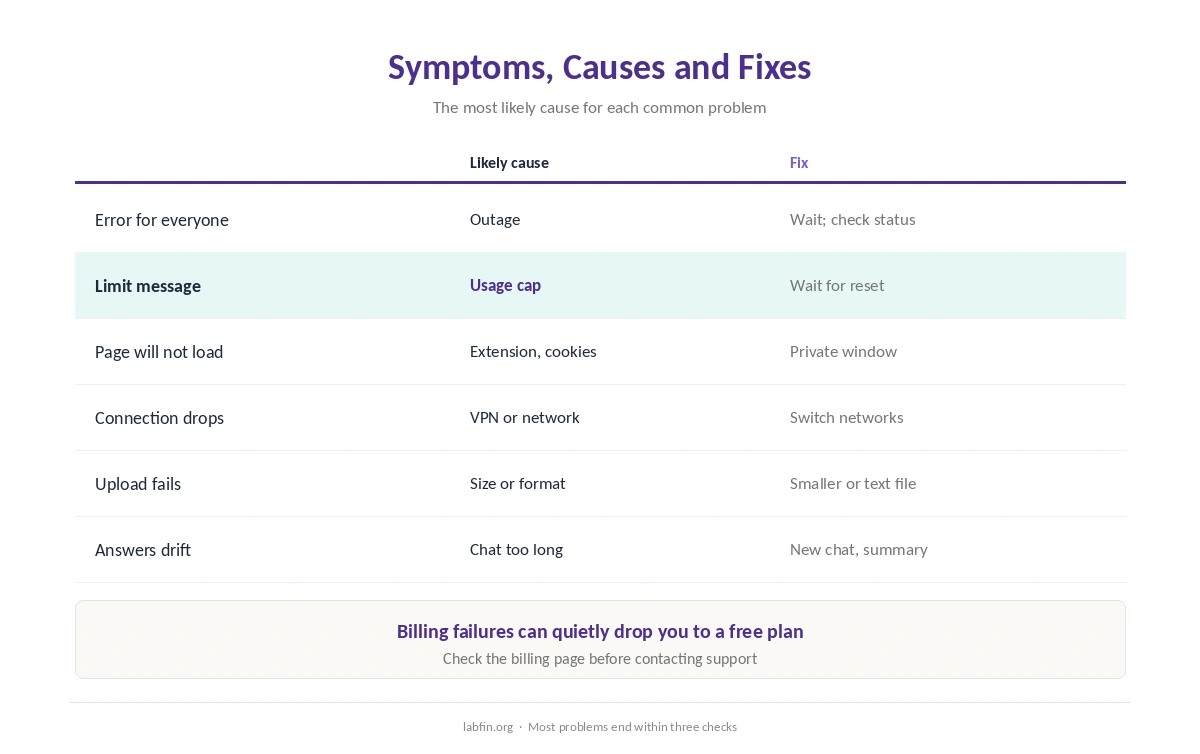
When AI tools are not working, the cause is most often one of six things: an outage, a usage limit, the browser, the network, a file the tool cannot read, or a chat that has grown too long. Most take a minute to check.
This guide, moreover, walks through each in order, from the quickest check to the slowest. It applies to ChatGPT, Claude, Gemini, Copilot, Perplexity and most other assistants, and our Gemini pricing guide covers Google’s limits.
AI Tools Not Working: The Short Answer
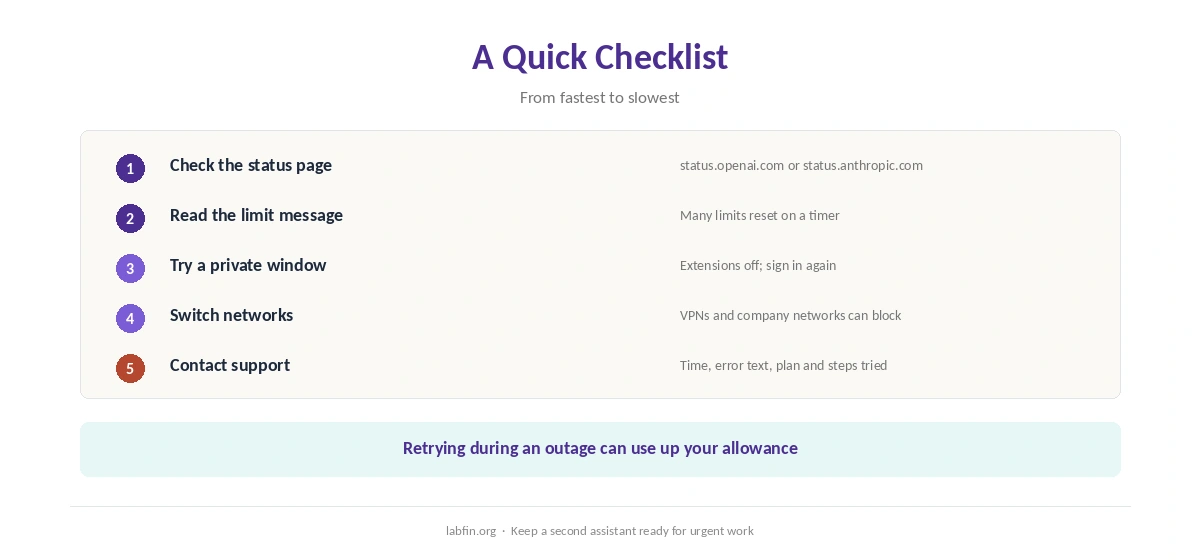
First, check the service’s status page for an outage. Then look for a usage-limit message, try a private browser window with extensions off, and switch networks.
If the problem is one chat, however, start a new chat and paste in a short summary. If nothing works, contact support with the time, the exact error and what you tried.
1. Check for an Outage
Big AI services have outages, and an error that appears for everyone is rarely your fault. OpenAI and Anthropic, for example, publish live status pages at status.openai.com and status.anthropic.com.
If a status page shows an incident, wait and retry later. Repeated retries during an outage, moreover, can use up your allowance once the service returns.
2. You Hit a Usage Limit
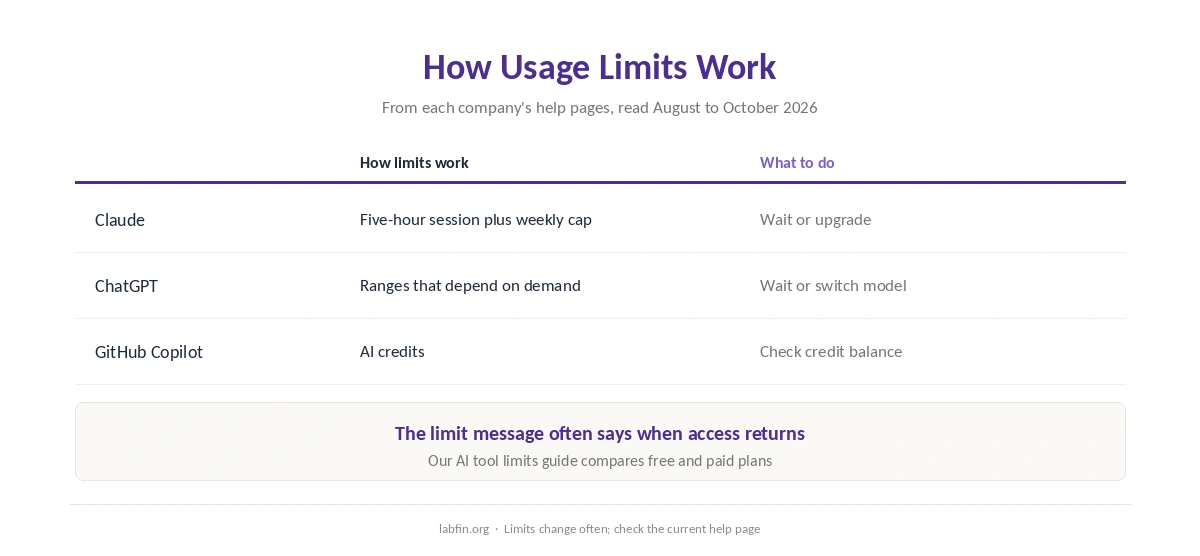
Every plan has limits, and many reset on a timer rather than monthly. Claude, for example, combines a five-hour session limit with a weekly cap, as our guide to Claude usage limits explains.
ChatGPT, by contrast, describes many limits as ranges that depend on demand, and GitHub Copilot counts AI credits, as our GitHub Copilot pricing guide explains. So read the message carefully: it often says when access returns. Our guide to AI tool limits compares the plans.
3. The Browser Is the Problem
If AI tools are not working only in your browser, extensions are a common cause: ad blockers and privacy tools can break chat pages or uploads. Open a private window with extensions off, and if that works, turn extensions back on one at a time.
Clearing the site’s cookies and signing in again also fixes many stuck sessions. On mobile, update the app or reinstall it.
4. The Network or Region
Company networks, VPNs and some public Wi-Fi block AI services or break their connections. Try another network, such as your phone’s data, to rule this out.
Some features, moreover, are limited by region or plan, and access can change quickly. In June 2026, for example, Anthropic suspended access to two of its newest models to comply with U.S. export controls, then restored it on July 1.
5. Files and Uploads Fail
Uploads fail when a file is too large, password-protected, scanned without text, or in an unsupported format. Try a smaller file, export a PDF as text, or split a long document.
If the tool reads the file but answers poorly, however, ask it to quote the passage it used. Our guide to fact-checking AI output explains why that matters.
6. The Chat Got Too Long
Very long conversations slow down, forget earlier details, or hit length limits. Start a new chat with a short summary of what matters, or keep reference files in a project.
Our guide to writing better prompts covers how to restate context clearly, and our guide to reducing AI hallucinations helps when answers drift.
Billing and Account Problems
A failed payment, an expired card or a plan change can quietly drop you to a free tier. Check the billing page first, then sign out and back in.
Some plans also bill only monthly, such as ChatGPT Plus. Our guides to ChatGPT pricing and Claude pricing list what each plan includes.
When to Contact Support
Contact support if the status page is clear, a private window and another network fail, and the problem persists for several hours. Include the time, the exact error text, your plan and the steps you tried.
Meanwhile, a second assistant can keep you working. Our list of the best AI tools covers alternatives, and our guide to free and paid AI tools explains the trade-offs.
To pick a backup, also see our lists of ChatGPT alternatives and Claude alternatives. Each one names its ranking rule.
How We Research
This guide on AI tools not working draws on the status pages and help centers of major AI companies and on our own reviews of their plans, read between August and October 2, 2026. We do not run our own uptime tests.
Our about page explains how we research.
AI Tools Not Working FAQ
Most often an outage, a usage limit, a browser extension, a blocked network, an unreadable file or a chat that grew too long.
Check status.openai.com or status.anthropic.com for live incidents.
You reached your plan’s allowance. Many limits reset on a timer, such as Claude’s five-hour session limit.
Files may be too large, password-protected, scanned without text, or in an unsupported format.
Very long conversations can lose earlier details or hit length limits. Start a new chat with a short summary.
The Verdict
When AI tools are not working, check in order: status page, limits, browser, network, files and chat length. Most problems end within the first three checks.
If they do not, contact support with clear details, and keep a second assistant ready for urgent work.