
Disclosure: LabFin is reader-supported. If you sign up for a tool through links on this page, we may earn a commission at no extra cost to you. Commissions vary between providers and our ratings do not — here’s our full disclosure.
How to build a personal AI workflow starts with a feature that is easy to skip: a place where the assistant keeps your instructions and files. ChatGPT and Claude call it a project, while Gemini calls it a Gem. All three offer one on their free plans. For more, our page on combining AI tools covers when a second assistant earns its cost.
The other pieces decide how much repeat work the assistant takes over. For example, memory sets what it carries between chats. Connected apps set what it can read, and scheduled tasks set what it does without being asked. Each one also changes how much of your data the assistant keeps. So the settings matter as much as the prompts.
How to Build a Personal AI Workflow: The Short Answer
First, pick three tasks you repeat every week. Then give each one a project with standing instructions and the files it needs. Next, decide what the assistant may remember, and connect only the apps those tasks touch. After that, schedule what recurs and check each output before it leaves your desk.
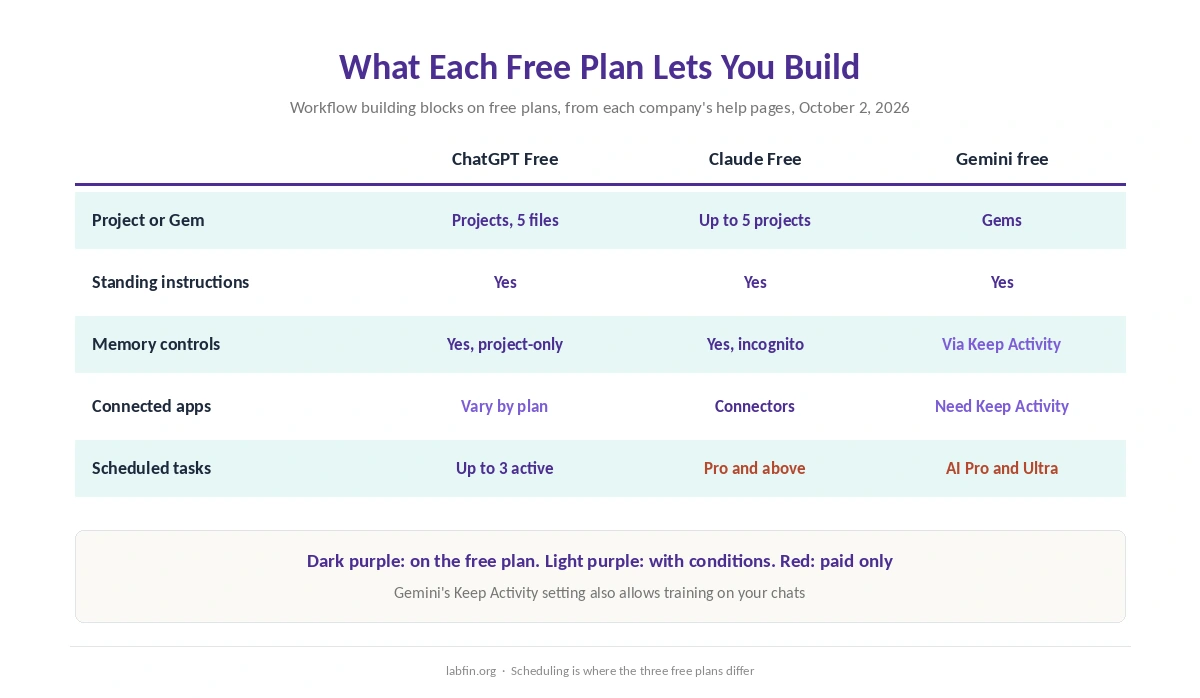
Of ChatGPT, Claude and Gemini, only ChatGPT schedules tasks on a free plan, up to three at a time. Gemini’s scheduled actions need Google AI Pro, Ultra or a qualifying Workspace plan, and Claude schedules tasks on Pro and above. Otherwise, everything in this guide works without paying. Our guide on how to build AI automations without code sets out the steps.
How to Build a Personal AI Workflow, Step by Step
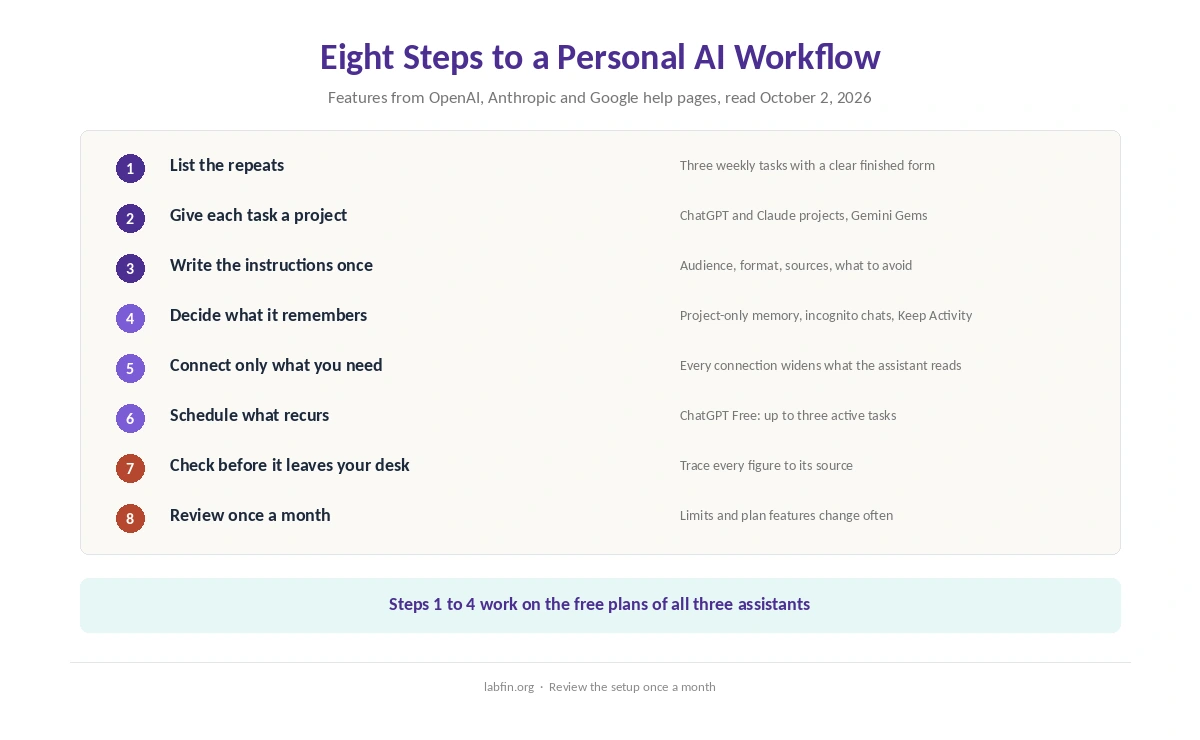
Here is how to build a personal AI workflow in eight steps. Each step names the feature to use in ChatGPT, Claude and Gemini, with the plan it needs, from each company’s help pages read on October 2, 2026.
1. List the repeats. Write down what you ask an AI for every week, such as a meeting summary, a status update or a first draft from your notes. Start with three tasks, because each one needs its own setup. Also, pick tasks with a clear finished form. Our guide to writing better prompts covers how to turn a vague request into a brief you can reuse.
2. Give each task a project. ChatGPT offers Projects on every plan, with up to 5 files per project on Free and 25 on Go and Plus, according to OpenAI’s help center. Similarly, Claude Free allows up to five projects, and paid plans lift that cap. Google, meanwhile, opened Gems to free users in March 2025, though you create them on the web.
3. Write the standing instructions once. Put the audience, the format, the sources to use and what to avoid into the project’s instructions. As a result, you stop retyping context, and every chat in the project starts from the same brief. However, keep personal preferences, such as tone or units, in the account-wide settings instead.
4. Decide what the assistant remembers. ChatGPT lets you view and delete saved memories, and a project can use project-only memory. Shared projects switch to it automatically, according to OpenAI’s August 14, 2026 release notes. Claude includes memory on every plan, and its incognito chats stay out of training even when the training setting is on.
⚠️ Gemini ties chat history and connected apps to Keep Activity. With it on, Google may use your chats for training and human review, according to its privacy hub. With it off, chats are kept for 72 hours and not used for training, but connected apps such as Gmail stop working. That trade-off shapes everything else in a Gemini workflow.
5. Connect only what the tasks need. Claude includes connectors on every plan, and Gemini links to Gmail, Calendar and Drive when Keep Activity is on. ChatGPT’s apps vary by plan and region. But each connection widens what the assistant reads. In fact, researchers showed in April 2026 that hidden instructions in text an agent reads can steer it.
6. Schedule what recurs. ChatGPT Free allows up to three active scheduled tasks, according to OpenAI’s release notes of August 25, 2026, though webhook-triggered tasks need a paid plan above Go. Gemini runs up to 10 active scheduled actions on Google AI Pro and Ultra. Claude also lists task scheduling among the features of Pro.
7. Check before it leaves your desk. A schedule makes errors repeat on time, too. Therefore, read each output before you send it, and trace every figure to its source. Our guide to fact-checking AI output sets out the checks, and our page on reducing AI hallucinations covers how to get fewer errors.
8. Review the setup once a month. Limits, models and plan features change often, so drop tasks you no longer use and check that each project still fits. In addition, our comparison of AI tool limits shows what each plan publishes, which is rarely a hard number.
| Building block | On free plans | What paying adds |
|---|---|---|
| Projects or Gems | ChatGPT Projects, 5 files each; Claude, up to 5 projects; Gemini Gems | More files and projects |
| Standing instructions | All three | No change |
| Memory controls | All three; Gemini history depends on Keep Activity | No change |
| Connected apps | Claude connectors; Gemini with Keep Activity on; ChatGPT apps vary | Research across connected sources |
| Scheduled tasks | ChatGPT only, up to three | Gemini up to 10 on AI Pro; Claude on Pro |
Where Each Assistant Fits
Gemini fits people whose mail, calendar and files already sit in Google, because it reads them directly. The catch is the Keep Activity trade-off above, and our Gemini review weighs it. ChatGPT, by contrast, gives the most to a free workflow, since it schedules tasks without a subscription.
Claude suits workflows built on long documents and projects, and its connectors work on the free plan. However, Claude Free has no Research and no scheduling, as our Claude review notes. For a fuller picture of ChatGPT’s agent features, our guide to ChatGPT for productivity covers them.
Finally, if your work lives in Word, Excel and Outlook, start with our guide to Microsoft Copilot for productivity instead. Copilot works inside those files, which can matter more than any project feature.
What to Keep Out of the Workflow
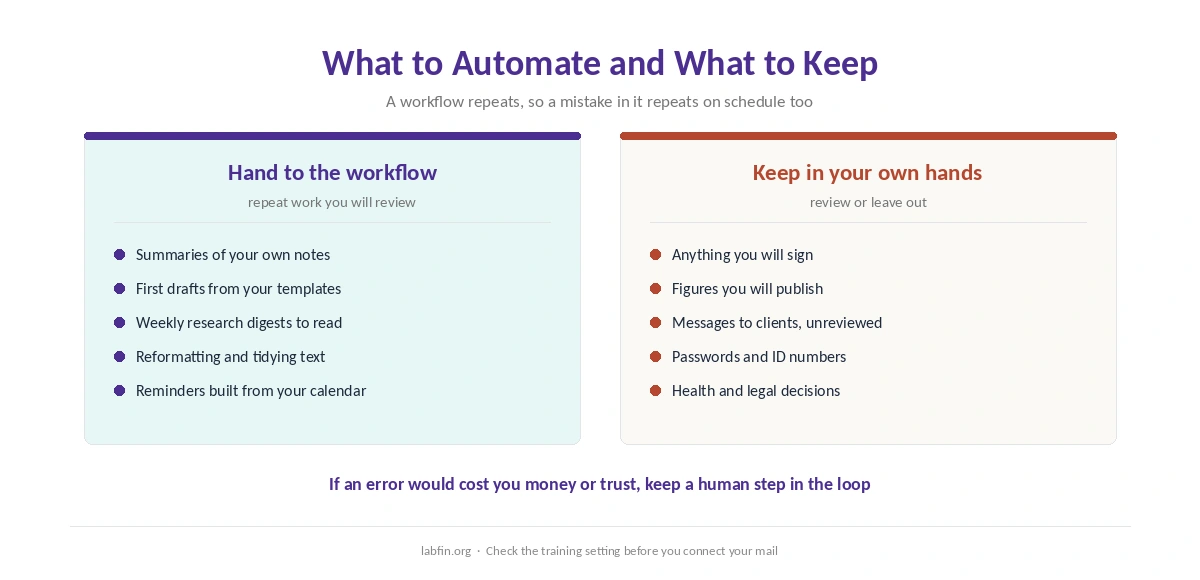
A workflow repeats, so a mistake in it repeats as well. Keep anything you will sign, publish or send to a client under your own review. Also keep passwords, ID numbers and health or legal details out of consumer chats. For instance, a scheduled summary of your inbox can copy them into a chat log.
Paying does not switch off training by itself. On consumer plans, ChatGPT and Claude train on chats by default unless you opt out, while Gemini trains with Keep Activity on. Our comparison of free and paid AI tools explains what each plan changes, and our ChatGPT review covers OpenAI’s data controls.
How We Research
This guide on how to build a personal AI workflow takes features and plan limits from each company’s own pages, read on October 2, 2026. These include OpenAI’s help article on Projects and its release notes, Anthropic’s pricing page and privacy center, and Google’s Gemini help and privacy hub.
Gemini’s scheduled actions come from Google’s announcement of June 6, 2025 and its current limits page, and the free Gems change from Tom’s Guide’s report of March 2025. The April 2026 finding on hidden instructions comes from a Cloud Security Alliance research note. We run no tests of our own, and our about page explains how we source.
Personal AI Workflow FAQ
Mostly, yes. ChatGPT, Claude and Gemini all offer projects or Gems, standing instructions and memory controls for free. Scheduled tasks are the exception: only ChatGPT Free includes them, up to three at a time.
A project holds instructions and files for one task. Memory carries facts about you across chats. ChatGPT can limit a project to project-only memory, so one task does not leak into another.
ChatGPT on every plan, with up to three active tasks on Free. Gemini runs up to 10 scheduled actions on Google AI Pro and Ultra, and Claude schedules tasks on Pro and above.
It widens what the assistant reads, including text written by strangers. Connect only what a task needs, and check the training setting first: Gemini’s Gmail access requires Keep Activity, which allows training.
Monthly is a sensible rhythm, because limits and plan features change often. Remove tasks you no longer use and recheck each project’s instructions and files.
The Verdict
Knowing how to build a personal AI workflow is mostly about setup, done once. Give each repeat task a project, write its instructions, decide what the assistant remembers and connect only what it needs. Then schedule the routine and review the results.
On a free plan, ChatGPT goes furthest because it schedules tasks. Claude and Gemini, on the other hand, cover everything else at no cost. Whichever you pick, set the memory and training controls before you connect your mail.