
Disclosure: LabFin is reader-supported. If you sign up for a tool through links on this page, we may earn a commission at no extra cost to you. Commissions vary between providers and our ratings do not — here’s our full disclosure.
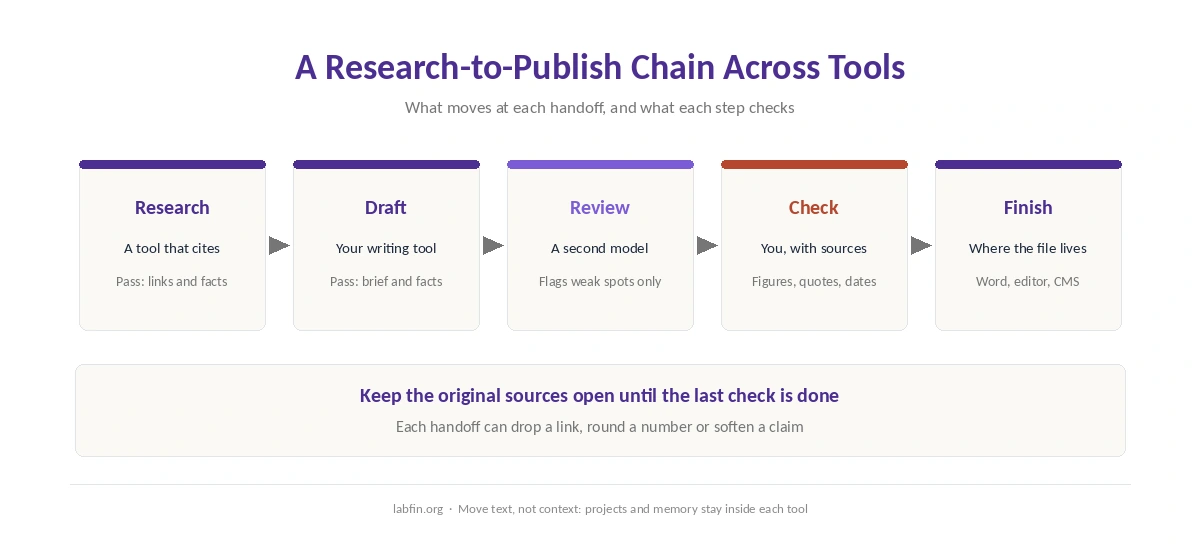
How to combine multiple AI tools comes down to handoffs: what moves from one tool to the next, and what each step checks. For example, you might research in a tool that cites its sources, draft in another, and then check the draft against those sources yourself. For more, our page on building a personal AI workflow covers projects, memory, connected apps and scheduled tasks.
Each extra tool, however, adds a subscription, another privacy policy and another place your data lives. So the first question is whether you need a second tool at all. This guide covers how to split the work, how to pass it along and how to keep the cost and the checks under control.
How to Combine Multiple AI Tools: The Short Answer
Give each tool one job, and pass work along as plain text with the sources attached. Then check the final output against those original sources, not against another AI.
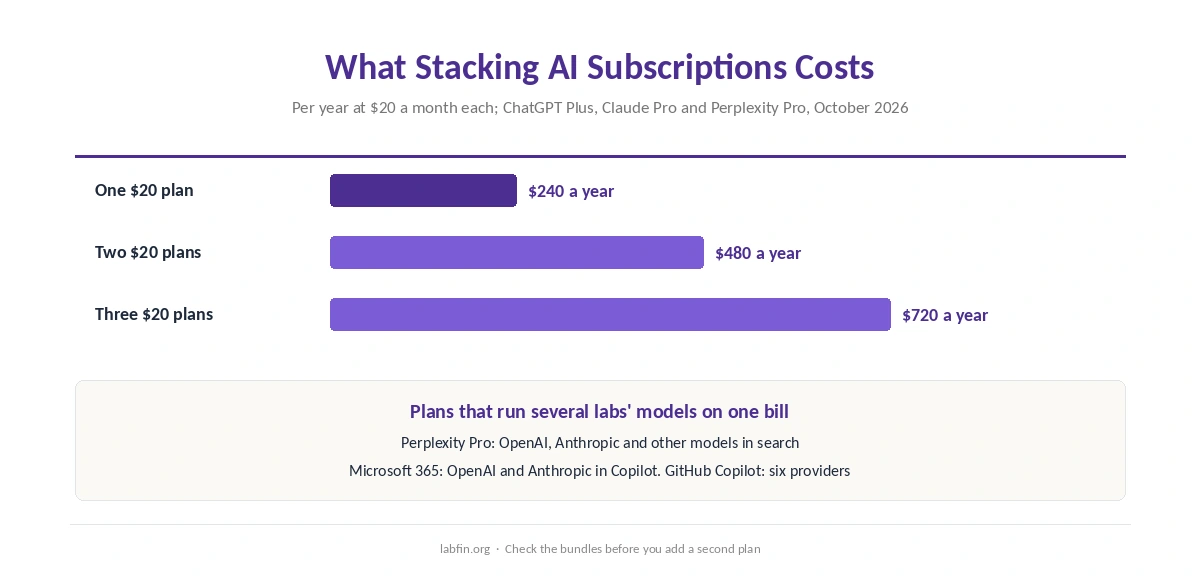
Before you add a second $20 subscription, check whether one plan already covers several labs’ models. Perplexity Pro runs models from OpenAI and Anthropic in its search, and Microsoft 365 runs both inside Copilot. For code, GitHub Copilot offers models from six providers.
How to Combine Multiple AI Tools, Step by Step
Here is how to combine multiple AI tools in seven steps. The features named below come from each company’s own pages, read between September 30 and October 2, 2026.
1. Give each tool one job. Pick tools by a documented strength rather than by habit. For instance, Perplexity cites sources in every answer, Microsoft Copilot works inside Word and Excel, and GitHub Copilot works inside your code editor. Our list of the best AI for research compares the research side.
2. Move text, not context. Projects, memory and chat history stay inside each assistant. Therefore, pass a short brief, the facts and the draft as plain text, and start each tool fresh. Claude’s import page offers one exception: a prompt that writes out what another assistant knows about you, which you paste into Claude’s memory. Even so, your projects and files still move by hand.
3. Keep sources attached to every claim. Carry the links from your research tool into the drafting tool, and ask it to keep each link next to its claim. As a result, any claim that loses its link during drafting stands out for a check.
4. Use a second model as a reviewer, not as proof. Models differ in how often they guess. On Artificial Analysis’s knowledge test, GPT-6 Astra at high effort scored 44 on the AA-Omniscience index, while DeepSeek V4.1 Flash scored minus 5.3. A second model can flag weak spots, but two models agreeing does not make a claim true.
Instead, trace every figure, quote and date to its source, as our guide to fact-checking AI output sets out.
5. Let one tool call another where it is built in. Some tools connect directly, which removes a manual handoff. Semrush launched an official app in ChatGPT in December 2025 and a connector for Claude in August 2026, so keyword data arrives inside the drafting chat. Our list of the best AI for blogging covers that setup.
6. Count the subscriptions. ChatGPT Plus, Claude Pro and Perplexity Pro each cost $20 a month, and Google AI Pro costs $19.99. Two $20 plans therefore come to $480 a year. Our breakdown of what AI tools cost per year lists every plan.
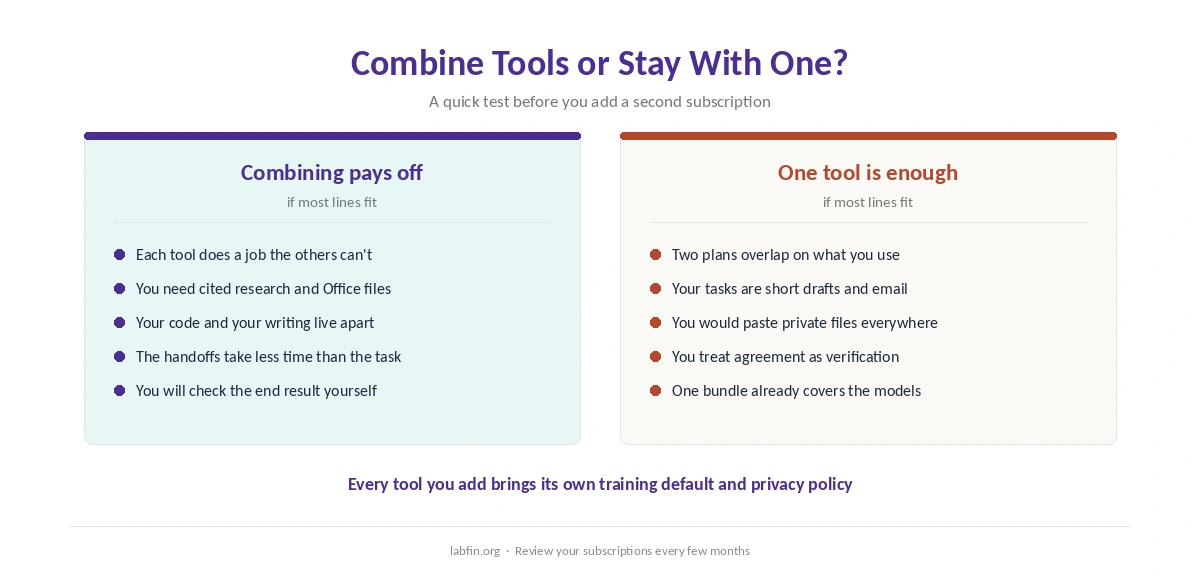
7. Count where your data goes. Every tool you add brings its own training default. On consumer plans, ChatGPT and Claude train on chats unless you opt out, Gemini trains while Keep Activity is on, and DeepSeek stores data in China. So a client document pasted into three tools sits under three policies.
Five Combinations and What to Check
| Combination | Tools for each step | What to check |
|---|---|---|
| Research, then draft | Perplexity for cited research; Claude or ChatGPT to draft | Every claim keeps its link |
| Draft, then finish in Office | Any assistant to draft; Copilot in Word | Facts survive the edit |
| Draft with SEO data | ChatGPT or Claude with the Semrush app | The data’s date and region |
| Write code, then review it | GitHub Copilot to write; a second model to review | Tests pass, not just the review |
| One plan, several models | Perplexity Pro, Microsoft 365 or GitHub Copilot | Which model ran each answer |
The last row often replaces the others. Perplexity Pro’s search runs GPT-5.6 Terra, Claude Sonnet 5 and Kimi K3, among others, according to its help center, though GPT-5.6 Sol and Claude Opus 5 need Max. Similarly, Microsoft announced Claude Opus 5.5 and GPT-6 Sol for its Office apps in September, WindowsForum reported.
For research in particular, our Perplexity review covers what its Pro plan includes. If your drafts end in Word, our guide to Microsoft Copilot for productivity covers the Office side.
When One Tool Is Enough
Combining tools pays off when each one does a job the others cannot. It costs more than it saves when two subscriptions overlap, or when the handoffs take longer than the task itself. Our list of the best AI for productivity shows what a single assistant covers.
For short drafts, everyday questions and email, start with one tool and add a second only when you hit a gap. In that case, compare a single plan’s features in our page on free and paid AI tools, and write a reusable brief with our guide to writing better prompts. For code, our list of the best AI for coding shows which single agent scores highest.
Common Mistakes When Combining Tools
One mistake is chaining tools without a check at the end. Each handoff can drop a source, round a number or soften a claim, and the final tool cannot see what changed. So keep the original sources open until the last check is done.
Another mistake is pasting private material into every tool in the chain. Also, avoid treating agreement between two assistants as verification, since both may draw on the same wrong page. Finally, review your subscriptions every few months, because plans change and one may come to cover what two did.
How We Research
This guide on how to combine multiple AI tools takes features and prices from each company’s own pages, read between September 30 and October 2, 2026. These include GitHub’s supported-models page, Perplexity’s help center and Microsoft’s plan pages.
Accuracy figures come from Artificial Analysis, and the Semrush integrations from Semrush’s own announcements. Claude’s memory import comes from Anthropic’s import page, read on October 2, 2026. We run no tests of our own, and our about page explains how we source.
Combining AI Tools FAQ
Only when each tool does a job the others cannot, such as cited research, work inside Office or code in your editor. For short drafts and everyday questions, start with one and add a second only for a clear gap.
A common pairing is Perplexity for cited research and Claude or ChatGPT for drafting. Microsoft Copilot suits finishing in Word, and GitHub Copilot suits code.
Yes. Perplexity Pro runs models from OpenAI, Anthropic and others in search, and Microsoft 365 runs OpenAI and Anthropic models in Copilot. GitHub Copilot offers models from six providers for code.
It can flag weak spots, but two models agreeing does not prove a claim. Trace figures, quotes and dates to their original sources.
Most standard plans cost about $20 a month, so two come to $480 a year. Check whether one plan already covers what you need before adding a second.
The Verdict
Knowing how to combine multiple AI tools is mostly about handoffs. Combining works when each tool has one clear job and the work moves between them as text with its sources attached. The final check belongs to you, against the original sources.
Before paying for a second plan, check the bundles: Perplexity Pro, Microsoft 365 and GitHub Copilot each run several labs’ models. Then count where your data goes, because every tool you add brings its own policy.