
Disclosure: LabFin is reader-supported. If you sign up for a tool through links on this page, we may earn a commission at no extra cost to you. Commissions vary between providers and our ratings do not — here’s our full disclosure.
GitHub Copilot for teams comes in two plans: Business at $19 a seat and Enterprise at $39, according to GitHub’s docs. Both, for example, pool AI credits across the organization and keep your code out of model training.
Team plans also add the controls that personal plans lack: audit logs, file exclusion, policies and legal indemnification. This guide covers what each plan includes, how credits work, and how to roll Copilot out.
GitHub Copilot for Teams: The Short Answer
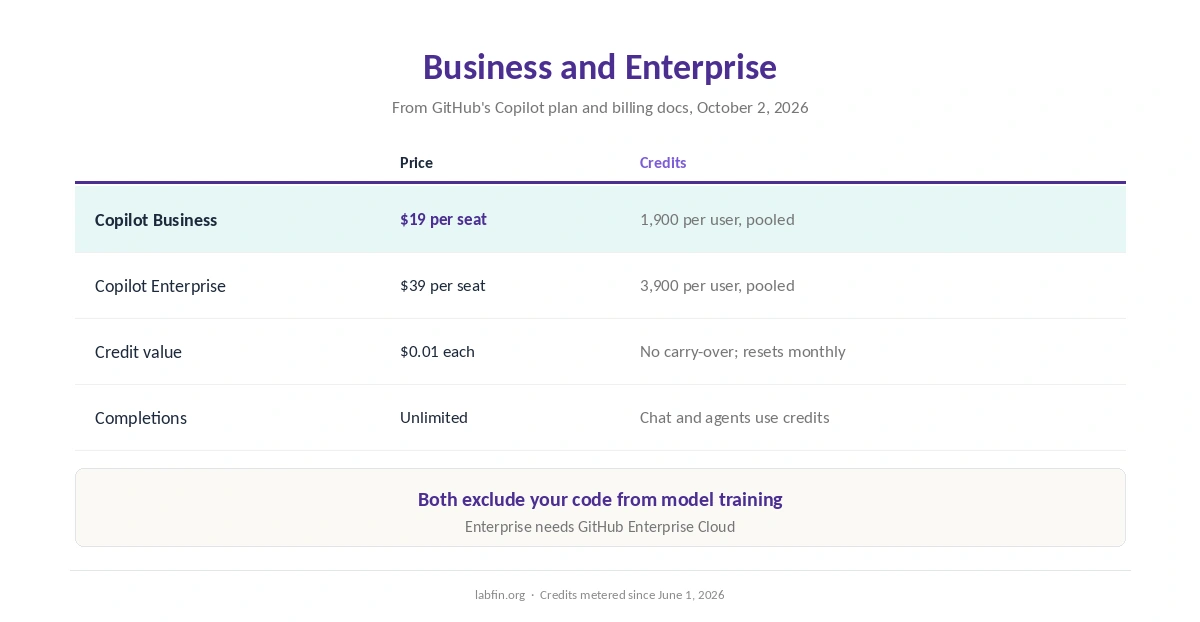
When you set up GitHub Copilot for teams on GitHub.com, Business is the place to start: $19 a seat with 1,900 AI credits per user, pooled. Enterprise, at $39 with 3,900 credits per user, needs GitHub Enterprise Cloud.
Neither plan runs on GitHub Enterprise Server. Our GitHub Copilot review scores the product 3.5 and covers personal plans.
Business and Enterprise Compared
| Plan | Price | Credits and requirements |
|---|---|---|
| Copilot Business | $19 per seat/mo | 1,900 per user, pooled; GitHub.com |
| Copilot Enterprise | $39 per seat/mo | 3,900 per user, pooled; needs Enterprise Cloud |
Both plans also include the Copilot CLI and app. Since June 1, 2026, moreover, chat, agents and the CLI draw down credits priced by tokens, while code completions stay unlimited.
Admin Controls
Business and Enterprise let admins exclude files and folders from Copilot, set policies, and review activity in audit logs. They also include indemnification coverage, which the Free plan lacks, GitHub’s docs say.
In addition, admins can set budgets for credit use, so heavy agent sessions do not surprise finance. Our comparison of AI plans and prices covers other team plans.
Data and Training
Copilot Business and Enterprise are excluded from training, and so are enterprise-owned repositories. Personal plans, by contrast, train on interaction data by default since April 24, 2026, unless users opt out.
Therefore, developers using personal Copilot accounts on company code are a real risk. Our guide to which AI tools train on your data compares other tools.
Models
Paid plans, for example, list models from OpenAI, Anthropic, Google, xAI, Moonshot AI and Microsoft. However, GitHub notes that Anthropic retains prompts for Claude Fable models by default, and enterprises can request zero retention through 2026.
A Rollout Plan
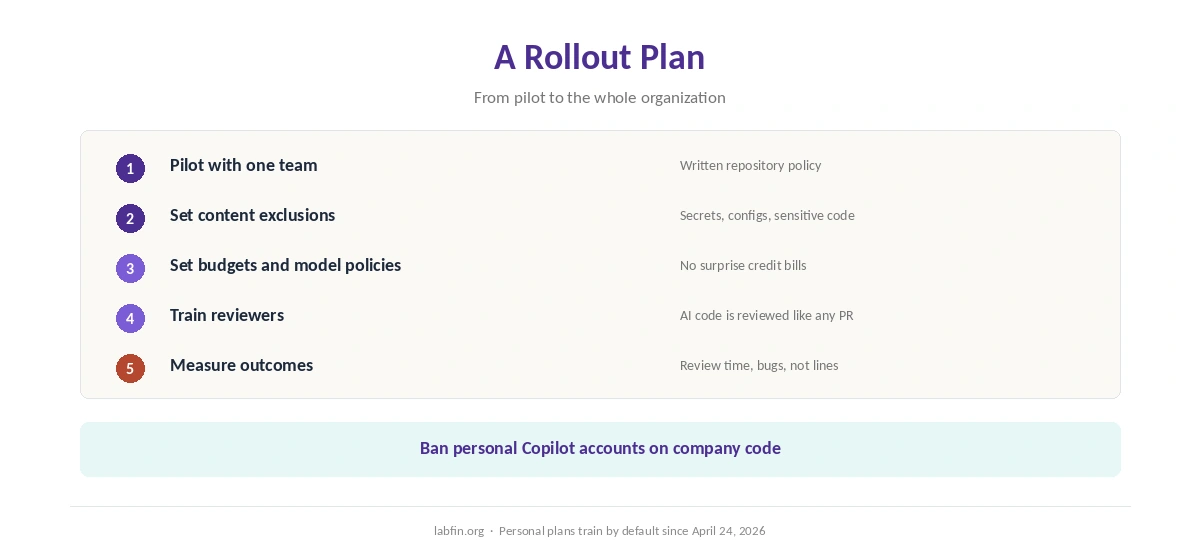
First, start with a pilot team and a written policy on which repositories Copilot may read. Then set content exclusions, credit budgets and model policies before wider rollout.
Next, train developers to review AI code, using our guide to reviewing AI-generated code. Finally, measure results such as review time and bug rates rather than lines written. Our guide to using AI for unit testing also helps teams keep quality up.
Security
In February 2026, Orca Security disclosed RoguePilot, where hidden instructions in a GitHub issue could steer Copilot in Codespaces. Agents that read issue text, therefore, need least-privilege tokens and review.
Our guide to using AI for coding projects covers safe agent settings.
Team Alternatives
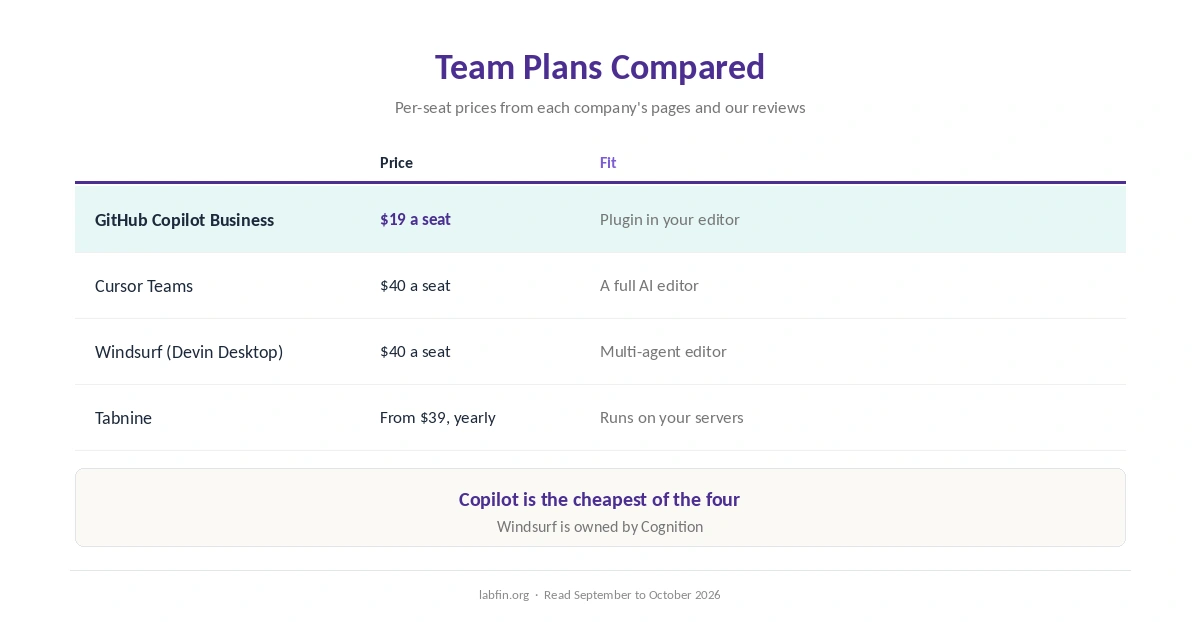
Cursor’s team seats cost $40, as our Cursor vs GitHub Copilot comparison covers. Windsurf, now Cognition’s Devin Desktop, also charges $40 for team seats, as our Windsurf review covers.
Tabnine, meanwhile, starts at $39 a user on yearly contracts and can run on your own servers, as our GitHub Copilot vs Tabnine comparison explains.
Our list of GitHub Copilot alternatives ranks more options, and our list of the best AI for coding ranks agents.
How We Research
This guide to GitHub Copilot for teams draws on GitHub’s Copilot plans documentation and billing docs, read October 2, 2026, and on our reviews.
We run no team trials of our own. Our about page explains how we research, and our list of the best AI for business covers general assistants for teams.
GitHub Copilot for Teams FAQ
Business costs $19 a seat and Enterprise $39 a seat a month, according to GitHub’s docs.
Enterprise doubles the pooled credits per user, at 3,900, and needs GitHub Enterprise Cloud.
No. Business and Enterprise are excluded from training, as are enterprise-owned repositories.
No. GitHub’s docs say Copilot plans are not available on Enterprise Server.
They do not carry over; the allowance resets at midnight UTC on the first of each month.
The Verdict
GitHub Copilot for teams is the cheapest of the four coding team plans compared here, at $19 a seat, with training excluded and real admin controls. Credits, however, now meter chat and agents, so set budgets.
So pilot on Business, set exclusions and policies, and train reviewers before a wide rollout.