
Disclosure: LabFin is reader-supported. If you sign up for a tool through links on this page, we may earn a commission at no extra cost to you. Commissions vary between providers and our ratings do not — here’s our full disclosure.
To use AI for social media content well, start from your own material and voice, then let AI plan, adapt and draft. Asked for posts from nothing, by contrast, AI produces the same upbeat filler as everyone else.
This guide, moreover, covers a six-step workflow, which tools fit which task, and the checks to run before you post. It works with Claude, ChatGPT or Gemini, plus a few marketing specialists.
How to Use AI for Social Media Content: The Short Answer
First, give the AI your content pillars, audience and a few of your best past posts. Then ask it to turn one long piece, such as a blog post or webinar, into several platform-specific posts. Our guide to using AI for email sequences covers the checks before sending.
Next, however, edit every draft for voice and facts, and check each platform’s rules on labeling AI-made images. Our list of the best AI for social media ranks the main assistants.
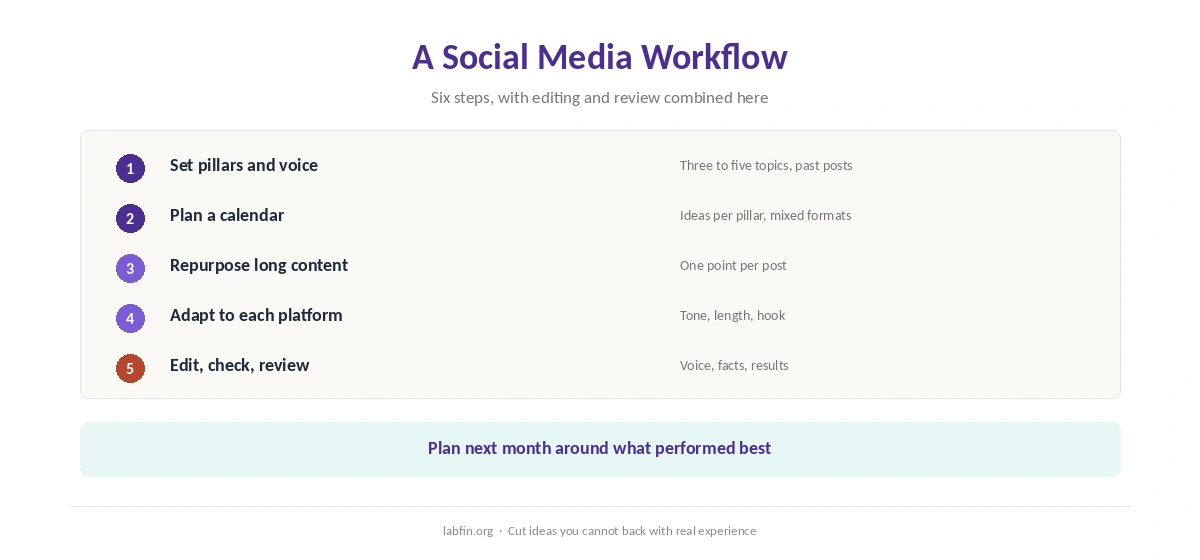
Step 1: Set Pillars and Voice
List three to five content pillars, the topics you post about, and paste a few past posts that performed well. As a result, the AI learns your tone instead of a generic one.
Our guide to writing better prompts covers how to give style context.
Step 2: Plan a Calendar
Ask for a month of post ideas per pillar, mixed by format: tips, stories, questions and announcements. Then cut anything you cannot back with real experience or data. Our Copy.ai review covers a shared workspace for small teams.
Our guide to using AI for content outlines uses a similar brief-first method.
Step 3: Repurpose Long Content
Paste a blog post, transcript or report, and ask for five posts that each make one point from it. Repurposing, moreover, keeps posts grounded in material you have already checked.
Claude handles long transcripts well, as our guide to using Claude for long documents explains.
Step 4: Adapt to Each Platform
Ask for platform-specific versions: short and direct for X, professional for LinkedIn, visual-first captions for Instagram, and a hook in the first seconds for short video scripts.
Ask also for three opening lines per post, then pick the one that sounds most like you. Our guide to ChatGPT for marketing covers campaign prompts.
Step 5: Edit and Check
Read every draft aloud and cut phrases you would never say. Then check numbers, dates and claims, since AI can invent statistics that sound plausible, as our guide to why AI gets facts wrong explains.
Our guide to using AI for editing covers editing passes that keep your voice.
Step 6: Review What Works
When you use AI for social media content over time, paste your post results into the AI after a few weeks and ask which pillars, formats and openings performed best. Then plan the next month around those patterns.
For paid ads, however, Anyword scores variants before you test them, though its accuracy claims have no published method, as our Anyword review explains.
Which Tool for Which Task
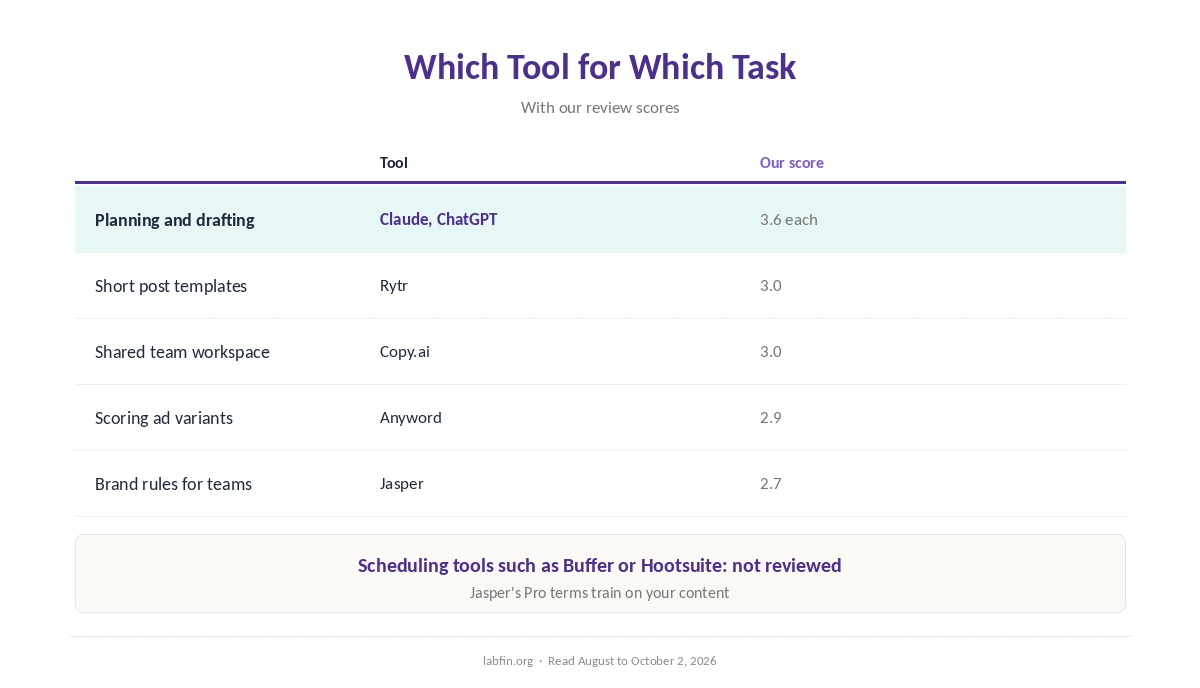
General assistants such as Claude and ChatGPT cover planning, repurposing and drafting. Rytr, by contrast, offers cheap templates for short posts, as our Rytr review covers.
Brand teams, meanwhile, may prefer Jasper’s shared style rules, though its Pro terms train on your content, as our Jasper review notes. Scheduling tools such as Buffer or Hootsuite we have not reviewed.
Checks Before You Post
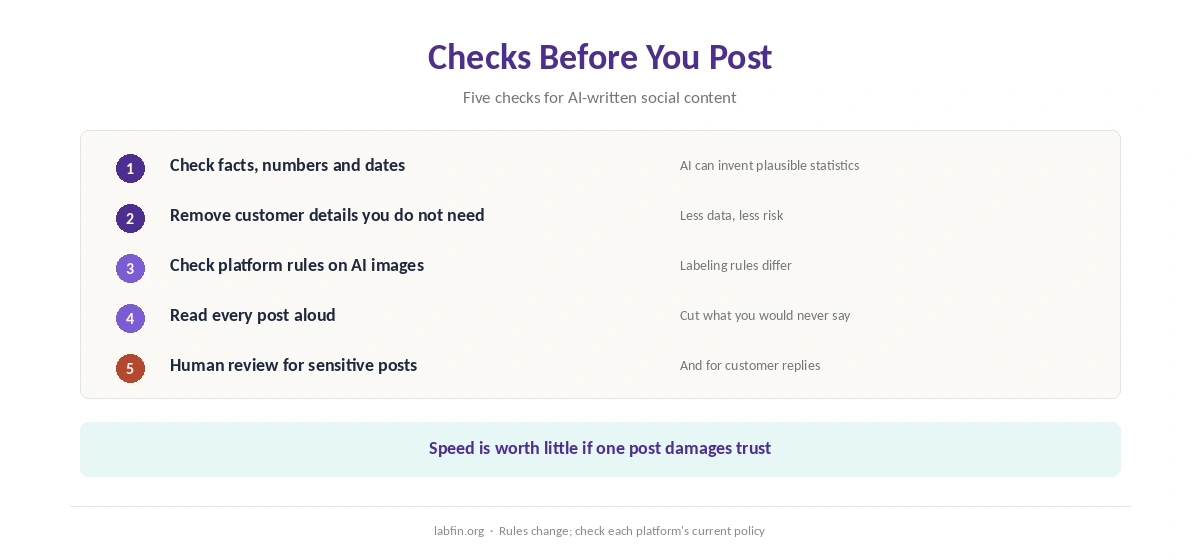
Check facts and numbers, remove customer details you do not need, and confirm each platform’s rules on AI-made images and disclosures. Keep, moreover, a human final read for anything sensitive or newsworthy.
For brand safety, also avoid replying to customers with unreviewed AI text. Our list of the best AI for marketing covers tools for larger teams.
How We Research
This guide on how to use AI for social media content draws on our reviews of each tool, read between August and October 2, 2026, and on Google’s guidance on helpful content.
We run no engagement tests of our own. Our about page explains how we research, and our guide to free AI workflows covers a no-cost setup.
How to Use AI for Social Media Content FAQ
It can draft them well from your own material and voice. Edit every post before publishing.
Claude and ChatGPT cover planning and drafting; Rytr is cheapest for short templates; Jasper suits brand teams.
Check each platform’s current rules, especially for AI-made images and realistic media.
Paste past posts that performed well, ask for several opening lines, and cut anything you would not say.
Yes. Give it your pillars and audience, then cut ideas you cannot back with real experience.
The Verdict
AI saves time on social media when it works from your material: planning, repurposing and adapting to each platform. Without that, however, it produces generic posts.
So set pillars and voice, repurpose what you already have, and check every post. That is how to use AI for social media content that still sounds like you.