
Disclosure: LabFin is reader-supported. If you sign up for a tool through links on this page, we may earn a commission at no extra cost to you. Commissions vary between providers and our ratings do not — here’s our full disclosure.
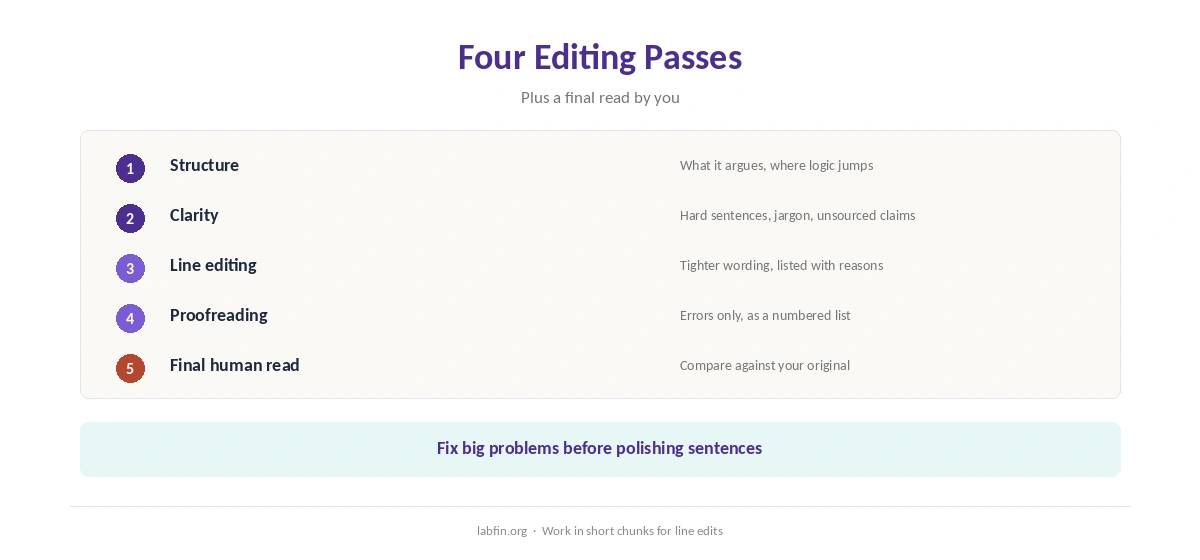
To use AI for editing well, edit in separate passes and ask the AI to show every change rather than rewrite your text. A single “make this better” prompt, by contrast, tends to flatten your voice and can quietly change meaning.
This guide, moreover, covers four editing passes, prompts that keep your voice, where to edit, and the checks that catch AI mistakes. It works with Claude, ChatGPT, Gemini or a dedicated editor such as Lex.
How to Use AI for Editing: The Short Answer
First, ask for structural feedback without edits. Then ask for clarity fixes, line edits and finally a proofread, each as a list of suggested changes you accept or reject.
Next, however, read the final text against your original for meaning changes. For unpublished work, also choose a tool that does not train on your writing, as our guide to which AI tools train on your data explains, and our list of the best AI tools for privacy ranks the safest options.
Pass 1: Structure
Ask the AI what the piece argues, where the logic jumps, and which sections could move or go, without rewriting anything. As a result, you fix big problems before polishing sentences that may be cut.
For long documents, ask for an outline of what you wrote first. Our guide to using Claude for long documents covers that step.
Pass 2: Clarity
Next, ask which sentences are hard to follow and why, then rewrite them yourself or accept specific suggestions. Ask also for jargon to define and claims that need a source.
Claims flagged here, moreover, need checking, as our guide to fact-checking AI output explains.
Pass 3: Line Editing
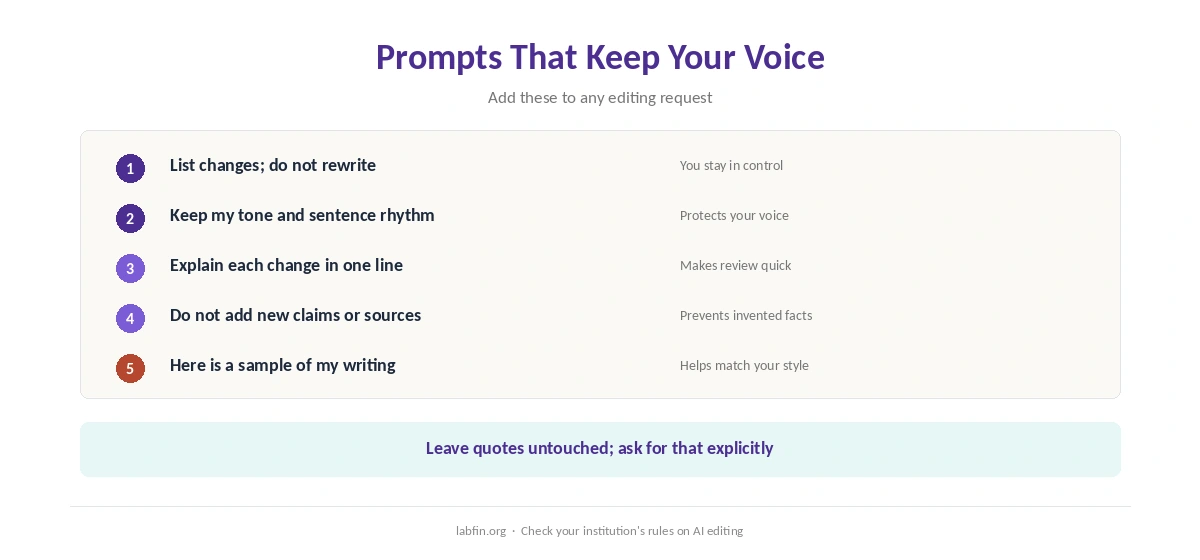
Now ask for tighter wording paragraph by paragraph, with each change listed and a short reason. Tell the AI to keep your voice and sentence rhythm, and to leave quotes untouched.
Work in short chunks, however, because long rewrites drift. Our guide to Claude for writing covers style guides in Projects.
Pass 4: Proofreading
Finally, ask for spelling, grammar, punctuation and consistency errors only, as a numbered list. Ask also for inconsistent names, dates and numbers across the piece.
Then fix each one yourself. AI proofreaders, for example, sometimes miss errors in names or introduce new ones, so a final human read still matters.
Prompts That Keep Your Voice
Useful instructions include: list changes, do not rewrite; keep my tone; explain each change in one line; do not add new claims. Pasting a sample of your own writing, moreover, helps the AI match your style. Our guide to avoiding overuse of AI in writing also sets out five rules that keep your voice.
Our guide to writing better prompts covers how to add that context.
Where to Edit
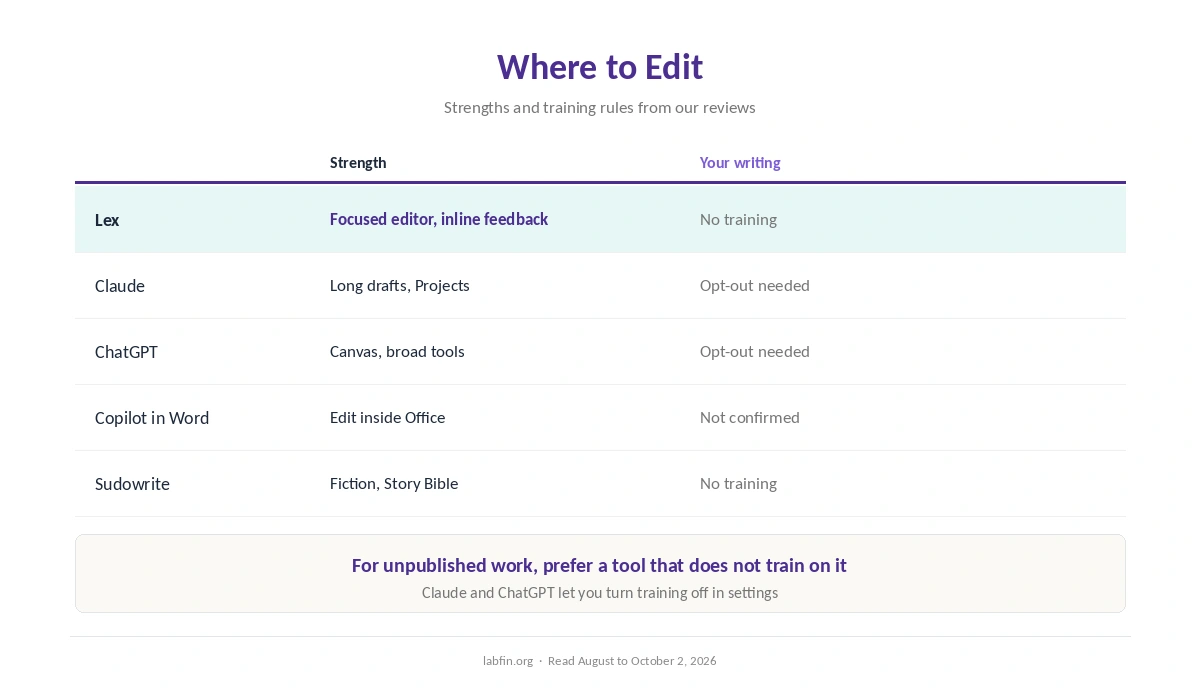
Lex, for example, puts AI feedback inside a clean editor and promises not to train on your writing. Claude and ChatGPT handle long drafts well, but their personal plans train by default unless you opt out. Our guide to ChatGPT for writing covers Canvas. Our ChatGPT vs Gemini for writing comparison covers which fits which job.
Copilot in Word, meanwhile, suits people who already draft in Office, as our guide to Microsoft Copilot for productivity explains. Sudowrite, by contrast, suits fiction with its Story Bible.
Our Lex review and Sudowrite review cover the two specialists in detail.
Risks to Watch
AI editors can change meaning while improving style, drop caveats, or make every writer sound alike. They can also invent sources when asked to strengthen a claim, as our guide to why AI gets facts wrong explains.
When you use AI for editing academic or professional work, therefore, check your institution’s rules. Keep your original, and compare the two versions before you submit. Our list of the best AI for students covers student tools.
How We Research
This guide on how to use AI for editing draws on our reviews of each tool and their data terms, read between August and October 2, 2026. One example source is Lex’s pricing page.
We run no editing tests of our own. Our about page explains how we research, and our list of the best AI for writing ranks the general assistants.
How to Use AI for Editing FAQ
Yes, as a first pass. Ask for a numbered list of errors, fix them yourself, and still read the final text.
Ask it to list changes rather than rewrite, keep your tone, and work in short chunks. A sample of your writing helps.
Lex is built for editing and does not train on your writing. Claude and ChatGPT handle long drafts but train on personal plans by default.
Use a tool that does not train on your writing, or turn training off first.
Yes. Sudowrite is built for fiction, with a Story Bible for characters and plot.
The Verdict
AI editing works best as a series of focused passes, each producing suggestions you accept or reject. That keeps your voice and catches errors without handing over the text.
So edit in passes, protect unpublished work, and compare versions before you submit. That is how to use AI for editing without losing what makes the writing yours.