
Disclosure: LabFin is reader-supported. If you sign up for a tool through links on this page, we may earn a commission at no extra cost to you. Commissions vary between providers and our ratings do not — here’s our full disclosure.
To use AI for email sequences well, decide the goal of the whole sequence and of each email first, then let AI draft from that map. Asked for “a welcome sequence” with no context, by contrast, AI writes polite emails that lead nowhere.
This guide, moreover, covers common sequence types, a six-step workflow, prompts that work, and the checks to run before anything is sent. It works with Claude, ChatGPT or Gemini.
How to Use AI for Email Sequences: The Short Answer
First, write down who receives the sequence, what should happen by the last email, and one job for each email. Then give the AI that map, your product facts and a few past emails, and ask for one email at a time. Our guide to using AI for product descriptions also starts from a checked fact sheet.
Next, however, check every claim, add personal details from real customer questions, and confirm consent and unsubscribe links. Our list of the best AI for email writing ranks the main assistants.
Common Sequence Types
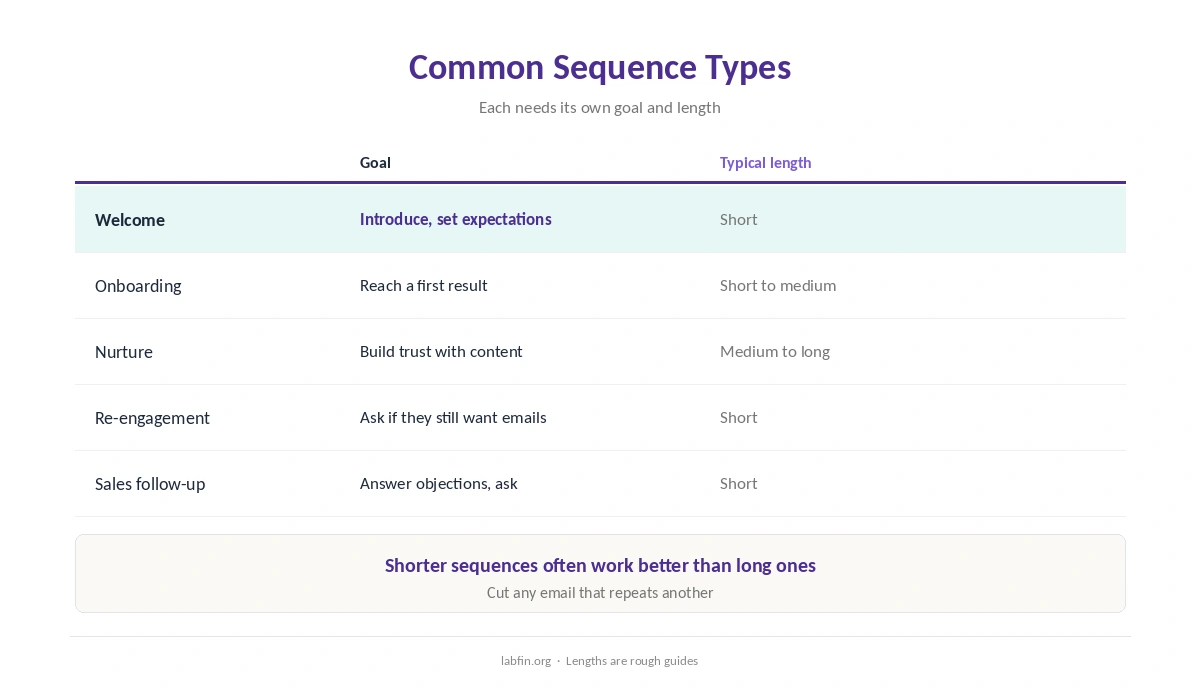
Welcome sequences introduce you and set expectations, and onboarding sequences help new users reach a first result. Nurture sequences, meanwhile, build trust over weeks with useful content.
Re-engagement sequences, finally, ask inactive subscribers whether they still want to hear from you. Each type, therefore, needs a different goal and length.
Step 1: Set the Goal
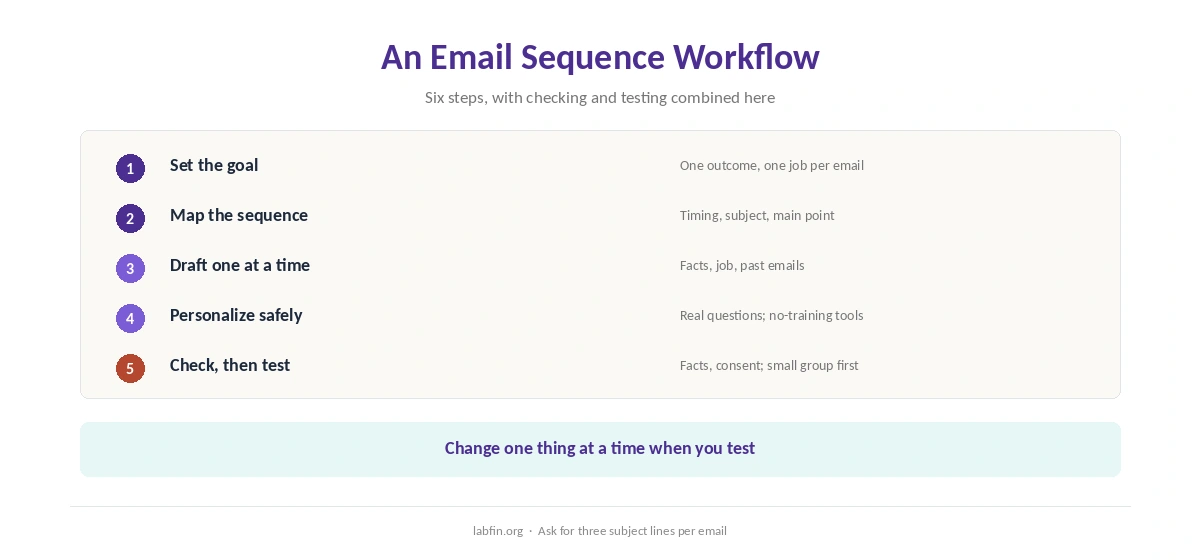
Write one sentence for the outcome, for example “a new trial user creates a first project within seven days”. Then write one job per email, such as explain, show, remind or ask.
Our guide to writing better prompts covers how to turn that into context for the AI.
Step 2: Map the Sequence
Ask the AI to propose timing, subject and one main point for each email, based on your goal. Then cut emails that repeat each other, since shorter sequences often work better than long ones.
Our guide to using AI for content outlines uses a similar brief-first method.
Step 3: Draft One Email at a Time
Give the AI your product facts, the email’s single job and a sample of your past emails. Ask, moreover, for three subject lines and two opening lines per email, then pick and edit.
Claude and ChatGPT both draft well, as our guides to Claude for writing and ChatGPT for marketing explain.
Step 4: Add Real Personalization
Use real customer questions, support tickets or interview notes to shape each email. Personal details that come from your data, however, should not be pasted into tools that train on it.
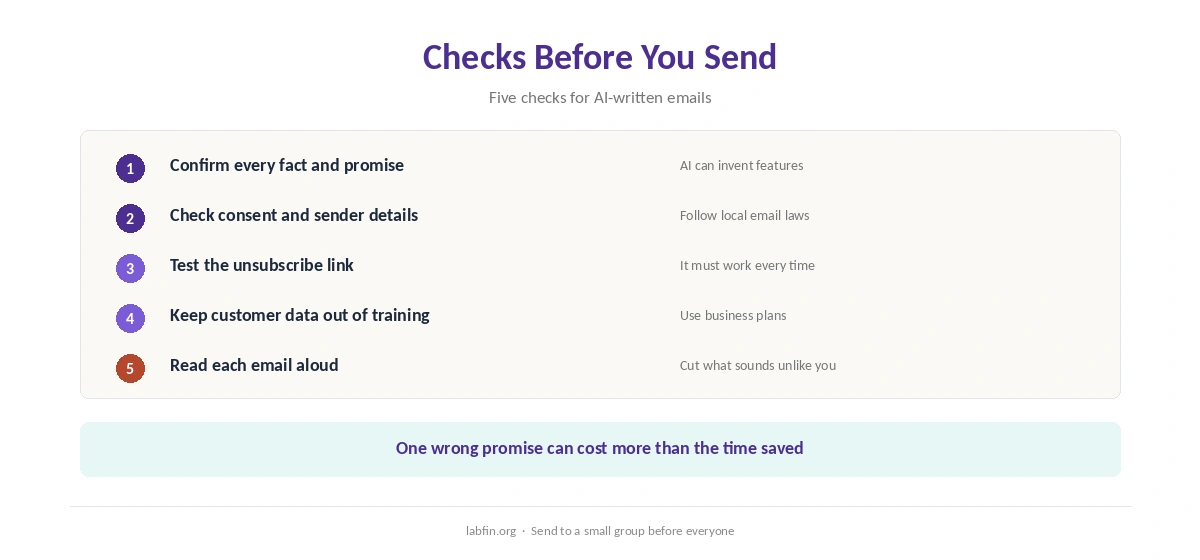
Business plans, for example Claude Team or ChatGPT Business, skip training by default. Our list of the best AI tools for privacy covers other options.
Step 5: Edit and Check
Read each email aloud, cut filler, and confirm every number, date and promise. AI, moreover, can invent features or statistics, as our guide to why AI gets facts wrong explains.
Also check consent, sender details and a working unsubscribe link, and follow the email laws where your readers live. Our guide to using AI for editing covers editing passes.
Step 6: Test and Improve
When you use AI for email sequences, send to a small group first, then compare open and click rates by email. Ask the AI to suggest changes based on the results, and test one change at a time.
For scoring subject lines before sending, Anyword offers predictive scores, though its accuracy claims have no published method, as our Anyword review explains.
Which Tools to Use
General assistants handle mapping and drafting well. Copy.ai’s shared workspace, by contrast, suits small teams, and Jasper’s brand rules suit larger marketing teams, as our Copy.ai review and Jasper review explain.
Email platforms with built-in AI we have not reviewed yet. Our list of the best AI for marketing covers general tools.
How We Research
This guide on how to use AI for email sequences draws on our reviews of each tool, read between August and October 2, 2026, and on Google’s guidance on helpful content for writing quality.
We run no email tests of our own. Our about page explains how we research.
How to Use AI for Email Sequences FAQ
Yes, from a clear map: the sequence goal, one job per email, product facts and samples of your past emails.
Claude and ChatGPT both draft well. Anyword scores subject lines; Jasper and Copy.ai suit teams.
As short as the goal allows. Cut emails that repeat each other.
Only into tools that do not train on it, such as business plans with training off by default.
Facts, numbers, promises, consent, sender details and a working unsubscribe link.
The Verdict
AI speeds up email sequences when it drafts from a clear map and your real facts. Without them, however, it writes emails that sound fine and achieve little.
So set the goal, map the sequence, draft one email at a time, and check before sending. That is how to use AI for email sequences that move readers somewhere.