
Disclosure: LabFin is reader-supported. If you sign up for a tool through links on this page, we may earn a commission at no extra cost to you. Commissions vary between providers and our ratings do not — here’s our full disclosure.
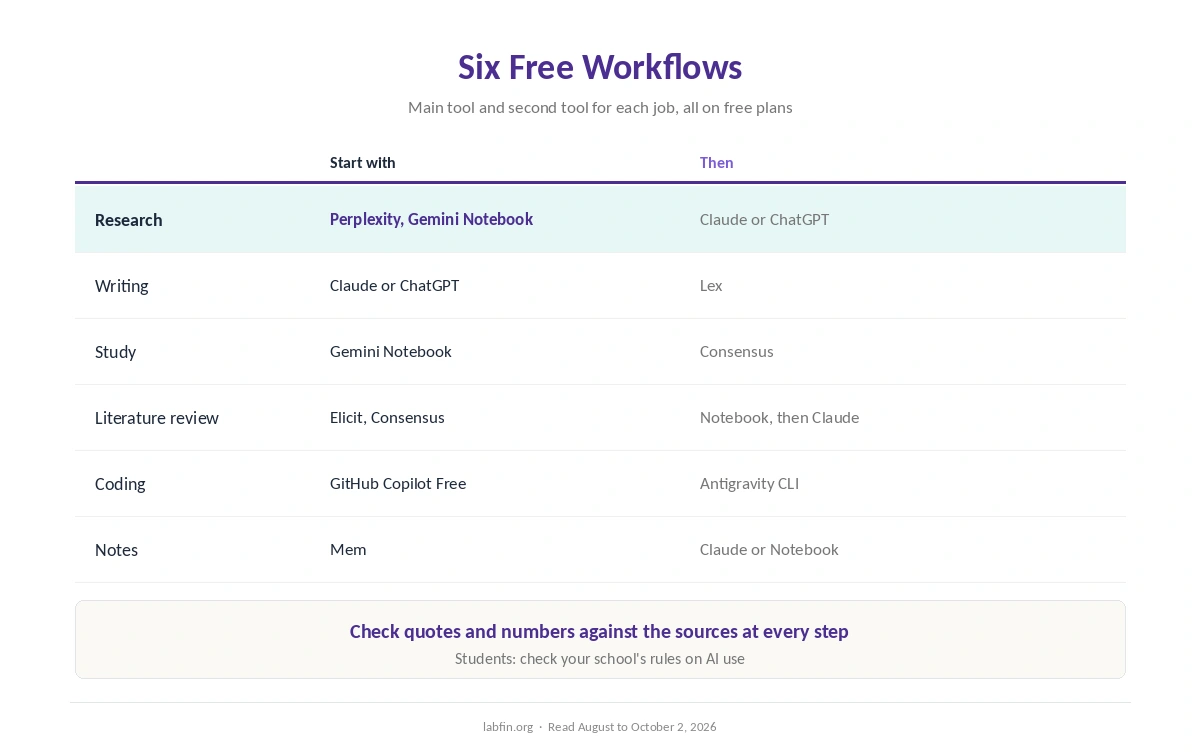
Free AI workflows that work combine several free plans, each used for what it does best. One tool searches, another reads your sources, and a third drafts, so no single free limit holds you back.
This guide, moreover, sets out six workflows for research, writing, study, literature reviews, coding and notes. Each uses only free plans we have reviewed, and each notes the catch.
Free AI Workflows That Work: The Short Answer
For research, search in Perplexity, read your sources in Gemini Notebook, and draft in Claude or ChatGPT. For academic work, by contrast, start in Consensus or Elicit, which both offer unlimited paper search for free. Our guide to AI free trials worth using also sorts trials by risk of surprise charges.
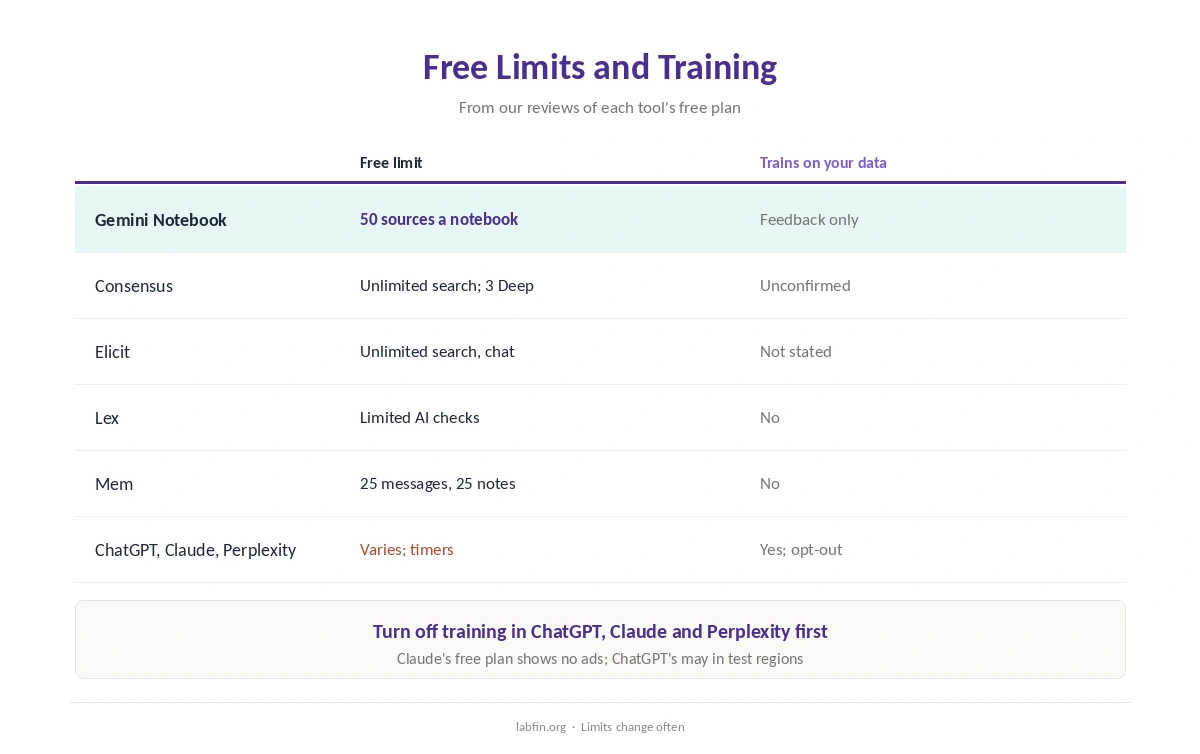
The catch, however, is data: ChatGPT, Claude and Perplexity train on free chats by default. So turn that off first, as our guide to which AI tools train on your data explains.
1. Research Workflow
First, search the question in Perplexity, which cites every answer and had the best record in the EBU and BBC news study. Then save the best sources and add them to Google’s Gemini Notebook. Our guide to using AI for learning also asks AI for questions, not answers.
Gemini Notebook, for example, answers from up to 50 sources per notebook with linked citations. Finally, draft the summary in Claude or ChatGPT, and check quotes against the sources. Our guide to Perplexity for research covers the first step.
2. Writing Workflow
Draft in Claude’s free plan, which shows no ads, or in ChatGPT’s free plan for broader tools. Then move the draft into Lex’s free editor for line-by-line feedback and collaboration.
Lex, moreover, promises not to train on your writing, though its free plan limits AI checks. Our Lex review covers the editor, and our guide to Claude for writing covers drafting.
3. Study Workflow
Add lecture notes and readings to Gemini Notebook, then ask it for summaries and practice questions from those sources. For claims that need evidence, also check Consensus, whose free plan includes unlimited paper search.
Students, however, should check each school’s rules on AI use. Our list of the best AI for students covers discounts on paid plans.
4. Literature Review Workflow
Search and screen papers in Elicit’s free Basic plan, which includes unlimited search, summaries and chat with papers. Consensus, meanwhile, gives three free Deep reviews a month for quick syntheses.
Then read your collected papers in Gemini Notebook, and draft in Claude or ChatGPT. Our list of the best AI for literature review explains each stage.
5. Coding Workflow
GitHub Copilot has a free plan that works inside VS Code and other editors. Google’s Antigravity CLI, moreover, is free for Google accounts with a quota.
For larger tasks, however, free coding limits run out fast, and agent work needs care. Our guide to using AI for coding projects covers safe settings, and our GitHub Copilot review covers the plans.
6. Notes Workflow
Capture meeting notes and ideas in Mem’s free plan, which allows 25 messages and 25 new notes a month. For longer documents, also use a Project in Claude or a notebook in Gemini Notebook.
Mem’s free caps, however, suit light use only. Our Mem review covers its paid plans.
Free Limits and Catches
Every free plan has caps, and several reset on timers. Claude, for example, combines a five-hour session limit with a weekly cap, while ChatGPT’s free plan may show ads in test regions.
On data, therefore, check each tool’s default before you paste anything personal. Our guide to AI tool limits compares free allowances.
When to Upgrade
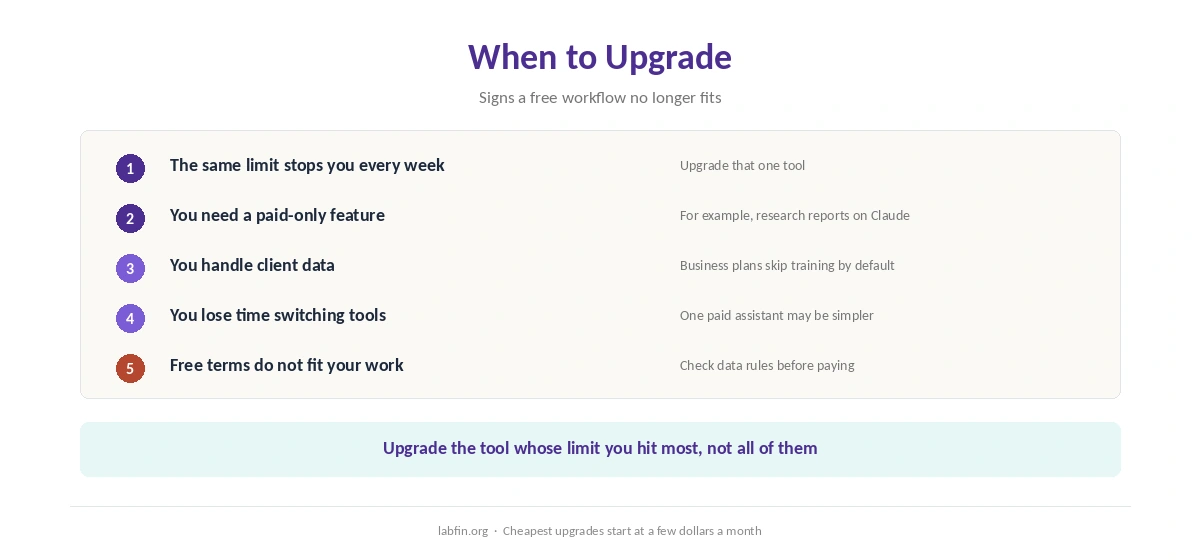
Upgrade when the same limit stops you every week, when you need a feature only paid plans have, or when you handle client data that needs business terms. Until then, free AI workflows that work cover a lot.
Our list of the cheapest useful AI tools shows the lowest-cost upgrades, and our guide to building an AI workflow explains how to combine paid tools.
How We Research
These free AI workflows that work draw on our reviews of each tool and their free plan limits, read against each company’s pages between August and October 2, 2026. One example source is Elicit’s pricing page.
We run no tests of our own, and free limits change often. Our about page explains the criteria.
Free AI Workflows That Work: FAQ
Yes, by combining them: Perplexity to search, Gemini Notebook to read sources, and Claude or ChatGPT to draft.
Perplexity for cited web answers, and Consensus or Elicit for academic papers, all with free plans.
ChatGPT, Claude and Perplexity do by default, with opt-outs. Gemini Notebook trains only on feedback you send, and Lex does not train.
Yes. GitHub Copilot has a free plan, and Antigravity CLI is free for Google accounts with a quota.
When the same limit blocks you every week, when you need a paid feature, or when client work needs business terms.
The Verdict
Free AI workflows that work rely on combining tools, not on one free plan doing everything. Search, read and draft in separate tools, and limits rarely stop you.
Still, turn off training where you can, and check every important fact. Then upgrade only the tool whose limit you hit most.