
Disclosure: LabFin is reader-supported. If you sign up for a tool through links on this page, we may earn a commission at no extra cost to you. Commissions vary between providers and our ratings do not — here’s our full disclosure.
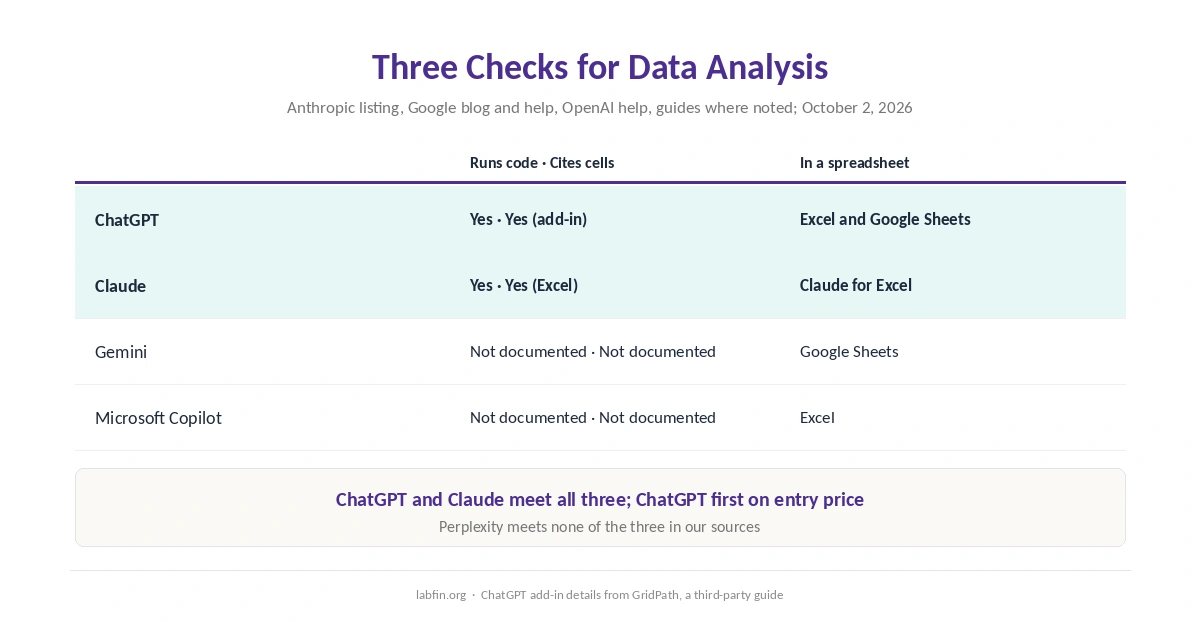
Of the tools on this list, the best AI for data analysis is ChatGPT, followed closely by Claude. Gemini and Microsoft Copilot then follow. We rank them by three documented features: running code, working inside Excel or Google Sheets, and citing the cells behind each answer.
Those features matter because analysis is only useful if you can check it. For example, code shows the exact calculation, while cell citations show where each number came from.
Best AI for Data Analysis: The Short Answer
Among the best AI for data analysis on this list, ChatGPT and Claude both meet all three checks. Both run code on uploaded data, both have Excel add-ins, and both point back to the cells they used. However, ChatGPT ranks first only on our tie-break. Its spreadsheet add-in works on every plan, including Free, a GridPath guide reports.
Gemini and Copilot work inside their own spreadsheets. For example, Gemini analyzes data in Google Sheets on Google AI Pro, Google’s Workspace blog says. Copilot, meanwhile, works inside Excel from $9.99 a month. However, our sources document no code execution or cell citations for either.
The List at a Glance
| Tool | Runs code · In a spreadsheet · Cites cells | From |
|---|---|---|
| ChatGPT | Yes · Excel and Sheets add-in · Yes | Free; Plus $20/mo |
| Claude | Yes · Claude for Excel · Yes | Pro $20/mo for Excel |
| Gemini | Not documented · Google Sheets · Not documented | Google AI Pro $19.99/mo |
| Microsoft Copilot | Not documented · Excel · Not documented | Personal $9.99/mo |
How We Ordered the Best AI for Data Analysis
This list of the best AI for data analysis counts three documented checks on each tool’s roughly $20 plan. First comes running code on your data, because a calculation in code can be inspected. Next comes work inside a spreadsheet, and last comes citing the cells behind each answer.
ChatGPT and Claude meet all three, so the tie-break from our list of the best AI tools applies. That means review score first, then the lower entry price. Gemini and Copilot meet one each, and their review scores set the order. Perplexity, meanwhile, meets none of the three in our sources, so it is not ranked.
1. ChatGPT: Code in Chat, an Add-In in the Sheet
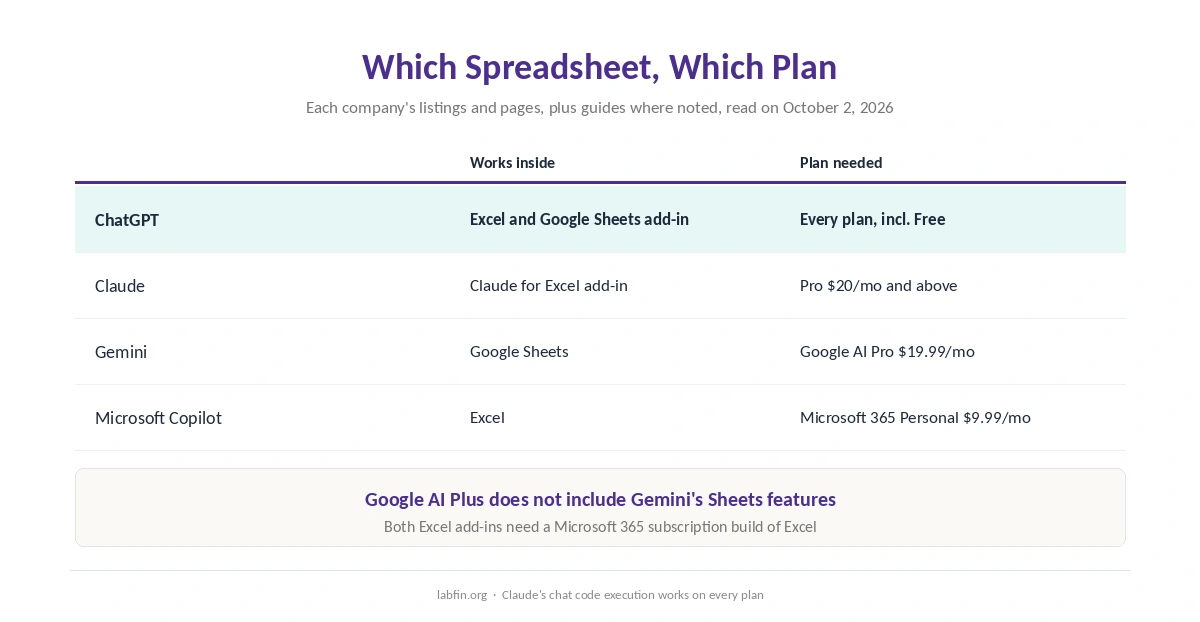
ChatGPT runs Python in a sandbox on files you upload, OpenAI’s help center says. Its Excel and Google Sheets add-in also reached general availability on May 5, 2026, on every plan. In addition, it links answers to the cells it used, according to GridPath.
The catch: the add-in asks before changing your sheet, but you still need to check formulas. Also, Free and Go show ads, and Plus bills monthly only. Our guide to ChatGPT for coding covers its sandbox in more detail.
2. Claude: Claude for Excel With Cell Citations
Anthropic’s Marketplace listing says Claude for Excel reads multi-tab workbooks and explains calculations with cell-level citations. It also builds pivot tables and charts. The add-in also comes with Pro, Max, Team and Enterprise.
In chat, code execution and file creation are available on every Claude plan. That comes from Anthropic’s help center, as a guide quoting it reports. The catch: the Excel add-in needs a paid plan. Its limits also come without published numbers, as our comparison of AI tool limits shows, and our ChatGPT vs Claude comparison covers the two side by side.
3. Gemini: Analysis Inside Google Sheets
On Google AI Pro and Ultra, Gemini in Google Sheets answers questions about your data and creates charts, Google’s Workspace blog says. Its AI function also summarizes and categorizes data in cells, Google’s help page says.
The catch: Google AI Plus does not include these Sheets features. That follows Google’s feature table, as summarized by The Rundown. Our sources also document no code execution or cell citations for Gemini.
4. Microsoft Copilot: Inside Excel
Microsoft 365 Personal puts Copilot inside Excel for $9.99 a month, as our guide to Microsoft Copilot for productivity covers. In addition, Microsoft says it does not train on that in-app use on Personal and Family plans.
The catch: our sources document no code execution or cell citations for consumer Copilot. So check its formulas, just as you would check a colleague’s.
Check the Analysis Before You Use It
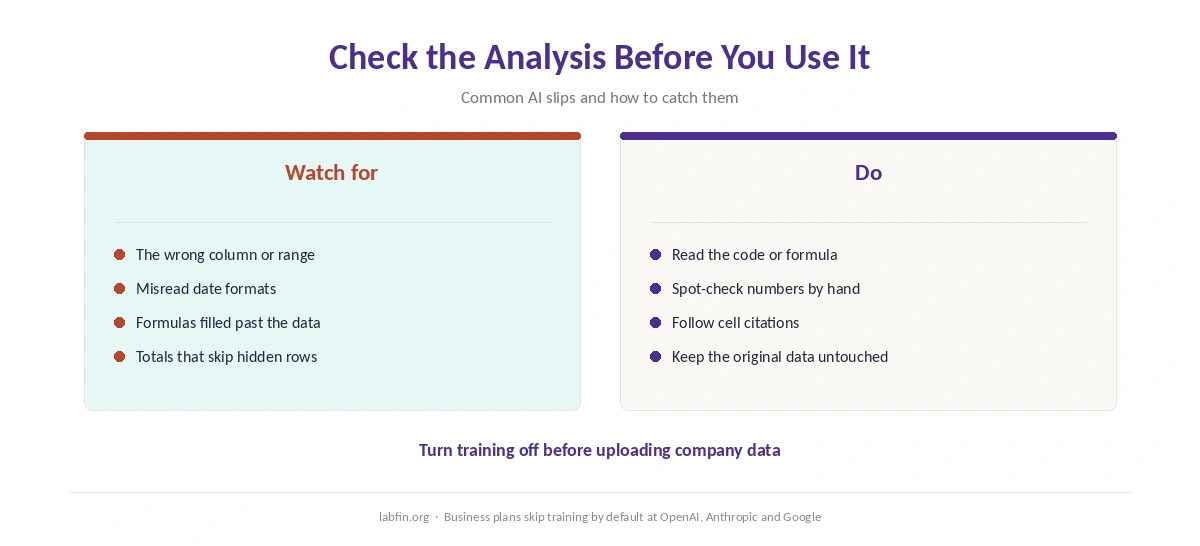
AI can pick the wrong column, misread a date format or apply a formula to the wrong range. So open the code or formula behind each result, and spot-check a few numbers by hand.
Use cell citations where the tool offers them, and keep the original data untouched. Our guide to fact-checking AI output covers the wider habits.
Your Data
Business data deserves care. Most consumer plans train on your chats by default, so turn training off before uploading company figures. Business plans from OpenAI, Anthropic and Google, however, skip training by default. Our list of the best AI tools for researchers covers those plans.
Which Tool for Which Data Job
The best AI for data analysis on this list depends on where your data lives. Excel workbooks: Claude for Excel or ChatGPT’s add-in, or Copilot inside Excel. Google Sheets: Gemini on Google AI Pro, or ChatGPT’s add-in. CSV files and one-off questions: ChatGPT or Claude in chat, with code.
For wider workflows, see our list of the best AI for productivity. For summaries of reports rather than tables, our list of the best AI for summarization fits better.
How We Research
This list draws on Anthropic’s Marketplace listing and Google’s Workspace blog and Sheets help. It also uses OpenAI’s help center, all read on October 2, 2026. ChatGPT’s add-in details come from GridPath and Claude’s code execution from a guide quoting Anthropic, and we name both.
We run no data tests of our own. Our criteria live on our about page.
Best AI for Data Analysis FAQ
Of the tools on this list, ChatGPT and Claude both run code, work inside Excel and cite the cells they used. ChatGPT ranks first on its cheaper entry price.
Claude for Excel works on Pro and above, and ChatGPT’s add-in on every plan. Microsoft Copilot also works inside Excel on Microsoft 365 Personal and above.
Gemini on Google AI Pro and Ultra, according to Google, and ChatGPT’s add-in, according to GridPath. Google AI Plus does not include the Sheets features.
Yes. ChatGPT runs Python on uploaded files, and Claude offers code execution on every plan. Check the code it writes before you trust the result.
Turn training off first on consumer plans. Alternatively, use a business plan, which skips training by default at OpenAI, Anthropic and Google.
The Verdict
Among the best AI for data analysis on this list, ChatGPT and Claude lead. Both offer code, Excel add-ins and cell citations. Gemini fits Google Sheets users on Google AI Pro, and Copilot fits Excel users from $9.99.
Whichever you pick, read the code or formula behind each result. Also keep company data on a plan that skips training.