
Disclosure: LabFin is reader-supported. If you sign up for a tool through links on this page, we may earn a commission at no extra cost to you. Commissions vary between providers and our ratings do not — here’s our full disclosure.
To compare AI model outputs side by side fairly, give every model the same prompts, hide which model wrote what, and score the answers against criteria you set in advance. A single prompt judged by impression, by contrast, mostly measures luck and brand.
This guide, moreover, covers the tools that make side-by-side tests easy, a six-step method, and a simple scoring rubric. It works for choosing an assistant, a model inside one app, or a local model.
How to Compare AI Model Outputs: The Short Answer
First, write five to ten prompts from your real work and decide what a good answer looks like. Then run each prompt on every model, hide the names, and score the answers on accuracy, completeness and clarity.
Finally, check every fact the winners state, since fluent answers can still be wrong. Our guide to AI benchmarks explained shows how public boards do the same at scale.
Tools for Side-by-Side Tests
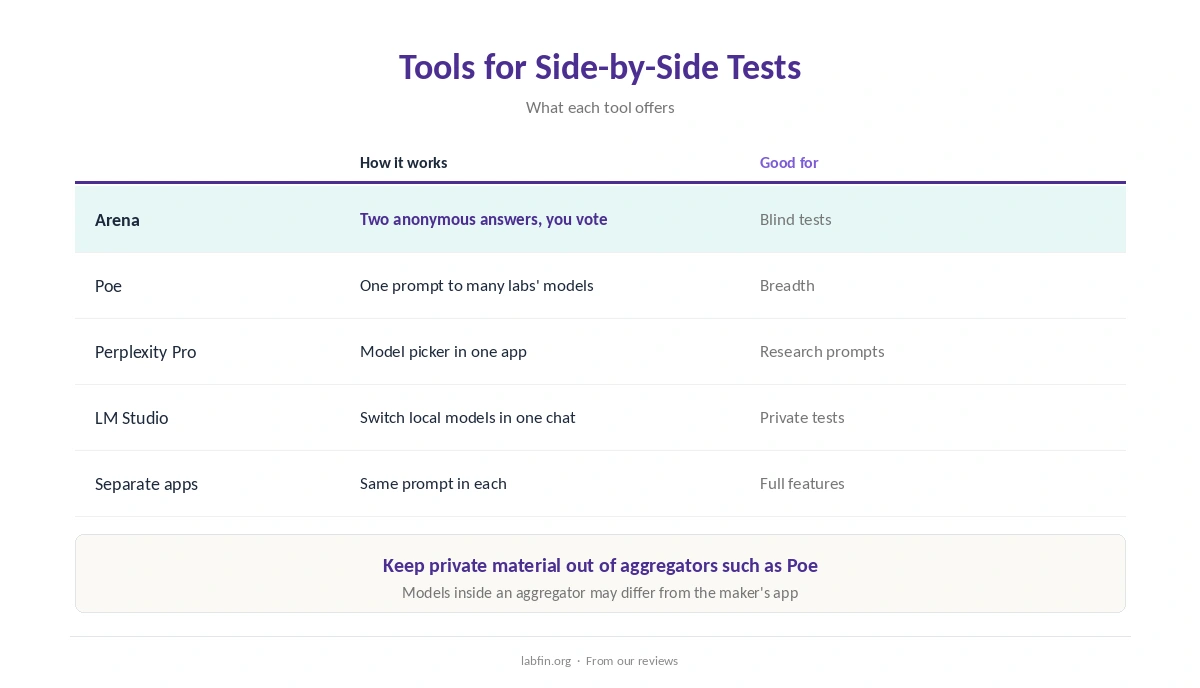
Arena, for example, shows two anonymous models’ answers to your prompt and asks which is better, which is how its public boards are built. Poe, meanwhile, puts many labs’ models behind one login, so you can send the same prompt to each, as our Poe review covers.
Perplexity Pro also lets you pick among several labs’ models inside one app, as our Perplexity review explains. For local models, LM Studio switches between downloaded models in one chat window, as our LM Studio review covers. Our local AI vs cloud AI comparison explains when local models fit.
Step 1: Define the Task and Criteria
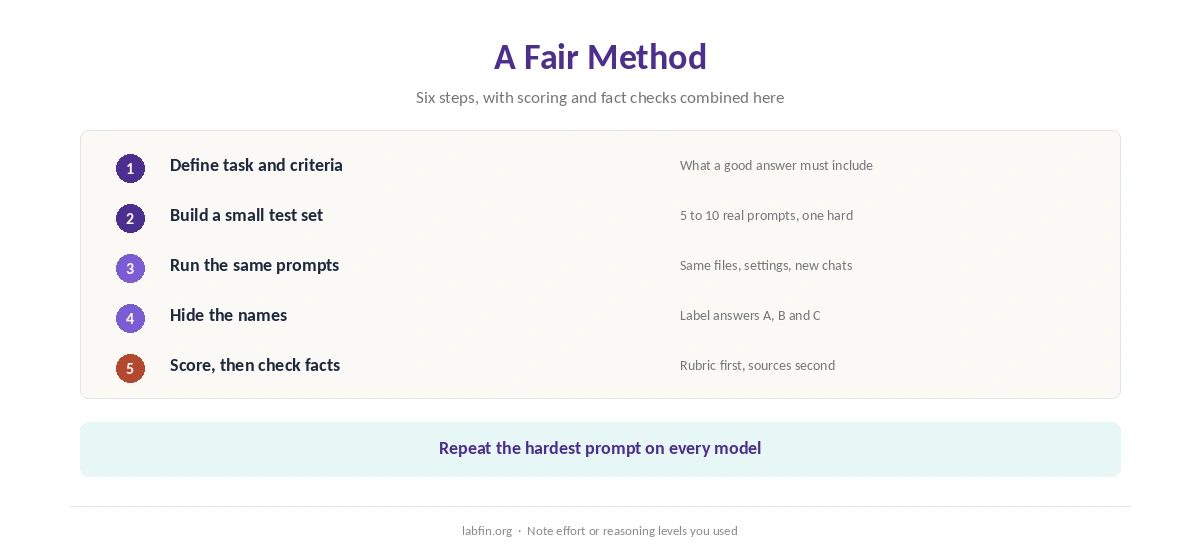
Name the job precisely, for example “summarize a 20-page contract for a manager”. Then write what a good answer must include and what would disqualify it.
Our guide to writing better prompts covers how to state the task.
Step 2: Build a Small Test Set
Use five to ten prompts from your real work, including at least one hard case. A single prompt, however, says little, since models vary from answer to answer. Our ChatGPT vs Claude comparison, for example, sets two leading assistants side by side on independent evidence.
Step 3: Run the Same Prompts
Send identical prompts, with the same files and settings, to every model. Start a new chat for each test, so earlier messages do not steer the answer.
If an app lets you choose effort or reasoning levels, also note which level you used, since results change with it. Our guide to using ChatGPT effectively covers effort settings.
Step 4: Hide the Names
When you compare AI model outputs, copy answers into a document labeled A, B and C, and ask a colleague to shuffle them if possible. Known brands, otherwise, shape how we read an answer.
Step 5: Score With a Rubric
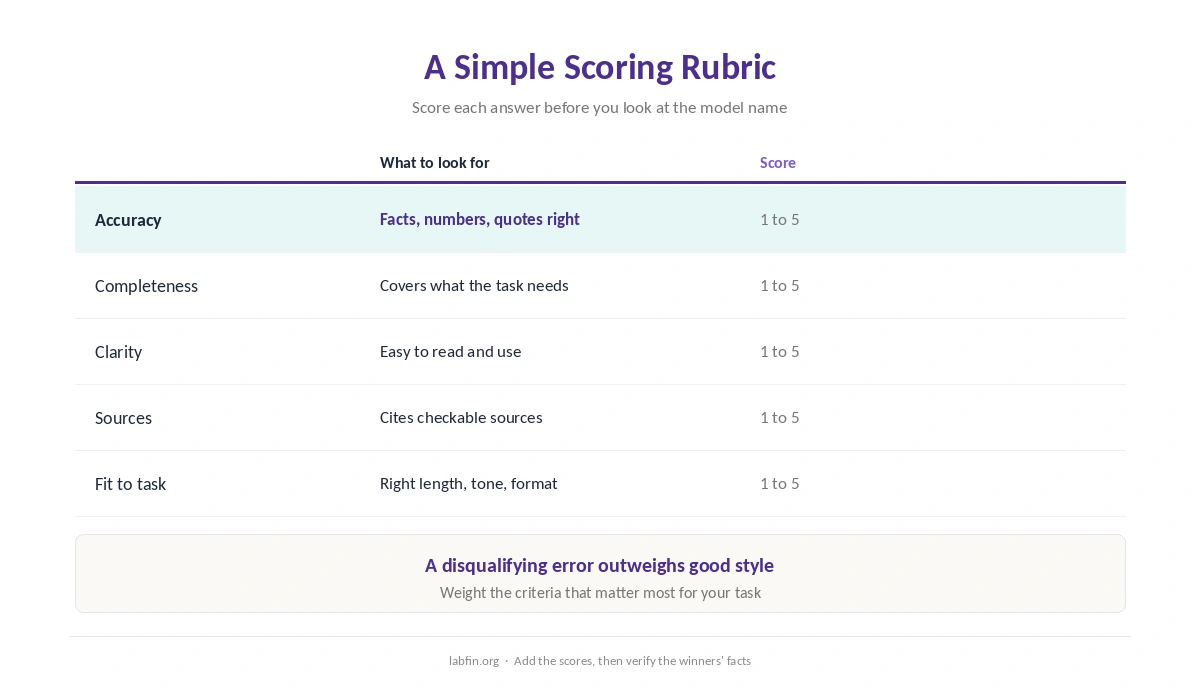
Score each answer from 1 to 5 on accuracy, completeness, clarity, sources and fit to your task. Add the scores, but also note any disqualifying error, which outweighs style.
Repeat the hardest prompt a second time on each model, since one lucky answer can mislead.
Step 6: Check the Facts
Verify every number, quote and claim in the top answers against a source. Fluent answers, moreover, can still be wrong, as our guide to why AI gets facts wrong explains.
Our guide to fact-checking AI output covers the routine.
Use Public Boards for Context
Your own tests show fit to your work; public boards show broad trends across many prompts. Arena ranks models by human preference, while Artificial Analysis runs fixed tests of capability and cost.
Together, therefore, they give a fuller picture than either alone. Our list of the best AI tools combines both with our reviews.
Mistakes to Avoid
Avoid judging by one prompt, comparing different settings, or reading names before scoring. Also avoid pasting private material into aggregators such as Poe, whose bot developers may store chats.
Our ChatGPT vs Poe comparison covers that trade-off.
How We Research
This guide on how to compare AI model outputs draws on our reviews and on how public boards such as Arena collect side-by-side votes, read between September and October 3, 2026.
We run no head-to-head trials of our own for this guide. Our about page explains how we research.
How to Compare AI Model Outputs FAQ
Use the same prompts and settings, hide the model names, and score answers against criteria set in advance.
Arena shows two anonymous answers to your prompt; Poe sends one prompt to many labs’ models.
Five to ten from your real work, including at least one hard case, and repeat the hardest one.
As context. They show broad trends; your own tests show fit to your work.
Only in tools whose data terms you accept; avoid aggregators for private material.
The Verdict
Comparing AI outputs well takes a little structure: the same prompts, hidden names, a rubric and fact checks. Without it, however, brand and luck decide.
So test on your own work, score blind, and use public boards for context. That is how to compare AI model outputs side by side and pick with confidence.