
A small museum is rewriting a loan-handling note so that volunteers can follow it without decoding dense registrar language. The note contains an accession identifier, a fragile-object warning, and a requirement to keep the object upright. DeepL Write can suggest clearer wording, but the museum cannot permit an elegant sentence to silently change those controlled details. This example is a hypothetical editorial workflow, not a report of a tested DeepL output.
Separate meaning from style
Start from the signed loan sheet, not a draft email copied from an old exhibition. Pull out the object ID, shipping orientation, material restrictions, named contact, and any requirement tied to the lender. Those items form the immutable fact list. A rewrite is successful only if a reader can act on it while each immutable item remains exact. Record who approved the source and when.
Decide which passages actually need language work. A sentence such as ‘Maintain orientation during transfer’ may benefit from ‘Keep the object upright while moving it.’ By contrast, an accession identifier is not prose and should never be paraphrased. Maintain a line-by-line correspondence between the controlled original and the proposed plain-language version so reviewers can inspect the difference without searching multiple files.
Use Write with a restricted input
DeepL documents a Write interface where entered text appears alongside suggested improvements. Paste only a permitted excerpt after removing personal information, private lender contacts, or security-sensitive storage details that do not belong in a third-party editor. Avoid assuming that a browser extension, Word integration, and web editor present the same buttons or have identical entitlements; check the current workspace before giving colleagues instructions.
For a small source paragraph, choose a straightforward revision rather than asking for a full policy rewrite. The purpose is improving sentence flow and grammar, not giving an AI tool authority over museum procedure. Keep the original visible in a separate document and copy only candidates that are understandable on first reading. If the resulting text simplifies away a condition such as ‘only under supervision,’ reject it immediately.
Protect terminology before shortening
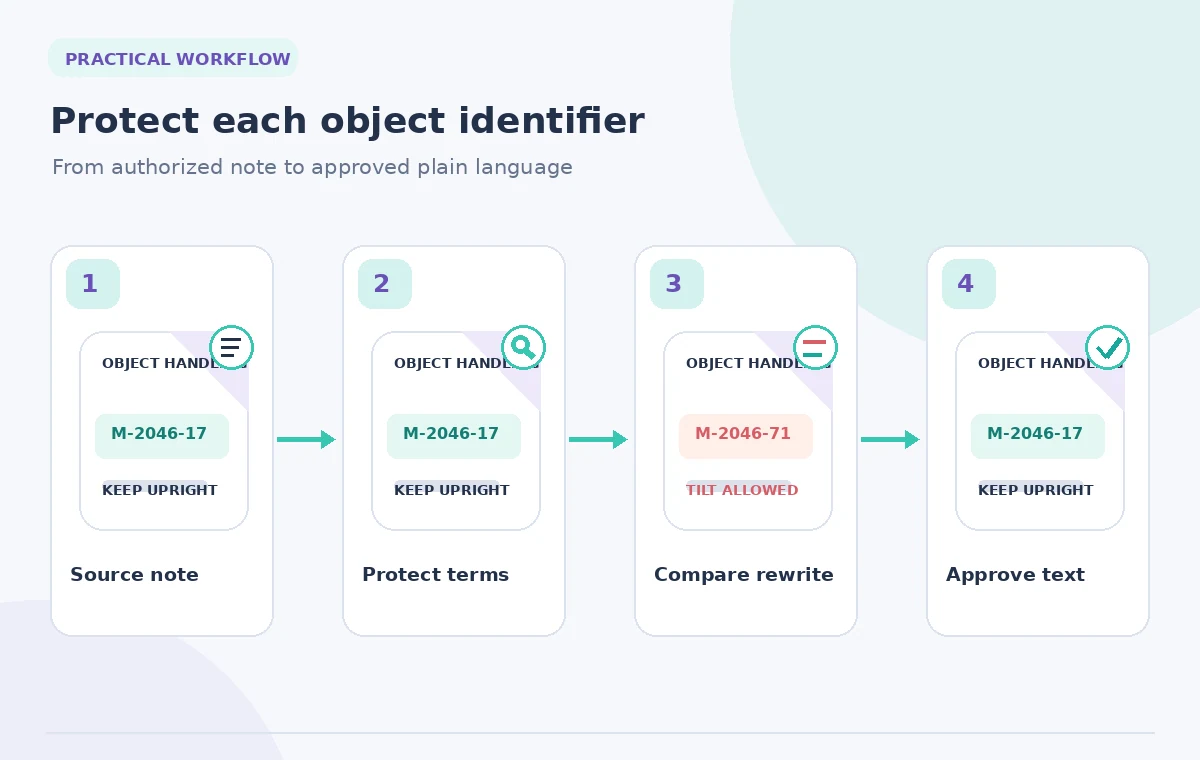
DeepL’s documentation describes a Terms feature for English and German on the web version of Write, including terms that should not be edited. Where available, add accession prefixes and standard handling phrases before revising. Free accounts have a documented ten-term limit; paid entitlements may differ. Treat a protected-term list as an editing aid, not a guarantee that every date, hyphen, or instruction will stay intact.
Create a simple proof table: exact source phrase, draft phrase, reason for change, reviewer decision. For example, ‘M-2046-17’ must remain the identical character sequence, while ‘do not invert’ can be restated only if its approved meaning is preserved. Avoid copying an example identifier into a real catalog record. The specific code in this article is illustrative and is not a real museum accession number.
Compare the two versions at claim level
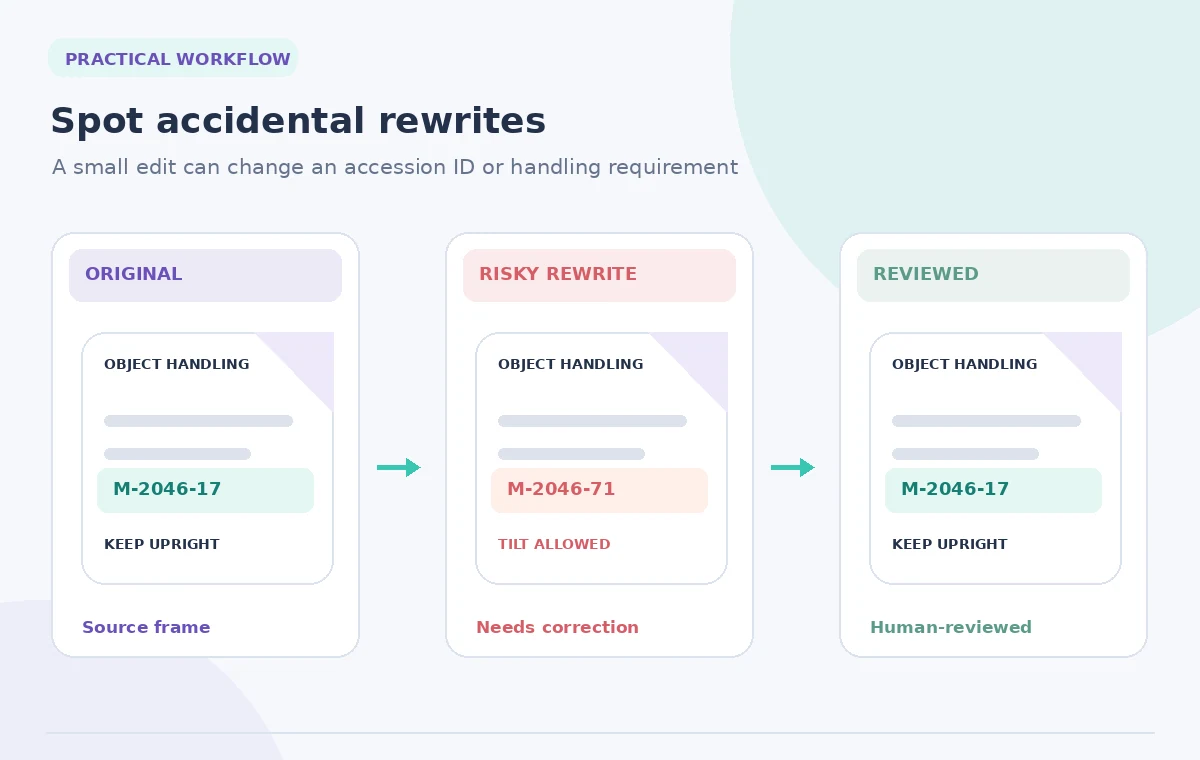
Read the proposed rewrite with a highlighter on every instruction verb: lift, tilt, open, contact, photograph, return. A change from ‘may be opened by trained staff’ to ‘open for inspection’ drops an important qualification. Comparing whole paragraphs for general tone may miss that sort of semantic deletion. Check conditionals, negations, quantities, dates, and names individually.
The most useful review is not a green check beside a fluent paragraph; it is an annotated difference showing why each edit is permissible. Ask one colleague who handles collections to explain the revised directions without seeing the source. If their interpretation differs, return to the controlled wording. Do not treat a successful spelling check as a substitute for the registrar’s professional sign-off.
Pick a tone without changing the audience
Write provides styles including Simple and Business and tones including Friendly and Diplomatic on supported platforms and languages. For a volunteer checklist, Simple is a reasonable candidate, but it should not make a fragile-object instruction sound optional. An informal tone that softens ‘must’ into ‘might want to’ is unsuitable for a required control. Check the available choices in the actual product interface.
Put a short heading before each action, one action per sentence when feasible, and define uncommon terms only once. Keep the directions compatible with an accessible print layout: clear order, no dense parentheses, and a visible line for the authorized contact. A tool may improve sentences, but it cannot decide whether a museum’s security, conservation, or loan requirements are correct.
Approve a stable revision and audit trail
Store the proposed text as a new version rather than replacing the signed source. Note the reviewer, date, and the exact section that was changed. When terminology is updated in the collections database, synchronize the public-facing instruction only after the owner confirms the update. Version labeling matters because staff may have printed a previous sheet for the same object.
Before anyone uses the instructions, verify the final printed form at normal size. Compare line breaks around accession numbers, instruction order, and warnings, not just the text in the editor. If a note references a photograph, match the caption and object ID as well. The final release decision belongs to the museum’s authorized staff, with AI used only for language suggestions.
Build a Reviewable AI Workflow
Handle exceptions without improvising policy
Some entries contain conflicting instructions from the loan contract, conservator, and exhibition plan. A prose assistant cannot resolve a legal or conservation conflict. Flag the discrepancy in a separate issue log and ask the responsible staff to decide which document controls. An attractive rewrite of inconsistent directions can be more dangerous than the original because it hides the unresolved disagreement.
For a missing procedure or an unclear material specification, write ‘confirmation required’ in the draft rather than letting a model infer the answer. Keep conditional text visible until the owner responds. If a loan requires lender approval for photography, that approval must be separately documented. The same review principle applies to packing lists and return-shipment notes.
Perform a release-ready proof
Conduct three passes: literal ID comparison, action-by-action meaning comparison, and a cold read by someone who did not draft the edit. Read all digits aloud against the authorized source, check ‘not’ and ‘only’ explicitly, and confirm that any newly added promise was approved. The ideal result feels uneventful: instructions are easier to follow, while none of their obligations changed.
Record the final wording and the source revision together. If a later correction arrives, reopen the comparison rather than editing the approved file silently. The source-to-output diagram here is instructional artwork: it illustrates possible editorial risks and does not claim that DeepL produced any of the example mistakes in a live test.

How We Research
We checked the official product materials for the named feature, including DeepL: Customize Your Text with Write; DeepL: Use DeepL Write. We compared the documented entry points, scope, availability limits, and changeable interface behavior with the risks in this specific use case. The article uses hypothetical source records and original instructional drawings; we did not run this scenario in a live account, claim measured performance, or receive real-world permissions. Product features and plan entitlements may change after review. Our proposed checks are editorial controls, not vendor guarantees, and release decisions must be made by the authorized humans who own the content.
Frequently Asked Questions
No. A protected-terms setting can reduce some unwanted substitutions, but the responsible editor must compare each code and all conditions with the approved source.
Only if your organization permits the service and the data handling under its policy. Prefer a minimal, permitted excerpt and remove unrelated personal or security information.
It may improve readability, but required verbs, negatives, and conditions must remain explicit. Do not let a friendly tone turn mandatory steps into suggestions.
DeepL documents platform and language limitations for Terms. Check your current editor and subscription before relying on that protection.
An authorized museum staff member who knows the governing loan and handling requirements. The AI draft alone is not an approval.