
A maintenance checklist may use “locking pin,” “release lever,” and “guard” as distinct names for physical parts. Inconsistent translation can make two different components sound interchangeable. DeepL glossaries let a translator specify preferred terminology for supported language pairs, including during file translation. This guide uses a hypothetical shop-floor checklist and an English-to-Spanish term sheet; the example labels are illustrative, not a certified technical translation. Machine translation should not be the sole authority for equipment servicing, where confusing a guard with a latch can create a safety risk.
Inventory the parts before translating sentences
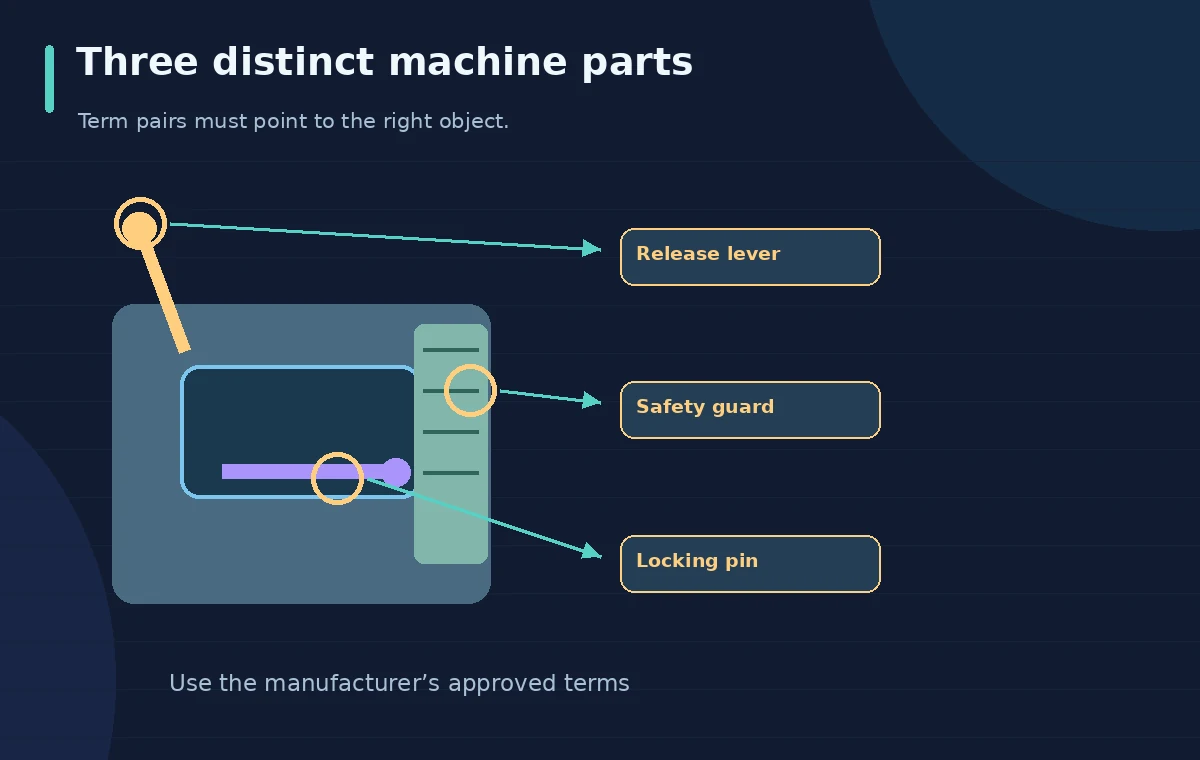
Start with an approved source manual, a parts diagram and the actual maintenance checklist. Give each component one identifier, even when staff use several informal names. Ask a bilingual technical reviewer to confirm the preferred target-language term in the destination market. The visual drawing identifies a lever, a pin and a guard as different objects connected to different instructions. Avoid creating glossary pairs from guesswork or from a generic dictionary alone. If the manual includes part numbers, keep them unchanged unless the manufacturer instructs otherwise. Establish the authority of the original text before asking a translation service to transform it.
Create a directional glossary with unique entries
In DeepL’s web translator, log in, open Glossaries and choose +New glossary to create a list manually. Name it for the equipment family, select the correct source and target languages, and enter each approved Source and Target term. DeepL says glossary entries must be unique rather than offering alternative translations for the same source term. For an English-to-Spanish checklist, do not assume the reverse direction is automatically active; the creation flow provides an optional setting to add reversed pairs. Use a terminology owner to resolve synonyms before creating the glossary.
Keep examples short but grounded in full instructions
A glossary can help map “locking pin” consistently, but an isolated phrase does not tell a technician whether to install, retract or inspect that pin. Review every instruction in the full sentence and against the parts diagram. For example, “verify the guard is secured before powering on” contains a safety order that must not be lost. Keep units, torque values, conditional wording and negation in the review checklist. Do not invent an exact Spanish safety warning for publication without a qualified translator. The diagram pairs source labels with approved target slots and marks the safety instruction as requiring specialist approval.
Apply the glossary to an actual document job
DeepL documents file translation from the web translator’s Translate files area: upload a supported document, set the language pair, open glossary controls, and select the desired glossary. Its help explains that multiple glossaries can be selected in eligible workflows, subject to availability. Ensure the glossary’s source and target languages match the translation direction; a mismatch defeats the purpose of controlled terms. Document translation requires an account, and plan-dependent limits may apply. The schematic workflow separates original DOCX, glossary term bank, translation job and an independent quality gate; it is not an image of a translated file generated here.

Compare the translated checklist with the parts diagram
Set the source document and translated result side by side. Inspect every step involving component selection, hand position, power isolation, rotation direction, torque or the sequence of actions. Make a cross-reference list of each source part identifier and its target term. If a label is used for the wrong object, stop rather than polishing the layout and overlooking the hazard. The conceptual comparison highlights consistent names but also a rejected instruction where “unlock” becomes “lock.” This contrast is educational and deliberately not attributed to a DeepL output. Safety wording requires a specialist translation and domain review.
Inspect tables, icons, units and page breaks
A file translator may aim to preserve the original layout, but you must check the downloaded document at actual page size. Verify that numbered steps remain in order; columns align with the correct icons; diagrams have readable captions; and long translated phrases do not overlap graphics. Ensure temperatures, units, decimal separators and part numbers are handled according to approved regional standards. Check whether a warning symbol visually precedes the right sentence. A glossary cannot fix a cropped warning or a table whose second row belongs to the first row’s component. Test the final printed or screen-view format.

Handle exceptions and ambiguous terms deliberately
Some English words carry several meanings, and one universal glossary mapping may be inappropriate. “Seal” can name a physical gasket or describe an action, while “ground” may refer to earth bonding or a surface. Do not force one target term across incompatible contexts. Create narrower phrases when supported, adjust source wording, or route the ambiguous instruction to a human translator. Maintain a change log noting which term the reviewer chose and why. The inspection schematic uses three separately labeled parts to show that consistency is useful only if the underlying component mapping is correct.
Approve the translated document as a controlled revision
After linguistic and technical review, give the translated checklist a version, language code and approval owner. Keep the original, glossary export or change record, reviewed translation and sign-off together according to company policy. Pilot the document with an authorized trainer only where workplace procedures permit. If any instruction still conflicts with the manufacturer’s manual, do not distribute the document for operational use. DeepL offers translation assistance, not equipment certification. We have not submitted real documents, held a paid account or verified the safety of any generated translation; the example serves as a model for proper review gates.
How We Research
We reviewed DeepL’s glossary creation instructions for unique directional term pairs, its file translation glossary workflow and its file translation overview. No document was uploaded and no translation quality or safety outcome was measured. The component labels are original educational art and require expert localization before real-world deployment.
Frequently Asked Questions
Yes, DeepL documents selecting glossaries in its file translation workflow, subject to account and plan limits.
No. Terminology consistency does not guarantee faithful negation, procedural order or safe equipment instructions.
Do not assume so. DeepL offers an option to add reversed term pairs when creating a glossary.
DeepL requires unique entries. Resolve context-dependent terms through more specific wording and human review.
No. A qualified bilingual technical reviewer should approve the wording, part references and layout before operational use.