
Disclosure: LabFin is reader-supported. If you sign up for a tool through links on this page, we may earn a commission at no extra cost to you. Commissions vary between providers and our ratings do not — here’s our full disclosure.
Grok vs Microsoft Copilot is a tie on our scores, 3.3 each. So the right pick depends on how you work. Grok reads posts on X in real time and scores higher on coding agents. Microsoft Copilot, by contrast, works inside Word, Excel and Outlook from $9.99 a month and has the better tested record. For more, our page on DeepSeek vs Microsoft Copilot covers a free open-weight model against AI inside Office.
This page covers Microsoft Copilot, the assistant in Microsoft 365, not GitHub Copilot. It also notes Grok’s new sibling: SpaceXAI, which makes Grok, has owned Cursor since August 14, 2026.
Grok vs Microsoft Copilot: The Short Answer
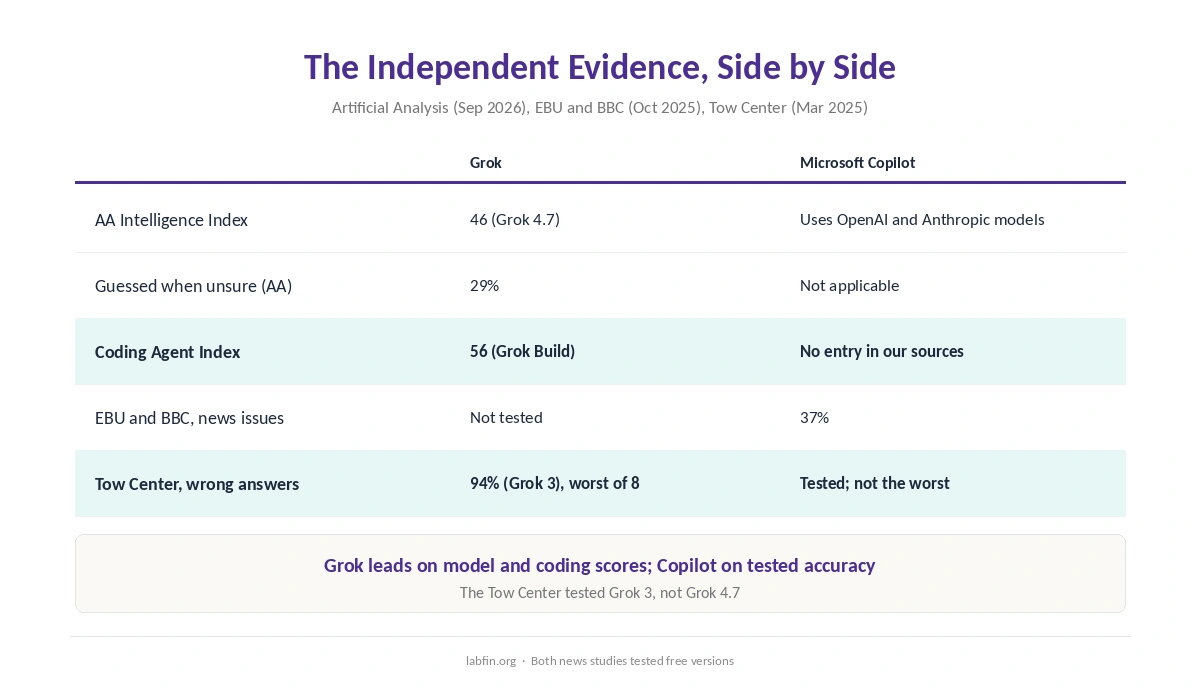
Choose Grok for X and coding; choose Microsoft Copilot for Office, price and a cleaner record. For example, Grok Build scored 56 on Artificial Analysis’s Coding Agent Index. Copilot’s Code feature, by contrast, has no entry there in our sources. Copilot, however, costs $9.99 a month with Office, against a reported $30 for SuperGrok.
On tested accuracy, Copilot has the edge. In the EBU and BBC study of October 2025, 37% of Copilot’s news answers had a significant issue. Grok, however, was not tested there. Meanwhile, Grok 3 answered 94% of citation queries wrong in the Tow Center study of March 2025, the most of eight tools.
Head to Head
| Criterion | Grok | Microsoft Copilot |
|---|---|---|
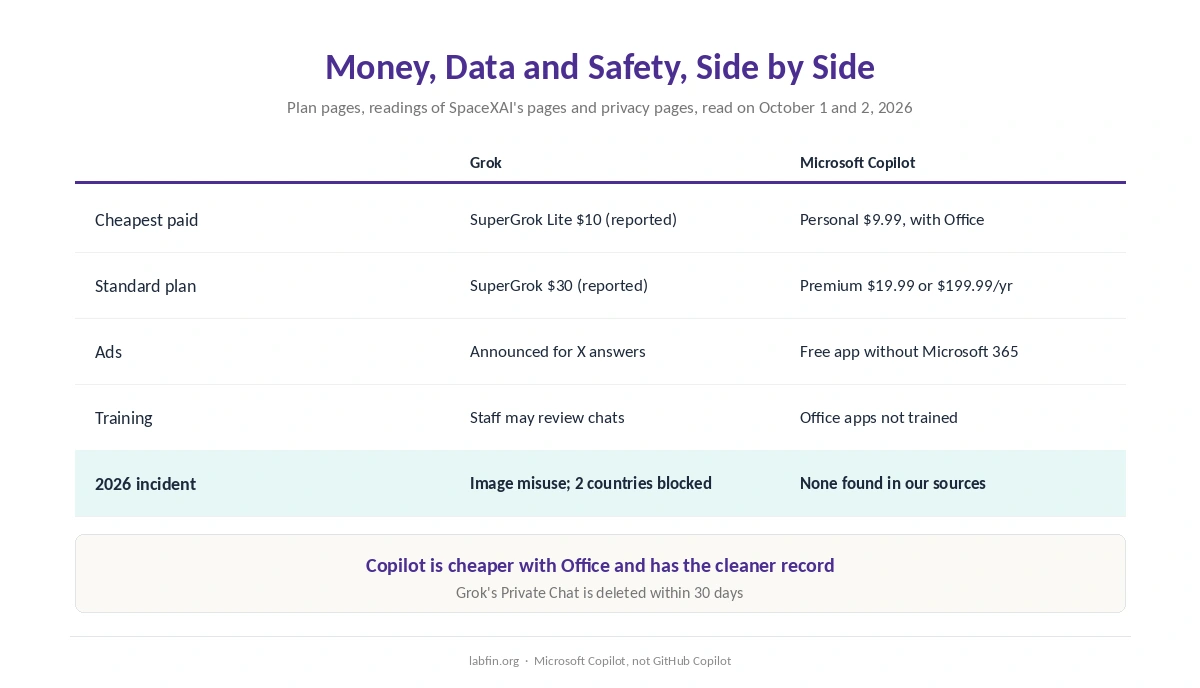
| Cheapest paid plan | SuperGrok Lite $10/mo (reported) | Microsoft 365 Personal $9.99/mo, with Office |
| Standard plan | SuperGrok $30/mo (reported) | Microsoft 365 Premium $19.99/mo or $199.99/yr |
| Works inside | X and its own apps | Word, Excel, Outlook |
| Models | SpaceXAI’s Grok | OpenAI’s and Anthropic’s |
| Coding Agent Index | 56 (Grok Build) | No entry in our sources |
| Ads | Announced for answers on X | Free app without Microsoft 365 |
| Our score | 3.3 | 3.3 |
Prices and Plans
At the entry level, Copilot starts cheaper. Microsoft 365 Personal costs $9.99 a month or $99.99 a year. That also includes the Office apps and 1 TB of storage. Premium, at $19.99 a month or $199.99 a year, also adds Researcher for cited reports.
Grok’s prices, by contrast, come from third-party readings: SuperGrok Lite at $10 and SuperGrok at $30. X Premium+ at $40 also includes SuperGrok. In addition, Bloomberg reported on September 30 that SpaceXAI is weighing a new combined plan, so check before paying.
Models, Coding and Real-Time Content
SpaceXAI’s side runs its own model. Grok 4.7 scores 46 on Artificial Analysis’s Intelligence Index and guessed on 29% of the questions it could not answer. Its coding agent, Grok Build, also scored 56, as our list of the best AI for coding covers.
Copilot borrows models. Microsoft announced Claude Opus 5.5 and GPT-6 Sol for Word, Excel and PowerPoint in September, WindowsForum reported. As a result, Copilot has no score of its own on these boards. Its Code feature also has no index entry in our sources.
Real-time content goes to Grok. It reads posts on X as they appear, which helps with breaking news and trends.
Office, Email and Research
Copilot, for its part, works where Office users already are: Word, Excel and Outlook, as our guide to Microsoft Copilot for productivity covers. Its Researcher returns cited reports on Premium, although Microsoft retired Deep Research in the consumer app on August 18, 2026.
Grok, however, does not work inside Office, and our sources document no cited research mode for it.
Ads, Training and Safety
Both have an ad question. Copilot’s free app shows ads without Microsoft 365. Its personalized ads can also draw on chat history, Microsoft’s privacy controls page says. Musk, for his part, told advertisers in 2025 that X would place ads in Grok’s answers. We could not confirm a launch, however.
On training, Microsoft says it does not train on Copilot use inside the Microsoft 365 apps on Personal and Family. SpaceXAI’s consumer FAQ, in contrast, says authorized staff may review Grok conversations. Signed-out users outside the EU and UK also cannot opt out.
In January 2026, people used Grok’s image tool to create sexualized, nonconsensual edits of real people. As a result, two countries blocked it for a time. The sources behind our Copilot review, however, contain no comparable incident.
Where Each One Is Weakest
Grok is weakest on price, sourcing and its record. Its standard plan is reported at $30, and Grok 3 had the worst citation record of eight tools in the Tow Center study. Its January scandal also led to blocks.
Copilot is weakest on research and clarity. Cited research needs Premium, the free app shows ads, and the updated app’s training rules are unclear.
Winners by Category
Price and yearly billing: Microsoft Copilot, because Personal costs $9.99 with Office and Premium bills yearly. Office work: Microsoft Copilot. Real-time X and coding agents: Grok, since it reads X and Grok Build scored 56. Tested accuracy: Microsoft Copilot, while Grok 3 had the worst Tow Center result. Safety record: Microsoft Copilot, with no comparable incident in our sources. Ads: a split, because both have an ad question.
When to Choose Grok Instead
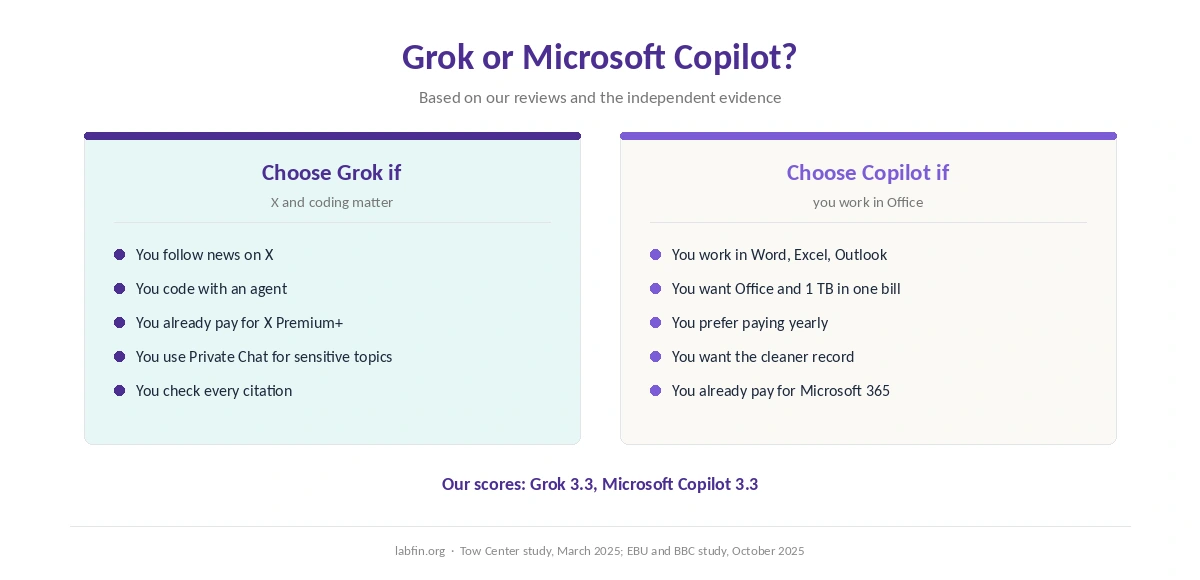
Take Grok if you follow news on X, code with an agent, or already pay for X Premium+. Also use Private Chat for sensitive topics, since SpaceXAI deletes it within 30 days.
Take Microsoft Copilot, however, for Office work, a lower price and the cleaner record. For Copilot against others, see our ChatGPT vs Microsoft Copilot comparison and our Gemini vs Microsoft Copilot comparison.
For Grok against others, see our Perplexity vs Grok comparison and our Grok vs DeepSeek comparison. Each one also weighs Grok’s X access against its record.
How We Research
This comparison reuses the sources behind our Grok review and our Microsoft Copilot review, rechecked on October 2, 2026. Accuracy figures come from the EBU and BBC and the Tow Center, and model scores from Artificial Analysis. Grok prices, meanwhile, come from third-party readings.
Both scores come from the same five criteria, applied to each tool in its own review. We run no tests of our own, and our criteria live on our about page. For SpaceXAI’s other product, see our Cursor review.
Grok vs Microsoft Copilot FAQ
They tie at 3.3 in our reviews. Grok suits X and coding; Microsoft Copilot suits Office, a lower price and a cleaner record.
Microsoft Copilot. Microsoft 365 Personal costs $9.99 a month with Office, while SuperGrok is reported at $30.
Copilot has the better tested record. The EBU and BBC found issues in 37% of its news answers. Grok 3, by contrast, had the worst result of eight tools at the Tow Center.
No. Grok works in X and its own apps, while Microsoft Copilot works inside Word, Excel and Outlook.
No. Microsoft Copilot is the assistant in Windows, Edge and Microsoft 365. GitHub Copilot is a separate coding tool.
The Verdict
Grok vs Microsoft Copilot is a tie on our score, 3.3 each, so pick by how you work. Grok wins on X and coding, while Copilot wins on Office, price, tested accuracy and safety record.
So choose Grok for real-time X and agent coding, and Copilot for everyday Office work. On either one, check training settings before you paste anything private.