
Disclosure: LabFin is reader-supported. If you sign up for a tool through links on this page, we may earn a commission at no extra cost to you. Commissions vary between providers and our ratings do not — here’s our full disclosure.
How to write better prompts is less of a mystery than it looks. After all, the companies behind the models publish their own advice. OpenAI, Anthropic and Google agree on the basics: say what you want, separate instructions from material, and show an example.
This guide on how to write better prompts turns that advice into steps, with the source for each one. It also shows where the official guides differ, and what to check once the answer arrives.
How to Write Better Prompts: The Short Answer
Be specific, structure the prompt, and show what good looks like. OpenAI’s prompting article asks for detail about context, outcome, length, format and style. Anthropic’s best practices likewise say to be clear and direct, and to use examples. For more, our page on using ChatGPT effectively covers effort levels, projects and memory after OpenAI’s September changes.
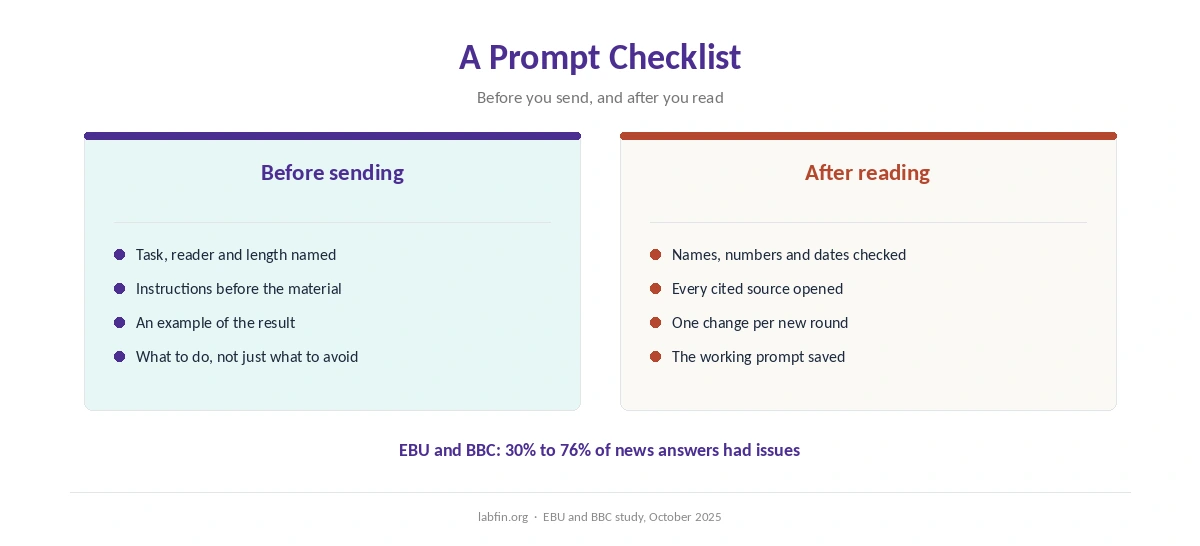
Then check the answer. Even a well-written prompt can return wrong facts, so open the sources for anything you plan to reuse. For example, in the EBU and BBC study of October 2025, between 30% and 76% of each assistant’s news answers had a significant issue.
Step 1: Say Exactly What You Want
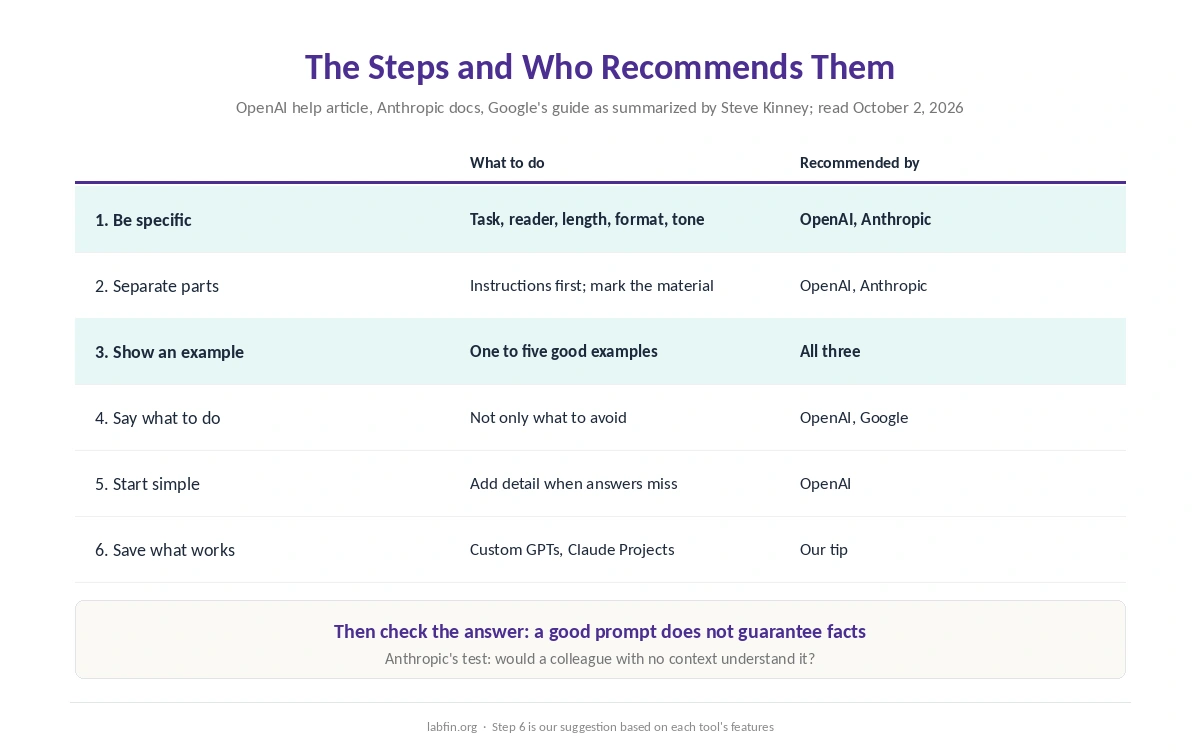
Name the task, the audience, the length, the format and the tone. For instance, instead of asking for a summary, ask for five bullet points on the attached report. Then add the reader, a finance manager, and a limit of 120 words. OpenAI’s guide lists these same details: context, outcome, length, format and style.
Anthropic’s guide adds a useful test. If a colleague with no context would be confused by your request, the model probably will be too. So include the background a newcomer would need.
Step 2: Put Instructions First and Separate the Material
Start with what you want done, then paste the text or data the model should work on. OpenAI suggests separating the two with clear markers, such as three hash signs or triple quotes. Anthropic, similarly, recommends XML tags such as instructions, context and example to keep parts apart.
As a result, the model is less likely to treat your pasted document as part of the instructions. That matters most with long documents, as our list of the best AI for research notes for cited reports.
Step 3: Show an Example of the Result
A short example of the output you want often works better than a long description. OpenAI calls this showing the format through examples. Anthropic, for its part, recommends three to five well-made examples, each wrapped in example tags.
Google’s guide also favors examples, developer Steve Kinney’s summary says. However, it warns that too many can make the model copy them too closely. So keep examples varied, and show good patterns rather than mistakes to avoid.
Step 4: Say What to Do, Not Only What to Avoid
A list of bans leaves the model guessing about what you do want. OpenAI’s guide, therefore, suggests stating the behavior you want instead of only what not to do. For example, rather than banning jargon, ask for plain language a high school student could follow.
Step 5: Start Simple, Then Add Detail
OpenAI suggests starting without examples and adding them only if the first answers miss. In practice, that means sending a clear prompt first and reading the result. Then you add the missing context or an example, which is how to write better prompts without overbuilding them.
Each round should change one thing, so you can see what helped. Also keep the version that worked, because you will want it again.
Step 6: Save Prompts You Reuse
If you repeat a task, store the prompt instead of retyping it. ChatGPT Plus offers projects and custom GPTs, which OpenAI plans to move to plugins, as our guide to ChatGPT for productivity covers. Claude, meanwhile, offers Projects and a Styles menu that can learn a voice from your writing. Our guide to Claude for writing explains both, and our ChatGPT vs Claude comparison sets the two side by side.
Where the Official Guides Differ
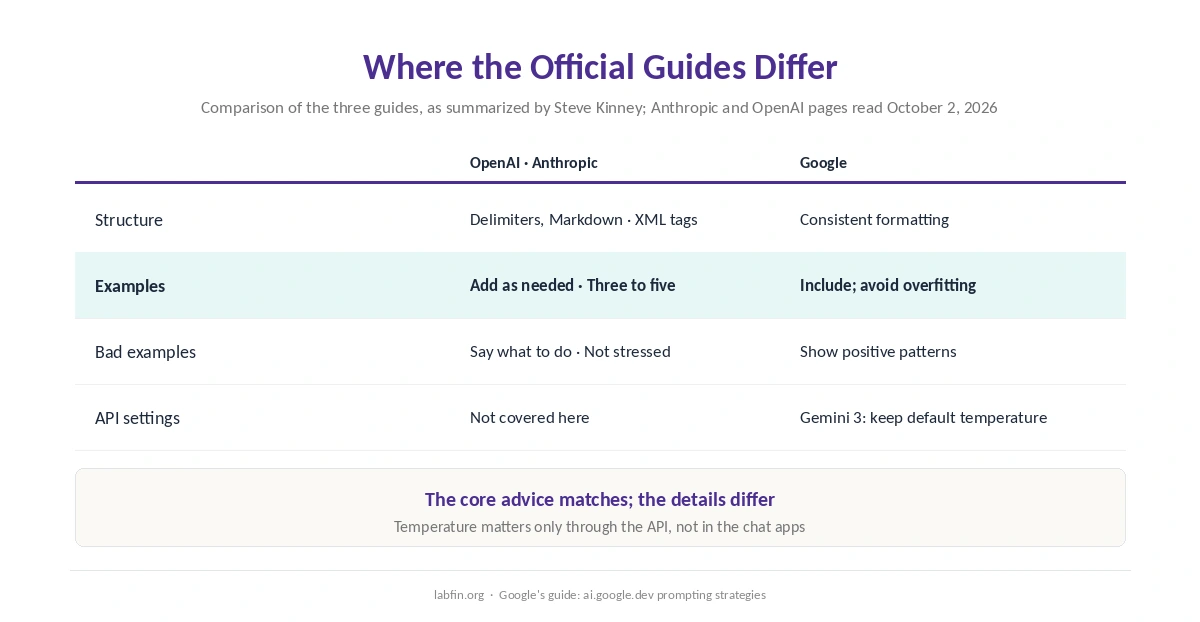
Structure. Anthropic treats XML tags as a core technique. OpenAI’s guidance, by contrast, uses delimiters and, more recently, Markdown or XML, Kinney’s comparison notes. Google, in contrast, stresses consistent formatting across examples.
Examples. OpenAI suggests starting with none and adding them as needed. Anthropic recommends three to five, and Google’s guide recommends including them, with a warning about overfitting.
Settings for developers. Google’s guide warns that lowering temperature below the default can cause looping on Gemini 3 models, Kinney reports. That setting matters only through the API, not in the chat apps.
Personas. Telling the model it is an expert is common advice, but tests by the Wharton School’s Generative AI Labs, published in December 2025, found that expert personas did not reliably improve factual accuracy. Our guide to prompt frameworks that actually help covers that research.
Check What Comes Back
A better prompt raises the odds of a good answer, but it does not guarantee one. So read the output as a first draft: check names, numbers and dates, and open every cited source. For writing tasks, our list of the best AI for writing covers which models write best. Our guide to ChatGPT for writing also covers its editor, and our list of the best AI for summarization covers cited summaries.
Beginners learning to code can also ask the model to explain before it answers. Our list of the best AI for beginners in coding covers learning modes that do this by default.
How We Research
This guide draws on OpenAI’s prompt engineering article and Anthropic’s prompting best practices, read on October 2, 2026. Google’s prompting strategies come through Steve Kinney’s comparison of the official guides, and we name that source where used.
The example prompts here are our own illustrations of each step, not tested outputs. Our criteria live on our about page, and our list of the best AI tools compares the assistants themselves.
How to Write Better Prompts FAQ
Say exactly what you want, and put instructions before your material. Then show an example of the result, say what to do rather than only what to avoid, and check the answer.
The basics match. Anthropic leans on XML tags and three to five examples, OpenAI suggests starting without examples, and Google stresses consistent formatting.
Often, yes. Anthropic recommends three to five, while OpenAI suggests adding them only when a plain prompt misses. Google warns that too many can cause copying.
It helps, but no. The EBU and BBC found significant issues in 30% to 76% of each assistant’s news answers, so check facts and sources.
Save it. ChatGPT Plus offers custom GPTs and projects, and Claude offers Projects and Styles.
The Verdict
How to write better prompts comes down to being specific, structured and concrete. The official guides from OpenAI, Anthropic and Google agree on that core. They differ mainly on tags and how many examples to use.
So start simple, and add context and an example when the answer misses. Then save what works, and check every fact before you use it.