
Disclosure: LabFin is reader-supported. If you sign up for a tool through links on this page, we may earn a commission at no extra cost to you. Commissions vary between providers and our ratings do not — here’s our full disclosure.
Of the tools on this list, the best AI tools for researchers working with their own papers are Gemini, ChatGPT and Claude. We rank them by how they handle your material. That means citations back to your own files, room for long documents, and plans that keep unpublished work out of training.
This page is about reading and analyzing your sources, not about web search. For sourcing accuracy on the open web, however, our list of the best AI for research ranks tools differently.
Best AI Tools for Researchers: The Short Answer
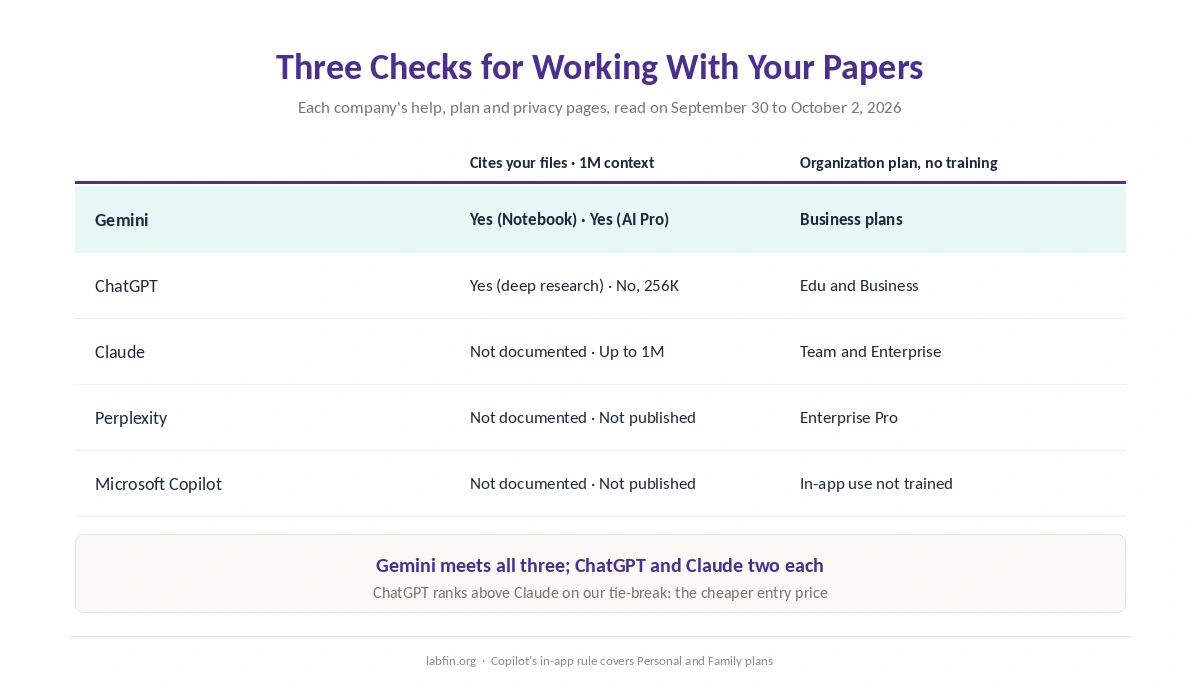
Among the best AI tools for researchers on this list, Gemini meets all three checks. Gemini Notebook answers from the papers you add and cites the passages it used. Google AI Pro also holds 1M tokens of context. Google’s business plans also skip training on your data by default.
ChatGPT and Claude each meet two. ChatGPT’s deep research cites sources in reports built from your uploads. Claude, meanwhile, offers up to 1M tokens, depending on the model. However, Gemini’s news-accuracy record is weak, so its strength here is grounding in your own sources, not its general knowledge.
The List at a Glance
| Tool | Cites your files · 1M context | Organization plan without training |
|---|---|---|
| Gemini | Yes (Notebook) · Yes (AI Pro) | Business plans |
| ChatGPT | Yes (deep research) · No, 256K | ChatGPT Edu and Business |
| Claude | Not documented · Up to 1M | Team and Enterprise |
| Perplexity | Not documented · Not published | Enterprise Pro |
| Microsoft Copilot | Not documented · Not published | No training on in-app use (Personal, Family) |
How We Ordered the Best AI Tools for Researchers
This list of the best AI tools for researchers counts three documented checks. First comes an answer that cites where in your own files each point came from. After all, that is how you verify a summary. Next comes a 1M-token context window on the roughly $20 plan, for long papers and theses.
Last comes an organization plan that skips training on your data by default, which matters for unpublished work. Almost every tool here meets that one, so the first two checks decide the order instead. ChatGPT and Claude then tie. So the rule from our list of the best AI tools puts ChatGPT first on its cheaper entry price.
1. Gemini: Notebook for Your Own Papers
Gemini Notebook answers from the documents you add and cites the passages it used. The free plan allows 50 sources per notebook, each up to 500,000 words. Google AI Pro then raises that to 300, according to Google’s limits as summarized by AI Weekly.
Gemini’s Deep Research can also research only your Drive files if you deselect Google Search. The catch: on consumer plans, some chats may go to human reviewers while Keep Activity is on. So use a business plan for unpublished data. Our guide to Gemini for research covers the details.
2. ChatGPT: Cited Reports From Your Uploads
ChatGPT’s deep research reads files you upload, and every output includes citations or source links, OpenAI’s Help Center says. Reports also download as Word or PDF, which suits sharing with co-authors. For Gemini against Claude on long documents, see our Claude vs Gemini comparison.
The catch: Plus holds 256K tokens with reasoning, short of a 1M window. Universities can provide ChatGPT Edu, which skips training by default, as our guide to ChatGPT for research covers.
3. Claude: Up to 1M Tokens in One Chat
Claude lists up to 1M tokens of context, depending on the model, and Projects keep reference papers together. Research, on paid plans, also returns cited answers from the web and connected Google Docs.
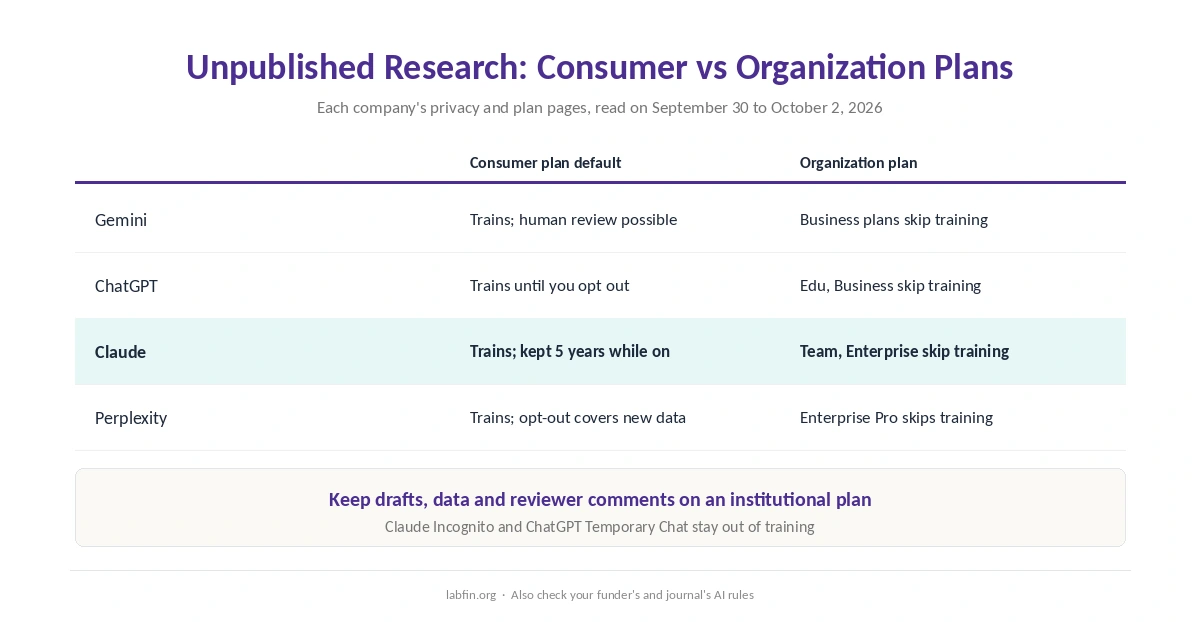
The catch: the sources behind our reviews do not document citations back to passages in uploaded files. On consumer plans with training on, Anthropic also keeps chats for five years. Therefore, use Team or Incognito for unpublished work. Our guide to Claude for research covers the details.
4. Perplexity: Sources From the Web
Perplexity cites every answer, and its sourcing record was also the strongest in two independent news studies. Enterprise Pro also skips training and allows 50 Research queries a month.
The catch: it publishes no context window, and uploads cap at 40 MB per file on a weekly allowance. Our guide to Perplexity for research covers where it fits.
5. Microsoft Copilot: Inside Word
Copilot works inside Word, and Microsoft also says it does not train on that in-app use on Personal and Family plans. However, its Researcher needs Microsoft 365 Premium, and our sources document no citations to your own files.
Protecting Unpublished Research
First, turn off training before you upload drafts, data or reviewer comments on any consumer plan. Better still, use your institution’s plan. ChatGPT Edu, Claude for Education, Google’s business plans and Perplexity Enterprise all skip training by default.
Also check your funder’s and journal’s rules on AI, because their policies can limit what you upload. Our list of the best AI tools for writers covers training opt-outs and ownership in more detail.
A Workflow That Holds Up
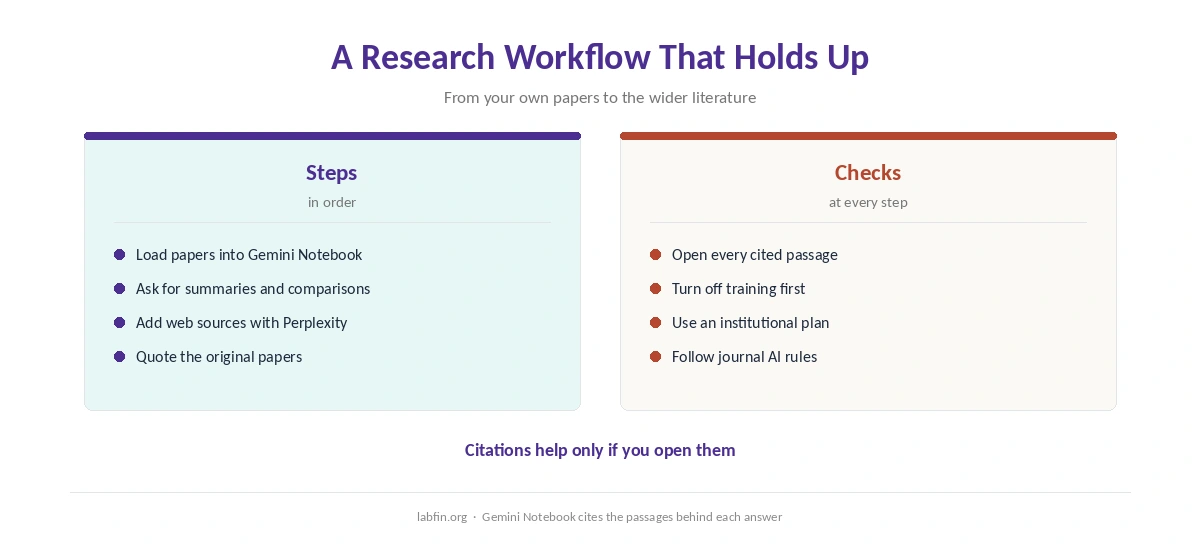
Start by loading your papers into a tool that cites passages, such as Gemini Notebook. Then ask for summaries and comparisons, but open every cited passage before you rely on it.
For the wider literature, however, add a web tool with a strong sourcing record, such as Perplexity. Finally, quote the original papers in your own work, as our list of the best AI for summarization also advises.
How We Research
This list draws on each company’s help, plan and privacy pages, read on September 30 to October 2, 2026. Examples include OpenAI’s deep research article and Google’s Deep Research help. Gemini Notebook limits come from Google’s help pages as summarized by AI Weekly, and we name that source.
We run no research tests of our own. Our criteria live on our about page.
Best AI Tools for Researchers FAQ
For working with your own papers, Gemini meets all three of our checks. Those are cited answers from your files, 1M-token context and business plans without training. ChatGPT and Claude follow.
Gemini Notebook cites the passages it used, and ChatGPT’s deep research includes citations in reports built from uploads. The sources behind our reviews do not document this for Claude or Perplexity.
Gemini on Google AI Pro and Claude, depending on the model, both list up to 1M tokens. ChatGPT Plus holds 256K with reasoning.
Not on consumer plans with training on. Use an institutional plan such as ChatGPT Edu or Claude for Education, or turn training off first.
For your own papers, yes. For sourcing from the open web, Perplexity had the strongest record in two independent news studies.
The Verdict
Among the best AI tools for researchers on this list, Gemini leads for working with your own papers. ChatGPT suits cited reports from uploads, and Claude suits very long documents in one chat.
Whichever you pick, keep unpublished work on an institutional plan, and open every cited passage before it reaches a manuscript.