
Disclosure: LabFin is reader-supported. If you sign up for a tool through links on this page, we may earn a commission at no extra cost to you. Commissions vary between providers and our ratings do not — here’s our full disclosure.
To use AI for refactoring well, put tests in place first, ask for a plan, and change structure in small steps while behavior stays the same. AI rewrites code quickly, but a large rewrite can quietly change what the code does.
This guide, moreover, covers which refactorings AI handles safely, a six-step workflow, and the risks to watch. It applies to Claude Code, Codex, Cursor, GitHub Copilot or a chat assistant.
How to Use AI for Refactoring: The Short Answer
First, make sure tests cover the code you will change, and add them if not. Then ask the AI for a refactoring plan, approve it, and apply one kind of change at a time.
Next, however, review every diff and run the tests after each step. Keep new features out of refactoring commits, so any change in behavior stands out.
What AI Refactors Safely
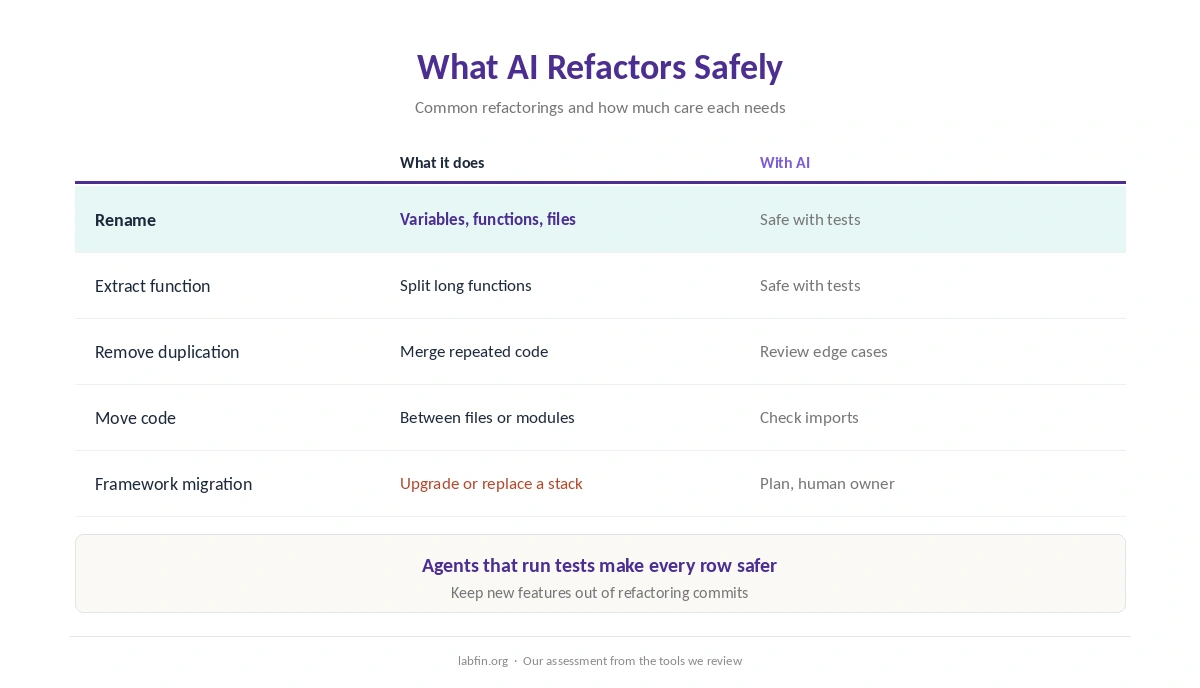
Renames, extracting functions, removing duplication and simplifying conditionals are routine for AI, especially with an agent that can run tests. Moving code between files, by contrast, needs more care with imports and side effects.
Framework upgrades and architecture changes, finally, need a plan, many small steps and a human owner. Our list of the best AI for coding ranks the agents.
Step 1: Build a Safety Net
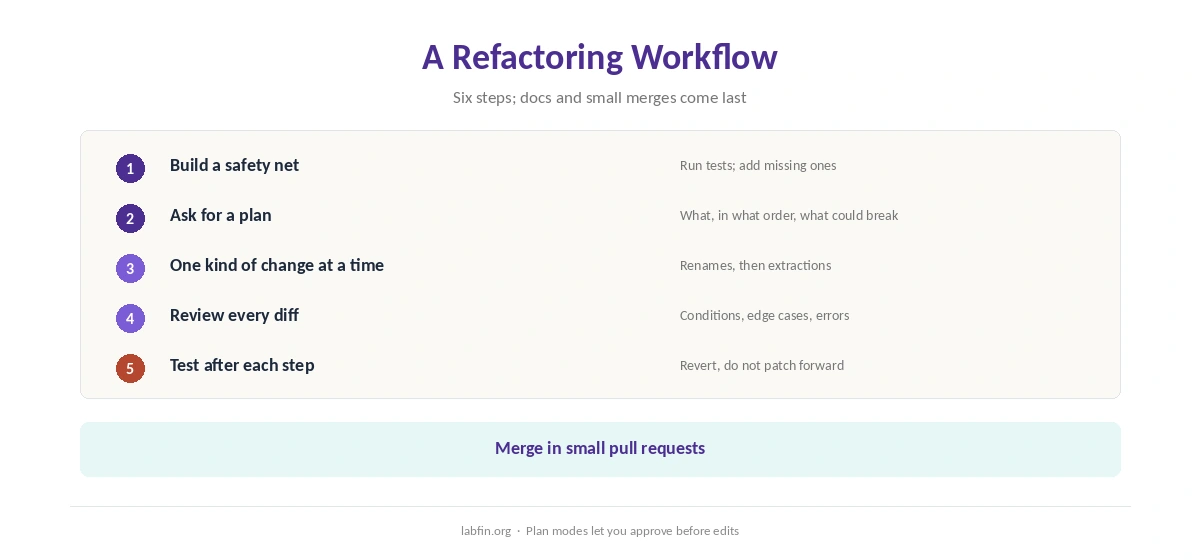
Run the existing tests, and add tests for any behavior they do not cover before you change code. Without tests, therefore, you cannot tell a refactor from a rewrite.
Our guide to using AI for unit testing covers tests that can actually fail.
Step 2: Ask for a Plan
Ask the agent to read the code and propose a plan: what to change, in what order, and what could break. Plan modes in tools such as Claude Code, moreover, let you approve the approach before any file changes, as our Claude Code review covers. Our guide to Claude for coding also covers its setup.
Step 3: One Kind of Change at a Time
Apply a single refactoring per step, for example renames first, then extractions. Small diffs, in addition, are easier to review and to undo.
Editor tools such as Cursor and GitHub Copilot handle small, local refactors well, as our Cursor review and GitHub Copilot review explain.
Step 4: Review Every Diff
Read each change for altered conditions, dropped edge cases, swallowed errors and deleted code. Ask the AI, moreover, to explain any change you do not understand.
Our guide to reviewing AI-generated code covers the checklist.
Step 5: Run Tests After Each Step
Run the full suite after every step, not only at the end. If a test fails, revert that step rather than patching forward, since the cause is then easy to find.
When a failure is unclear, our guide to using AI for debugging sets out a workflow.
Step 6: Update Docs and Merge in Small Pieces
Update comments and docs that the refactor touched, then merge in small pull requests. Our guide to using AI for code documentation covers keeping docs in sync.
Risks to Watch
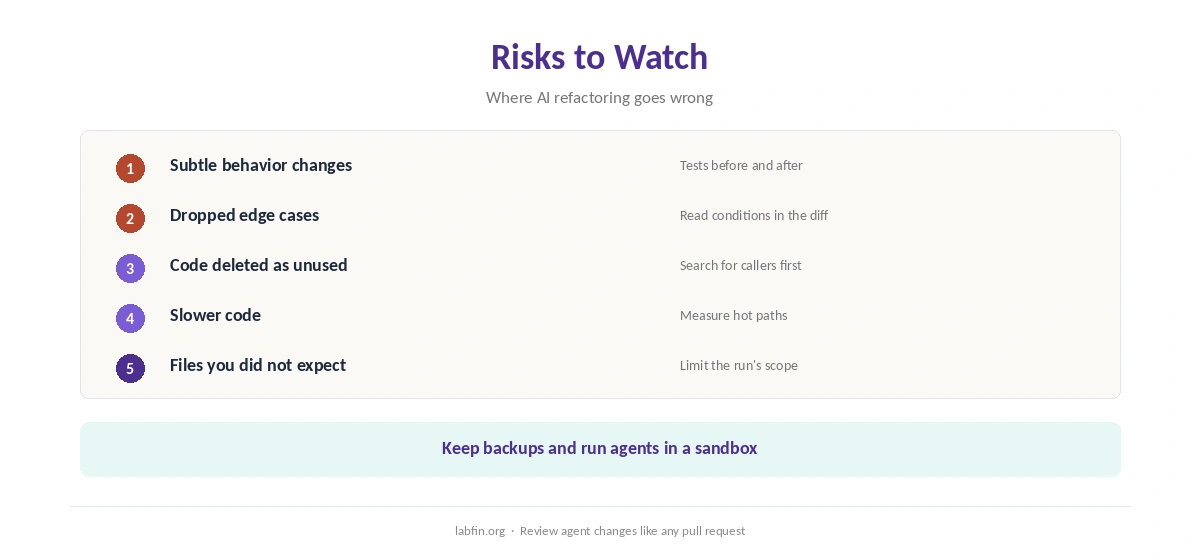
When you use AI for refactoring, watch for subtle behavior changes, slower code, and deleted code the AI thought was unused. Large agent runs, in addition, can touch files you did not expect.
So limit each run’s scope, keep backups, and run agents in a sandbox, as our guide to using AI for coding projects explains.
Private Code
For code that must stay in-house, Tabnine runs on your own servers, and local runners keep everything on your machine. Our Tabnine review covers deployment, and our list of the best local AI tools covers local options.
How We Research
This guide on how to use AI for refactoring draws on our reviews of each coding tool and on common refactoring practice, read between August and October 3, 2026. One example source is Martin Fowler’s refactoring site.
We run no refactoring trials of our own. Our about page explains how we research, and our guide to ChatGPT for coding covers Codex.
How to Use AI for Refactoring FAQ
Yes, in small steps with tests in place, a reviewed plan, and a test run after every change.
Agents that read the project and run tests, such as Claude Code and Codex; Cursor and Copilot suit small, local refactors.
Subtle behavior changes, dropped edge cases, slower code and deleted code the AI thought was unused.
No. Add tests for the behavior you will touch first.
It helps, but plan it, split it into small steps, and keep a human owner.
The Verdict
AI makes refactoring faster when tests protect behavior and changes come in small, reviewed steps. Large unreviewed rewrites, however, trade speed for hidden bugs.
So test first, plan, change one thing at a time, and run tests after every step. That is how to use AI for refactoring without changing what your code does.