
A community archive scans a soft, decades-old photograph showing several people outside a library. Some faces are small but visible; others have almost no usable detail. Topaz Photo Recover Faces 3 can generate plausible facial detail from low-resolution inputs, which may make a display easier to view but can also introduce features absent from the source. The article proposes a conservative enhancement and disclosure workflow rather than suggesting AI can recover a person’s true appearance or name. All depicted portraits are original hypothetical drawings; no identifiable person or real archival photograph was processed.
Preserve the scan as historical evidence
Begin with a high-quality scan of the print and store the master in the archive’s approved preservation format. Record physical identifiers, collection rights, scan settings, known date range, and any existing captions. Do not sharpen or overwrite the master. A soft face is still a legitimate part of the historical record; a generated face is a modern interpretation of missing pixels. Ask the collection owner whether AI-enhanced imagery may appear in a public exhibit and whether it needs a label. Create a separate derivative file, so researchers can always return to the untouched artifact.
Check the newest available model and processing options
Topaz Photo’s documentation identifies Recover Faces v3 as the newer generative model, introduced in the May 2026 v1.6.0 release. It processes selected faces individually and may be slower when many faces are included. The model supports local inference on suitable NVIDIA, AMD, and Apple Silicon hardware, while cloud rendering is available for systems that cannot use it locally. Check the published requirements, organizational privacy restrictions, and whether internet-based processing is authorized for the specific collection. Do not confuse current subscription-based Topaz Photo with the older discontinued Photo AI product or rely on legacy menus.

Identify faces that are truly recoverable
Import the scan and let the program analyze it, or add the Recover Faces enhancement manually. Topaz explains that a selected face is indicated by a yellow outline, while a deselected one is grey. That selection indicates which detected faces receive the effect; it does not show the exact area that will be changed. Very tiny, sideways, or unrecognizable faces may not be detected, and the application cannot force detection on an unsupported region. Do not crop and hallucinate a missing person simply to increase coverage. Leave faces with too little evidence unprocessed and note the limitation in the exhibit record.
Start with a modest enhancement strength
Choose a single face with enough original features to guide the model and start from a conservative strength. Compare it with the original at matching zoom levels. Topaz provides controls for recovery strength and for including hair or neck in the processed region. Aggressive reconstruction can create a smooth, glamorous portrait inconsistent with film grain and age. A beautiful result is not necessarily a faithful result. When the original face is already clear, the vendor advises that recovery may overprocess it; use another, less generative enhancement or leave it alone. Treat each face as a separate editorial decision rather than applying one setting to the entire group.
Recognize invented details as a rejection signal
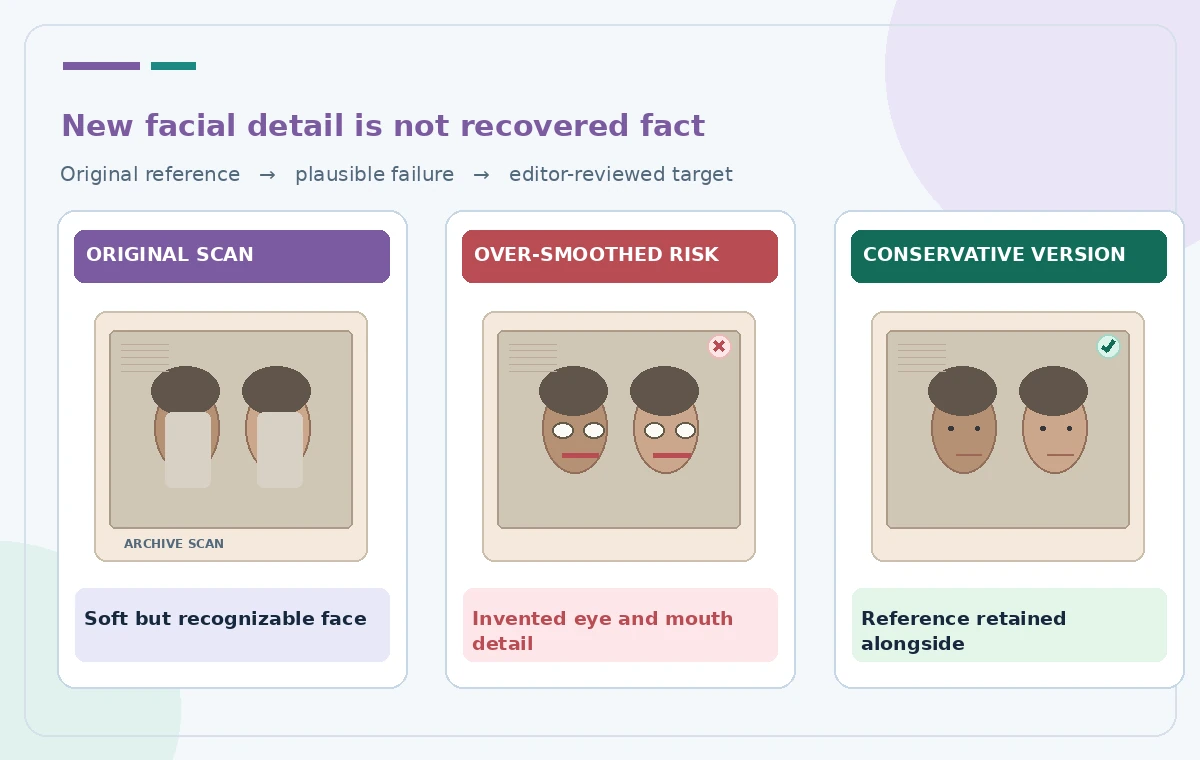
In the drawn comparison, one version has implausibly neat eyes and a redesigned mouth; that is a failure example, not an actual Topaz result. Look for changed eye spacing, new teeth, altered eyebrows, different glasses, sharpened jewelry, or an expression that did not exist in the reference. Do not identify a person from the reconstructed version or use it for facial recognition. Human identity depends on provenance and corroborated records, not the certainty of a generative enhancer. If a face remains ambiguous, describe it as unidentified. Keep the original crop adjacent to any enhanced image in internal review.
Check consistency across every group member
If one face has been improved, the rest of the photograph can look uneven. Compare skin texture, grain, lighting, and sharpness across all participants. Do not process everyone automatically just for a uniform poster aesthetic. The strongest enhancement may pull attention to one figure and create an unintended hierarchy. Topaz’s face selection is meant to allow per-face inclusion; use it deliberately and review after each change. When the scan is too degraded, a simple tonal or exposure correction may serve the collection better. Do not stitch an AI face from a different photo unless that separate reconstruction is explicitly labeled and permitted.
Keep privacy, consent, and attribution in view
Some archival portraits include living people or collections with donor restrictions. Determine what permission the archive has to create and display derivatives. Local versus cloud processing is not only a speed decision: uploading an image may be prohibited under an institutional data agreement. Record the use of generative enhancement in the collection’s derivative metadata without suggesting that Topaz verified personal identities. If relatives provide names, verify those claims independently against accession notes or other records. Never use a reconstructed face to make allegations, biographies, or personal claims about a person depicted in the source.
Publish the enhancement as a clearly labeled derivative
For a museum display, consider presenting the original crop and the enhanced crop side by side with an unobtrusive caption stating that facial details were reconstructed by AI. Keep the original full scan available through the archive’s approved access system. Do not use the enhancement as the only image in a scholarly catalog entry when its provenance could be misconstrued. Verify the print size and color conversion to prevent additional artifacts. If the derivative changes the perceived age, emotion, or identity, withhold it or reduce the effect. A respectful label should acknowledge uncertainty instead of promising recovery of lost truth.

Approve the version with the least unsupported invention
Make a brief record for each selected face: whether it was detected, whether processing was local or cloud, what adjustments were applied, and which visual discrepancies were found. Invite a conservator or experienced photo editor to compare the derivative against the original. A version that remains soft may be the more responsible choice. The product can aid visual access to small faces, but it cannot establish who the individuals were or what they looked like in missing detail. No empirical restoration results, actual facial identities, or proprietary archive images are claimed in this hypothetical tutorial.
How We Research
We reviewed these named official developer resources: Topaz Photo — Recover Faces; Topaz Photo — Release summary; Topaz Photo — Autopilot configuration. We checked the documented feature entry points, eligible platforms, administrator or licensing controls, and known sharing or source limitations against the tutorial steps. Editorial examples were designed as hypothetical failure-mode checks, not reports of hands-on testing. We did not have a live account, source files from a museum or nonprofit, user interviews, access to private records, or measured model outputs. Every illustration is original explanatory artwork rather than a vendor screenshot or measured before/after result. Features and entitlements can change. A responsible editor should confirm current product documentation, applicable organizational policy, and the original evidence before putting the workflow into consequential use.
Frequently Asked Questions
No. It generates plausible detail for viewing. It must not be used to identify people or prove what missing facial features truly looked like.
Topaz says the model cannot force detection when key face details are absent. Leave those regions unprocessed rather than inventing them.
No. Support depends on hardware and platform; Topaz also documents cloud processing for unsupported systems. Check privacy policy before using cloud render.
Usually not. The vendor warns that well-defined faces may become overly smooth or artificial; conservative non-generative adjustments may be preferable.
Keep the original available and disclose that AI reconstructed visual details. Do not present the derivative as an untouched historical photograph.