
A local archive digitizes a folded community-hall blueprint. Fine dust and white scratches run across the scan, but the drawing also includes original pencil corrections and narrow dimension marks that must not disappear. Topaz Photo Dust & Scratch is designed to clean surface damage, and the vendor specifically warns that some real detail can be removed. This guide uses a fictional architectural plan to build an evidence-first workflow: preserve the untouched scan, distinguish damage from historical marks, inspect repaired regions at full size, and keep any uncertain text readable only through the source.
Make an archival master and a working derivative
Scan the drawing at a documented resolution with a ruler or scale reference and correct orientation. Retain a lossless unedited master, record its color profile and any scanner corrections, and create a separate derivative for enhancement. Photograph fold lines and handwritten marginalia if the scan cannot capture their texture adequately. A crisp final picture is not a replacement for the physical document or a provenance record.
Identify which strokes are genuine: wall outlines, dimension ticks, pencil amendments, and architect initials. Dust may be scattered dots, while fold damage can look like a straight line cutting through rooms. A model optimized for restoration does not know the provenance of each line. Mark fragile annotations in a reference layer before any automatic cleanup.
Select Dust & Scratch with realistic system checks
Topaz documents Dust & Scratch v2 as a no-control enhancement that can be added before denoising or sharpening. In the current Topaz Photo workflow, locate it using Add enhancement or the alternate enhancement selector, then choose local or cloud processing according to available hardware. The official requirements specify at least 8 GB VRAM for local Windows processing and Apple Silicon with a minimum of 16 GB RAM and macOS 14 for local Mac use.
If the workstation cannot process the model locally, consider the supported cloud option only after confirming the archive’s image-sharing rights and the institution’s policy. Do not upload restricted material merely because local processing is slow. Preserve exact file identifiers between the master and derivative, and avoid vague output names such as “fixed final.”

Prioritize cleaning order, not maximum processing
The Topaz guidance recommends running Dust & Scratch early, before Denoise and similar enhancements. Apply it to a duplicate, review the entire document, then make only justified additional adjustments. There is no reason to run several generative enhancements simply to make century-old paper look new. A strong global effect can remove pencil texture along with actual dust.
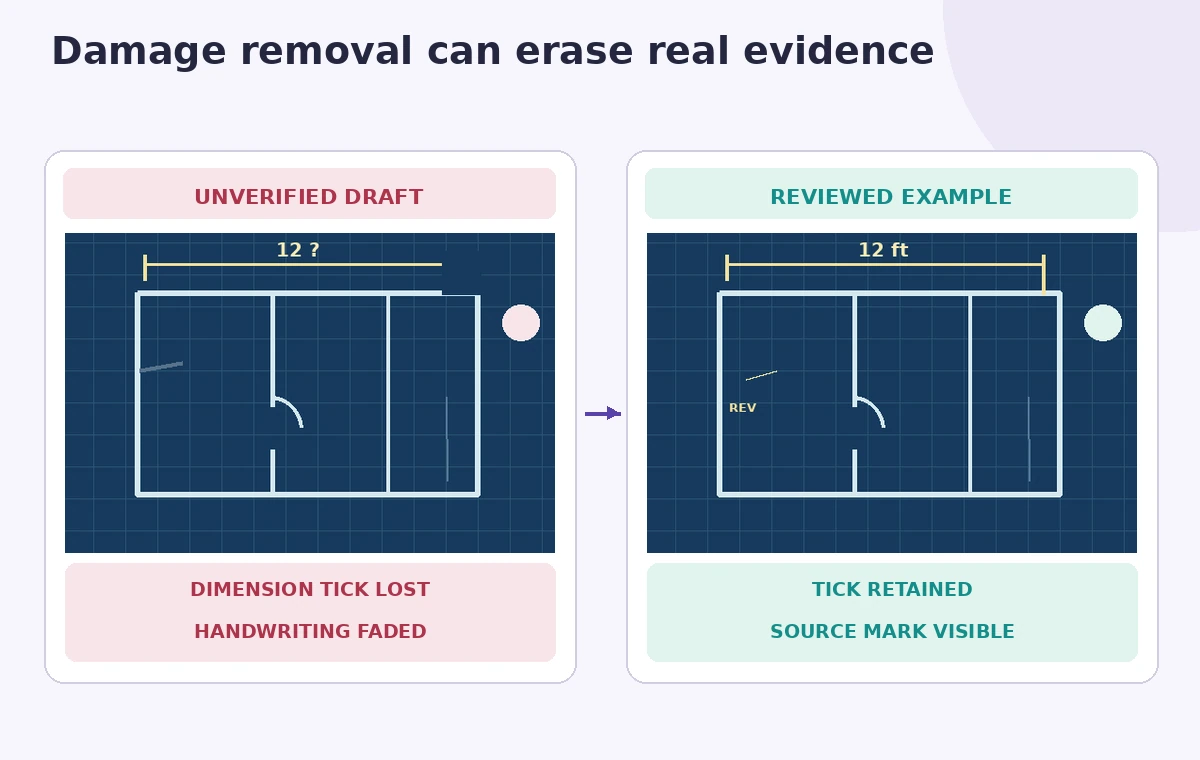
In this hypothetical blueprint, the right-hand margin contains a fine hand-lettered “12 ft” note beside a scratch. That label must remain traceable to the original, even if the restored image leaves a small blemish. Treat the measure as an archival fact, not something that the model can reconstruct from context.
Inspect thin strokes and dimension ticks side by side
Zoom into lines that are the same width as the scratches. A vertical beam edge, extension mark or arrowhead might look like a dust track to the model. Compare the enhanced crop with the untouched scan at identical scale and pan across the line. A stroke disappearing from one side of a wall is a substantive change, even if the overall photograph looks cleaner.
The before-and-reviewed illustration shows an AI-like cleanup that accidentally erases a dimension tick and a conservative derivative that preserves it. These are original drawings, not measured output from Topaz. If a line is genuinely illegible in the source, mark it uncertain. Do not redraw a dimension from architectural expectations.
Handle ambiguous writing and lost detail explicitly
Topaz notes that its Dust & Scratch model can remove original detail. The documentation suggests Preserve Text as one recovery option and a Spot Healing enhancement for large residual damage. Neither turns unreadable historical writing into verified words. Use the physical print, other archival scans, or a subject specialist if a dimension is crucial to research or preservation decisions.
Keep a short exception log with coordinates: “Upper-left stair label appears weakened after processing.” Review these with the archivist before release. If the restoration removes marks that cannot be confidently restored, retain the blemish in the public derivative or provide a paired original rather than silently inventing clean geometry.
Distinguish damage cleaning from interpretive reconstruction
Automated spot removal is a retouching step; it does not certify a building’s historic dimensions. A surviving “12” next to a destroyed unit suffix cannot be assumed to mean twelve feet. Reconstructed text should be separately labeled as an editorial transcription with its source and certainty level rather than baked into an image that appears authentic.
Do not alter the archive master or overwrite its checksum. Metadata should identify the derivative as digitally cleaned and record the chosen model version, date, operator, and known exclusions. This makes future reprocessing possible when better, less destructive methods become available.
Check performance, batch output and privacy
Topaz Photo’s current Dust & Scratch v2 documentation supports local and cloud rendering and describes batch workflow through enhancement steps. The legacy Topaz Photo AI guidance can differ; use the current product’s documentation rather than old instructions copied from a forum. Since local hardware requirements are unusually high, choose a small representative crop before committing a large batch.
For collections with personal notes, restricted maps, or private property data, an offline-approved workstation may be preferable. If the organization cannot use cloud processing, a slower manual cleaning workflow is better than breaching its handling policy. Never infer an actual processing time, throughput or error rate from this theoretical illustration.
Publish the image with a clear restoration trail
The final review targets the handwritten measurement, a fine structural line, and the fold edge. Confirm each against the untouched archive master and log any change. Share a comparison view when possible so researchers can distinguish visual cleanup from historical evidence. An archive caption should state that dust and scratches were digitally reduced without implying that missing information was recovered.
If the original is uncertain, preserve that uncertainty in the derivative. The goal is easier viewing, not a pristine design drawing that hides the material history of the sheet.

How We Research
For this article we reviewed named official product documentation: Topaz Photo Documentation, Dust & Scratch; Topaz Photo Documentation, Editing Tutorials. We checked the documented interface, eligibility, action limitations, model behavior, and available recovery options as of November 2026. The article uses a hypothetical editorial scenario with invented records and illustrative artwork rather than a real login, paid tool run, user dataset, listening test, performance benchmark, or measured image restoration. We did not verify access to any individual subscription. Our review method was to map each proposed result to a primary record, identify decisions requiring a qualified human, and avoid promising AI accuracy not demonstrated by the vendor documentation. Before applying this method in production, verify the current release, permissions, source integrity, and organization data-handling rules.
Frequently Asked Questions
No. Topaz itself cautions that fine image details may be removed. Compare with the source at full scale.
Topaz recommends using Dust & Scratch as an early step, before Denoise and similar enhancements.
A restored-looking label is not proof. Consult the original document or archival evidence.
No. Local processing has significant VRAM, memory, operating-system, and chipset requirements; cloud processing may be offered.
No. Preserve the untouched scan and label the enhanced output as a separate derivative.