
A volunteer archivist has a small scan of a fictional 1978 neighborhood reunion. Five people stand behind a folding table; two faces occupy only a few dozen pixels. The organization wants the image to be easier to see on a display, but nobody wants an AI model inventing a grin or making a person’s eyes look different. Topaz Photo’s Recover Faces enhancement can generate detail for detected faces. That makes the output potentially useful as an interpretive aid, not automatically reliable as a historical record. Here is a cautious, reversible way to evaluate it.
Define preservation before enhancement
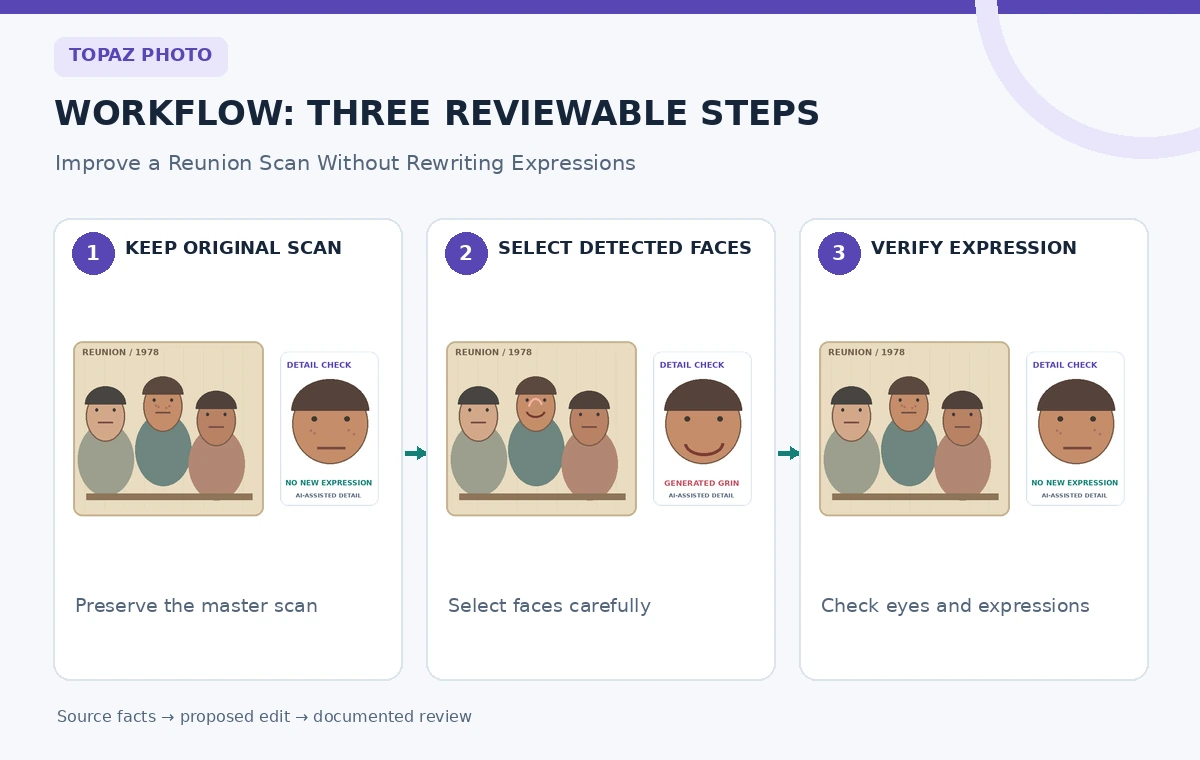
Write down the photograph’s known provenance before opening an editor: the approximate date, source of the physical print, permissions, and the difference between confirmed identifications and handwritten guesses. Give the scan a permanent source identifier such as REUNION-07 and note its native pixel dimensions. Save a lossless master that will never be overwritten. If the original shows a person’s mouth as a neutral line, the edited image should not quietly turn it into a smile merely because that looks friendlier in a promotional layout.
Decide which version will serve which purpose. The unchanged scan remains the documentary source. A selectively enhanced derivative might be suitable for a clearly marked gallery magnification, while a research catalog should still link to the master. Tell the curator in advance that invented facial detail may look convincingly real. An attractive result is not proof that the imagined fine detail matches the subject’s actual appearance. Record this distinction before generating anything, so editorial judgment does not drift after seeing a compelling preview.
Prepare a repeatable comparison file
Crop a duplicate for evaluation, keeping the original frame and the other people visible in the master. Avoid applying aggressive sharpening, skin smoothing, or other transformations before the comparison; stacked effects can hide which step caused a new expression. Mark a reference rectangle around each low-resolution face and record its approximate source location. Include a visible object such as the table edge in the reference crop so you can spot unintended changes beyond the facial region.
Plan a side-by-side review at both whole-photo and close-up scales. One view should show all five people together; another should show face crops at consistent size. For the fictional photo, the archivist is concerned about the two distant faces, not the clear central portrait. Restrict attention to those faces. Processing a face that already has good detail can produce an unnecessarily plastic finish, which Topaz explicitly cautions against in its product guidance.
Use Recover Faces only where detection is plausible
Import the working copy into Topaz Photo and check whether the software detects the tiny faces. The official guidance says Recover Faces can be added manually or can be enabled through Autopilot; selected detections determine which faces are processed. The yellow selection rectangles identify selected faces rather than the exact boundary of the enhancement. Confirm the two intended people are highlighted and the other three are not. Do not infer that a detected box constitutes a correct identification of any person.
If a face is too small, partly turned away, or missing key visual information, Topaz says it may not be detected and cannot simply be forced into the detected set. Stop rather than disguising the limitation. For each detected face, compare a conservative Strength setting with the original. Topaz describes a newer generative Recover Faces model and separate processing for each selected face; model availability and local-versus-cloud options depend on version and hardware. Check the installed edition before assuming the same controls are available.
Read the AI tool selection checklist
Look for fabricated expressions and surfaces
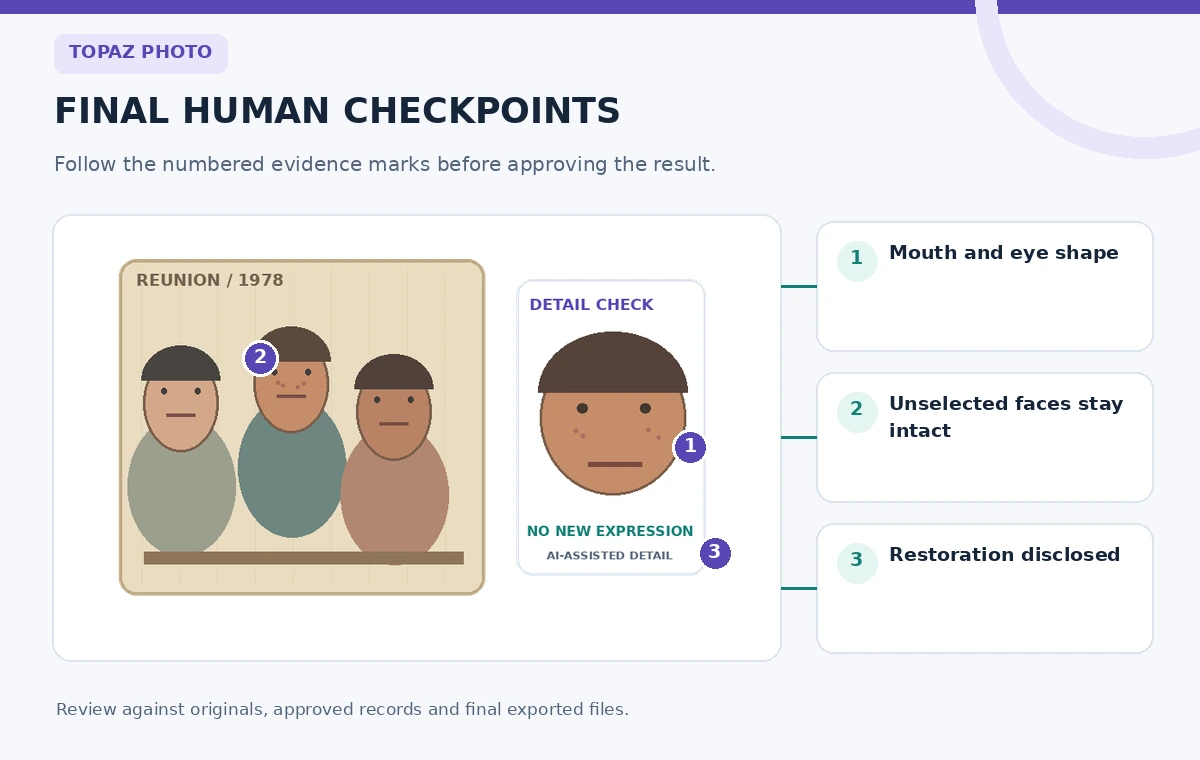
Inspect mouth corners, eyelid openings, nose edges, teeth, and hairlines at a matched viewing size. A dangerous failure is a small neutral mouth transformed into an unmistakable smile. Another is a softened face acquiring sharply drawn eyelashes that were not recoverable in the source. Check the transition into the neck and hair, because the selectable options for those regions can affect the apparent blend. Do not score an image only by how crisp the eyes look on a large monitor.
Use a simple three-column log: source observation, generated change, editorial judgment. Record ‘mouth neutral in source’ and ‘raised corners in result’ rather than claiming a facial expression that the scan does not substantiate. If enhancement changes a person’s visible characteristics, lower Strength or reject that face’s recovery. The archival objective is to help viewers read the original photograph, not to provide a portrait that could be mistaken for a higher-resolution camera capture.

Review group consistency, not just isolated crops
Return to the whole frame after examining the face crops. A single extremely clean face among four grainy faces often signals reconstruction rather than an authentic photographic result. Compare relative head size, skin texture, lighting direction, and depth of field. Look for haloing around the processed face, new hair strands crossing the backdrop, or an apparent age change. A modest improvement that blends with the rest of the print is often more responsible than an obviously synthetic face.
Ask a second reviewer who has access to the source scan to look at the pairs without being told which generated variation the editor prefers. Have that reviewer flag unsupported differences before discussing aesthetics. If the identities are unverified, do not use resemblance to another image as proof; face reconstruction is not a facial identification system. This independent inspection is especially useful when the edited portrait is likely to appear beside names in a public history exhibit.
Choose an honest display treatment
For a museum label, consider showing the source scan first with a small adjacent ‘AI-assisted enlargement’ detail and a short explanation that missing detail may be inferred. Place the label near the derivative, not on an unrelated website page. Keep names, dates, and relationships sourced from archival records. Do not use generated facial features to retroactively confirm a person’s presence, clothing details, or mood at the event. The tool cannot recover information that the original scan never captured.
If the group portrait is published online, provide alt text that describes the original scene and disclose the enhancement in a caption. Avoid the phrase ‘fully restored original’ because it overstates evidentiary fidelity. For print production, retain the unenhanced scan at the accessible download link and keep the recovery result as a separate derivative. A viewer should be able to understand what was changed without having to ask a staff member or reverse-engineer the file.
Keep provenance alongside the derivative
Store the source filename, generated version, Topaz edition, the selected faces, an approximate Strength setting, editorial notes, and date of review. A simple spreadsheet row for each output is enough for a small community archive. Add a clear rule that the derivative may not replace the master in the catalog. If an enhanced detail is reused by another team, the provenance note should travel with it. This reduces the risk of an unlabeled reconstruction becoming the only available copy.
Make preservation copies in a stable format and maintain a link between versions. If no recovered face passes review, document that outcome rather than trying additional transformations until something looks persuasive. A failed enhancement is not a failed archive project. It tells the team that the existing evidence does not support a more specific portrait, and that a careful enlargement of the original may be the better public representation.
See our responsible multi-tool workflow
Run a final source-versus-output audit
Open the original and proposed display image at matching zoom. Check that every person’s pose, facial expression, hair outline, table placement, and background remain plausibly aligned. Ask whether any new feature is being presented as historical fact. Check that the enhanced version is labeled, the original remains available, and the captions do not make unverified identity claims. If a noticeable expression has shifted, return to the original for that face or discard the generated variant.
The release decision is a small sign-off, not a beauty contest: one curator verifies the documented provenance, one editor verifies visible changes, and the publisher confirms that disclosure is attached to the actual image. Preserve the comparison sheet for future researchers. This is the distinction between using Recover Faces as a viewing aid and allowing generated pixels to silently become the historical record.
How We Research
We reviewed Topaz Photo Recover Faces official guide and Topaz face recovery user guide to confirm the documented feature names, editorial limits, and supported workflows. The people, values, rooms, projects, and visuals in this article are fictional teaching examples, not measured tool output or genuine product screenshots. We did not operate a live customer account, submit private material, conduct a hands-on performance test, or certify any produced result. Source documentation supports what the product is described as doing; the evidence-preservation and human-approval tests are independent editorial recommendations. Confirm current plans, platform support, and interface wording in your own installed version before use.
Frequently Asked Questions
No. It produces a plausible enhancement and newer modes can generate missing detail. A sharper image is not independent evidence of the person’s exact expression or identity.
The official guide explains that the yellow rectangle identifies which detected face will be enhanced. It is not a precise boundary of changed pixels.
Topaz says a face lacking enough detectable details cannot simply be forced into its detection set. Preserve the source and avoid presenting a manual guess as recovery.
Usually not without a specific reason. Topaz warns that high-quality portraits can become over-smoothed or plastic after face recovery.
Keep the untouched master and label the displayed derivative as AI-assisted or generatively enhanced. Do not present speculative facial detail as authenticated history.