
Use an expiry as part of document handling, not as a permission slip
A hypothetical museum uploads a curator-approved public object description for a short AI-assisted indexing job. The file is useful for generating search suggestions, but keeping that extra uploaded copy indefinitely is not necessary. The collections system should remain the authoritative location for the original description, accession number and rights notes, while the API copy serves a bounded processing purpose.
An expiration setting is not a judgment about whether a document may be uploaded. Before making any request, the institution must classify the material, remove unnecessary identifiers, verify its vendor agreement and decide whether external processing is allowed. A public-facing caption can still contain donor details, unpublished coordinates or licensed photography that must not be shared.
Know exactly what expires_after configures
The OpenAI Files upload reference exposes an optional expires_after object with anchor set to created_at and seconds between 3,600 and 2,592,000. This means the specified lifetime is measured from file creation, not from the most recent time a reviewer opened the file. The operation accepts a file, purpose and optional expiry policy; it does not ask the API to discover an appropriate preservation period.
The same reference says files uploaded with purpose batch expire by default after 30 days, while other purposes normally persist until manually deleted. Do not copy those defaults into a blanket retention promise. Set an explicit lifetime when the supported API workflow and local policy allow one, and document any purpose-specific behavior that matters to your integration.
Separate your master archive from the temporary API file
In a safe hypothetical workflow, a versioned museum catalog export sits in the institution-controlled repository. An operator creates a minimal derivative for the indexing request, notes the source version and uploads only that derivative. The returned file ID then links the API copy to an internal work item without exposing the whole source document in logs or issue comments.
The original catalog version, the exported derivative and the uploaded file are different objects. An API expiration cannot substitute for an institution-managed retention schedule or preservation checksum. A catalog export may need to remain available for provenance review long after a temporary upload is deliberately allowed to expire.

Send a coherent upload request
For a multipart Files API request, the documented parameters include purpose, file and nested expiry fields. A typical instructional example uses purpose=”user_data”, expires_after[anchor]=”created_at” and expires_after[seconds]=”86400″ for one day. The exact purpose must be appropriate for the intended endpoint; do not choose a value merely because it happens to permit an upload.
Build the expiry value from a reviewed configuration and keep it in seconds. Reject values outside the documented range locally, rather than guessing that the API will extend a too-short or too-long interval. The example is an API parameter pattern, not an executed call, and its one-day duration is an editorial illustration rather than a universal compliance recommendation.
Inspect the returned expires_at value instead of assuming success
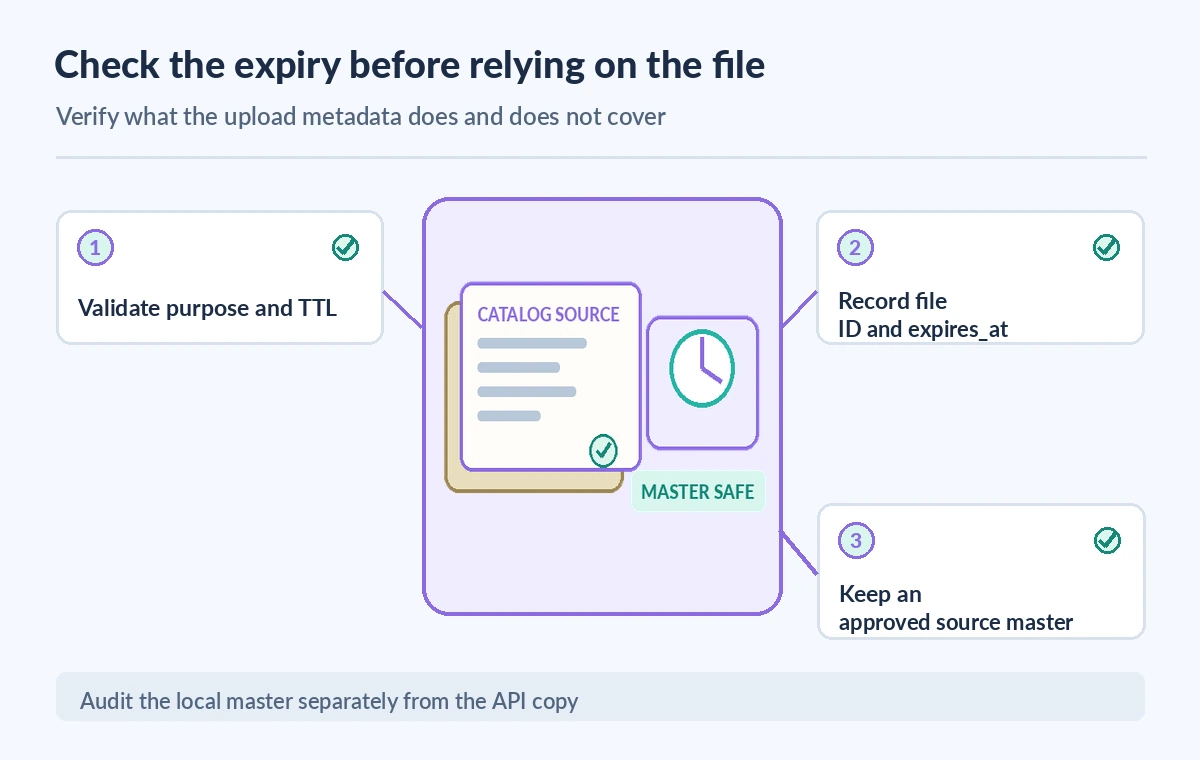
OpenAI documents a File object containing created_at and an optional expires_at timestamp. After upload, retrieve the File metadata by its ID and record the observed expiry value in your internal inventory. An absent expires_at should not be displayed as a confirmed date. Treat upload success and a verified retention policy as two checks, not one.
Because expires_at is a Unix timestamp in seconds, a monitoring page must convert it to a timezone-aware display. Store the original numeric value alongside the converted date so later auditors can reproduce the display. Include file ID, source revision, purpose and the policy version used at upload time, but avoid adding full document text to ordinary telemetry.
Make downstream workflows resilient to expiry
A summarization job may be queued for review after the file was uploaded. If it starts too close to expiry, a later operation may no longer be able to use the uploaded file. Plan the job window, review steps and cleanup policy together. Do not assume reading the file refreshes a created_at-based expiration, because the documented anchor does not say that.
If a task misses its window, re-evaluate whether the derivative is still approved for processing before creating another upload. A replacement receives its own file ID and lifecycle. Never silently map an expired ID to an unrelated newer file merely to make a workflow run; retain an audit trail tying each attempt to its source version.
Distinguish expiry from a complete deletion guarantee
An expiration setting governs the Files API object lifecycle described by the endpoint. It does not by itself establish when every log, backup, processed output or vector-store derivative disappears from all systems. A file attached to another service may have additional lifecycle rules, and the institution still needs the relevant contractual, privacy and service documentation.
For an urgent withdrawal of material, consult the documented file deletion operation and separately review dependent resources and copies. A UI message should say that a file is configured to expire or that an API deletion succeeded only when that has actually been verified. Avoid absolute claims such as all traces were erased or the original catalog master was deleted.
Review three distinct expiry scenarios
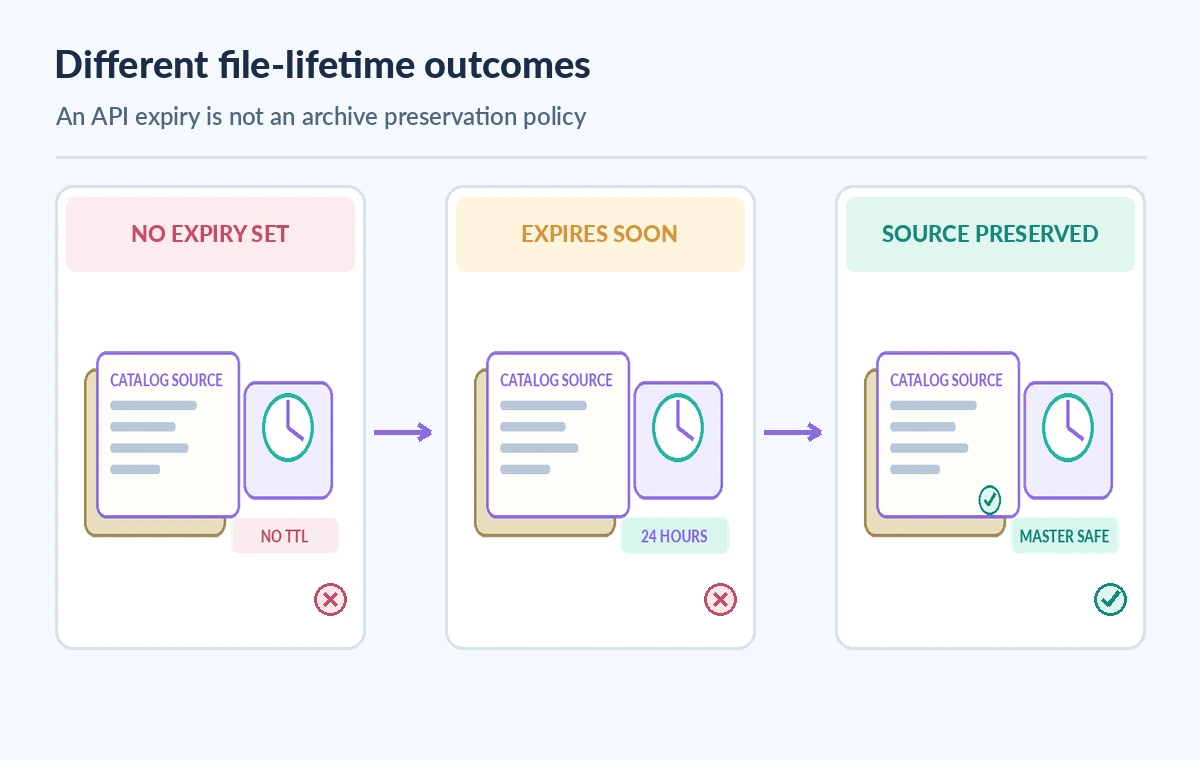
Consider three schematic cases. In the first, a non-batch file has no explicit expiry and may persist until manual deletion. In the second, a file has an explicit short created_at-based expiry that is shown in metadata. In the third, the temporary API copy is no longer needed but the authoritative internal source remains versioned and available to editors.
The comparison illustration depicts policy states, not measured deletion times or a real account. A green check beside preserved evidence means institutional source handling is accounted for, not that the API has provided a systemwide data-erasure certificate. This distinction helps reviewers avoid treating housekeeping metadata as legal compliance evidence.
Build a release checklist before relying on temporary files
For each approved data class, record the allowed file purpose, redaction procedure, source owner, intended duration, expiration verification and downstream dependencies. Give operators a way to find an upload that unexpectedly has no expires_at value. Confirm that any generated visitor-facing copy has passed an independent factual and rights review before publication.
Also test the negative path with synthetic files: missing expiry, malformed seconds, a file whose time has passed and a downstream reference to a retired ID. No real donor records are needed for these rehearsals. Keep the ability to stop a workflow when the document or policy version no longer matches the approved source.
Treat the file lifecycle as one boundary in a larger process
A sensible handoff begins with source approval, then derivative creation, upload metadata verification, controlled processing, human review and eventual retirement of the temporary copy. Each stage produces evidence with its own owner. By comparison, a lone expiration field is not a complete data-governance system and cannot decide who has reproduction rights.
This guide is a desk-reviewed description of documented API fields and a fictional museum workflow. We did not upload a file, inspect a real account, confirm deletion timing, or test compliance controls. Verify the current API schema, available purposes and the organization’s legal requirements before adopting a retention setting in production.
How We Research
For this November 11, 2026 desk review we checked named primary documentation: OpenAI Upload file API reference; OpenAI Retrieve file API reference; OpenAI Delete file API reference. We compared the vendor-defined fields and limits with a fictional museum workflow, identified states that the API cannot prove, and designed original diagrams to show the boundaries. We did not access a live customer account, upload or modify files, run API calls, inspect private records, verify service performance, or claim empirical success rates. Preview features, permissions and product behavior can change; confirm current release notes, your organization’s contracts, and human legal or editorial approval before deploying.
Frequently Asked Questions
The current Files upload reference lists 3,600 to 2,592,000 seconds, measured from the created_at anchor.
Do not assume that. The documented anchor is created_at, not last access.
No. The documented default varies by purpose; batch files have a default expiry and other file purposes generally persist until manually deleted.
Retrieve the File object and inspect expires_at, rather than treating a successful upload alone as sufficient proof.
No. It concerns the uploaded API file, not the institution-controlled source archive or every downstream copy.