
A small museum is preparing three borrowed artifacts for a return shipment. Its registrar has a OneNote page with condition notes, packing suggestions, a lender deadline, and a conversation about who might contact the courier. Turning those fragments into a task list could save time, but a polished list can also turn a suggestion into a named assignment or a delivery promise. This hypothetical walkthrough uses Microsoft Copilot in OneNote as a draft extractor, while keeping object identifiers, shipment requirements, and owner approvals anchored to the original record.
Separate the packing record from discussion notes
Before generating tasks, make a clean copy of the source page. Divide it into lender requirements, observed condition, open questions, and staff discussion. In the fictional example, object M-104 needs a foam support, object M-108 needs a signed condition photograph, and object M-113 has a question about allowable humidity. The courier date is proposed, not confirmed. This distinction matters more than whether the final list looks professional.
Do not ask Copilot to infer a ship date from a calendar invitation or to infer ownership from the last person who commented. A condition note is evidence about an object; a discussion line is not authorization to pack it. If the lender has formal instructions, retain those instructions as the primary record and cite the relevant clause beside any checklist item.
Use the documented OneNote task-list workflow
Microsoft documents Copilot task-list extraction from a OneNote page using the Copilot pane: open the page, choose Copilot on the Home ribbon, and request a to-do list scoped to the notes on that page. On supported versions, the page context can also be selected through a contextual Copilot shortcut. Availability depends on eligible Microsoft 365 subscriptions, operating system, and organizational settings.
Try a constrained prompt: “Extract packing tasks only from this page. Retain M-104, M-108, and M-113 exactly. Mark deadlines and owners as unconfirmed unless the notes explicitly assign them.” The result appears as a draft in the Copilot pane, not as a verified collection-management record. Copy it into a separate review list so the original notes remain unchanged.

Build a task register with evidence fields
Give each candidate task a traceable source line, action verb, object ID, evidence owner, approval state, and deadline status. A useful row might read “Photograph base of M-108 — registrar condition note — not yet assigned.” Keep “proposed carrier pickup Thursday” in an information field rather than as a due date. Do not make an unapproved packing method sound like a lender requirement simply because it was written near one.
When Copilot combines two bullets into one task, split them again if they require different approvals. Fabricating a single completion checkbox for “photograph and authorize export” could allow an assistant to mark the first action done while the authorization remains missing. This article’s illustrations show a fictional register, not an exported Microsoft interface.
Compare a confident draft with the real notes
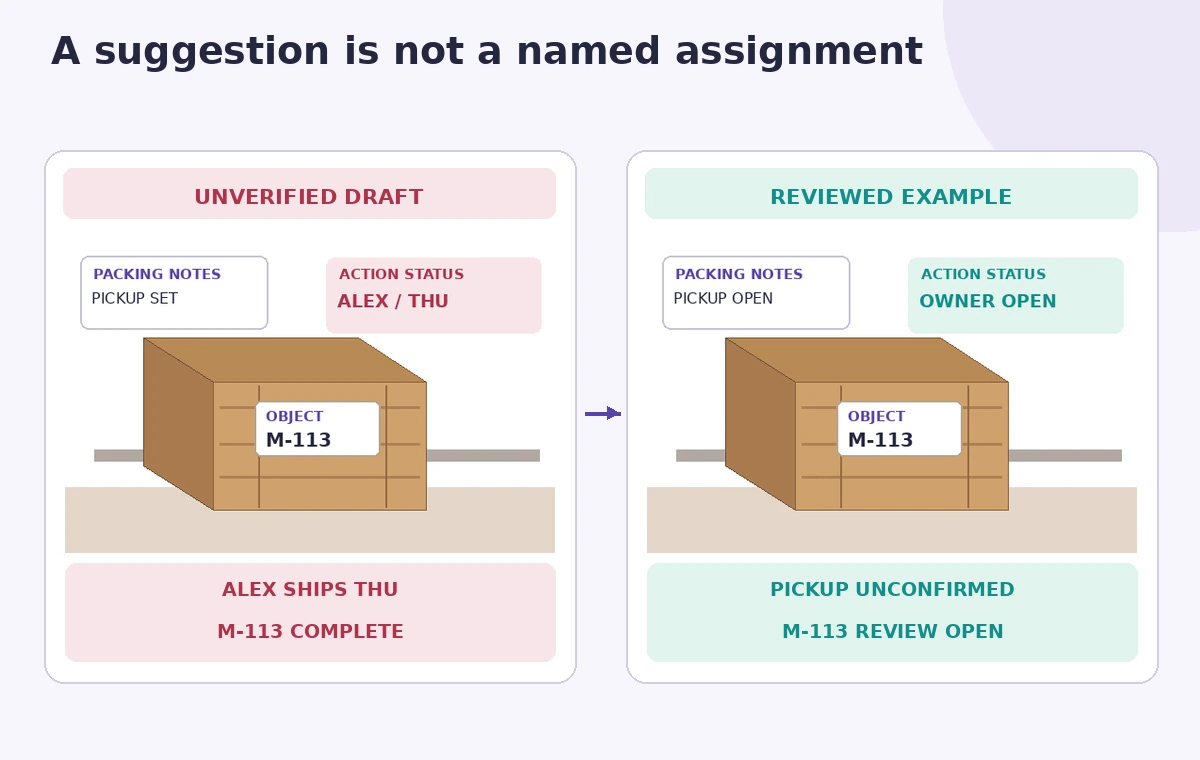
Imagine a generated checklist that reads “Alex ships M-113 on Thursday.” The notes actually say “Ask Alex whether the courier can collect Thursday.” That is a plausible but unacceptable promotion of possibility into fact. The comparison diagram puts these versions side by side; the corrected example leaves the courier confirmation and humidity instructions open rather than inventing an answer.
Review every proper noun, object ID, date, instruction verb, and assigned person. A single wrong artifact number can send the wrong item to the packing table. If a task lacks a citation in the source notes, either locate the supporting instruction or mark it as an editorial suggestion awaiting a curator, registrar, or authorized lender representative.
Set the human approval gate before work starts
The registrar should check condition documentation and object identifiers; the conservator should resolve any material or humidity questions; the shipping coordinator should confirm carrier timing. Copilot may arrange questions into a useful list, but it cannot approve conservation treatment or make a lender commitment. Put an explicit approval status beside actions with physical handling or external costs.
Use a simple status language: “source-confirmed,” “review needed,” “approved,” and “completed.” The status is not a confidence score from AI. It reflects an identifiable person and evidence. Keep the open owner column empty until the team actually assigns someone, even if the draft sounds natural with a name.
Protect sensitive collection records and access
A museum notebook may contain security details, lender contacts, location codes, or insurance values. Before asking AI to work on a page, check organizational permissions and retention policies for the enabled Microsoft service. Minimize the information in prompts to the portion necessary for task extraction. Do not copy restricted notes to another service merely to bypass a missing subscription or administrator setting.
Keep shared checklists free of building access codes, private contact details, and unneeded object values. The official OneNote documentation describes task extraction but does not guarantee that every organization has identical deployment or the same surrounding security configuration. Test the workflow with sanitized content first.
Run a dry-review before making the list operational
Have a colleague unfamiliar with the discussion read the candidate list alongside the underlying page. Can they tell which tasks are approved and which remain questions? Can they locate the condition-photograph requirement for M-108 without guessing? Ask them to trace each deadline to a primary record rather than to the AI summary itself.
For physical handling, a missing task is at least as important as an invented one. Compare the full packing checklist against the lender instructions and count the objects before anything is sealed. If the source page is incomplete, return to the primary documents; extracting the same incomplete notes again will not solve the gap.
Export a conservative, reviewable packing checklist
Once approved, move the task register to the museum’s usual tracker with an attached source reference and a date-stamped approver. Keep a stable copy of the original OneNote notes and the Copilot draft for editorial traceability. Do not replace the condition report or the lender’s signed instructions with a generated checklist.
The final image highlights three review points: the object code, the owner field, and the proposed pickup. A safe result may deliberately contain blank owners and unresolved dates. That is more useful than a visually complete list that authorizes something no one agreed to do.

How We Research
For this article we reviewed named official product documentation: Microsoft Support, Create a to-do list and tasks in OneNote with Copilot; Microsoft Support, Welcome to Copilot in OneNote. We checked the documented interface, eligibility, action limitations, model behavior, and available recovery options as of November 2026. The article uses a hypothetical editorial scenario with invented records and illustrative artwork rather than a real login, paid tool run, user dataset, listening test, performance benchmark, or measured image restoration. We did not verify access to any individual subscription. Our review method was to map each proposed result to a primary record, identify decisions requiring a qualified human, and avoid promising AI accuracy not demonstrated by the vendor documentation. Before applying this method in production, verify the current release, permissions, source integrity, and organization data-handling rules.
Frequently Asked Questions
The documented OneNote flow generates a task list for review. A named owner should be confirmed from the original notes or by an authorized colleague.
Do not assume so. Compare each object ID character by character with the source collection record.
No. A proposed time in notes is not a carrier confirmation.
Access depends on an eligible license, platform and organization settings. Microsoft documents current availability.
No. Keep the lender requirements and signed condition documentation as primary records.