
A small product team is deciding whether a product launch can proceed on Friday. One person proposes postponing the date, another volunteers to verify inventory, and the final decision may be left unresolved. Notion AI Meeting Notes can transcribe and summarize a meeting, but a generated action item is not proof that an attendee accepted responsibility. This guide explains how to request consent, capture a useful transcript, and verify decisions before sharing them. The meeting, names, and deadlines are illustrative rather than a real recording or a tool test.
Prepare a decision agenda before anyone records
Write down the three outcomes needed from the launch call: whether the launch date changes, who will verify inventory, and who approves the public announcement. Put these points into the meeting notes as context, without labeling any proposed owner as confirmed. A well-defined agenda makes it easier to spot a missing decision in the summary. Invite only people who need access to the discussion. Decide where the notes will be filed and who can view them, because an ordinary meeting database may have broader permissions than a private page.
Confirm plan, app, and microphone capture
Notion’s documentation lists AI Meeting Notes for Business and Enterprise users, with eligibility details for some mobile subscriptions. Check the current workspace plan and app version rather than assuming it is included in every account. For a remote call, the desktop app is usually the more appropriate path because it can use microphone and system audio with the needed permissions. Notion documents important browser and mobile limitations: a browser may only capture mic input, and headphones can prevent meeting audio from reaching that mic. Never claim a silent recording proves another participant was absent.
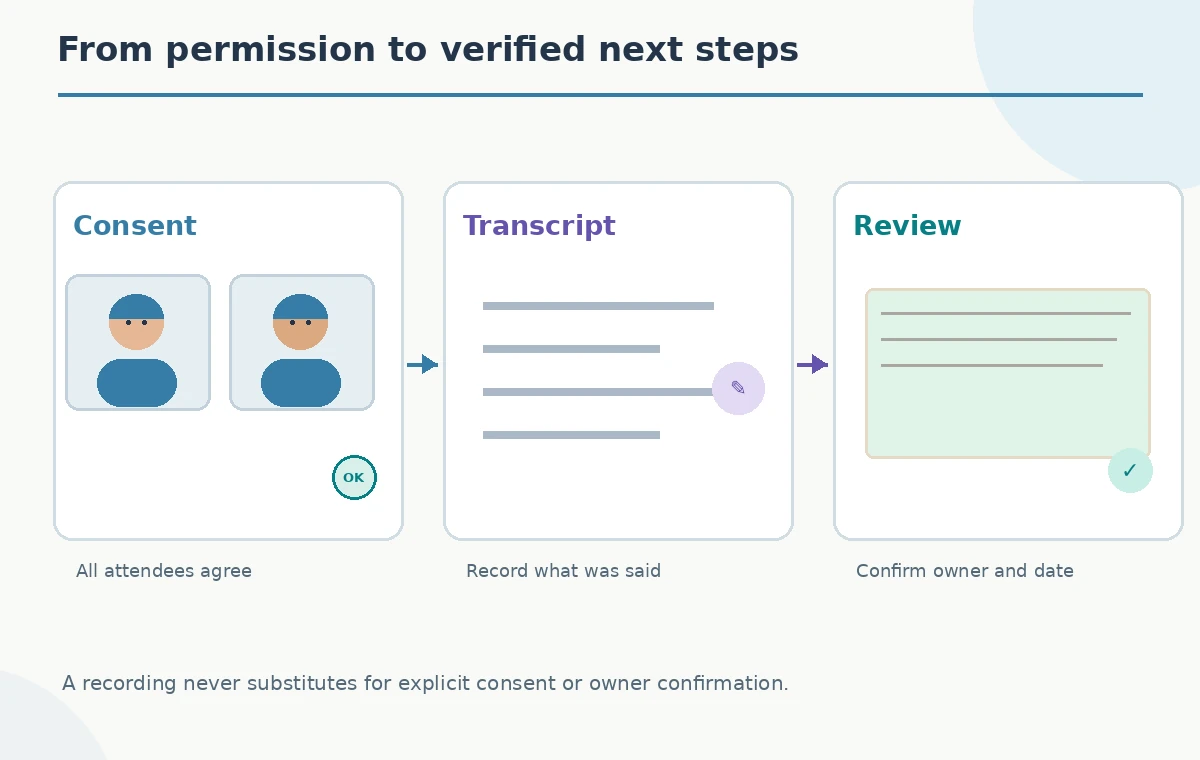
Ask consent before starting transcription
Tell everyone that an AI system will transcribe the call, explain the intended audience for the notes, and obtain affirmative consent from all participants before selecting Start transcribing. Notion provides text and voice consent-message options, but the organizer remains responsible for getting permission. If a late attendee joins, stop to address consent for that person. Do not assume a visible recording icon is sufficient for every jurisdiction or workplace policy. Keep a brief note of the consent process outside the generated transcript and honor anyone who opts out.
Capture the call without losing the context
In an appropriate Notion page or meeting entry point, start the AI Meeting Notes block and add agenda context. On desktop, the /meet command is one documented route. Check that system audio and microphone capture work before proceeding with substantial discussion. Notion says the summary is generated when transcription stops and requires at least roughly a minute of spoken content. A hypothetical note illustration shows participants discussing the date, then a transcription stage, then a human verification stage. These pictures are not a screenshot or evidence of a completed meeting.
Distinguish a suggestion from a decision
At the end of a meeting, the transcript may include “maybe Friday,” “I can check stock,” and “we agreed to wait for finance.” Those phrases are different. A summary should mark Friday as tentative if nobody approved it. A volunteer offer is not always the same as a confirmed assignment. Check the transcript near each action item and, where possible, review with the people involved. For unresolved points, label them “open” rather than filling in a convenient answer. The comparison diagram keeps proposal, decision, and open question visibly separate.

Verify owners and deadlines against the actual conversation
For each item, locate the spoken evidence for the task, owner, and due date. The person who mentions a task may be asking someone else to perform it, not taking ownership. If the deadline was “before the announcement,” do not silently convert it to a calendar date. Ask the responsible person for an explicit confirmation before recording a hard deadline. Notion can provide speaker labeling and citations in supported contexts, but availability and attribution quality may vary. A mistaken name should be corrected before the summary is shared beyond the immediate attendees.
Control note access as carefully as the recording
Notion notes have sharing controls, and placement in a shared database can affect who can view them. Inspect the actual page permissions before distributing a link. Avoid copying a full transcript into a broad company channel when a short, verified decision list is sufficient. Product-launch conversations may contain customer details, draft prices, or confidential vendor names. Consider retention policies and whether the original audio or transcript should remain accessible. A summary that is accurate but overshared can still cause operational harm. Permission review belongs inside the publishing checklist, not as an afterthought.
Use a review table without presenting it as automatic truth
A compact editorial checklist can track each item: proposal, cited transcript passage, human-confirmed owner, and status. The diagram highlights three danger points: a false owner, a proposed date misread as final, and accidental broad sharing. Those are areas for review, not quantitative error rates. If the team makes a new decision after the call, record that update separately with its date and approver. Do not rewrite the original transcript to make the timeline appear cleaner. Preserve the distinction between meeting evidence and later approvals.

Send a concise confirmed follow-up
The meeting organizer can distribute a short note stating approved decisions, unresolved questions, and named next steps. For each actionable item, include the owner only after confirmation. If the public announcement must wait for inventory, state that dependency plainly. Ask recipients to correct any misunderstanding by a clear internal deadline. Link to the restricted meeting notes only where appropriate, rather than exposing raw recordings widely. The aim is a reliable handoff from conversation to work, not a polished summary that hides uncertainty.
Have a fallback when recording is not allowed
If a participant declines transcription, do not start it. Use written notes taken by an agreed note-taker and read the action list back to the group before the call ends. If the desktop app cannot capture remote audio, do not assume a browser will solve it; verify the actual input path or return to manual minutes. AI Meeting Notes can be useful for drafting, but permission, context, and ownership remain human responsibilities. The most trustworthy record is one the participants recognize and can correct, not simply the longest transcript.
How We Research
This article was researched against the current official guidance: Notion AI Meeting Notes help and Notion Meeting Notes help center. We compared documented workflow steps, version or subscription limits, and stated capabilities with the specific editing decisions in this hypothetical scenario. We did not open a paid account, process the described media, inspect a real project, time a render, or assert measured results. All visuals in this guide are explanatory drawings, not screenshots or recordings of a completed tool run. The editorial assessment is source-based; no paid account, hands-on benchmark, or measured before-and-after result is claimed. Review the current vendor documentation again before a production run because interfaces and entitlements can change.
Frequently Asked Questions
No. Notion documents Business and Enterprise availability and some separately eligible subscriptions; check the current workspace.
No. It offers consent tools, but organizers must secure appropriate consent and honor participants who decline.
Not necessarily. Notion warns browser capture is mic-based and remote voices may not be recorded when headphones are used.
It can suggest an owner, but responsibility should be verified against conversation evidence and with the person concerned.
Not always. Review the page and database permissions and any auto-share settings before sharing.