
AI meeting notes can turn ordinary conversation into durable searchable records. That is valuable for accountability and potentially risky for participants, clients and confidential business plans. A safe workflow must answer who may start transcription, which signals notify attendees, where the text goes, who can read it and when it disappears. This is an operational checklist, not legal advice or a claim that one vendor guarantees compliance.
Decide if the meeting should be transcribed at all
Classify the meeting before choosing a bot: routine project update, customer support, private personnel conversation or regulated discussion. The recording decision should follow the subject and the organization’s requirements, not whether the application makes recording convenient. A handwritten decision log may be more proportionate for sensitive events.
Define a permitted purpose in one sentence. “Capture approved project actions for attendees” is narrower and easier to govern than “record everything for future AI search.” Specify who owns the data, whether guests are expected, and who can authorize a change to the purpose. Involve privacy or legal stakeholders when applicable.
Establish clear attendee notice and meaningful consent
Announce that audio may be transcribed or summarized, name the tool, explain the planned use and describe how participants can raise concerns. Zoom documents configurable AI consent notices, including a setting that can require acceptance before a participant unmutes. Notion advises obtaining consent from participants before starting its meeting notes. Do not assume that a platform banner alone satisfies every jurisdiction or company policy.
For external meetings, send the notice in the invitation and repeat it when the session starts. Handle late arrivals instead of assuming prior disclosure reached them. Provide an alternative, such as manual minutes, where appropriate. Record that consent was obtained without storing unnecessary personal details or treating silence as universal authorization.

Understand the distinction between summaries and retained transcripts
A summary is a derivative record; a transcript may contain substantially more detail, including mistaken names, personal remarks and exploratory ideas. Zoom documents controls for retaining meeting-summary transcripts and host access. Its guidance says those retention controls do not automatically cover every other note-capture feature. Build a data map per enabled feature instead of assuming one toggle governs every artifact.
List where raw audio, transcripts, summaries, action items and shared links reside. Ask whether downloaded or exported copies inherit deletion schedules—they often require independent handling. A meeting record may outlive the original service if it was emailed or copied into a team wiki.
Check third parties, workspace permissions and sharing defaults
Read documentation about subprocessors, integrations and user access. Notion describes the handling of audio, transcripts, summaries and permission inheritance for AI Meeting Notes. A page saved in a broadly shared workspace can expose content more widely than the meeting attendees intended. The existence of a permission menu is not evidence that the default configuration is least-privilege.
Create a small test meeting using non-sensitive material. Generate a note, then attempt to open it as a regular workspace member and as an invited external recipient. Check what appears in notifications, shared search and linked databases. Review integration privileges before connecting meeting tools to CRM, email or task systems.
Set retention rules for every kind of record
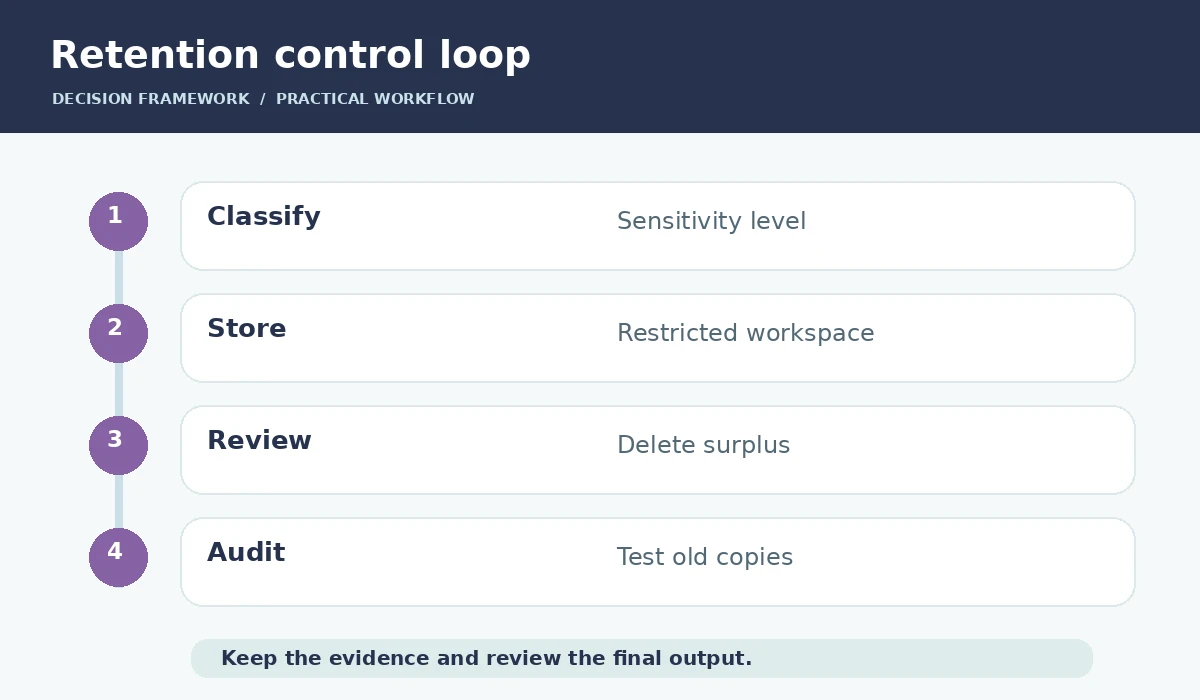
Agree on deletion timelines for raw audio, transcript, summary and approved action list separately. The approved action list may need to survive longer than a verbatim recording, while sensitive audio may have no continuing justification. Document any contractual, regulatory or preservation requirements rather than adopting a universal arbitrary number of days.
Test deletion using an example meeting. Confirm which artifacts disappear, which remain recoverable, and whether cached or exported copies persist. Notion documents controls including transcript deletion and enterprise schedules; options vary by account and feature. Maintain a named owner who can respond to access or deletion requests.

Reduce data exposure during the note-writing stage
A summary should not replay all confidential content. Ask the reviewer to remove personal anecdotes, unnecessary customer identifiers and sensitive tangents. Record decisions and tasks in the minimum detail needed for the team to act. When a transcript is required for evidentiary reasons, store it with restricted access rather than embedding it in a widely searchable knowledge page.
Prompting an AI system to “ignore sensitive content” is not an access-control boundary. Stronger controls include workspace permissions, clear retention policy, export restrictions where available and human review before sharing. A model may misclassify what is private, so the final release decision belongs to the host or appointed owner.
Create a meeting privacy preflight checklist
Before: identify purpose, classify data, select tool, check participants and send a notice. During: confirm agreement, make the recording state visible, pause capture for sensitive segments and protect guests who object. After: review accuracy, narrow the audience, remove surplus content, apply retention and record who approved sharing.
Include a failure path. If an unauthorized bot joined, suspend distribution and follow the organization’s incident-response procedure. If the meeting involved minors or protected professional information, obtain specialized guidance before relying on this general checklist. Operational readiness is the objective, not a blanket promise of legal compliance.
Review settings when products change
Meeting products frequently update interfaces, names and account requirements. Zoom’s AI meeting features and Notion’s note capture have settings that differ by account tier and organization. Make a quarterly owner-led review of the enabled features, policy links and permission tests, and revisit the review after any change to participant notices or connectors.
A practical audit record can be one page: feature enabled, owner, approved use, notice method, default recipients, raw transcript retention, export policy, last access test and next review date. This is more durable than screenshots from an old tutorial. It also makes vendor migrations less likely to re-enable unwanted capture features by default.
How We Research
We reviewed official and product-maintained documentation including Zoom meeting summary, Zoom AI consent controls, Notion meeting notes data and permissions, Zoom transcript retention. We mapped each documented feature to the specific workflow discussed above, separated product claims from editorial recommendations, and documented cases requiring confirmation by a human or a workspace administrator. We did not purchase or operate paid accounts, run independent quality benchmarks, test every platform configuration, or guarantee costs, privacy outcomes or productivity gains. Source checks were performed on October 27, 2026; documentation and feature availability may change.
Frequently Asked Questions
No. Different products may process or retain audio, transcripts and summaries differently. Examine each feature and its settings.
No. Consent requirements depend on jurisdictions, contracts, participants and context; seek qualified advice when necessary.
Some platforms support separate controls, but verify the active plan and what happens to exported copies.
Limit access to authorized participants or others with a genuine work need; test actual workspace sharing settings.
No. Consider a manual decision log or restricted process when the sensitivity outweighs the benefit of automated capture.