
An imagined interview in a seed archive was recorded beside a ventilation fan. The noise is relatively steady, but the archivist speaks softly when naming a tray. An aggressive denoise pass could remove the hum while stripping away “s” and “f” consonants. The words might sound smoother and be less intelligible. This is an audio-preservation task, not a contest to create the quietest possible waveform.
iZotope documents RX Spectral De-noise as a tool for unwanted tonal and broadband noise, included in RX Standard and Advanced. Its archived module reference explains the concept of learning a noise profile, while current RX 12 product pages describe adaptive processing and artifact control. These figures are conceptual waveforms and spectrograms; no live RX repair or listening comparison has been conducted for this article.
Preserve the original recording and transcribe uncertainty
Create a read-only backup of the original interview, including sample rate, bit depth, channels, and recording notes. Make a rough transcript with timestamps for every softly spoken phrase rather than silently guessing unclear words. The source should include an uninterrupted section where only the fan is audible; if it does not, do not pretend a pure noise-only sample exists.
Mark any other noises such as page turns, chair squeaks, and distant speech. These may need distinct handling. Save a versioned work copy and make the quality review independent of the eventual noise-reduction result.
Decide between a learned profile and adaptive cleanup
The legacy iZotope RX module documentation explains that Spectral De-noise can learn steady broadband and tonal backgrounds from a representative selection. RX 12 product information also describes Adaptive Mode for changing noise profiles.
Choose a technique based on the recording, the installed RX edition, and the actual availability of controls rather than copying an old screenshot. A stable fan in a consistent room may offer a suitable profile; a fan that speeds up mid-take calls for careful auditioning or segmented treatment. Never capture speech consonants as though they were pure fan noise and then subtract them.
Select a true noise-only interval when possible
Find a moment after the recorder starts and before the archivist speaks, or another interval without human speech. Listen to the selection several times to ensure no whisper or significant object sound is present.
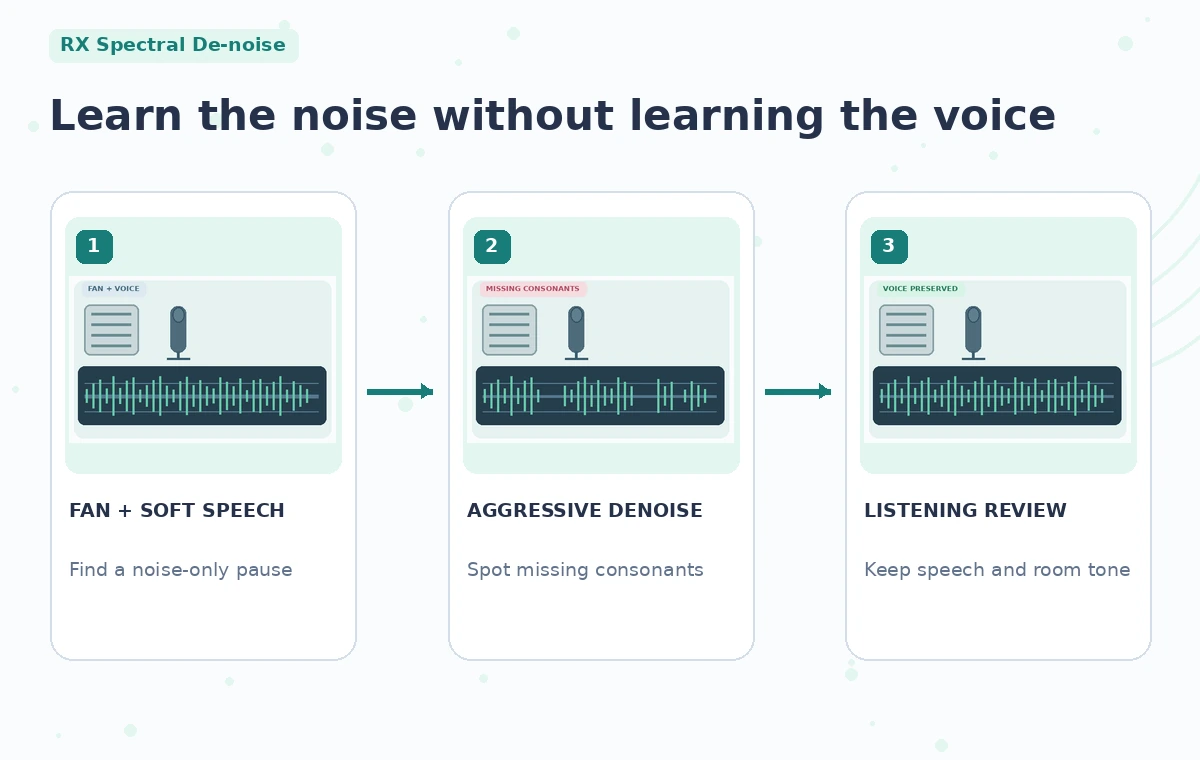
A few seconds of representative noise may help characterize the fan, but the exact duration depends on the recording and the tool’s workflow. Keep a note of the selected time range so it can be reviewed later. The illustrated profile contains a steady hum band; that is a teaching drawing, not a measured frequency or actual RX spectrogram.
Reduce noise conservatively and compare to the source
Use a gentle initial pass and audition the quiet words before increasing reduction. Pay particular attention to soft consonants, trailing syllables, and breath sounds because their energy can overlap the broad hiss of a fan. An overprocessed example removes vertical speech details along with the horizontal hum stripe.
A more defensible result keeps a little background energy but leaves the named tray intelligible. Do not replace unclear words with a synthesized reconstruction or claim that a cleaned track reveals something the microphone did not capture. The original recording is always the authority for transcription.

Listen for musical noise, pumping, and speech thinning
Inspect the transitions between pauses and speech at normal speed, then listen through headphones at a moderate level. Digital chirps, watery warbles, gating, and changing room tone can be artifacts of aggressive settings. Compare identical source and processed excerpts at matched loudness so that volume differences do not masquerade as improved intelligibility.
Check whether the fan’s low-frequency character disappears abruptly at every syllable. If an edited section sounds unnatural, lessen reduction or treat only the most distracting parts. An interview with modest remaining room sound is often more trustworthy than one where words seem to float in artificial silence.
Document the removed component without overstating results
If your RX workflow supports auditioning the residual or difference signal, inspect it for audible voice fragments. Speech in the discarded component is a strong warning of destructive cleanup, although the exact available preview controls vary.
The educational diagram shows three states: fan plus speech, a bad denoise candidate with missing consonant strokes, and a review direction with a softer noise band and intact speech peaks. It does not quantify decibels of reduction. Record the module version, processing approach, selection boundaries, and listening decisions; avoid inventing numerical improvement claims without measurement.
Cross-check transcripts and room context
Have a second listener compare the cleaned track with the original while reading the timestamped transcript. Mark words that remain uncertain rather than repairing the text to match a guess. If the archivist identifies a specimen tray or storage practice, confirm terminology against the archive inventory before publishing. Room fan noise can be part of the setting, and removing all of it may make pauses sound unnatural next to nearby untreated clips. Keep consistent ambience across edits, respect the interviewee’s recording permissions, and do not publish an enhanced clip as though it were an untouched field recording.

Export, label, and retain both versions
Check the exported file for clipping, sync, channel order, speech completeness, and audible artifacts. Keep both original and repaired audio along with the transcript, module notes, approval record, and a short disclosure that the interview was cleaned for intelligibility.
No synthetic words should enter the final track. If a passage remains undecipherable, label it appropriately in the transcript or ask the speaker to clarify through a separate recorded follow-up. A successful repair reduces distraction while preserving what the person said and the limits of what the recording can support.
How We Research
We prepared this guide on November 4, 2026 using named official documentation: iZotope: RX 12 Standard feature description; iZotope: RX 12 feature overview; iZotope: Spectral De-noise reference, legacy module documentation. We checked the feature description, documented controls and edition requirements, and how the tool may be misunderstood in the specific scenario. We did not run a live account, upload real customer assets, measure outputs, or produce service screenshots. The images are original instructional art; each failure is a hypothetical risk, not a claim that the developer produced that result. Access, labels, model behavior, licensing and billing may change. A human reviewer must confirm any factual claim, rights, and the final result against independent source material before publication.
Frequently Asked Questions
Current RX 12 product information lists Spectral De-noise in Standard and Advanced.
There is no guarantee; editors must compare the original and processed speech and moderate the settings.
No. It is useful when a clean representative noise interval exists; adaptive workflows may suit changing noise.
No. Do not invent a transcript from a clearer-sounding but still ambiguous recording.
No. They are original educational illustrations of possible failure and review conditions.