
Disclosure: LabFin is reader-supported. If you sign up for a tool through links on this page, we may earn a commission at no extra cost to you. Commissions vary between providers and our ratings do not — here’s our full disclosure.
Gemini for Google Workspace puts Google’s AI inside Gmail, Docs, Sheets, Slides, Drive and Meet, so you work on the email or document in front of you rather than copying it into a chat. However, what you get depends on your plan. Personal Google AI plans start at $4.99 a month, while business Workspace plans have their own tiers.
This guide on Gemini for Google Workspace covers what Gemini does in each app, which plan unlocks what, how your data is handled, and where it runs short. Our Gemini review covers the assistant as a whole.
Gemini for Google Workspace: The Short Answer
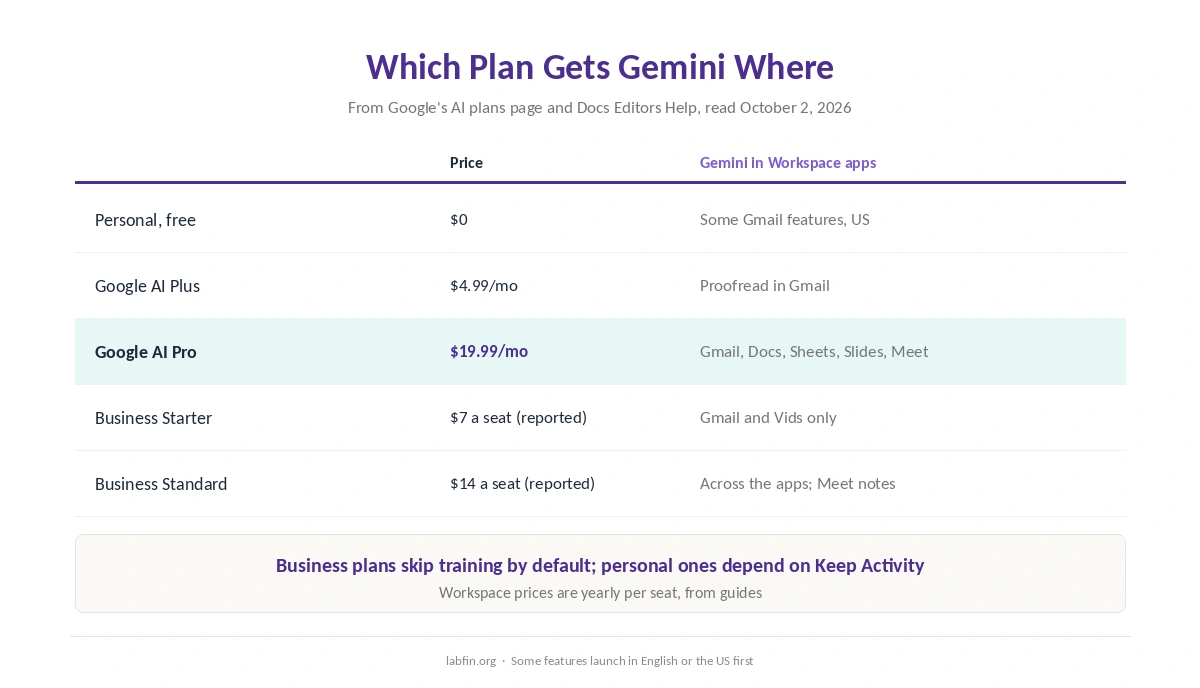
For personal accounts, first, Google AI Pro at $19.99 a month brings Gemini into Gmail, Docs, Sheets, Slides and Meet. Google AI Plus at $4.99, by contrast, mainly adds proofreading in Gmail, according to Google’s plan page.
For companies, in turn, Workspace Business Standard includes Gemini across the apps, while Business Starter covers only Gmail and Vids. On business plans, moreover, Google does not train on your data by default.
What Gemini Does in Each App
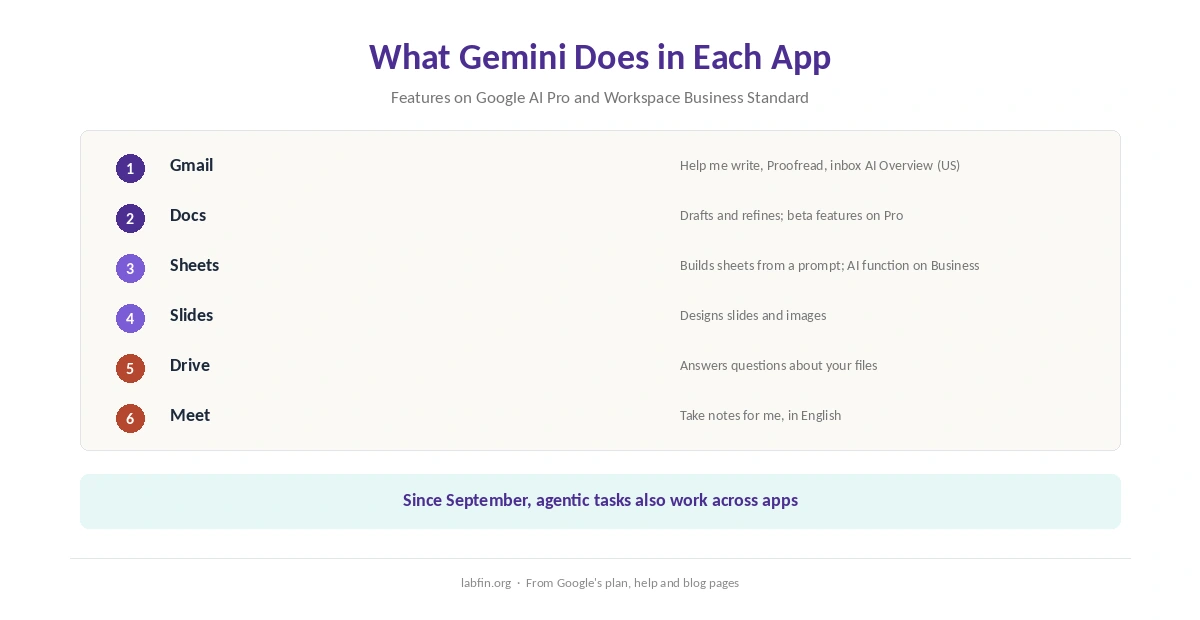
Gmail. First, Help me write drafts and rewrites emails, Proofread checks them, and in the US you can ask your inbox for an AI Overview on Google AI Pro. Some Gmail features also work free on personal accounts in the US, Google’s help center says, as our list of the best AI for email writing covers.
Docs, Sheets and Slides. In these apps, Gemini drafts and refines documents, builds spreadsheets from a prompt and designs slides. In March 2026, moreover, Google added beta features in these apps for AI Pro and Ultra subscribers, first in English. Our list of the best AI for data analysis covers the Sheets side.
Meet and Drive. Likewise, Take notes for me captures meeting notes, in English, and Gemini in Drive answers questions about your files. In September, Google also added agentic tasks that work across apps, such as turning a Docs proposal into a slide deck.
Which Plan Gets What
| Plan | Price | Gemini in Workspace apps |
|---|---|---|
| Personal, free | $0 | Some Gmail features, US only |
| Google AI Plus | $4.99/mo | Proofread in Gmail; Gmail Live on mobile, US |
| Google AI Pro | $19.99/mo | Gmail, Docs, Sheets, Slides and Meet; 5 TB |
| Workspace Business Starter | $7 a seat, yearly (reported) | Gmail and Vids only |
| Workspace Business Standard | $14 a seat, yearly (reported) | Side panel across the apps; Meet notes |
Business Standard, for example, also unlocks Sheets features such as the AI function and data insights, Google’s comparison shows. Our list of the best AI for business compares Workspace with other business plans.
Your Data
On Workspace business and education plans, first, Google says your data stays under your control, and it does not train on it by default. Admins can also switch the Gemini app and Gemini Notebook on or off for the organization, as our Gemini Notebook review notes.
On personal accounts, however, Gemini’s training rules depend on Keep Activity, and some connected features also need it on. Our list of the best AI tools for writers therefore covers what that means for drafts.
Check What Gemini Produces
Drafts inside your apps, however, still need checking. In the EBU and BBC study of October 2025, Gemini had significant issues in 76% of its news answers, the weakest of four assistants tested.
That study covered news answers in the Gemini app, not drafting in Docs. Still, read every email before it goes out, and verify figures in any generated sheet or deck. Our guide to fact-checking AI output lists quick checks.
Where Gemini Runs Short
First, the cheapest personal plan adds little inside the apps: AI Plus mainly proofreads Gmail. Several features, moreover, launch in English or in the US first, and some arrive as betas.
On the business side, similarly, Business Starter leaves out Docs, Sheets and Slides, so most teams need Business Standard. Finally, Gemini works best on Google’s own files; for Office documents, Microsoft Copilot fits better, as our guide to Microsoft Copilot for productivity explains.
Who Should Use Gemini for Google Workspace
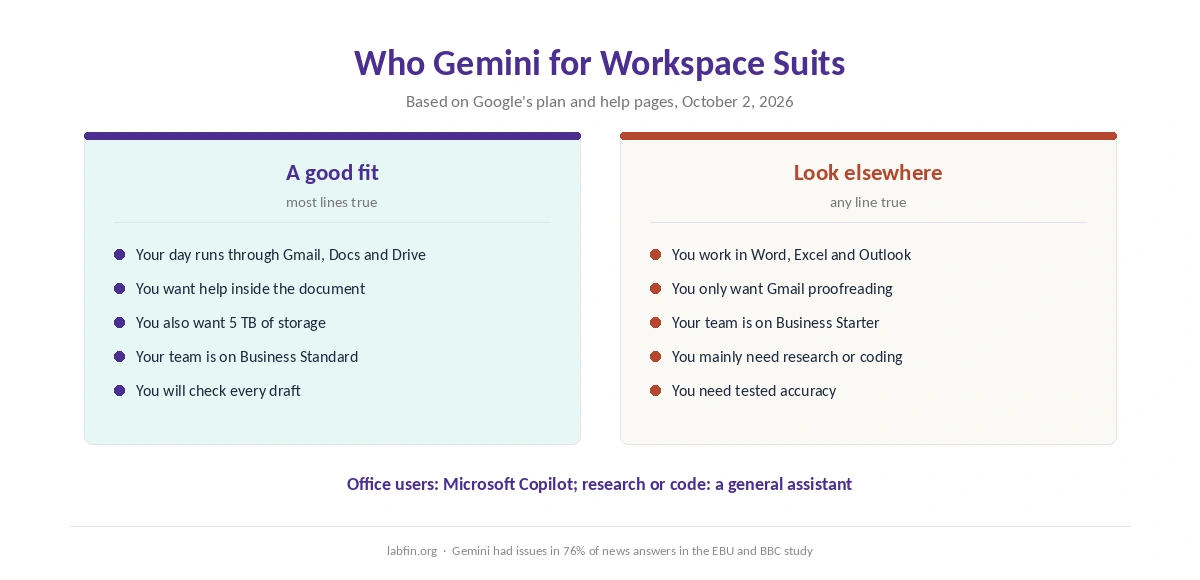
Overall, Gemini for Google Workspace suits people and teams whose day already runs through Gmail, Docs and Drive. For individuals, Google AI Pro covers the main apps and adds storage; for companies, Business Standard does the same per seat. Our breakdown of AI tool costs adds up a year of either.
By contrast, Office users should look at Microsoft Copilot, as our Gemini vs Microsoft Copilot comparison explains, and people who mainly need research or coding should start with a general assistant. Our list of the best AI for productivity also ranks Gemini first for work inside your apps.
How We Research
This guide on Gemini for Google Workspace draws on Google’s AI plans page, Google Docs Editors Help, Google’s March 2026 blog post and the Workspace blog, read on October 2, 2026.
Workspace seat prices, however, come from guides, marked as reported. We run no tests of our own; our about page explains the criteria, and our list of the best AI for summarization covers Gemini Notebook.
Gemini for Google Workspace FAQ
For personal accounts, Google AI Pro at $19.99 a month brings Gemini into Gmail, Docs, Sheets, Slides and Meet. For companies, Workspace Business Standard does.
Partly. Some Gemini in Gmail features work free on personal accounts in the US, Google says. Google AI Plus adds proofreading, and Pro adds the full set.
Not on business and education plans by default. On personal accounts, training depends on Gemini’s Keep Activity setting.
No. Business Starter includes Gemini in Gmail and Vids only; Docs, Sheets and Slides need Business Standard or higher.
It depends on your apps. Gemini fits Gmail, Docs and Drive, while Copilot fits Word, Excel and Outlook. Our Gemini vs Microsoft Copilot comparison covers both.
The Verdict
In short, Gemini for Google Workspace pays off if your work already lives in Google’s apps. Google AI Pro is the personal plan that unlocks it, and Business Standard is the team equivalent.
So skip AI Plus if you want help inside Docs and Sheets. Also check every draft before it goes out. For Office users, however, Microsoft Copilot remains the better match.