
Disclosure: LabFin is reader-supported. If you sign up for a tool through links on this page, we may earn a commission at no extra cost to you. Commissions vary between providers and our ratings do not — here’s our full disclosure.
This Descript review covers Descript, the audio and video editor that turns recordings into a transcript you edit like a document, with an AI co-editor called Underlord.
It suits podcasts and talking-head video well. However, it bills on two meters, media hours and AI credits, and its data terms read differently in different places.
Descript Review: Is It Worth It in 2026?
For podcasters and creators who edit people talking, yes. Hobbyist costs $16 a month billed yearly and removes the watermark.
For heavy effects work or cinematic editing, a traditional editor fits better. Descript’s strength is speech, not motion graphics.
What Descript Does
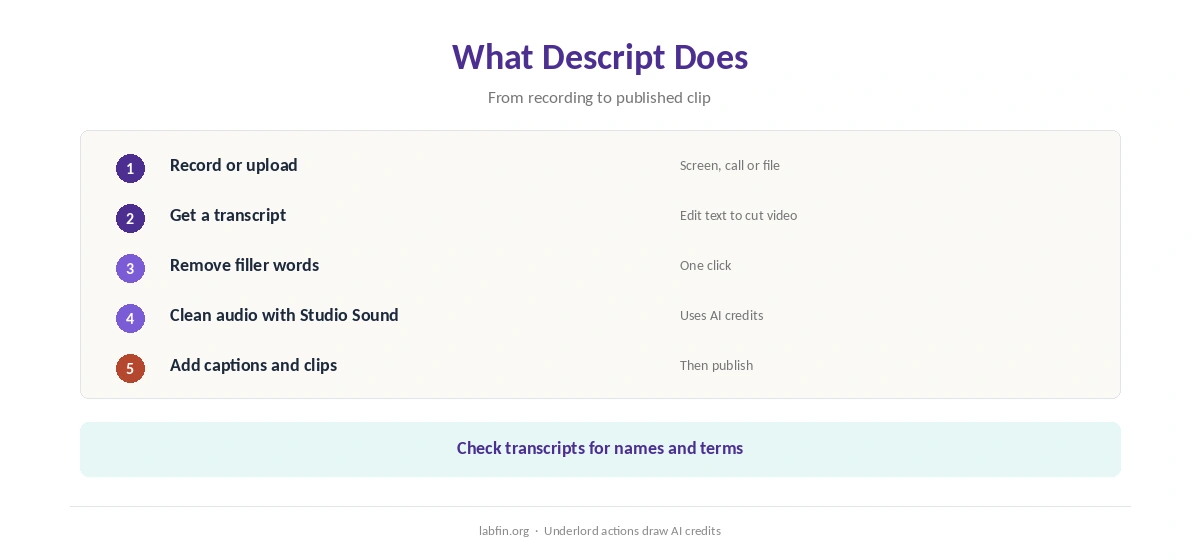
First, Descript transcribes a recording, for example, and deleting words in the transcript cuts them from the audio and video. It also removes filler words and records screens and calls.
Studio Sound, moreover, cleans up audio, and Underlord handles edits such as captions, clips and translation on request. Our guide to using AI for repurposing content also shows where it fits.
What Descript Costs
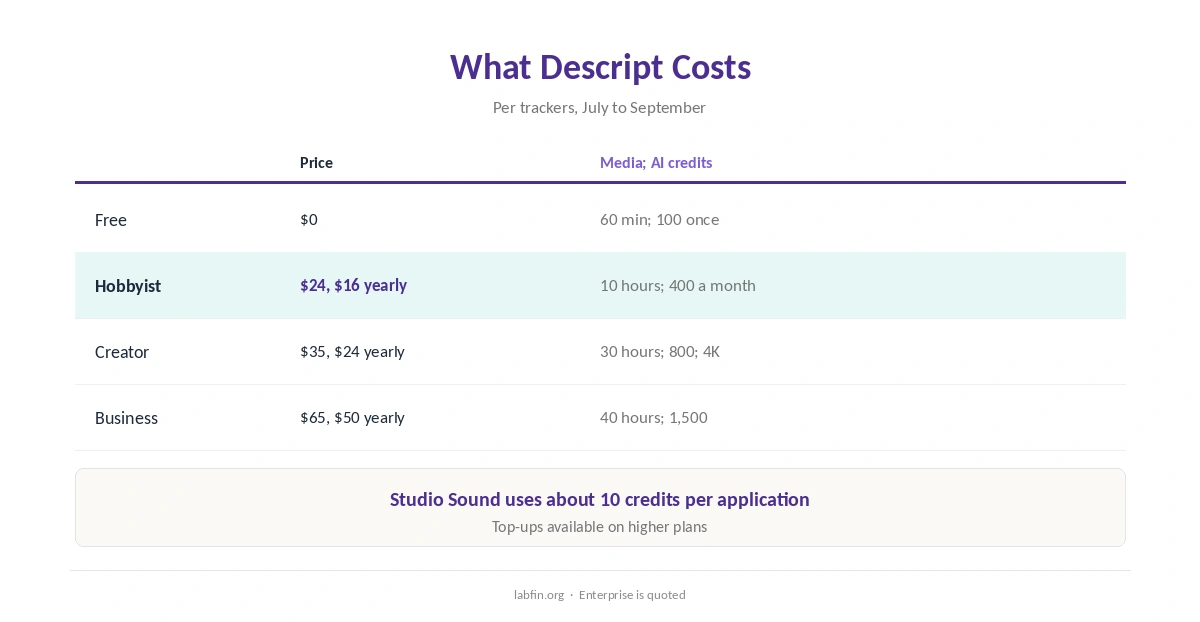
Descript sells four self-serve plans and Enterprise, as trackers read its pricing page between July and September 2026.
| Plan | Price | Limits |
|---|---|---|
| Free | $0 | 60 media minutes a month; 100 AI credits once; 720p with watermark |
| Hobbyist | $24/mo, or $16 yearly | 10 media hours; 400 AI credits; 1080p |
| Creator | $35/mo, or $24 yearly | 30 media hours; 800 AI credits; 4K |
| Business | $65/mo, or $50 yearly | 40 media hours; 1,500 AI credits; dubbing |
However, AI credits run out faster than media hours for heavy users: Studio Sound, for example, uses about 10 credits per application, guides report. Our guide to understanding AI usage limits also explains metered billing, and our guide to reducing AI subscription costs lists savings.
AI Features
Underlord, Descript’s AI co-editor, works across tools such as Studio Sound, Eye Contact and Green Screen, and each action draws AI credits. Creator unlocks the full set.
Voice cloning, however, also needs care: clone only your own voice, or one you have written permission to use.
Your Data
Descript’s help center says its production AI models use no customer data, and that internal research uses only data from users who allowed data sharing. That choice appears at onboarding and can be changed in settings.
Its terms, however, describe training unless you opt out, a policy analysis by ConductAtlas reports. So check Share data with Descript in settings before uploading client recordings. Our guide to which AI tools train on your data compares more tools.
Accuracy and Voice Clones
We found no independent test of Descript’s transcription or AI edits. Transcripts, therefore, can mishear names and terms, so check them before publishing.
Voice clones can also put words in someone’s mouth. Our guide to fact-checking AI output covers checks before publishing.
Descript vs Other Tools
Fathom and Otter, for example, record and summarize meetings, while Descript edits recordings for publishing. In addition, our Descript vs ElevenLabs comparison weighs editing recorded speech against generating new voices.
Our guide to using AI for social media also covers posts built from recordings.
Our ElevenLabs review, moreover, covers AI voices, and our list of the best AI for meeting notes covers recording tools.
In addition, our reviews of Fathom and Otter.ai cover the alternatives.
Who Should Use Descript
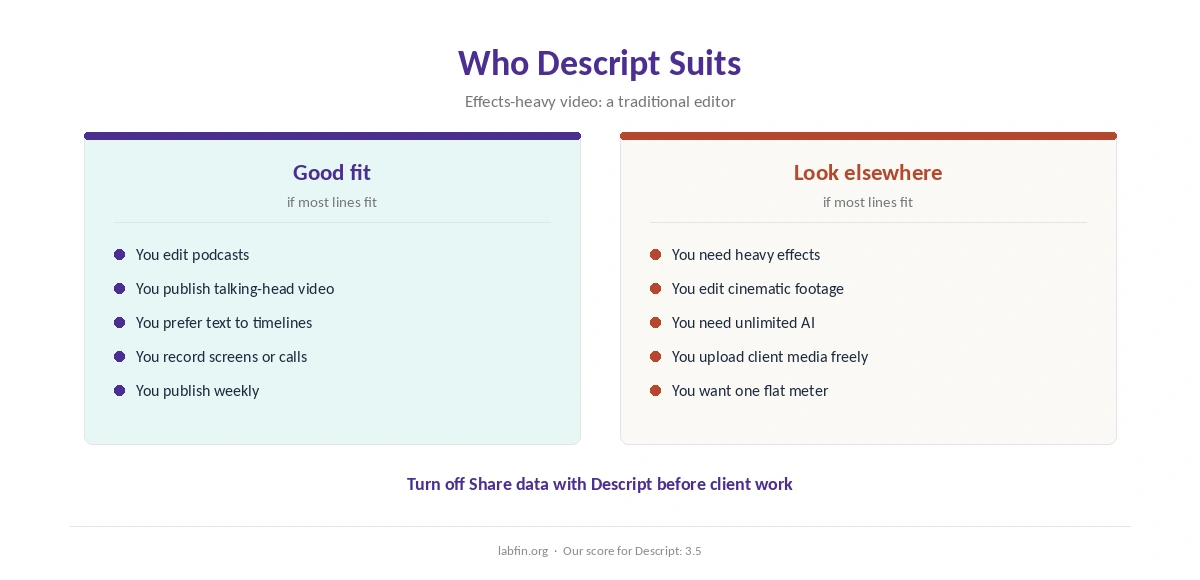
Overall, this Descript review finds it suits podcasters, YouTubers and teams that publish talking-head video. It also suits anyone who prefers editing text to editing a timeline.
By contrast, however, it suits effects-heavy video and cinematic editing less. Our list of the best AI for productivity covers other tools.
How We Research
This Descript review takes plans from trackers that read its pricing page in 2026, and data terms from Descript’s data privacy help page.
However, we ran no tests of our own. Our about page explains the criteria, and our guide to measuring AI tool ROI helps judge the cost.
Descript Review FAQ
Free; Hobbyist $24 a month or $16 yearly; Creator $35 or $24; Business $65 or $50; Enterprise quoted.
Yes: 60 media minutes a month, 100 one-time AI credits and 720p exports with a watermark.
A monthly allowance for AI features such as Studio Sound and Underlord, separate from media hours.
Its help center says production models use no customer data; turn off Share data with Descript to stay out of research.
Descript’s AI co-editor, which runs edits such as captions, clips and audio cleanup using AI credits.
Descript
Edit recordings like a document
Descript turns recordings into editable transcripts, cleans audio and adds AI edits, from $16 a month yearly. Against that, it bills on two meters, AI credits run out fast for heavy users, and its data terms read differently in its help center and terms.
The Verdict
Descript makes editing speech as easy as editing text, with useful AI on top. Heavy AI users, however, should watch credits closely.
The rest of this Descript review sets the score at 3.5. So start free, pay yearly if you publish weekly, and check data sharing before uploading client work.