
A comic page must tell a sequence, not just display several attractive pictures. AI tools can create compelling characters, but panel-to-panel continuity is a separate editorial problem: hairstyles change, props disappear and characters swap sides. This guide uses a fictional astronaut named Mara and a small four-panel scene to show how a character sheet, panel plan and dialogue review create a coherent page. It does not claim a specific service is perfectly consistent or reproduce any copyrighted comic franchise.
Write a panel script before making art
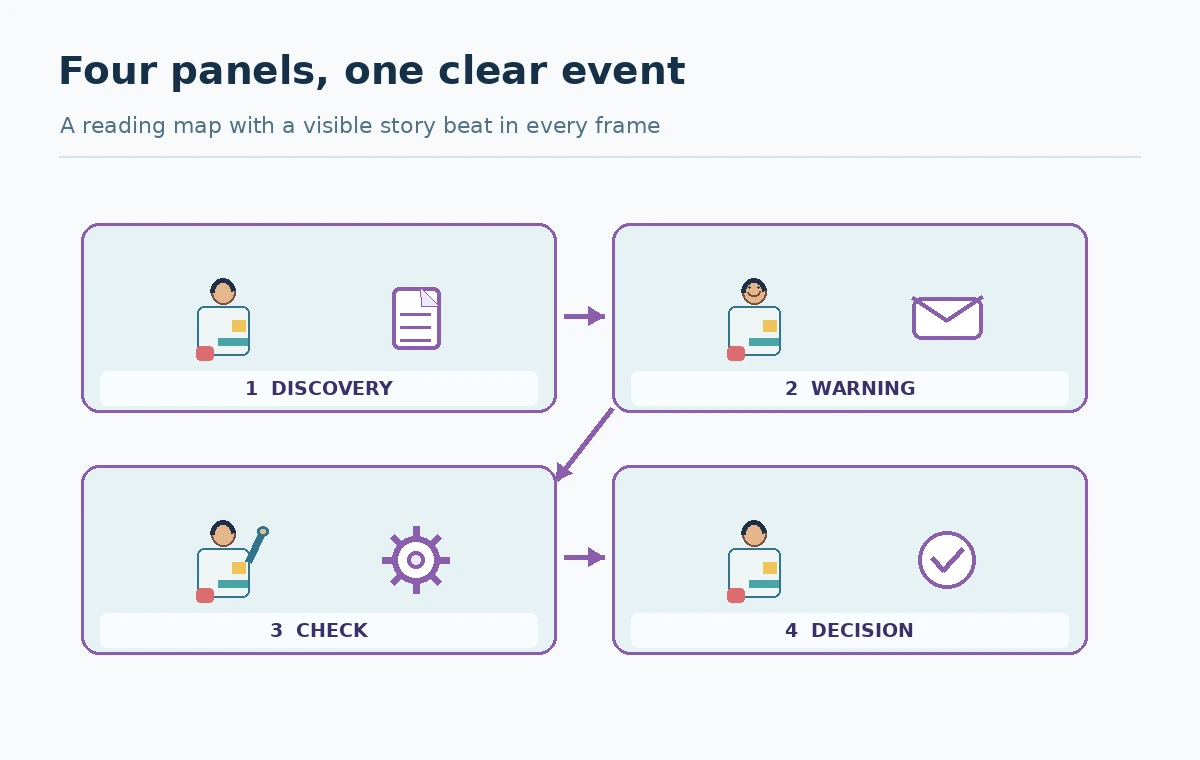
Begin with the action in each panel. For the fictional scene: first, Mara finds a cracked map; second, she hears a warning; third, she checks a damaged airlock; fourth, she chooses a safe route. Each panel should introduce one visual change the reader can follow. Write the camera distance, character position, key prop, emotional beat and dialogue separately. This protects story logic when a generator offers dramatic but irrelevant compositions.
Keep the page to four frames for the first pilot. Record reading order and where speech bubbles will fit. A picture with no space for dialogue may be unusable even if the character looks appealing. If a sequence requires precise hand positions or a complex action, plan additional manual art editing rather than promising one-click generation.
Build a character sheet with immutable traits
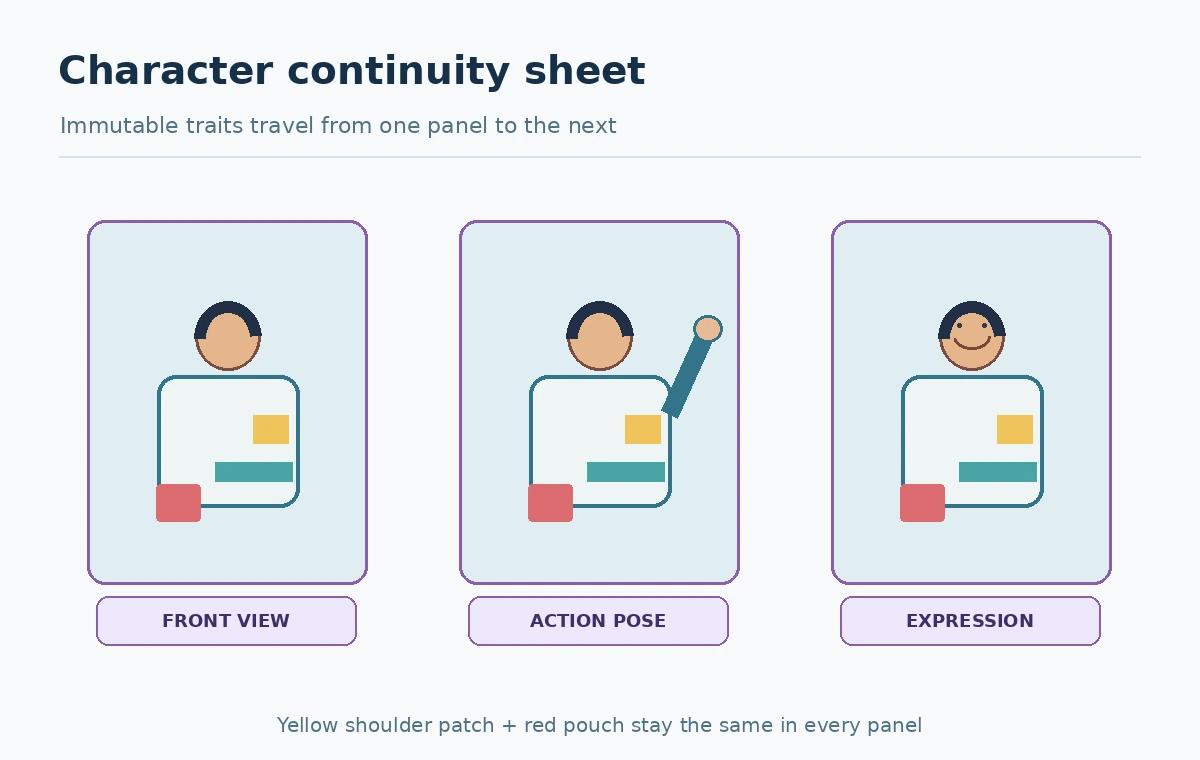
Define Mara’s distinguishing features: short dark hair, a yellow shoulder patch, white suit with teal seams and a small red tool pouch. Draw or describe a front view, side view, neutral expression, and one action pose. Add a list of features that must not change across panels, plus features that may change such as pose, lighting and facial expression. The checklist makes continuity a verifiable editorial criterion.
Avoid borrowing the likeness of a recognizable person or a copyrighted character without appropriate authorization. Save the approved base art as a reference in a controlled folder. A seed alone is not a reliable promise of consistency: model updates and small prompt changes can alter details substantially.
Use the current model-specific reference system
Midjourney’s official version documentation says V8.2 became the default on July 24, 2026 and includes the new Edit Model. Its Edit Model guide describes written edits and up to four reference images in this version, replacing earlier Omni Reference and Character Reference workflows. Do not send a new user outdated V7-only parameter instructions without a compatibility check.
Use only authorized reference art. Put the clean character sheet ahead of decorative examples and state the identity-critical details in the prompt. The tool may still reinterpret the outfit or pose; the character sheet is a review anchor, not a technical guarantee.
Design the page as a reading sequence
Create a simple panel map before placing final art. For Western left-to-right reading, label the panel order and trace eye movement with a pencil. Choose consistent gutters and reserve safe areas for balloons, captions and sound effects. A wide establishing shot can introduce the location, then a close-up can reveal the damaged airlock gauge. Make the story readable without requiring captions to explain missing action.
Use panel boundaries as an editorial device, not as decorations. Each image should clearly depict its own beat. A dramatic background from one panel may be visually appealing but continuity-breaking in the next if the door changes sides. Test page flow at thumbnail size before polishing faces and textures.
Check continuity like a production editor
Compare each draft to the character sheet and previous panel. Review outfit colors, badges, pouch location, the map’s tear, airlock geometry, light direction and who is holding what. Make a four-column continuity table: panel, object state, character state and required next state. For Mara, the red pouch remains on the same side; the cracked map should not suddenly become an undamaged blue tablet.
Use an edit request for a specific discrepancy. If a reference-driven rerender fixes the patch but removes the map, it still fails continuity. Keep source copies and track each approved panel; otherwise the team may assemble incompatible generations under deadline pressure.
Letter dialogue manually for reliable reading
Generate art with intentional blank areas, then place final dialogue in editable text bubbles in a design application. Check spelling, reading order, tail direction and whether the speaker is obvious. Short lines usually work better in a narrow panel than a dense paragraph. Use a font with clear punctuation and check accessibility for small-screen viewers. Avoid relying on decorative lettering embedded into generated pixels when script wording must remain exact.
For the example, Mara’s warning “Airlock pressure is dropping” must not become a scientific claim beyond the fictional story; label the work as fiction where appropriate. Final proofreading should compare balloons with the locked script, not simply with the image that looks most polished.

Review originality, consent and publication context
A general “superhero style” brief is different from asking a generator to recreate protected character designs, logos, or specific comic panels. Check source references and the image tool’s terms before publication. If a real person’s face or private photograph is used, obtain appropriate permission. Do not assume the output’s new file format establishes exclusive ownership or a transferable trademark.
Keep evidence of the approved original concepts, reference permissions and editorial approvals. When preparing a client comic, resolve rights with the actual contract terms and qualified guidance when needed. This guide offers a practical checklist, not a legal determination of copyright ownership.
Produce a four-panel review packet
A handoff packet contains the script, character sheet, numbered page map, four approved images, editable lettering file, visual continuity table and permissions record. Review at two scales: full size for fingers, costume and balloon tails, and reduced size for the reading path. Ask a reviewer who has not read the script to describe what happens. If the plot is not understandable, revise the composition before adding more effects.
The benchmark is whether the story communicates the intended action consistently—not whether all outputs came from one model or have a particular simulated camera style. An AI comic art generator becomes useful when it fits a disciplined comics-production workflow instead of replacing one.
How We Research
Verification date: October 27, 2026. We reviewed official product documentation, including Midjourney versions, Midjourney Edit Model, Midjourney Editor. This article separates documented feature and permission claims from our original suggested workflows, checklists, scripts and design-review criteria. We did not run comparative benchmarks, buy subscriptions, print physical products or conduct live user testing. Account access, credits, licensing and model versions can change; recheck the current official conditions before spending money or using an output commercially.
Frequently Asked Questions
It may produce a draft, but coherent reading order, character continuity and exact dialogue should be reviewed and often edited separately.
The documented Edit Model supports creating or modifying images using reference images; check the current version-specific interface.
Use an approved character sheet, a list of immutable traits and a panel-by-panel continuity table.
Reserve balloon space in the art but add critical dialogue as editable text for more dependable spelling and layout.
Only with suitable permission. A model accepting an upload does not grant copyright or publicity rights.