
AI-generated illustrations can help explore the visual language of a picture book, but a beautiful individual page does not ensure that the same character looks recognizable on page twelve, that the text survives trimming, or that publishing disclosures are correct. This guide follows a fictional illustrated story about a red fox visiting a lighthouse. It combines a character reference sheet, consistent scene briefs, page-layout checks, and Amazon KDP’s documented print and AI disclosure requirements. It is a production workflow rather than a claim that a book was generated, printed, accepted, or reviewed by Amazon. The editor remains responsible for narrative, artwork decisions, rights, and proofreading.
Start with a manuscript and page map, not standalone prompts
Split the written story into spreads or individual pages, depending on the intended format. Assign each page a setting, emotional beat, number of characters, and location for text. For the fox-and-lighthouse example, page two introduces the fox at the beach, page six shows a storm approaching, and page ten resolves the journey. Write a scene ledger listing what must remain the same: red tail tip, cream scarf, small satchel, and eye color. Note where the fox faces and which hand holds the satchel so images do not flip these details between pages. The scene map also identifies pages that need negative space behind text. If a generated picture cannot support the narrative without awkward cropping, revise the composition brief before generating more pages. Image quality is only one part of picture-book quality; pacing, readability, and continuity matter just as much.
Build a reference sheet that separates fixed and flexible details
Create an approved front, side, and three-quarter concept for the main character. Record invariant features such as clothing color, body proportions, and signature objects. Keep pose, light direction, and facial expression flexible for each scene. A style guide should describe palette, line treatment, texture, and intended age group without pretending that a text prompt can fully enforce them. Use images that you own or are permitted to reference. Adobe Firefly’s composition reference controls can guide structure, but reference strength and model behavior vary, so do not promise identical identity across every output. Compare every page with the signed-off character sheet and reject unapproved changes, even if the variant is prettier by itself. Check incidental characters too: the librarian seagull on page four should not mysteriously change species or clothing in the last chapter.

Compose each illustration around the actual text placement
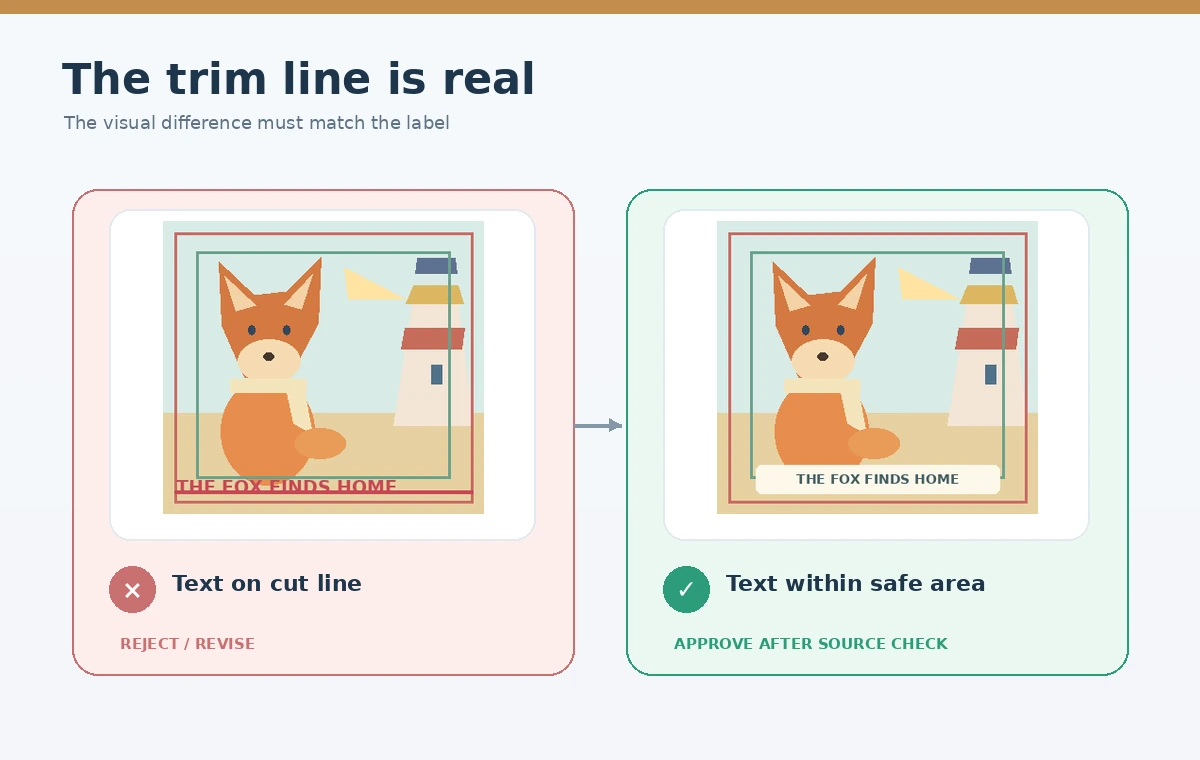
Place a low-resolution placeholder of the intended text before committing to a final scene. Ask whether the illustration has a calm area that provides suitable contrast and whether essential characters remain clear when text is placed. Avoid creating important objects exactly at the edge of a page or across a gutter. If the book uses full-bleed art, keep background color and noncritical scenery extending into the bleed zone while placing faces, words, and other essential details safely inside. When text is generated as part of an image, check it letter by letter; it is usually more reliable to typeset final copy as editable text in the layout application. Save the art without embedded placeholder words. A reader should see the narrative and expressions before noticing decorative generation artifacts.
Calculate print trim, bleed, and margins from KDP guidance
Amazon KDP explains that full-bleed interior pages require an extra 0.125 inch at the top, bottom, and outside edge. Its example for a six-by-nine-inch trim uses a 6.125-by-9.25-inch page with bleed. Do not copy this example to a different book trim without recalculating. The minimum outer margin differs between no-bleed and bleed interiors, and the inside gutter depends on the page count. KDP asks for single pages rather than two-page spreads in print manuscript submissions. Build a page template using the selected trim, bleed settings, and required margins before placing illustrations. Export a print-ready PDF that preserves the intended page dimensions, and do not assume a low-resolution screen image will become sharp because the file says 300 DPI. Measure actual pixel data or vector detail against the print size.
Review page-to-page continuity at thumbnail and full size
Lay out all pages as a contact sheet in reading order. This makes changes in the fox’s proportions, scarf color, and lighthouse architecture easier to spot than opening one image at a time. Then inspect each final illustration at full resolution for extra limbs, unnatural hands, inconsistent shadow direction, incoherent signs, and texture errors. Distinguish a purposeful change in the story from an AI continuity mistake: a torn scarf may be a plot point, but a randomly blue scarf is probably not. Ask an editor to check the images without reading the prompts, because readers see the pages rather than the generation history. If a later page must be revised, recheck adjacent pages so the correction does not introduce a new lighting or palette mismatch. A completed contact sheet is a review tool, not a substitute for a printed proof.
Document AI provenance and publishing disclosures correctly
KDP’s current content guidelines require disclosure of AI-generated text, images, or translations when publishing or republishing a book. The policy explicitly includes interior illustrations and cover artwork. KDP distinguishes AI-generated material from AI-assisted material created by a person and merely refined or checked using AI. Substantial manual edits do not automatically reclassify content that was created by an AI system as merely AI-assisted. Record which pages, cover parts, and text were generated, and retain source files and licenses. Make the disclosure decision based on the actual creative process and current KDP form rather than the visual appearance of the final pages. Copyright and permission issues remain the publisher’s responsibility regardless of whether an upload form accepts the file.

Order a proof and inspect the physical reading experience
Before approving a paperback, order the proof or use the available preview process and inspect the page sequence, gutters, crop, text sharpness, contrast, and paper appearance. Look for pages where the fox’s tail falls into the binding area or the lighthouse beam disappears beyond the trim. Confirm that narration can be read under ordinary room lighting by the intended audience and that important facial expressions are not buried under typography. Record any corrections with page number and file revision. Check the final cover and interior separately, since their templates and bleed rules differ. Publish only after the manuscript, rights, disclosure, and page-proof gates are complete. The last step is editorial accountability, not another automatic generation pass.
How We Research
We reviewed Amazon KDP’s official trim, bleed, and margins documentation (kdp.amazon.com), paperback requirements (kdp.amazon.com), and AI content policy (kdp.amazon.com). We also consulted Adobe Firefly’s composition reference guidance (helpx.adobe.com). Sources were checked October 28, 2026. No actual book, KDP upload, or physical proof was produced.
Frequently Asked Questions
Yes. KDP requires disclosure of AI-generated images, including interior artwork. Purely AI-assisted work has a different treatment under its policy.
Not automatically. KDP still classifies AI-created content as generated even after substantial manual edits.
It is artwork that extends beyond the final trim edge so a cut does not leave unintended white borders.
Not reliably. Use an approved reference sheet and review page-to-page features manually.
Editable typesetting is usually safer for proofreading, font control, and maintaining print-safe placement.