
Disclosure: LabFin is reader-supported. If you sign up for a tool through links on this page, we may earn a commission at no extra cost to you. Commissions vary between providers and our ratings do not — here’s our full disclosure.
Cursor pricing in 2026 starts with a free Hobby plan. Paid plans then run from Pro at $20 a month to Pro Plus at $60 and Ultra at $200, while Teams seats cost $40, or $120 for Premium.
The price is only half the story, though. Each paid plan splits usage into two pools, and heavy agent work can cost more than the plan itself. This Cursor pricing guide explains both, as read on Cursor’s documentation on October 2, 2026. Our Cursor review covers the editor itself.
Cursor Pricing: The Short Answer
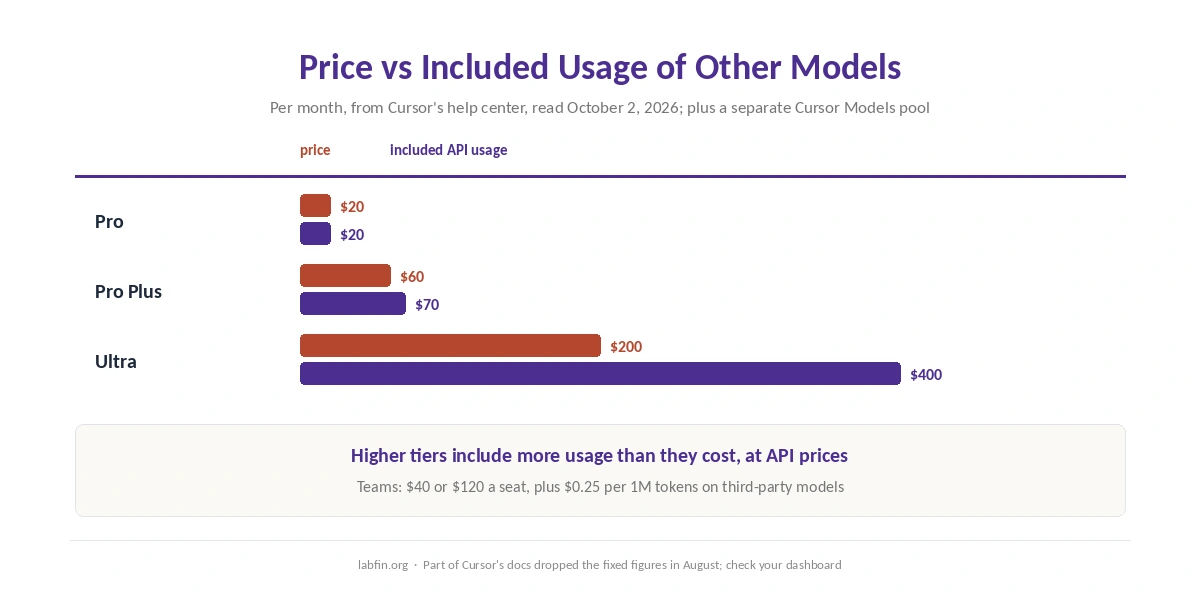
For most developers, Pro at $20 is enough. It includes unlimited Tab completions and a generous pool for Cursor’s own models. It also covers $20 of other labs’ models at API prices, Cursor’s help center says.
However, if you run agents on Claude or GPT models every day, Cursor itself estimates $60 to $100 a month in total. At that point, Pro Plus, with $70 of included usage, or Ultra, with $400, can cost less than paying on demand.
Every Cursor Plan and Price
| Plan | Price | Included usage |
|---|---|---|
| Hobby | $0 | Limited agent use and Tab (guides) |
| Pro | $20/mo | $20 of other models; Cursor models pool |
| Pro Plus | $60/mo | $70 of other models; larger Cursor pool |
| Ultra | $200/mo | $400 of other models; largest Cursor pool |
| Teams Standard | $40 a seat | SSO, admin, team Privacy Mode |
| Teams Premium | $120 a seat | Five times Standard agent limits |
The Two Usage Pools
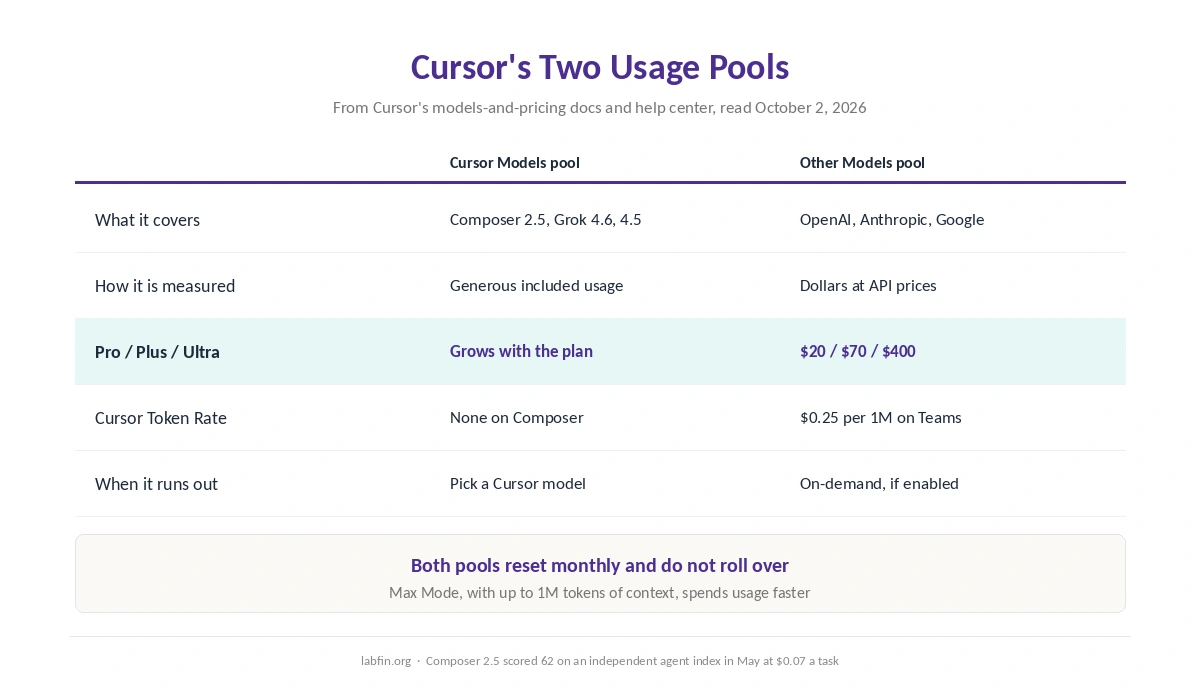
Every paid individual plan has two monthly pools. The Cursor Models pool covers Cursor’s own Composer 2.5 and its Grok 4.6 and 4.5, with what Cursor calls generous included usage. The Other Models pool covers models from OpenAI, Anthropic, Google and others, charged at each model’s API price.
So the model you pick decides how fast you spend. Composer 2.5, for example, scored 62 on an independent agent index in May at $0.07 a task. Claude and GPT models, by contrast, draw down the dollar pool. Our Claude vs Cursor comparison covers what Claude costs inside Cursor.
When Included Usage Runs Out
Usage resets with each billing cycle and, moreover, does not roll over. When it runs out, on-demand charges apply at the same API rates, but only if you have turned on-demand usage on.
Cursor’s guidance is blunt. Daily Tab users typically stay within included usage, while daily agent users spend about $60 to $100 a month. Max Mode, which allows longer reasoning and up to 1M tokens of context, also draws down usage faster.
Teams and Enterprise
Teams Standard costs $40 a seat a month and adds SSO, admin controls and Privacy Mode on by default. Premium seats, meanwhile, cost $120 and raise agent limits fivefold.
On Teams, Cursor also adds a Cursor Token Rate of $0.25 per million tokens on third-party models, though not on Composer 2.5. Enterprise, finally, adds pooled usage, invoicing and SCIM through sales.
Start: Cursor’s Plan for India
In India, Cursor sells Start at ₹649 a month, tax included. It covers the Cursor Models pool and Cloud Agents, but not the Other Models pool, on-demand usage or Bugbot.
Privacy Mode and Data
With Privacy Mode on, first, Cursor does not train on your code and keeps zero data retention agreements with its model providers. With it off, however, Cursor may store and use code and prompts. Teams get Privacy Mode on by default, while individuals should switch it on. Cursor’s maker, Anysphere, has also belonged to SpaceXAI since August 2026, as our ChatGPT vs Cursor comparison notes.
Cursor vs Other Coding Plans
GitHub Copilot Pro costs $10 a month and works inside your current editor, as our GitHub Copilot review covers. Claude Code and Codex, by contrast, come with Claude Pro and ChatGPT Plus at $20. Our Claude pricing and ChatGPT pricing guides explain those plans, too.
Windsurf, now Cognition’s Devin Desktop, also costs $20 for Pro on daily and weekly quotas, as our Windsurf review covers. Its quotas refresh daily rather than monthly. For the agents’ scores, see our list of the best AI for coding, and for leaving Claude Code, our list of Claude Code alternatives.
Which Cursor Plan to Choose
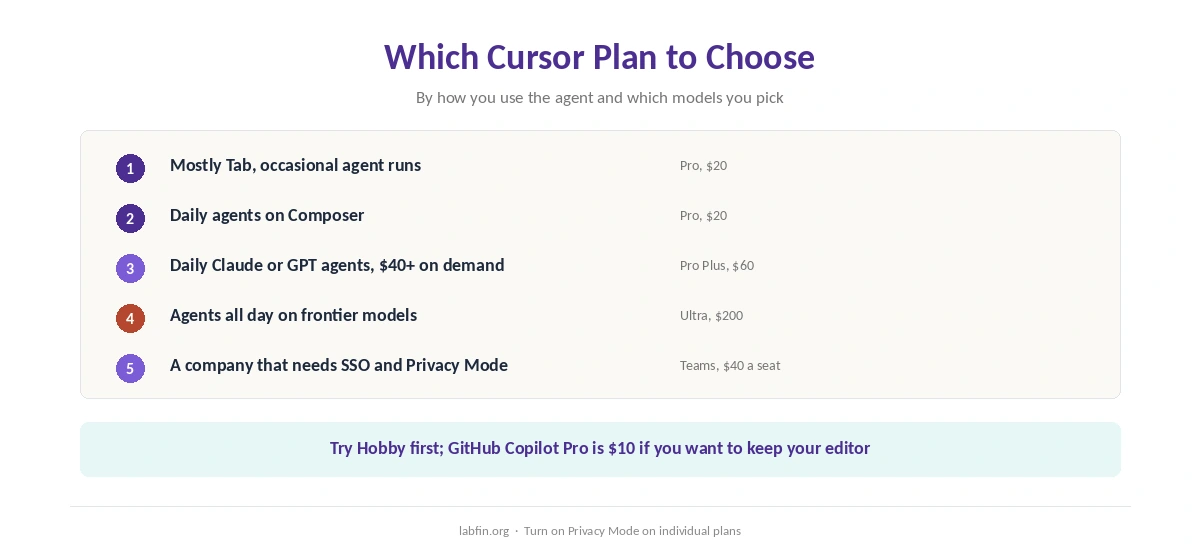
In short, Cursor pricing rewards knowing your habits. Try Hobby first, and take Pro if you mostly use Tab and occasional agent runs, especially on Composer. Our Cursor vs Windsurf comparison also weighs two AI editors at $20.
Move to Pro Plus or Ultra if you run Claude or GPT agents daily and your on-demand bill keeps passing $40. Teams, meanwhile, suit companies that need SSO and Privacy Mode by default, as our list of GitHub Copilot alternatives also discusses.
How We Research
Prices and pools come from Cursor’s models and pricing docs and its help center’s usage page, read on October 2, 2026. ⚠️ In August, Cursor removed the fixed dollar figure from part of its docs, so check your dashboard for your plan’s exact allowance.
Hobby limits come from guides, marked where used. Our about page explains how we work, and our list of Cursor alternatives compares other coding tools. Our breakdown of AI tool costs, in addition, adds up a year of each plan.
Cursor Pricing FAQ
Hobby is free. Pro costs $20 a month, Pro Plus $60 and Ultra $200. Teams seats cost $40, or $120 for Premium.
Unlimited Tab completions and a generous pool for Cursor’s own models. It also covers $20 of other labs’ models at API prices each month, Cursor’s help center says.
Agent work on Claude or GPT models draws on the dollar pool at API prices, and on-demand charges apply after it runs out. Cursor estimates $60 to $100 a month for daily agent users.
No. Included usage resets with each billing cycle and does not roll over.
No. GitHub Copilot Pro costs $10 a month against $20 for Cursor Pro, and team seats cost $19 against $40.
The Verdict
Cursor pricing looks simple at $20, but the bill depends on which models your agents use. Composer stretches the plan far, while Claude and GPT models spend the dollar pool quickly.
So start on Pro, watch the usage dashboard for a month, and move up only if on-demand charges keep appearing. Turn on Privacy Mode either way.