
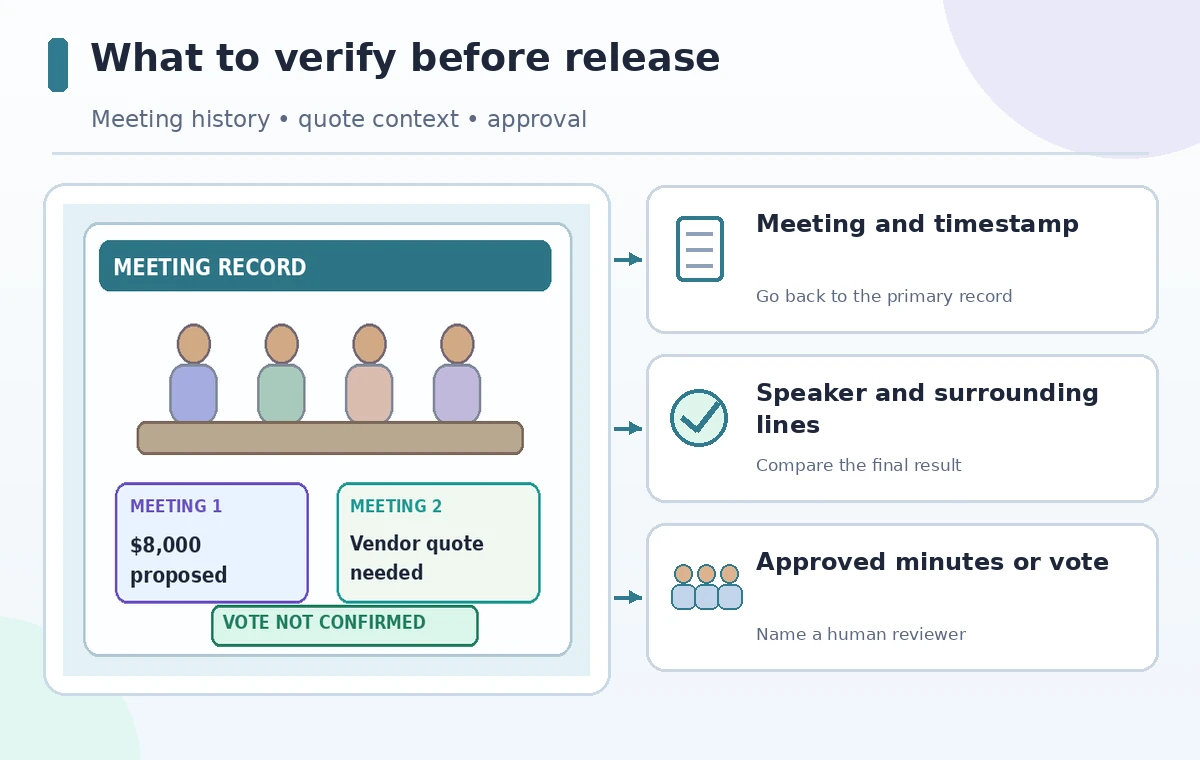
A grant committee meets twice about community garden improvements. At one meeting, a member suggests allocating $8,000 to irrigation; at the next, the group postpones the budget vote pending a quote. Someone asks Otter AI Chat, ‘What amount did we approve?’ A fluent answer is not enough: the question contains an assumption that approval occurred. This example shows how to investigate a meeting record without converting a proposal into a decision. All names, figures, and meeting outcomes here are illustrative.
Define the decision question and its time window
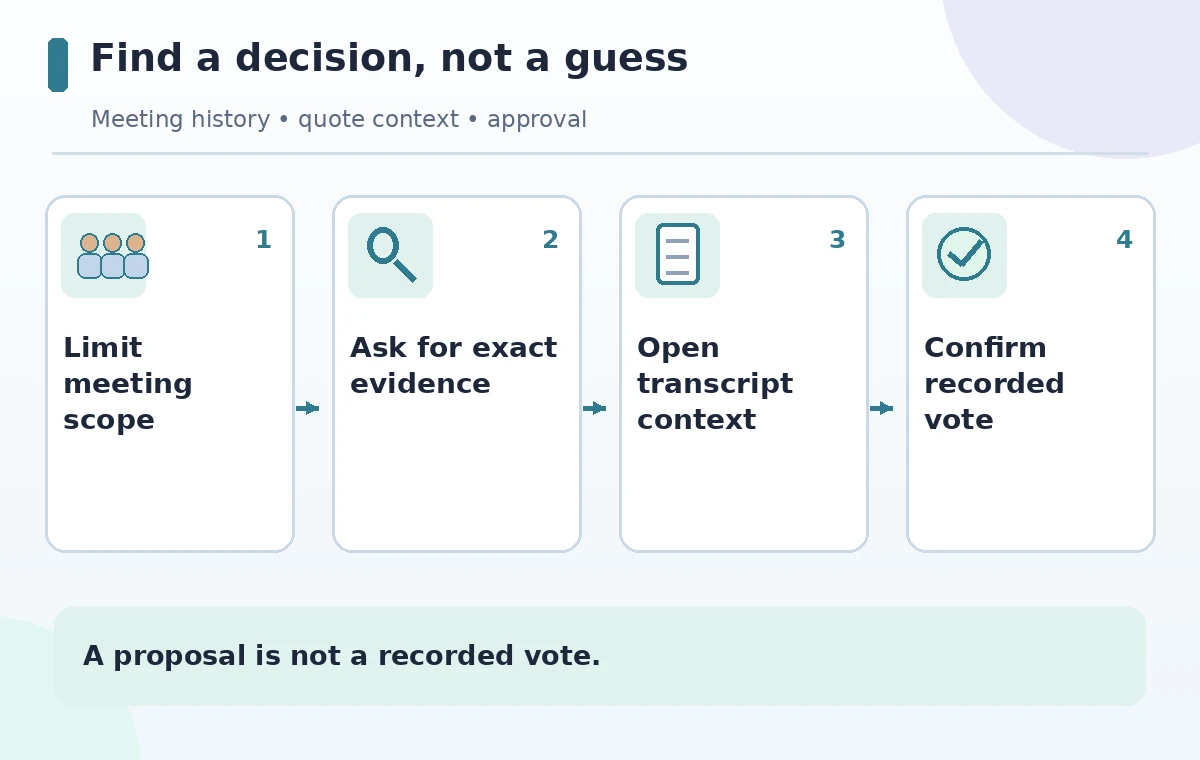
List the meetings that could contain the relevant action and the calendar period in which the committee discussed irrigation. Do not ask a system to search ‘everything’ if private channels and unrelated committees are also accessible. In a suitable workspace, the question should identify the project, the two session dates, and the type of evidence sought: proposal, amendment, motion, vote, or follow-up. Phrase it neutrally: ‘Across the last two garden grant meetings, was an irrigation amount formally approved? Show the relevant source passages and unresolved points.’ Avoid leading wording such as ‘Confirm that we approved $8,000.’ A neutral question reduces the chance that a summary simply echoes the user’s presupposition.
Understand the current Otter AI Chat experience
Otter’s current help pages describe an AI Chat experience with Chat for questions and Work for taking supported actions. Otter says the updated experience is rolling out gradually, so users may see a legacy interface. AI Chat can draw on conversations the account is allowed to access, including shared meetings; it can be reached from a conversation or channel on supported clients. Confirm the account’s access and the meeting’s visibility before asking. There is no reason to give a broad workspace access to a reviewer who only needs two meetings. A chat answer is generated analysis of the transcript, not the meeting’s legally approved minutes or a direct record of organizational authority.
Ask for passages that challenge the hypothesis
The most valuable follow-up is often a counter-check: ‘Show where members said the amount was only a suggestion, and whether any motion or recorded vote followed.’ Ask for the speakers, dates, and surrounding transcript context rather than a single decontextualized sentence. For example, ‘We could spend $8,000’ is substantially different from ‘The committee moved and unanimously approved $8,000.’ Also ask for explicit abstentions, changes to the figure, and evidence of a deferred decision. If Otter cannot produce a source passage, write ‘not located in the available transcripts’ rather than ‘never happened.’ Otter’s official help warns that AI answers may contain factual mistakes, which makes source checking a normal part of the workflow.
Read the transcript around every key phrase
Open the relevant conversation and read before and after the returned phrase. Automated speaker separation can be imperfect, particularly in overlapping or remote audio. A caption like ‘yes’ may answer a different question from the one immediately preceding a budget discussion. Compare the actual sound when authorized and available, and verify speaker attribution with the committee secretary if it affects the meaning. Do not quote invented timestamps. Record the time codes as they appear in your own accessible meeting record; a diagram can illustrate a time marker without claiming a specific one was measured. The example contrast between an informal $8,000 suggestion and a postponed vote is a teaching scenario, not an Otter test result.
Separate proposals, conditions, and adopted decisions
Create three lines in the review log: ‘Proposed amount,’ ‘Conditions for adoption,’ and ‘Final authorization.’ Put $8,000 only under the first unless the evidence supports more. A request for a vendor estimate is a condition or follow-up, not necessarily a motion. A chair’s positive response may be encouragement rather than a formal vote. Compare the transcript with the organization’s voting rules and approved minutes: some groups document consent differently. If there is a formal conflict between the transcript and the ratified minutes, escalate it to the secretary rather than asking the AI to choose the version that sounds more decisive. This prevents a strong summary from becoming a fabricated governance record.

Draft a memo that shows uncertainty
A useful memo might read, ‘At the first session, $8,000 was suggested for irrigation; at the second, the committee requested a quote and no approval has been confirmed in the reviewed material.’ Include the relevant source links or references and identify who needs to verify the minutes. Avoid writing that the system ‘proved no vote’ merely because it could not find one. Otter AI Chat can draft language, but a human should approve the memo and remove any private comments not relevant to recipients. If the decision is urgent, contact the committee chair or secretary directly instead of depending on a generated response to an incomplete meeting archive.
Restrict automated actions during the review
The newer Otter help distinguishes Chat, used for inquiry, from Work, used for actions such as drafting emails or creating connected documents. The investigation should remain in the question-and-review stage until a responsible person signs off. Do not let a generated memo create a purchase request, change a grant budget, or send an approval notice without an explicit, independent gate. Where an integration is available, check exactly which external applications it can reach and what the organizational permissions allow. This is especially important when the transcript references donor names, bid details, or account information not appropriate for a general project channel.
Close with a traceable decision record
Store the meeting date, source link, quote or paraphrase, confidence limit, and reviewer name next to the issue. A second person should confirm whether the committee has a signed or approved record of its vote. If the amount is still proposed, assign an owner to obtain the quote and schedule the formal decision rather than labeling the budget complete. Later, update the memo with the approval date and responsible authority while keeping the prior proposal history. A successful Otter-supported process ends with a traceable human conclusion, not a polished answer that cannot be checked against the actual discussion.
How We Research
We reviewed Otter’s AI Chat Overview and its guide to asking AI Chat questions for the Chat/Work distinction, rollout, transcript scope, and cautions about generated answers. The two grant meetings and $8,000 amount are hypothetical; we did not access live committee recordings. Approval and minutes checks are recommended human governance practices, not Otter features.
Frequently Asked Questions
Otter documents cross-conversation questions, subject to account and shared-conversation access. Keep the search scope proportionate to the task.
No. Open the relevant transcript, check exact wording, and compare with the committee’s approved minutes or vote record.
Otter is rolling out the newer Chat and Work experience. Some users still have the previous interface.
No. A proposal, condition, motion and recorded decision have different meanings and should be tracked separately.
Not during an unresolved decision review. Obtain an explicit human approval before taking actions in connected apps.