
Three planning calls for a volunteer event contain competing suggestions about when check-in opens. One transcript records an early proposal, a second records a counterproposal, and a later call apparently settles the schedule. Otter AI Chat can query meeting conversations and draft summaries, but it is not the meeting chair and cannot grant approval. The editorial job is to find what was actually decided, distinguish suggestions from commitments, and confirm who owns the next step. Otter’s newer Chat and Work experience is still rolling out, so this guide centers on the documented Chat behavior and human checks rather than assuming every account has identical controls. The example meetings are invented.
Confirm that the meeting record can be used
Before using the conversation transcripts, check recording consent, attendee notice, retention rules, and access to shared conversations. A volunteer meeting can mention private contact numbers, individual availability, or health accommodations; not every detail belongs in a general briefing. Ensure the relevant meetings are actually available to the account and that you have authority to process them. A transcript may be incomplete if Otter joined late or a participant’s microphone failed. Record the meeting dates and which transcript is considered the authoritative record. If a material decision happened outside the recorded call, Chat cannot reconstruct that missing evidence.
Start in Chat, not an action-taking workflow
Otter’s current overview distinguishes Chat for asking questions and examining conversations from Work for tasks such as creating files or updating connected services. For a decision audit, start in Chat so no downstream ticket or email is sent prematurely. Select the relevant conversation or add a tightly scoped set of conversations, channels, or folders as your available interface permits. The updated experience is gradually rolling out, and older Otter AI Chat screens may look different. Avoid combining unrelated staff conversations just to obtain a broader answer; wider context also means more chances to mix events and roles with similar names.
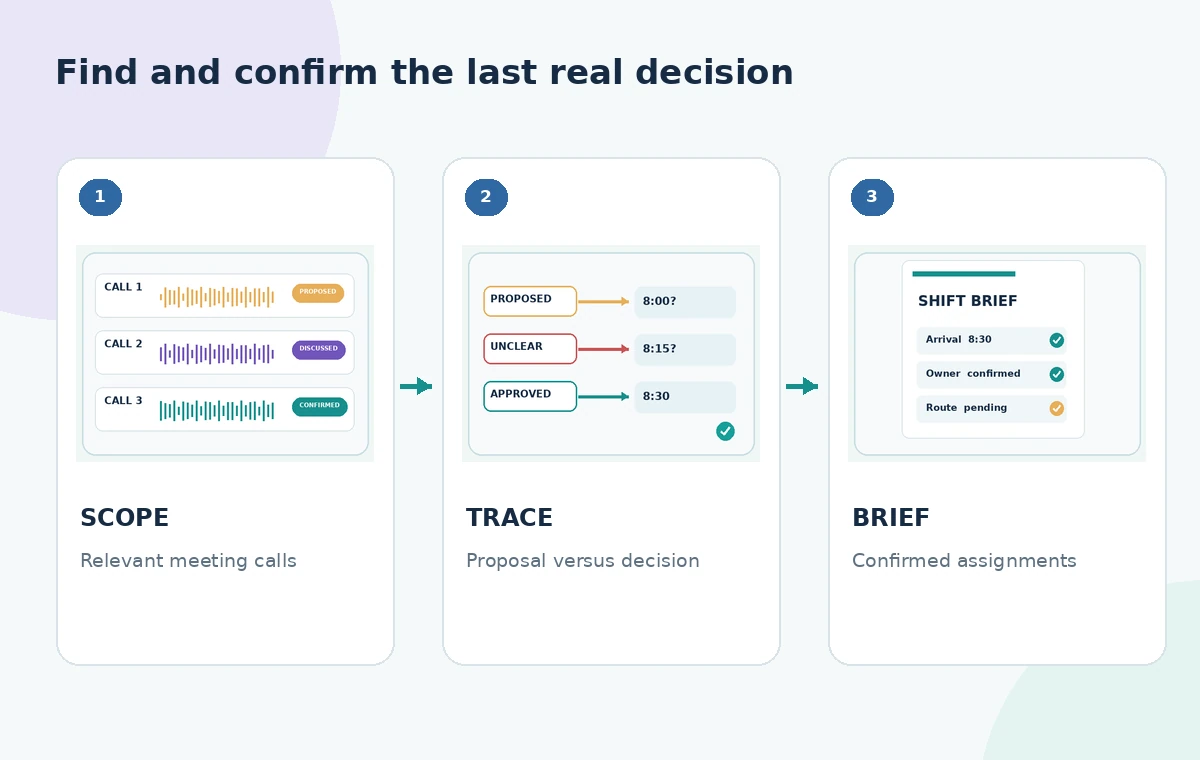
Ask for a timeline of proposals versus decisions
Use a prompt that separates stages: ‘For volunteer check-in opening time, list each proposal, who said it, the meeting date, and any explicit final decision. Mark unresolved points rather than guessing.’ Otter’s own examples describe asking for concerns, resolutions, speakers, and action items over several meetings. The result is a search aid. Compare cited or described moments against the actual transcript and, where needed, the audio. A later statement can supersede an earlier one, but mere recency does not make it approved. Look for language that indicates acceptance by the responsible organizer, not just repeated agreement in casual conversation.
Distinguish the person discussing a task from its owner
A transcript line such as ‘Maybe Jordan could bring badges’ is not an assignment, and an assistant may compress it into ‘Jordan will bring badges.’ Build a decision ledger with columns for task, evidence quote, speaker, named owner, confirmation status, and deadline. Verify the name against attendee roles and listen for conditional language. If the recording lacks a final acceptance, ask the organizer to confirm ownership. Do not publish individual volunteers’ contact information in a broad summary. The comparison diagram contrasts this common failure with a traceable record that preserves the difference between tentative, agreed, and still open.
Use focused follow-ups instead of a generic summary
Once you identify a potentially final decision, narrow the next question: ‘Where was the 8:30 a.m. check-in time confirmed, and did anyone later revise it?’ Ask separately about the accessible entrance, supply table, and volunteer arrival window. Otter warns that generated answers can be factually incorrect and that follow-up questions may draw on earlier conversational context. Reset the scope when switching to another event. If the source is silent, write ‘not confirmed’ in the worksheet rather than allowing the model to fill in a reasonable-sounding time. An unanswered question is valuable information for the project lead.

Check access before using connected contexts
The new Chat experience may draw context from shared conversations, channels, folders, and supported external connections, depending on rollout and settings. Document exactly which sources were available during review. Connector data can add useful updates but also introduce emails that were never adopted as official meeting decisions. Ask whether access controls allow the intended reviewers to see the evidence. Otter’s guidance also describes meeting chat-message options; live AI answers can be shared with participants if enabled. Avoid putting sensitive assessment or personnel questions into a channel that could expose answers more widely than intended.
Draft a brief with separate confirmed and pending sections
Write the volunteer briefing from the reviewed ledger, not from an uninspected generated paragraph. Lead with confirmed arrival time, location, and the single point of contact who can resolve a problem on the day. Put pending topics under ‘Awaiting confirmation’ rather than hiding them in a polished sentence. For each responsibility include the human owner and realistic checkpoint, but do not manufacture commitments or private phone numbers. A short ‘changed since the prior call’ line prevents readers from following old instructions. Ask the organizer to approve the brief before anyone sends it to volunteers or prints check-in signs.
Avoid treating a generated summary as official minutes
AI Chat can accelerate retrieval, yet a formal decision record may exist in an agreed agenda, project board, or signed minutes rather than the spoken transcript. Compare any proposed schedule with that authoritative record, and retain edits made by the meeting chair. If there is a conflict, do not pick the most recent chatbot answer. Separate verbatim quotations, your paraphrase, and administrative conclusions. The goal is to give volunteers operational clarity without rewriting the historical record of what participants said. Consider offering a brief correction window to participants for factual errors rather than automatically distributing a raw transcript.
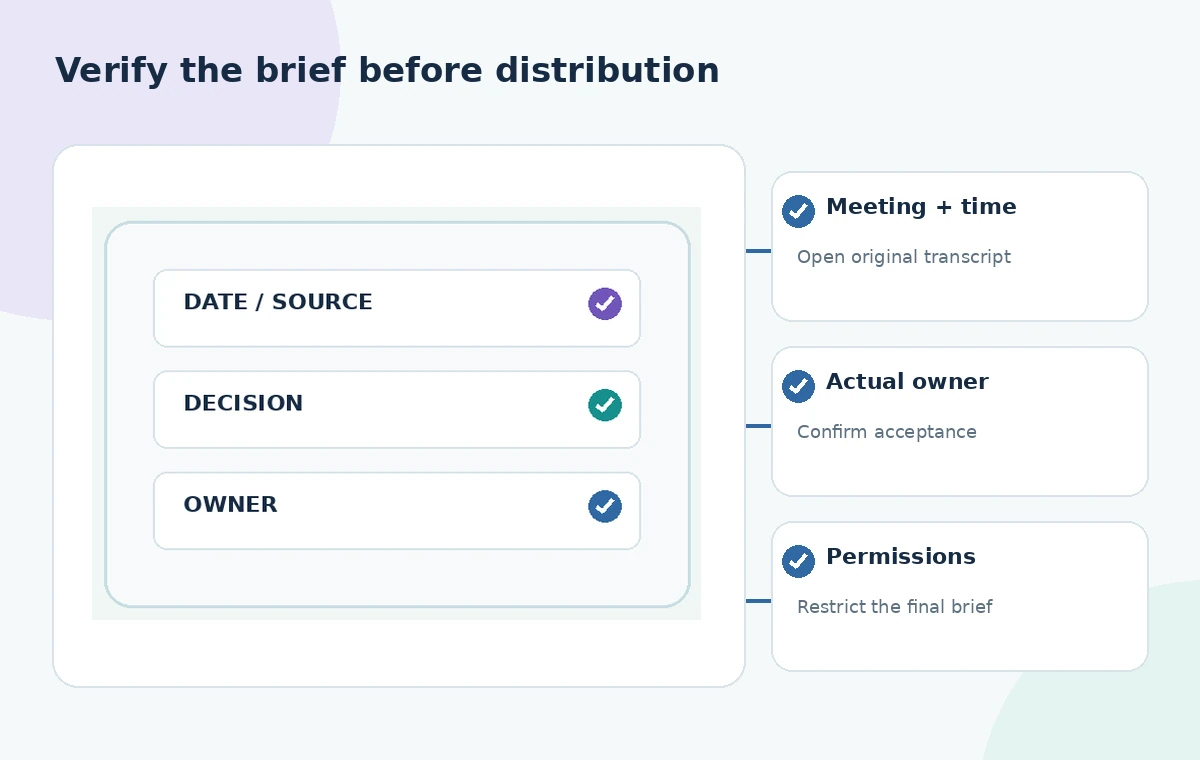
Run a final release checklist on the message
Ask a human reviewer to confirm dates, local times, venue name, accessible route, assignments, contact channel, and the approved version of the plan. Make sure nothing in the summary is labeled ‘decided’ merely because a model offered it confidently. Check whether recording consent permits the particular distribution, especially if the brief contains attributed quotes. Keep a restricted audit worksheet with transcript references for future questions. The diagrams in this guide are original illustrations of an imagined set of calls; we did not record meetings, ask Otter questions on an account, or establish an actual decision. The audit method matters more than the speed of a draft email.
How We Research
To prepare this guide, we reviewed the official product documentation: Otter: AI Chat Overview and Otter: Asking AI Chat Questions. We compared the explicitly documented feature entry points, supported tasks, limitations and configuration requirements with the decisions in the hypothetical scenario. We did not access a customer account, upload any of the described documents, run prompts, obtain actual generated outputs or measure performance. The visuals are custom instructional diagrams, not software screenshots or evidence of live tests. Any scenario-specific people, approvals, files, vendor availability and outcomes are illustrative. Check the current documentation, account entitlements and your organization’s policies before acting on the workflow.
Frequently Asked Questions
Otter documents asking questions across conversations and adding relevant channels or folders, depending on the account and interface. Limit scope to authorized meeting records.
The newer experience describes Chat for exploration and answers, while Work can take actions in connected apps. Use Chat for evidence gathering before approval.
No. Verify the precise transcript wording and check that the named owner actually agreed to the assignment.
Otter says the updated Chat and Work experience is rolling out. Use the controls available in your account and check its current help.
Usually a verified, permission-appropriate briefing is better. Share only the information required for the shift and respect consent and access controls.