
Disclosure: LabFin is reader-supported. If you sign up for a tool through links on this page, we may earn a commission at no extra cost to you. Commissions vary between providers and our ratings do not — here’s our full disclosure.
How to fact-check AI output starts with advice from the AI companies themselves. OpenAI’s help article tells users to verify quotes, data, technical information and references. Google’s, similarly, says to double-check Gemini’s answers about people. Independent studies show why. In the EBU and BBC study of October 2025, 30% to 76% of each assistant’s news answers had a significant issue.
This guide on how to fact-check AI output turns that advice into steps, with the source for each one. It also explains how citations fail, so you know what to look for.
How to Fact-Check AI Output: The Short Answer
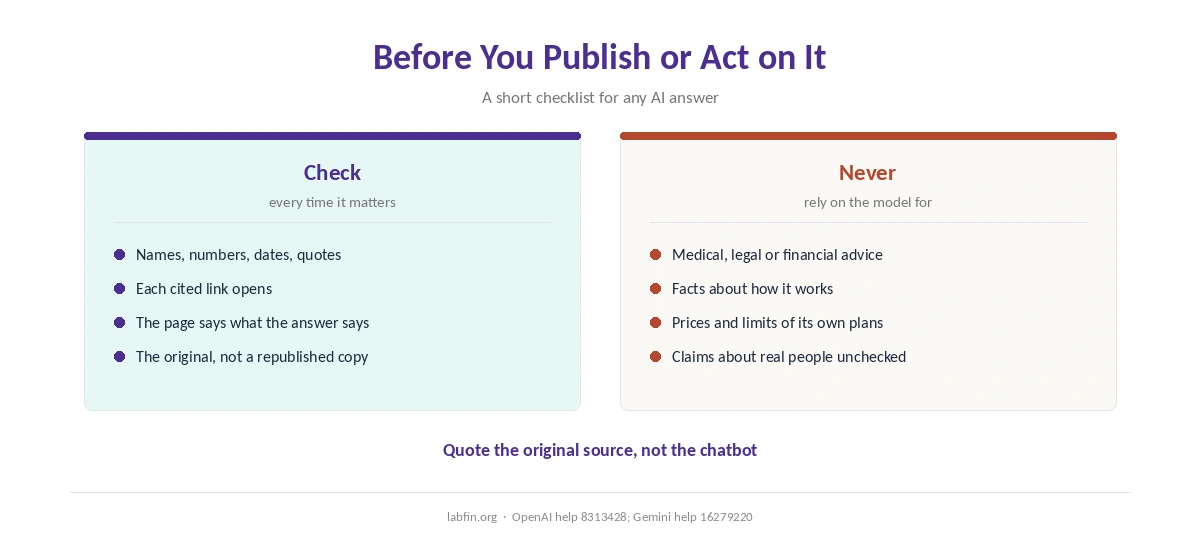
Check the claims that matter, open every source, and confirm it says what the answer claims. OpenAI’s help article recommends visiting links directly when accuracy matters. Google’s Gemini help also warns not to rely on answers as medical, legal or financial advice.
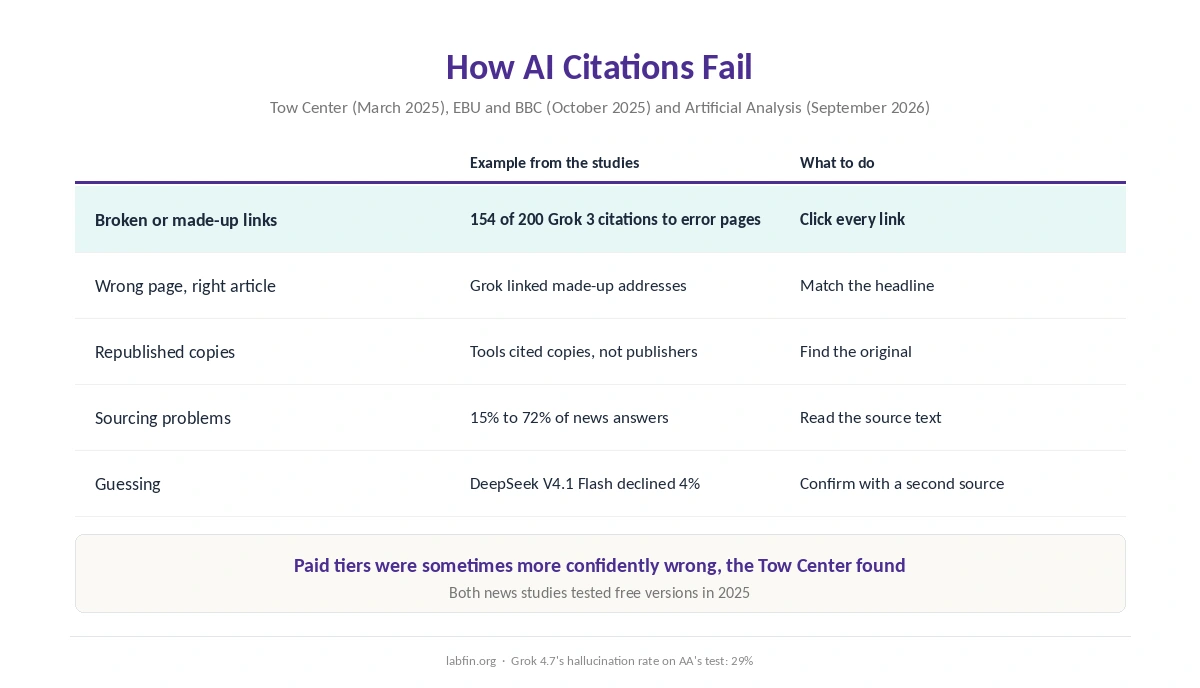
A citation is not proof. In the Tow Center study of March 2025, more than half of Gemini’s and Grok 3’s citations led to broken or fabricated links. So treat every answer as a draft until you have read the source.
Step 1: Decide What to Check
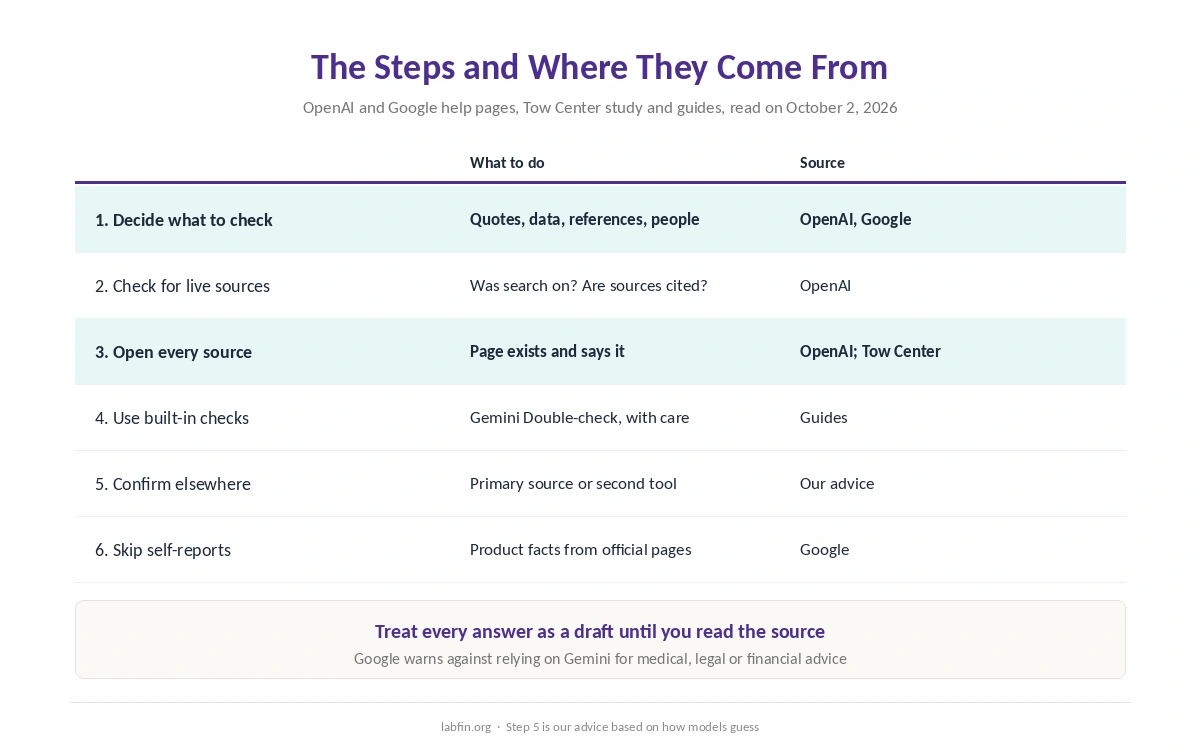
You do not need to verify every sentence. Instead, focus on the claims OpenAI names: quotes, data, technical information and references to documents. Google adds statements about people, which Gemini may get wrong.
In practice, that means names, numbers, dates, quotes, prices and anything you plan to publish or act on. Opinions and drafts for your own use, by contrast, need less checking.
Step 2: Check Whether the Answer Used Live Sources
Without search, a model answers from its training data, which stops at a knowledge cutoff, OpenAI’s article explains. So check whether search was on. In ChatGPT, look for the search or deep research icon, or for cited web sources in the answer.
An answer without sources about anything recent deserves extra suspicion. For current facts, ask again with search turned on, as our guide to ChatGPT for research covers.
Step 3: Open Every Cited Source
Click each link and confirm two things: the page exists, and it says what the answer claims. In the Tow Center study, 154 of Grok 3’s 200 citations led to error pages. Even when Grok named the right article, it often linked to a made-up address.
Also prefer the original over a copy. The same study found tools citing republished versions of articles rather than the publisher’s own page. Our Perplexity vs Grok comparison covers how the two did.
Step 4: Use the Built-In Checks, With Care
Some tools help you check. Gemini, for example, has a Double-check response button that runs parts of an answer through Google Search. Guides from AI Goes to College and others describe it. Statements with similar content found turn green, while those with different or missing content turn orange. For more, our page on combining AI tools covers when a second assistant earns its cost.
However, a green highlight only means similar text exists online, not that it is true. Perplexity and ChatGPT’s search, meanwhile, cite sources on each answer. Still, the EBU and BBC found sourcing problems in 15% to 72% of answers. Our list of the best AI for research compares those records.
Step 5: Confirm With a Second Source
For anything important, find a primary source yourself: the official page, the study, the law or the company announcement. Alternatively, ask a second tool and compare, especially when the first answer has no citation.
Models often guess rather than admit they do not know. For example, on Artificial Analysis’s knowledge test, DeepSeek V4.1 Flash declined only 4% of the questions it could not answer. Grok 4.7, which declines more often, still had a 29% hallucination rate there.
Step 6: Do Not Ask the Model About Itself
Google’s help page warns that Gemini can misrepresent how it works, including how it cites sources or gets fresh information. So check product facts, prices and limits on the company’s own pages rather than asking the chatbot.
Make Checking Easier From the Start
A clear request with a demand for sources makes checking faster, as our guide to writing better prompts explains. Also, tools that cite passages in your own files, such as Gemini Notebook, make checks quicker. Our list of the best AI for summarization covers them, and our list of the best AI tools for researchers covers work with your own papers.
For research workflows, our guide to Perplexity for research and our guide to Gemini for research cover each tool’s checks. Claude’s Research also cites sources, as our guide to Claude for research explains. Each guide shows how to fact-check AI output from that tool.
How We Research
This guide draws on OpenAI’s help article on accuracy and Google’s Gemini help page, read on October 2, 2026. Citation failures come from the Tow Center study and the EBU and BBC study, and model figures from Artificial Analysis.
Gemini’s Double-check button comes from guides, and we name them as such. We run no fact-checking tests of our own, and our criteria live on our about page.
How to Fact-Check AI Output FAQ
Pick the claims that matter, check whether the answer used live sources, and open every cited link. Then confirm important facts with a primary source or a second tool.
Not on their own. In the Tow Center study, more than half of Gemini’s and Grok 3’s citations led to fabricated or broken links.
It runs parts of an answer through Google Search and highlights statements green or orange, guides report. Green means similar content exists, not that it is true.
OpenAI names quotes, data, technical information and references. Google adds statements about people, and both warn against relying on AI for professional advice.
Of the assistants tested, Perplexity had the lowest error rates in both studies, the Tow Center’s and the EBU and BBC’s. It still needs checking.
The Verdict
How to fact-check AI output comes down to three habits. Choose what matters, open the source, and confirm the important parts elsewhere. The AI companies themselves say so, and the independent studies show why.
So treat every answer as a draft, and quote the original source rather than the chatbot.