
Disclosure: LabFin is reader-supported. If you sign up for a tool through links on this page, we may earn a commission at no extra cost to you. Commissions vary between providers and our ratings do not — here’s our full disclosure.
This ClickUp AI review covers ClickUp Brain, the AI layer inside ClickUp’s tasks, docs and chat, which answers questions across your workspace and runs agents.
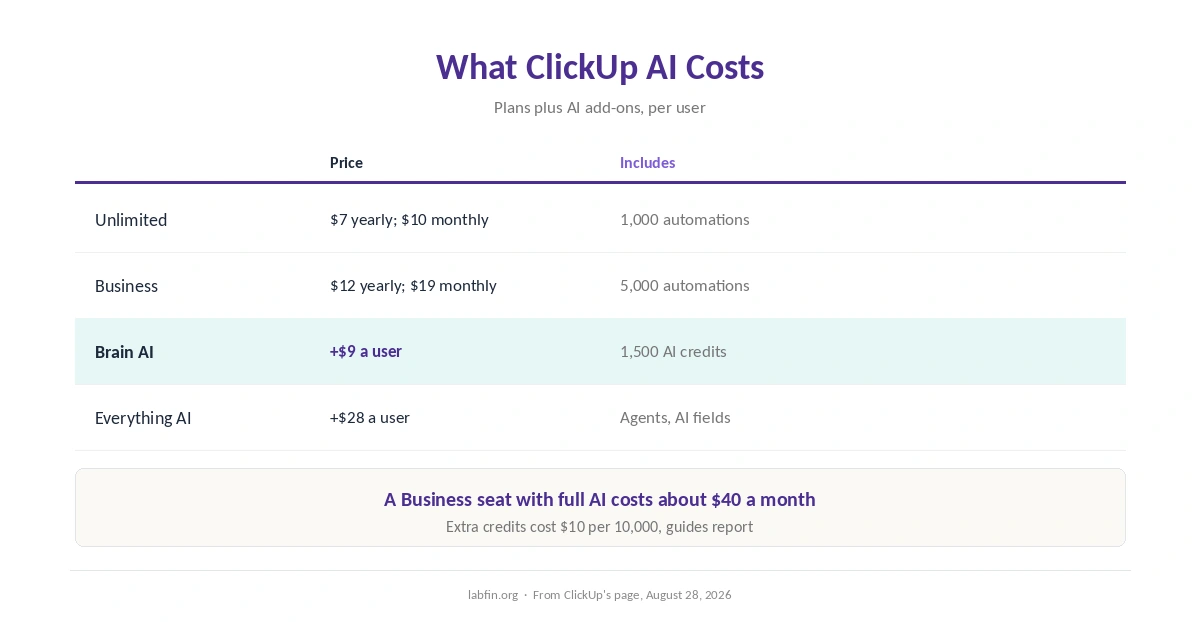
ClickUp’s plans are cheap, but AI is a separate add-on: $9 a user for Brain AI or $28 for Everything AI. So a Business seat with full AI costs about $40 a month.
ClickUp AI Review: Is It Worth It in 2026?
For teams that already run projects in ClickUp, Brain AI can pay off. It searches tasks, docs and chat, and writes inside the workspace.
For teams not using ClickUp, the add-on is no reason to switch. General assistants and Notion AI cost less per seat for similar writing help.
What ClickUp AI Does
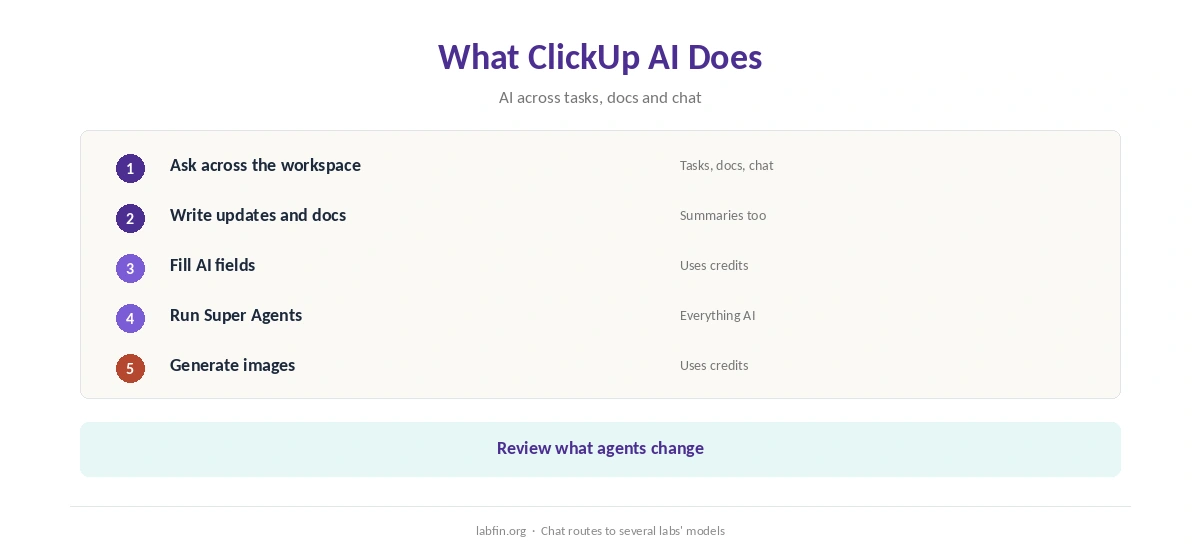
First, Brain answers questions across tasks, docs and chat, and writes updates, summaries and docs. Its chat routes to models from Anthropic, OpenAI and Google, trackers report.
Everything AI, moreover, adds Super Agents that run multi-step work, AI fields that fill task data, and image generation. Our guide to building a personal AI workflow also shows where it fits.
What ClickUp AI Costs
ClickUp prices plans and AI separately, as its pricing page read on August 28, 2026 and trackers show.
| Plan | Price | Limits |
|---|---|---|
| Free Forever | $0 | Core tasks and docs; no AI add-on |
| Unlimited | $7/user/mo yearly, or $10 monthly | Unlimited storage; 1,000 automations |
| Business | $12/user/mo yearly, or $19 monthly | 5,000 automations; Google SSO |
| Brain AI / Everything AI | +$9 / +$28 per user a month | 1,500 AI credits; agents on Everything AI |
Advanced features such as Super Agents and AI fields draw AI Super Credits, and extra credits cost $10 per 10,000, guides report. Our guide to understanding AI usage limits also explains metered billing, and our guide to reducing AI subscription costs lists savings.
AI Features
Super Agents can take on multi-step tasks such as triage or status reports, while AI fields fill task data automatically.
Such agents, however, act on real projects, so start with read-only tasks and review what they change.
Your Data
We could not confirm in our sources whether ClickUp trains models on workspace data. Therefore, treat its training terms as unconfirmed.
Check ClickUp’s current AI terms before letting Brain read client projects. Our guide to which AI tools train on your data compares more tools.
Cost and Agent Control
Per-seat AI pricing scales with team size, so a 10-person team pays $90 a month more for Brain AI alone. Therefore, enable AI only for the people who use it, if your plan allows.
Our list of the best AI for productivity also covers cheaper assistants.
ClickUp AI vs Other Tools
Notion AI, for example, includes AI on its Business plan, while Zapier and Make automate across apps.
Our guide to building AI automations without code also covers workflows outside ClickUp.
Our list of the best AI automation tools, moreover, ranks Zapier, Make and n8n, and our ChatGPT review covers a general assistant.
In addition, our reviews of Notion AI and Zapier cover the alternatives.
Who Should Use ClickUp AI
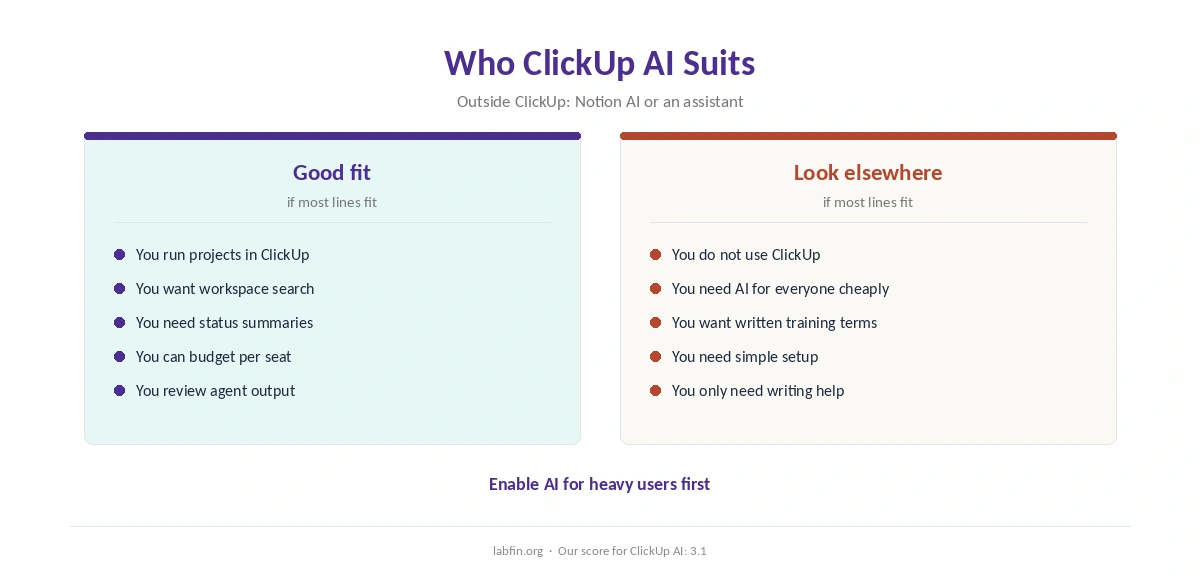
Overall, this ClickUp AI review finds it suits teams that already manage projects, docs and chat in ClickUp. It also suits managers who want AI summaries of project status.
By contrast, however, it suits teams outside ClickUp and small budgets less. Our list of the best AI for business covers team tools.
How We Research
This ClickUp AI review takes plans from trackers that read its pricing page in 2026, and data terms from a pricing check of ClickUp’s page from August 28, 2026.
However, we ran no tests of our own. Our about page explains the criteria, and our guide to measuring AI tool ROI helps judge the cost.
ClickUp AI Review FAQ
Brain AI adds $9 a user a month and Everything AI $28, on top of a paid plan from $7 a user yearly.
No; trackers report AI as a separate add-on on paid plans.
Brain AI covers chat, writing and search; Everything AI adds Super Agents, AI fields and image generation.
Trackers report chat routed to models from Anthropic, OpenAI and Google.
We could not confirm it in our sources; check its current AI terms.
ClickUp AI
Useful inside ClickUp, priced on top
ClickUp Brain searches and writes across tasks, docs and chat, and Everything AI adds agents and AI fields. Against that, AI costs $9 to $28 a user on top of the plan, advanced features draw credits, and training terms are unconfirmed.
The Verdict
Overall, ClickUp AI earns its place for teams already living in ClickUp, but its per-seat add-on can double the bill. Training terms, moreover, need checking.
The rest of this ClickUp AI review sets the score at 3.1. So enable Brain AI for heavy users first, and add Everything AI only when agents save real time.