
Disclosure: LabFin is reader-supported. If you sign up for a tool through links on this page, we may earn a commission at no extra cost to you. Commissions vary between providers and our ratings do not — here’s our full disclosure.
This Canva AI review covers the AI features in Canva, from Magic Studio’s image generation and Magic Write to Canva AI’s conversational design, inside the design tool many teams already use.
The free plan includes limited AI, and Pro unlocks the full set with a monthly allowance. However, trackers report different Pro prices, and heavy AI use can exhaust the allowance.
Canva AI Review: Is It Worth It in 2026?
For marketers and small businesses that already design in Canva, yes. Pro also adds the premium library, Brand Kit and a monthly AI allowance.
For professional illustration or print production, specialist tools fit better. Canva’s AI aims for speed and templates, not fine control.
What Canva AI Does
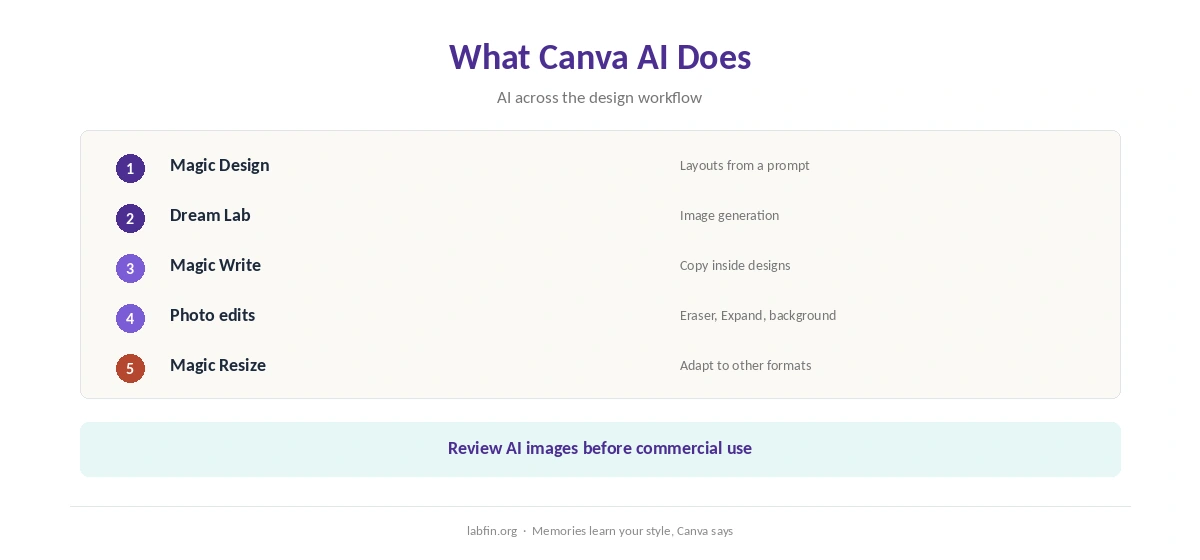
First, Magic Design turns a prompt or upload into templated layouts, and Dream Lab generates images. Magic Write drafts copy inside designs.
Magic Eraser, Magic Expand and background removal, moreover, edit photos, and Magic Resize adapts a design to other formats. Our guide to using AI for social media also shows where it fits.
What Canva AI Costs
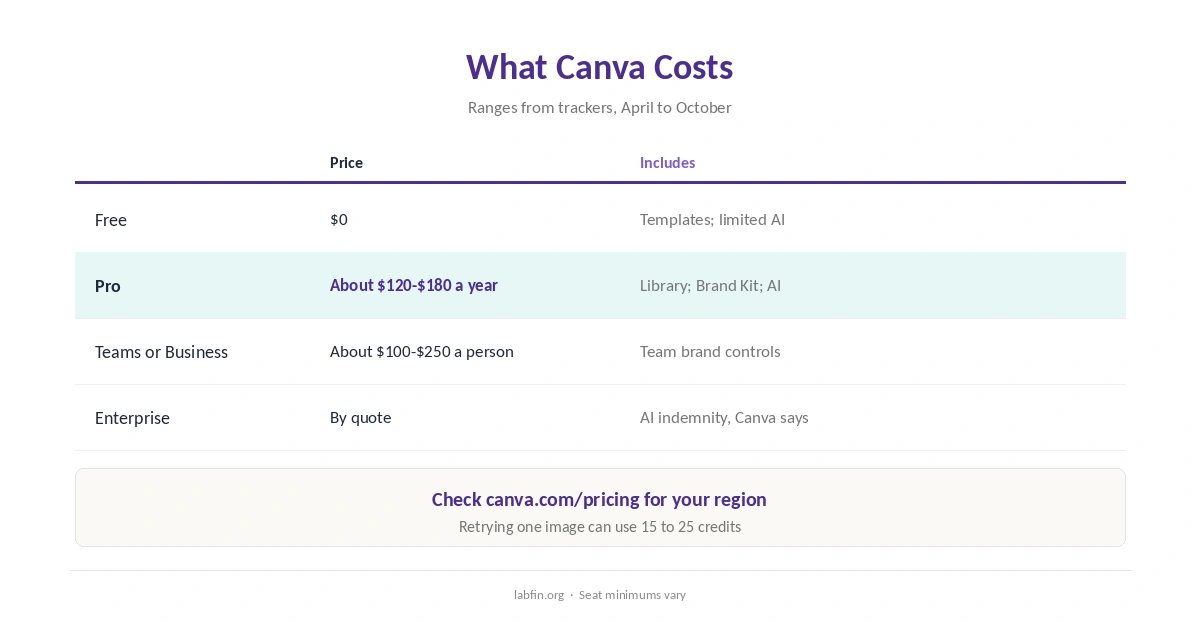
Trackers report Canva’s prices differently, by region and date, so treat these as ranges.
| Plan | Price | Limits |
|---|---|---|
| Free | $0 | Templates; limited AI uses a month; 5 GB storage |
| Pro | About $120 to $180 a year | Premium library; Brand Kit; about 500 AI credits a month |
| Teams or Business | About $100 to $250 per person a year | Team brand controls; seat minimums vary |
| Enterprise | By quote | Admin controls; AI indemnity, Canva says |
However, each generation attempt uses credits, so iterating on one image can use 15 to 25, one tracker reports. Heavy users may need extra credits. Our guide to understanding AI usage limits also explains metered billing, and our guide to reducing AI subscription costs lists savings.
AI Features
Its conversational assistant, for example, designs from a chat, and Memories learn your style from recent designs. Canva says Memories do not train its AI more broadly.
AI images, however, need checks for odd details and for rights before commercial use.
Your Data
Canva’s co-founder told Digit that user content is not used to train its AI by default, and that creators can opt in for royalties. Its privacy settings hold the AI toggles.
Education accounts, moreover, are locked out of AI training, guides report. Check canva.com/settings/privacy-preferences before uploading client material. Our guide to which AI tools train on your data compares more tools.
Rights and Brand Consistency
For example, AI images can echo existing styles or include odd details, so review them before commercial use. Enterprise subscribers get indemnity for AI-generated content, Canva says.
Brand Kits keep colors and fonts consistent, as our guide to creating brand voice guidelines for AI explains for text.
Canva AI vs Other Tools
Gamma, for example, builds decks and docs from a prompt, while Beautiful.ai keeps slides tidy with guardrails.
Our guide to using AI for repurposing content also covers turning articles into posts.
Our list of the best AI for marketing, moreover, ranks copy tools, and our Gamma vs Beautiful.ai comparison covers decks.
In addition, our reviews of Gamma and Beautiful.ai cover the alternatives.
Who Should Use Canva AI
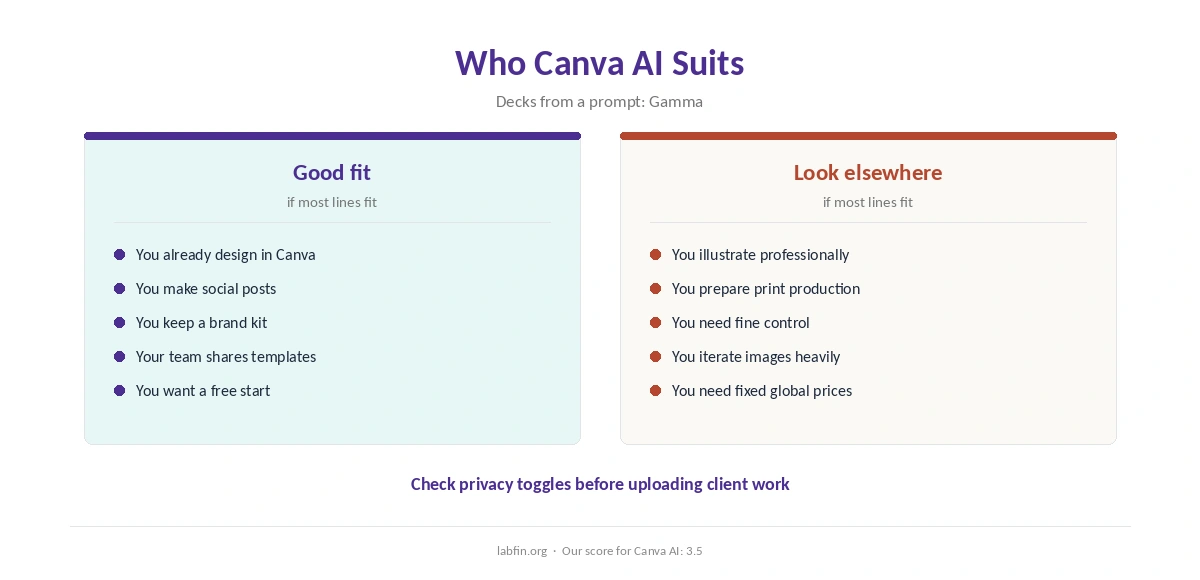
Overall, this Canva AI review finds it suits marketers, small businesses and teachers who design social posts, decks and flyers. It also suits teams that want one shared brand kit. Our list of Canva AI alternatives ranks the options by our review scores.
By contrast, however, it suits professional illustrators and print-production work less. Our list of the best AI for presentations covers deck tools.
How We Research
This Canva AI review takes plans from trackers that read its pricing page in 2026, and data terms from Canva’s privacy settings and an interview with its co-founder.
However, we ran no tests of our own. Our about page explains the criteria, and our guide to measuring AI tool ROI helps judge the cost.
Canva AI Review FAQ
Trackers report about $120 to $180 a year depending on region and date; check Canva’s page.
The free plan includes limited AI uses a month; Pro adds about 500 AI credits a month.
Canva says not by default; check the toggles in its privacy settings.
Canva’s set of AI tools, including Magic Design, Dream Lab, Magic Write and photo editing.
Canva for designed visuals across formats; Gamma for decks and docs from one prompt.
Canva AI
AI inside the design tool you already use
Canva adds image generation, copywriting and conversational design to its template editor, with a useful free plan and Pro’s monthly AI allowance. Against that, trackers disagree on prices, credits run out with heavy iteration, and AI images need rights checks.
The Verdict
Overall, Canva AI is most useful inside work you already do there: posts, decks and flyers. Pricing, however, varies by region, and credits limit heavy use.
The rest of this Canva AI review sets the score at 3.5. So start free, upgrade when the library and AI allowance pay off, and check privacy settings first.